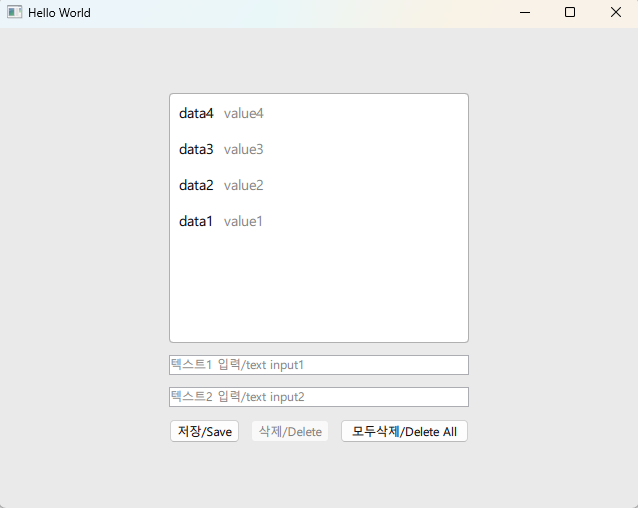
👉 QML은 디자인을 담당하고 C++이 데이터 처리를 담당합니다.
QML handles the design and C++ handles the data processing.
👉 qt_add_excutable함수는 exe파일을 만들때 필요한 cpp파일 리스트입니다.
The qt_add_executable function is a list of cpp files required when creating an exe file.
1.CMakeLists.txt
cmake_minimum_required(VERSION 3.16)

project(example6 VERSION 0.1 LANGUAGES CXX)

set(CMAKE_CXX_STANDARD_REQUIRED ON)

find_package(Qt6 REQUIRED COMPONENTS Quick)

#--sqlite
find_package(Qt6 REQUIRED COMPONENTS Quick Sql)


qt_standard_project_setup(REQUIRES 6.8)

#-- making .exe file list
qt_add_executable(appexample6
    main.cpp
    #--sqlite
    databasemanager.cpp
)

qt_add_qml_module(appexample6
    URI example6
    VERSION 1.0
    QML_FILES
        Main.qml
        #-- 추가/Add
        qml/Screen01.qml
        SOURCES Databasemanager.h Databasemanager.cpp
)

# Qt for iOS sets MACOSX_BUNDLE_GUI_IDENTIFIER automatically since Qt 6.1.
# If you are developing for iOS or macOS you should consider setting an
# explicit, fixed bundle identifier manually though.
set_target_properties(appexample6 PROPERTIES
#    MACOSX_BUNDLE_GUI_IDENTIFIER com.example.appexample6
    MACOSX_BUNDLE_BUNDLE_VERSION ${PROJECT_VERSION}
    MACOSX_BUNDLE_SHORT_VERSION_STRING ${PROJECT_VERSION_MAJOR}.${PROJECT_VERSION_MINOR}
    MACOSX_BUNDLE TRUE
    WIN32_EXECUTABLE TRUE
)
#-- sqlite
target_link_libraries(appexample6
    PRIVATE Qt6::Quick Qt6::Sql
)

target_link_libraries(appexample6
    PRIVATE Qt6::Quick
)

include(GNUInstallDirs)
install(TARGETS appexample6
    BUNDLE DESTINATION .
    LIBRARY DESTINATION ${CMAKE_INSTALL_LIBDIR}
    RUNTIME DESTINATION ${CMAKE_INSTALL_BINDIR}
)
2.databasemanager.h
#ifndef DATABASEMANAGER_H
#define DATABASEMANAGER_H

#include <QObject>
#include <QSqlDatabase>
#include <QSqlQuery>
#include <QSqlError>
#include <QVariantList>
#include <QDebug>

class DatabaseManager : public QObject {
    Q_OBJECT
public:
    explicit DatabaseManager(QObject *parent = nullptr);
    Q_INVOKABLE bool insertData(const QString &text1, const QString &text2);
    Q_INVOKABLE QVariantList loadData();
    Q_INVOKABLE bool deleteData(int id);
    Q_INVOKABLE bool deleteAll();

private:
    QSqlDatabase db;
    void initialize();
};

#endif // DATABASEMANAGER_H
3.databasemanager.cpp
#include "DatabaseManager.h"

DatabaseManager::DatabaseManager(QObject *parent)
    : QObject(parent)
{
    db = QSqlDatabase::addDatabase("QSQLITE");
    db.setDatabaseName("localdata.db");

    if (!db.open()) {
        qWarning() << "Database open error:" << db.lastError().text();
        return;
    }

    initialize();
    qDebug() << "데이터베이스 초기화 실행/Run database initialization";
}

// 데이터베이스 초기화 / database initialize
void DatabaseManager::initialize() {
    QSqlQuery query;
    query.exec("CREATE TABLE IF NOT EXISTS records ("
               "id INTEGER PRIMARY KEY AUTOINCREMENT, "
               "text1 TEXT, "
               "text2 TEXT)");
}
// 입력 / input
bool DatabaseManager::insertData(const QString &text1, const QString &text2) {
    QSqlQuery query;
    query.prepare("INSERT INTO records (text1, text2) VALUES (?, ?)");
    query.addBindValue(text1);
    query.addBindValue(text2);
    bool ok = query.exec();
    if (!ok) qWarning() << "Insert failed:" << query.lastError().text();
    return ok;
}

// 데이터 로딩 / data loading
QVariantList DatabaseManager::loadData() {
    QVariantList list;
    QSqlQuery query("SELECT id, text1, text2 FROM records ORDER BY id DESC");
    while (query.next()) {
        QVariantMap item;
        item["id"] = query.value(0).toInt();
        item["text1"] = query.value(1).toString();
        item["text2"] = query.value(2).toString();
        list.append(item);
    }
    return list;
}
// 삭제 / data Delete
bool DatabaseManager::deleteData(int id) {
    QSqlQuery query;
    query.prepare("DELETE FROM records WHERE id = ?");
    query.addBindValue(id);
    bool ok = query.exec();
    if (!ok) qWarning() << "Delete failed:" << query.lastError().text();
    return ok;
}
// 모두 삭제 /delete all data
bool DatabaseManager::deleteAll() {
    QSqlQuery query("DELETE FROM records");
    return query.exec();
}
4.qml/Screen01.qml
import QtQuick
import QtQuick.Controls
import QtQuick.Layouts

Rectangle {
    id: root
    width: 800
    height: 600
    color: "#EAEAEA"

    property int selectedId: -1

    ColumnLayout {
        anchors.centerIn: parent
        spacing: 12
        width: 300

        // 리스트뷰 / ListView
        Rectangle {
            Layout.fillWidth: true
            height: 250
            color: "white"
            border.color: "#B0B0B0"
            radius: 4

            ListView {
                id: listView
                anchors.fill: parent
                anchors.margins: 4
                clip: true
                model: ListModel { id: listModel }
                interactive: true
                currentIndex: -1

                delegate: Rectangle {
                    height: 36
                    width: listView.width
                    //color: listView.currentIndex === index ? "#D0E6FF" : (index % 2 === 0 ? "#FFFFFF" : "#F9F9F9")
                    color: listView.currentIndex === index ? "#D0E6FF" : (index % 2 === 0 ? "#FFFFFF" : "#FFFFFF")

                    Row {
                        anchors.fill: parent
                        anchors.margins: 6
                        spacing: 10
                        Text { text: text1; font.pixelSize: 14; color: "black" }
                        Text { text: text2; font.pixelSize: 14; color: "gray" }
                    }

                    MouseArea {
                        anchors.fill: parent
                        onClicked: {
                            listView.currentIndex = index
                            root.selectedId = id
                        }
                    }
                }
            }
        }

        // 입력 필드 / input field
        TextField { id: input1; Layout.fillWidth: true; placeholderText: "텍스트1 입력/text input1" }
        TextField { id: input2; Layout.fillWidth: true; placeholderText: "텍스트2 입력/text input2" }

        // 버튼 / button
        RowLayout {
            Layout.fillWidth: true
            spacing: 10

            Button {
                text: "저장/Save"
                Layout.fillWidth: true
                onClicked: {
                    if (input1.text.length === 0 || input2.text.length === 0)
                        return
                    DB.insertData(input1.text, input2.text)
                    refreshList()
                    input1.text = ""
                    input2.text = ""
                }
            }

            Button {
                text: "삭제/Delete"
                Layout.fillWidth: true
                enabled: root.selectedId !== -1
                onClicked: {
                    DB.deleteData(root.selectedId)
                    root.selectedId = -1
                    refreshList()
                }
            }

            Button {
                text: "모두삭제/Delete All"
                Layout.fillWidth: true
                onClicked: {
                    DB.deleteAll()
                    refreshList()
                }
            }
        }
    }

    // 데이터 새로고침 / data refresh
    function refreshList() {
        listModel.clear()
        const data = DB.loadData()
        for (let i = 0; i < data.length; i++) {
            listModel.append({
                id: data[i].id,
                text1: data[i].text1,
                text2: data[i].text2
            })
        }
    }

    Component.onCompleted: refreshList()
}
5.main.cpp
#include <QGuiApplication>
#include <QQmlApplicationEngine>

//코드추가 / Add code
#include <QQmlContext>          // QML과 C++ 연결용 / For connecting QML and C++
#include "DatabaseManager.h"    // database

int main(int argc, char *argv[])
{
    QGuiApplication app(argc, argv);

    QQmlApplicationEngine engine;


    QObject::connect(
        &engine,
        &QQmlApplicationEngine::objectCreationFailed,
        &app,
        []() { QCoreApplication::exit(-1); },
        Qt::QueuedConnection);


    // DatabaseManager 인스턴스 생성
    // Create a DatabaseManager instance
    static DatabaseManager dbManager;


    // QML 전역 컨텍스트에 등록
    // Register in the QML global context
    engine.rootContext()->setContextProperty("DB", &dbManager);

    //
    engine.loadFromModule("example6", "Main");

    return app.exec();
}
6.main.qml
import QtQuick

Window {
    width: 640
    height: 480
    visible: true
    title: qsTr("Hello World")
    Loader {
        anchors.fill: parent
        source: "qml/Screen01.qml"  // 로컬 QML 파일 로드 / Local QML file load
    }
}
7.실행 / run