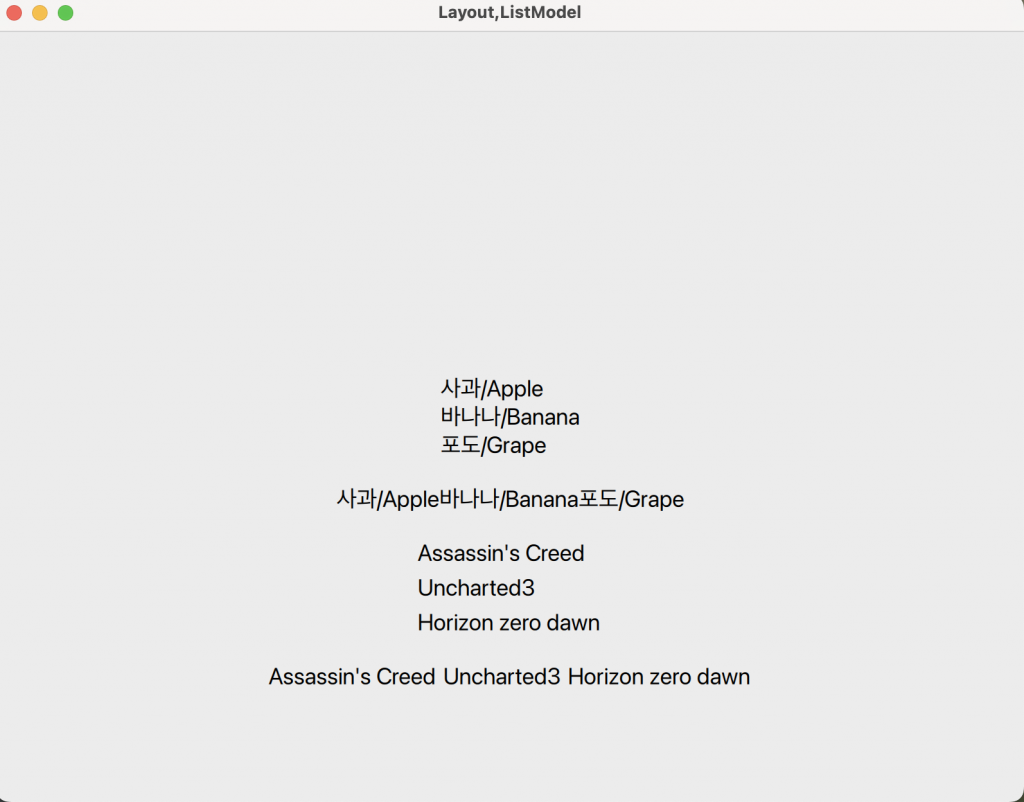
👉🏻 QT QML에서 가로 세로 레이아웃에 대한 설명과 코드입니다.
Description and code for horizontal and vertical layout in QT QML.
👉🏻가로 ,세로레이아웃에는 Column,Row,ColumnLayout,RowLayout이 있습니다.
For horizontal and vertical layouts, there are Column, Row, ColumnLayout, and RowLayout.
👉🏻 ColumnLayout과 RowLayout은 반응형 UI나 창 리사이즈 대응 UI에 적합합니다.
ColumnLayout and RowLayout are suitable for responsive UI or UI that responds to window resizing.
1.Colum {} : 아이템을 세로로 정렬하기 위해서 사용합니다. / Used to align items vertically.
2.Row {} : 아이템을 가로로 정렬하기 위해서 사용합니다 / Used to align items horizontally
3.ColumnLayout {} :
— Column과 같이 세로로 정렬하기 위해서 사용합니다. / Used to align vertically, like a column.
— 좀더 복잡한 구조를 사용할때 사용합니다. / Used when using more complex structures.
4.RowLayout {} :
— Row와 같이 가로로 정렬하기 위해서 사용합니다. / Used to align horizontally, like Row.
— 좀 더 복잡합 구조를 사용할 때 사용합니다. / Used when using more complex structures.
6.anchor :
— QML에서 UI 요소의 위치를 다른 요소(또는 부모)의 특정 위치에 맞춰서 배치하기 위한 속성 시스템.
A property system in QML for positioning UI elements relative to a specific location in another element (or parent).
5.코드 / Code
✔️Main.qml
— 코드에보시면 ListModel과 Repeater가 있습니다.
If you look at the code, there is a ListModel and a Repeater.
— ListModel은 배열,Repeater는 대부분의 프로그래밍언어에서 사용하는 반복문이라고 이해하셔도 됩니다.
You can understand ListModel as an array, and Repeater as a loop used in most programming languages.
import QtQuick
import QtQuick.Controls
import QtQuick.Layouts

ApplicationWindow {
    visible: true
    width: 800
    height: 600
    title: "Layout,ListModel"

    // 데이터 모델 정의
    ListModel {
        id: fruitModel
        ListElement { name: "사과/Apple" }
        ListElement { name: "바나나/Banana" }
        ListElement { name: "포도/Grape" }
    }

    ListModel {
        id: gameModel
        ListElement { name : "Assassin's Creed" }
        ListElement { name : "Uncharted3" }
        ListElement { name : "Horizon zero dawn" }
    }

    // 화면에 표시
    Column {
        id:column1
        anchors.centerIn: parent // vertical,horizontal모두 가운데 정렬 / Center align both vertically and horizontally

        Repeater {
            model: fruitModel
            Text {
                text: model.name   // ListElement 안의 name 속성 사용 / Using the name property in ListElement
                font.pixelSize: 18
            }
        }
    }

// 화면에 표시
// anchors.centerIn: column1 : 가로,세로를 모두 가운데 정렬 됨,잘못 사용할경우 충돌 오류 있음.
// Display on screen
// anchors.centerIn: column1 : Centers both horizontally and vertically. If used incorrectly, a crash error may occur.

    Row {
        id:row1
        //anchors.centerIn: column1
        anchors.top: column1.bottom        // Column 바로 아래 위치 / Located just below the column
        anchors.horizontalCenter: parent.horizontalCenter  // 가로 가운데 정렬 / horizontally center aligned
        anchors.topMargin: 20              // 위쪽 여백 / top margin
        Repeater {
            model: fruitModel
            Text {
                text: model.name
                font.pixelSize :  18
            }
        }
    }

    ColumnLayout {
        id:column2
        anchors.top:row1.bottom
        anchors.horizontalCenter: row1.horizontalCenter  // row1의 가로 중심에 정렬 / Align to the horizontal center of row1
        anchors.topMargin: 20
        Repeater {
            model: gameModel
            Text {
                text:model.name
                font.pixelSize : 18
            }
        }
    }

    RowLayout {
        id:row2
        anchors.top:column2.bottom
        anchors.horizontalCenter: row1.horizontalCenter  // row1의 가로 중심에 정렬 / Align to the horizontal center of row1
        anchors.topMargin: 20
        Repeater {
            model: gameModel
            Text {
                text:model.name
                font.pixelSize : 18
            }
        }
    }
}
6.스크린샷 / ScreenShot