👉🏻 QT QML에서 앵커에 대한 설명입니다.
Here is a description of anchors in QT QML.
👉🏻 QML에서 각 요소를 배치하기 위해서 레이아웃과 앵커를 사용 할 수 있습니다.
You can use layouts and anchors to position each element in QML.
👉🏻 UI 요소끼리 관계 기반으로 배치할 경우에 사용합니다.
Used when arranging UI elements based on their relationships.
👉🏻앵커는 아래와 같은 속성들이 있습니다.
Anchors have the following properties:
| 속성 / Attribute | 설명 / Explanation |
|---|---|
anchors.left | 왼쪽 정렬 / left align |
anchors.right | 오른쪽 정렬 / right align |
anchors.top | 위쪽 정렬 / top alignment |
anchors.bottom | 아래쪽 정렬 / bottom alignment |
anchors.horizontalCenter | 수평 중앙 정렬 / horizontal center alignment |
anchors.verticalCenter | 수직 중앙 정렬 / vertical center alignment |
anchors.centerIn | 가로+세로 전체 중앙 정렬 / Center all horizontal and vertical alignment |
anchors.fill | 꽉 채우기 / fill up |
👉🏻 사용법 / Usage
✔️ 아이디.속성 / id.attribute
— 아래의 코드처럼 id는 각 요소를 구별하기 위한 이름으로 id:”이름”으로 설정 할 수 있습니다.
As in the code below, id can be set as id:”name” to distinguish each element.
— 당연히 id이름은 중복되어서는 안되며 고유해야 합니다.
Of course, the ID name must not be duplicated and must be unique.
        Text {
            id:anchorTxt1
            text: "Anchor1!"
            anchors.centerIn: parent
            font.pixelSize: 24
            color: "black"
        }
— 위의 아이디를 실제로는 아래처럼 사용합니다.
The ID above is actually used as follows:
anchors.top : anchorTxt1.bottom✔️부모아이템.속성 / parent.attribute
— QML에서 parent는 현재 요소를 감싸고 있는 바로 위 요소를 의미합니다.
In QML, parent means the element immediately above the current element.
— 아래의 코드에서 parent란 Rectangle의 id:rt를 의미합니다.
In the code below, parent refers to the id:rt of the Rectangle.
        Text {
            id:anchorTxt2
            text: "Anchor2!"
            anchors.left: parent.left
            anchors.top: parent.top
            font.pixelSize: 24
            color: "black"
        }
👉🏻 주의 사항 / Caution
✔️anchors.horizontalCenter와 anchors.verticalCenter를 중앙 정렬 시키면
anchors.centerIn과 기능이 같습니다.
Centering with anchors.horizontalCenter and anchors.verticalCenter has the same functionality as anchors.centerIn.
✔️그런데 anchors.centerIn이 적용된 UI요소에 anchors.horizontalCenter와 anchors.verticalCenter를 적용하면 속성 충돌이 일어나서 UI요소가 제대로배치 되지 않을 수 있습니다.
However, if you apply anchors.horizontalCenter and anchors.verticalCenter to a UI element to which anchors.centerIn has been applied, a property conflict may occur, causing the UI element to not be positioned properly.
✔️ 속성 충돌이 발생하지 않게 위의 사항을 고려해서 사용하는게 중요합니다.
It is important to use it while considering the above to avoid attribute conflicts.
👉🏻 코드 / Code
import QtQuick

Window {
    width: 640
    height: 480
    visible: true
    title: qsTr("Anchor") // window title

    Rectangle {
        id:rt
        color: "lightgreen"

        // 부모(Window)에 꽉 채우기
        // QML에서 parent는 현재 요소를 감싸고 있는 바로 위 요소

        // Fill the parent (Window)
        // In QML, parent is the element immediately above the current element.

        anchors.fill: parent

        // 가운데 정렬 / center aligned
        Text {
            id:anchorTxt1
            text: "Anchor1!"
            anchors.centerIn: parent
            font.pixelSize: 24
            color: "black"
        }
        // 좌상단 / Top-Left
        Text {
            id:anchorTxt2
            text: "Anchor2!"
            anchors.left: parent.left
            anchors.top: parent.top
            font.pixelSize: 24
            color: "black"
        }
        // 우상단 / Top-Right
        Text {
            id:anchorTxt3
            text: "Anchor3!"
            anchors.right:parent.right
            anchors.top:parent.top
            font.pixelSize: 24
            color: "black"
        }
        // 좌하단 / Bottom-Left
        Text {
            id:anchorTxt4
            text:"Anchors4!"
            anchors.left:parent.left
            anchors.bottom:parent.bottom
            font.pixelSize: 24
            color: "black"
        }
        // 우하단 / Bottom-Right
        Text {
            id:anchorTxt5
            text:"Anchor5!"
            anchors.right:rt.right // id
            anchors.bottom:parent.bottom
            font.pixelSize: 24
            color: "black"
        }

        Text {
            id:anchorTxt6 // id
            text:"Anchor6!"
            anchors.top : anchorTxt1.bottom

            // horizontalCenter : 수평중심선 / horizontal center line
            // verticalCenter : 수직 중심선 / vertical center line

            // Anchor1 기준 중앙 정렬 / Center alignment based on Anchor1
            anchors.horizontalCenter: anchorTxt1.horizontalCenter
            font.pixelSize:24
            color:"black"
        }

        // Anchor6의 기준은 Rectangle이 아니라 Anchor1 텍스트(anchorTxt1)
        // The reference for Anchor6 is not Rectangle, but Anchor1 text (anchorTxt1)
        Text {
            id:anchorTxt7
            text:"Anchor7!"
            anchors.top : anchorTxt6.bottom
            anchors.left : anchorTxt6.right
            font.pixelSize:24
            color:"black"
        }
    }

}
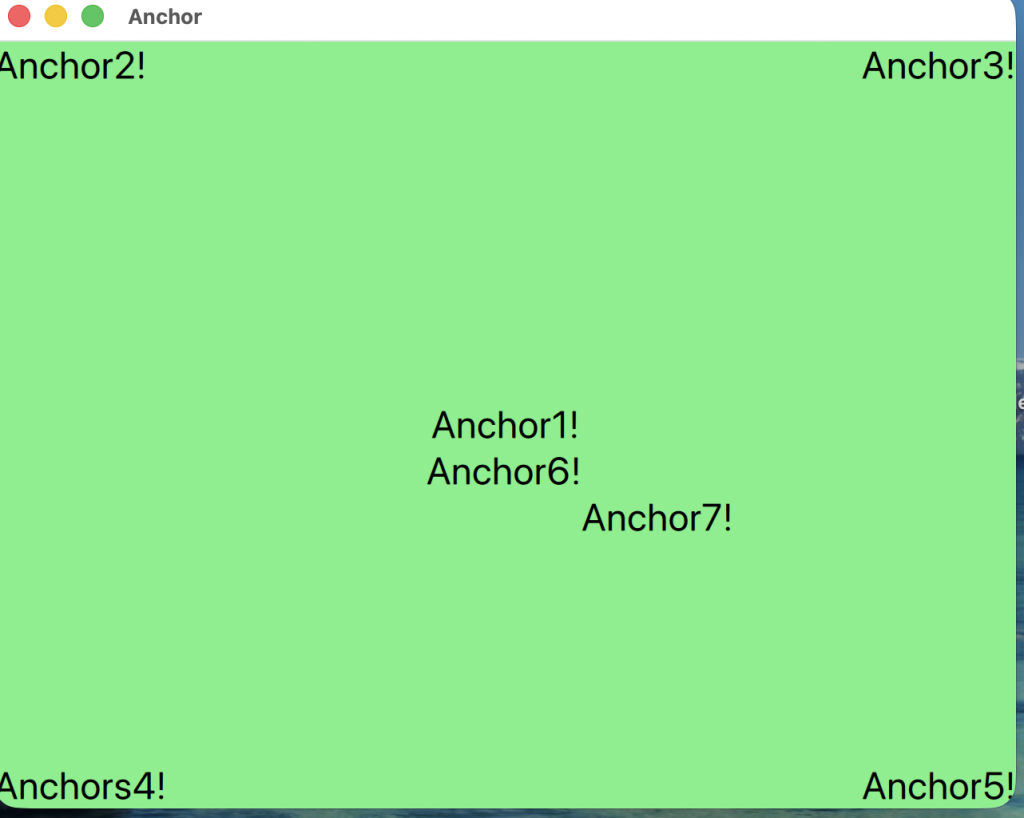
👉🏻스크린샷/ScreenShot