👉🏻 QT QML에서 윈도우 구현시 어플리케이션 윈도우 타입과 윈도우 타입에 대한 설명입니다.
This is a description of application window types and window types when implementing windows in QT QML.
👉🏻 Window :
✔️가장 기본적인 윈도우 컨테이너. 단순 창으로, 메뉴, 툴바, 상태바 등 고급 UI 구성 요소는 없습니다.
The most basic window container. It’s a simple window, lacking advanced UI elements like menus, toolbars, or status bars.
✔️ 윈도우는 게임, 시뮬레이션, 단순 도구 UI, 팝업을 구현하는 경우 사용합니다.
Windows is used for implementing games, simulations, simple tool UIs, and pop-ups.
👉🏻 ApplicationWindow :
✔️ Window를 상속받아 Qt Quick Controls 2에서 제공하는 메뉴바, 툴바, 상태바 등을 쉽게 사용할 수 있도록 확장된 윈도우 타입입니다.
This is an extended window type that inherits from Window and allows easy use of menu bars, toolbars, status bars, etc. provided by Qt Quick Controls 2.
✔️ 어플리케이션윈도우는 일반 데스크탑 앱, 메뉴/툴바/상태바 필수로 사용하는 경우나 macOS 시스템 메뉴 연동 필요한 경우에 사용합니다.
Application windows are used when general desktop apps require menus/toolbars/status bars, or when macOS system menu integration is required.
👉🏻 MacOS 메뉴 특징 / MacOS Menu Features
✔️MacOS에서는 아래의 사진처럼 프로그램의 메뉴는 윈도우에 붙어 있습니다.
On MacOS, the program’s menu is attached to the window, as shown in the picture below.
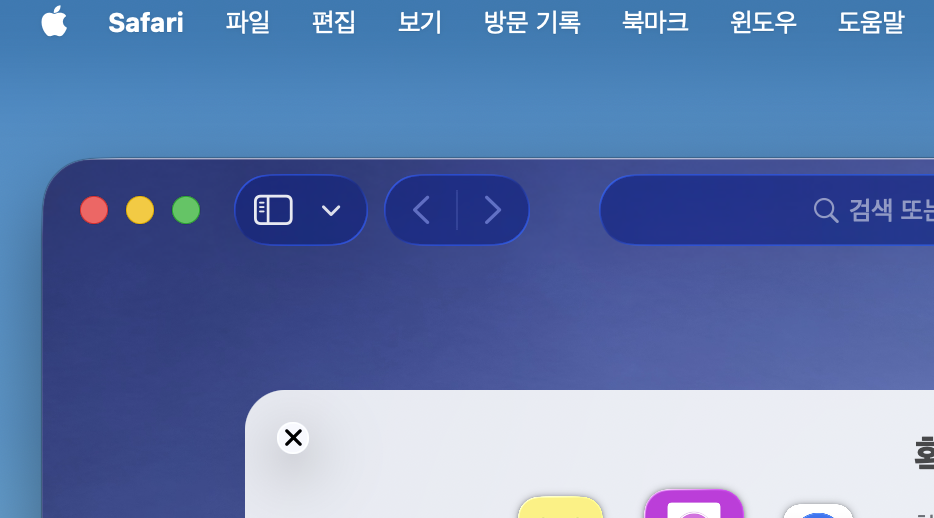
✔️ MacOS의 시스템메뉴와 충돌하는 경우 메뉴가 나타나지 않을 수 있습니다.
If there is a conflict with the system menu of macOS, the menu may not appear.
👉🏻 윈도우 타입과 어플리케이션의 차이점
Differences between Windows types and applications
| 항목 / Item | Window | ApplicationWindow |
|---|---|---|
| menuBar 지원 menuBar support | 없음 / No | 있음 (menuBar 속성)Yes (menuBar property) |
| toolBar 지원 toolBar support | 없음 / No | 있음 (toolBar 속성)Yes (toolBar property) |
| statusBar 지원 statusBar support | 없음 / No | 있음 (statusBar 속성)Yes (statusBar property) |
| 레이아웃 Layout | 단순 / Simple | 메뉴/툴바/상태바가 레이아웃에 자동 배치됨 Menu/ToolBar/StatusBar automatically managed |
| 기본 컨트롤 Built-in controls | 없음 / No | Qt Quick Controls 2 컴포넌트와 호환 최적화 Optimized for Qt Quick Controls 2 components |
| macOS 메뉴바 macOS system menu | 시스템 메뉴바와 연동 불가능함 Not supported | macOS 시스템 메뉴바와 자동 연동 Automatically integrated with macOS system menu bar |
| 윈도우 내부 메뉴 Internal window menu | 구현 필요 Must be implemented manually | menuBar 속성 사용 가능 Available via menuBar property |
👉🏻 코드 / Code
✔️ 아래는 윈도우 타입과 어플리케이션 윈도우 타입에서 메뉴를 구현하는 코드입니다.
Below is the code that implements the menu in the window type and application window type.
✔️윈도우 타입에서는 메뉴를 구현해야하며 MacOS와 호환되지 않습니다.
The Windows type requires the implementation of a menu and is not compatible with MacOS.
✔️Main.qml
import QtQuick
import QtQuick.Controls

Window {
    width: 640
    height: 480
    visible: true
    title: qsTr("Window")


    Column {
        anchors.fill: parent

        Rectangle {
            color:"lightblue"
            width:parent.width
            height:30 // 높이 지정하지 않으면 Recangle이 안보임 / Recangle is not visible if height is not specified

            Row{
                anchors.left: parent.left // Row의 왼쪽을 column의 왼쪽에 맞추기 / Align the left side of the row to the left side of the column
                anchors.leftMargin: 10 // 좌측 간격
                anchors.verticalCenter: parent.verticalCenter // 수직 중앙 정렬 / vertical center alignment

                spacing : 20 // Row안에 있는 아이템들의 간격 / Spacing between items in a row

                Text {
                    id:fileText
                    text: "File"
                    color: "#333"
                    MouseArea {

                        // 마우스 클릭 영역을 Text전체로 설정
                        // Set the mouse click area to the entire text

                        anchors.fill: parent
                        onClicked: fileMenu.open(fileText)
                    }
                }
                Text {
                    id:editText
                    text: "Edit";
                    color: "#333"

                    MouseArea {
                        anchors.fill : parent
                        onClicked: editMenu.open(editText)
                    }
                }
            }

        }
        Text{
            text : "Window"
            font.pixelSize: 25
            anchors.centerIn: parent

        }

        // File 메뉴 / File Menu
        Menu {
            id: fileMenu
            title: "File"
            MenuItem { text: "New" }
            MenuItem { text: "Open..." }
            MenuItem { text: "Save" }
            MenuItem {
                text: "Open ApplicatioonWindow"
                onTriggered: {

                    // 새창 띄우기,ApplicationWindow.qml 불러오기
                    // Open a new window, load ApplicationWindow.qml

                    var component = Qt.createComponent("ApplicationWindow.qml")
                    if (component.status === Component.Ready) {
                        var newWin = component.createObject(null)  // parent 없이 새 창 / New window without parent
                        if (newWin) newWin.visible = true
                    } else {
                        console.log("Error loading component:", component.errorString())
                    }
                }
            }
            MenuItem { text: "Exit" }
        }

        // Edit 메뉴 / Edit Menu
        Menu {
            id: editMenu
            title: "Edit"
            MenuItem { text: "Copy" }
            MenuItem { text: "Paste" }
            MenuItem { text: "Cut" }
        }
    }
}
👉🏻 ApplicationWindow.qml
✔️ 어플리케이션 윈도우 타입에서는 메뉴등을 구현하기가 쉽고 MacOS와 메뉴호환이 가능합니다.
In the application window type, it is easy to implement menus, etc., and menu compatibility with MacOS is possible.
import QtQuick
import QtQuick.Controls

ApplicationWindow {
    width: 400
    height: 300
    visible: true

    menuBar: MenuBar {
        Menu {
            title: "File"
            MenuItem { text: "Open" }
            MenuItem { text: "Close window"; onTriggered: Qt.quit() } //real exit
            MenuItem { text: "Exit" } // macOS에서는 안나타남 / It doesn't appear on macOS
        }
    }

    Column{
        anchors.fill: parent

        Text{
            text: "Application Window"
            font.pixelSize: 25
            anchors.centerIn: parent
        }

    }
}
👉🏻 스크린 샷 / ScreenShot


