👉🏻 함수레이블 / Function label
✔️ 스위프트에서는 파라메터 외에 함수레이블을 사용 할 수 있습니다.
In Swift, you can use function labels in addition to parameters.
✔️ 함수레이블은 코드의 가독성을 높이기 위해서 사용합니다.
Function labels are used to improve the readability of code.
✔️ 바로 아래의 코드처럼 to와 for가 레이블이 됩니다.
As in the code below, to and for become labels.
✔️ 함수내부에서 사용시는 파라메터를 사용하고 외부에서는 레이블을 사용할 수 있습니다.
When used inside a function, you can use parameters, and when used outside, you can use labels.
    func welcome(to town: String, for guest: String) -> String {
        let fulltown = "\(town)에 오신 것을 환영합니다, \(guest)님!\nWelcome to \(town), \(guest)!"
        return fulltown
    }
✔️ 외부에서 레이블을 아래처럼 사용합니다.
Use labels externally like this:
            Button("지역 환영 인사/Local welcome greetings") {
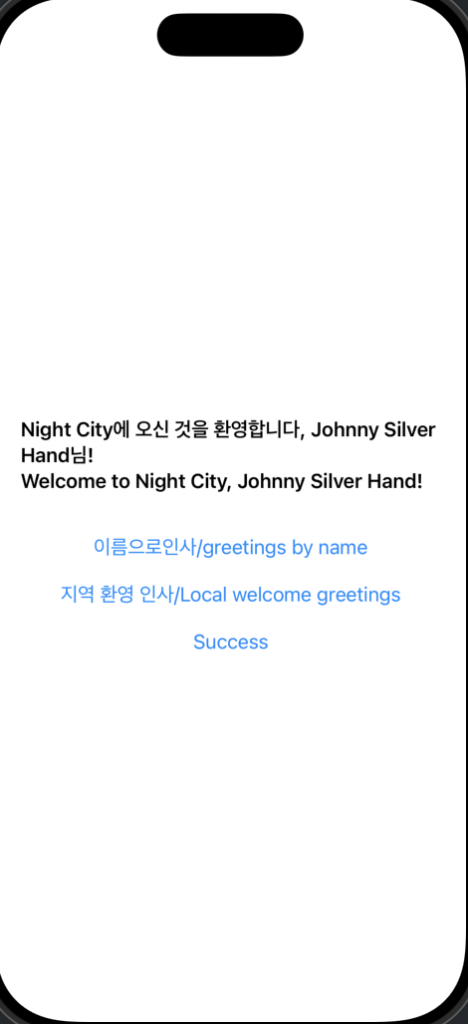
                message = welcome(to: "Night City", for: "Johnny Silver Hand")
            }
✔️ 와일드 카드( _ )를 사용하면 레이블을 생략 할 수 있습니다.
You can omit labels by using the wildcard ( _ ).
    func addExclamation(_ textmsg: String) -> String {
        let textmessage = "\(textmsg) + !!!@@"
        return textmessage
    }
✔️ 아래의 코드는 가장 일반적인 함수의 형태로 파라메터와 레이블을 같이 사용하는 경우 입니다.
The code below uses parameters and labels together in the most common function form.
    func greet(name: String) -> String {
        let fullname = "Hello, \(name)!"
        return fullname
    }
👉🏻 전체 코드 / Full Code
import SwiftUI

struct ContentView: View {
    @State private var message: String = "버튼을 눌러보세요/Try pressing the button"

    // 레이블과 파라미터 이름을 통일한 경우 (가장 일반적)
    // When labels and parameter names are unified (most common)
    func greet(name: String) -> String {
        let fullname = "Hello, \(name)!"
        return fullname
    }

    // 아규먼트(파라메터) 레이블을 따로 써서 문장처럼 만든 경우 (가동성 중심)
    // When creating a sentence by writing argument (parameter) labels separately (focused on mobility)
    func welcome(to town: String, for guest: String) -> String {
        let fulltown = "\(town)에 오신 것을 환영합니다, \(guest)님!\nWelcome to \(town), \(guest)!"
        return fulltown
    }

    // 와일드카드(_)를 사용해 레이블을 생략한 경우 (간결함 중심)
    // If the label is omitted using a wildcard (_) (focused on brevity)
    func addExclamation(_ textmsg: String) -> String {
        let textmessage = "\(textmsg) + !!!@@"
        return textmessage
    }

    var body: some View {
        VStack(spacing: 20) {
            Text(message)
                .font(.headline)
                .padding()

            // 일반적인 형태
            // common form
            Button("이름으로인사/greetings by name") {
                message = greet(name: "Cyberpunk2077")
            }

            // to, for 레이블 사용
            // Use to, for labels
            Button("지역 환영 인사/Local welcome greetings") {
                message = welcome(to: "Night City", for: "Johnny Silver Hand")
            }

            // 아래의 코드는 오류 발생
//            Button("지역 환영 인사") {
//                message = welcome(town: "서울", guest: "철수")
//            }

            // 레이블 생략
            // Label omitted
            Button("Success") {
                message = addExclamation("Success")
            }
        }
    }
}

#Preview {
    ContentView()
}
👉🏻 스크린 샷 / ScreenShot