👉🏻 회원가입 및 로그인 기능을 시작합니다.
We are launching the sign-up and login functions.
👉🏻 publick key 검증로직을 추가했습니다.(기존은 검증 없이 패스)
Added public key verification logic (previously, it proceeded without verification).
👉🏻 User테이블 구조를 변경 했습니다.
The User table structure has been modified.
👉🏻 전체 코드는 깃허브에서 확인 할 수 있습니다.
You can find the full code on GitHub.
https://github.com/gideonslife01/flm-nextjs
📁 전체 프로젝트 구조 / Overall Project Structure
myapp project/
├── app/  (Next.js App Router)
│   ├── .well-known/webfinger/route.ts  -> webfinger
│   ├── api/follow/route.ts    -> Follow API(temporary)
│   ├── api/announce/route.ts  -> Boost(Announcement)
│   ├── api/like/route.ts.     -> Like API
│   ├── api/posts/route.ts     -> Writing API
│   ├── api/timeline/route.ts  -> Timeline API
│   ├── users/[username]/
│   │   ├── statuses/[id]/route.ts -> Indivisual Post
│   │   ├── route.ts               -> Acotr Information
│   │   ├── followers/route.ts     -> Followers List
│   │   ├── following/route.ts     -> Following List
│   │   ├── inbox/route.ts         -> Inbox
│   │   └── outbox/route.ts        -> outbox
│   ├── usersui/[username]/
│   │   ├── page.tsx               -> Timeline UI
│   │   └── _components/themes/
│   │       ├── themeex/ThemeexTheme.tsx   -> Example Theme
│   │       ├── pinafore/PinaforeTheme.tsx -> Theme 1
│   │       ├── mastodon/MastodonTheme.tsx -> Theme 2
│   │       └── minimal/MinimaltTheme.tsx  -> Theme 3
│   ├── layout.tsx, page.tsx, globals.css
│   └── favicon.ico
├── lib/
│   ├── theme.tsx              -> Theme Provider
│   ├── watchThemes.ts         -> Check real-time theme changes
│   ├── auth.ts                -> Authentication, User Management
│   ├── ap.ts                  -> Follow,Undo,Create,Likes,Announce
│   └── db.ts                  -> DB connection
├── data/
│   ├── keys/userIDs/          -> private.pem, public.pem(New)
│   └── keys/                  -> private.pem, public.pem(legacy)
├── data.sqlite                -> Database(1/3)
├── data.sqlite-wal            -> Database(2/3)
├── data.sqlite-shm            -> Database(3/3)
├── Caddyfile                  -> https
├── instrumentation.ts         -> Background Server
└── package.json
📁 프로젝트 시작 / Porject Start
📁 모듈 설치 / Module install
— 비밀번호 암호화 / Password encryption
npm install bcrypt jsonwebtoken
npm install -D @types/bcrypt @types/jsonwebtoken
📁 DB 마이그레이션 / DB Migration
✔️ 기존 Users테이블에서 User1을 유지하고 정보를 업데이트합니다.
Retain User1 in the existing Users table and update its information.
✔️ Users 테이블 / User Table
— email,password_hash,email_verified,vaerification_token 필드를 추가합니다.
Add the email, password_hash, email_verified, and verification_token fields.
CREATE TABLE users (
  username TEXT PRIMARY KEY,
  display_name TEXT DEFAULT '',
  summary TEXT DEFAULT '',
  private_key TEXT,
  public_key TEXT,
  email TEXT UNIQUE,
  password_hash TEXT,
  email_verified INTEGER DEFAULT 0,
  verification_token TEXT,
  created_at DATETIME DEFAULT CURRENT_TIMESTAMP
);
✔️ SQLITE
— ALTER명령어로는 UNIQUE를 추가할 수 없어서 테이블을 새로만듭니다.
Since a UNIQUE constraint cannot be added using the ALTER command, I am creating a new table.
# - 테이블 신규 생성 / Create New Table -

sqlite3 data.sqlite

# - 기존 테이블 삭제(UNIQUE는 ALTER로 입력 불가능) -
# Delete existing table (UNIQUE constraint cannot be added via ALTER)
DROP TABLE IF EXISTS users;

# - 테이블 생성 / Create Table --

CREATE TABLE users (
  username TEXT PRIMARY KEY,
  display_name TEXT DEFAULT '',
  summary TEXT DEFAULT '',
  private_key TEXT,
  public_key TEXT,
  email TEXT UNIQUE,
  password_hash TEXT,
  email_verified INTEGER DEFAULT 0,
  verification_token TEXT,
  created_at DATETIME DEFAULT CURRENT_TIMESTAMP
);

# - 사용자 입력(패스워드 1111) --
# User input (password 1111

INSERT INTO users (username, display_name, summary, email, password_hash, email_verified)
VALUES ('user1','user1','My Fediverse account on aloy-horizon','freelifemakers@gmail.com','$2b$10$EixZaYVK1fsbw1ZfbX3OXePaWxn96p36WQoeG6Lruj3vjPGga31lW',1);

SELECT * FROM users;
— Private ,Public 키 생성 및 DB업데이트(또는 기존 키 활용)
Generate private and public keys and update the database (or utilize existing keys)
# 키 생성 / Key Generation
cd ~/myapp31
node -e "
const crypto = require('crypto');
const fs = require('fs');
const { privateKey, publicKey } = crypto.generateKeyPairSync('rsa', {
  modulusLength: 2048,
  publicKeyEncoding: {type: 'spki', format: 'pem'},
  privateKeyEncoding: {type: 'pkcs8', format: 'pem'}
});
fs.writeFileSync('pri.pem', privateKey);
fs.writeFileSync('pub.pem', publicKey);
console.log('생성됨!');
console.log('private length:', privateKey.length);
console.log('public length:', publicKey.length);
"

# cat 명령어로 키 확인후 DB에 업데이트 하기
Check the key using the `cat` command and update the database.

# DB Update / DB Update
UPDATE users SET
  private_key = '-----BEGIN PRIVATE KEY-----',
  public_key = '-----BEGIN PUBLIC KEY-----'
WHERE username = 'user1';

SELECT username, length(private_key) as pri_len, length(public_key) as pub_len FROM users;
— 사용자 디렉토리 만들고 키 파일 복사(db.ts로직이랑 맞추기 위해서)
Create the user directory and copy the key file (to align with the db.ts logic).
# 기존파일유지
# Keep existing files
# /myapp31/data/keys/

user1 % ls
private.pem     public.pem

# 신규파일
# New File
#/myapp31/data/keys/user1

user1 % ls
private.pem     public.pem
1) 회원가입시 키는 data/keys/userid/private_key.pem or public_key.pem 으로 저장 됨.
📁 코드추가 / Add code
✔️ 회원가입처리나 로그인관련 함수입니다.
These are functions related to user registration and login processing.
— lib/auth.ts
... ...
export async function hashPassword(password: string) {
  ... ...
}

export async function verifyPassword(password: string, hash: string) {
  ... ...
}

export function createToken(username: string) {
  ... ...
}

export function verifyToken(token: string) {
... ...
}

export function getUser(username: string) {
  ... ...
}

export function getUserByEmail(email: string) {
 ... ...
}

//  ✅ myapp31 - 신규 유저 생성 (키도 같이 생성!) / Create a new user (with keys!)
export function createUser(username: string, email: string, passwordHash: string, displayName: string = '') {
... ...

}

//  ✅ myapp31 -기존 DB -> 파일로 마이그레이션! / Migrate existing DB keys to files!
export function migrateKeysToFiles() {
  ... ...
}
... ...
📁 코드 수정 / Code Modification
✔️ lib/db.ts
// lib/db.ts
// keys 폴더 생성! / Create keys folder!
const keysDir = path.join(process.cwd(), 'data/keys');
if (!fs.existsSync(keysDir)) {
  fs.mkdirSync(keysDir, { recursive: true });
  console.log('✅ keys 폴더 생성/ keys folder created:', keysDir);
}

... ...

db.exec(`
CREATE TABLE IF NOT EXISTS users (
  username TEXT PRIMARY KEY,
  display_name TEXT DEFAULT '',
  summary TEXT DEFAULT '',
  private_key TEXT,
  public_key TEXT,
  email TEXT UNIQUE,
  password_hash TEXT,
  email_verified INTEGER DEFAULT 0,
  verification_token TEXT,
  created_at DATETIME DEFAULT CURRENT_TIMESTAMP);
`);
✔️ publick key 검증로직 부분 수정
Modified the public key verification logic.
— lib/ap.ts
1) Publick Key 검증로직 추가
Added public key verification logic.
2)getPublicKey, verifyHttpSignature, fetchActorPublicKey 함수 추가
Added getPublicKey, verifyHttpSignature, and fetchActorPublicKey functions.
function getPublicKey(username: string): string {
  ... ...
}

... ...

export async function verifyHttpSignature(
  req: Request,
  publicKeyPem: string
): Promise<boolean> { ... ...}

export async function fetchActorPublicKey(actorUrl: string): Promise<string> { ... ...
}
✔️ 내 서버로 팔로우 요청시 Public Key로 검증
Verify using the public key when a follow request is sent to my server.
— app/api/inbox/route.ts
export async function POST(req: Request, { params }: { params: Promise<{ username: string }> }) {

  const { username } = await params;
  let body: any;
  let rawBody = '';

  try {
    // rawBody를 먼저 읽기 / Read rawBody first
     rawBody = await req.text();
    try {
      body = JSON.parse(rawBody);
    } catch {
      console.log('⚠️ JSON 파싱 실패! 빈 바디? / Failed to parse JSON! Empty body?', rawBody.slice(0,200));
      return new Response('', { status: 202 });
    }

   // const body = await req.json();
    console.log(`📩 [${username}] INBOX:`, body.type, body.actor, body.id);

   ... ...

   }
... ...
}
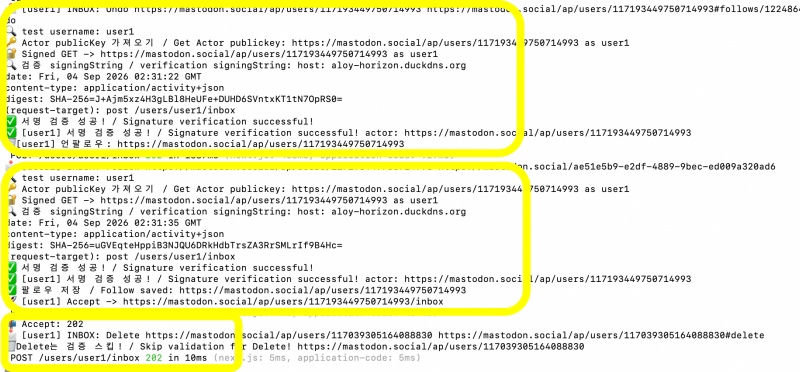
1) 팔로우,언팔로우,글 받기,좋아요,부스트 모두 publick key로 검증
Follow, undo, receive posts, like, and boost(announce) actions are all verified using public keys.
2)DELETE 요청에는 public key 검증 안함.
Public key verification is not performed for DELETE requests.
— DELETE요청은 본인의 계정이 삭제된걸 다른서버에 알리는 기능임.
The DELETE request serves to notify other servers that your account has been deleted.
— 계정이 삭제됐으므로 public key가 없을 수 있음.
The public key may be missing because the account has been deleted.
📁 테스트 / Test
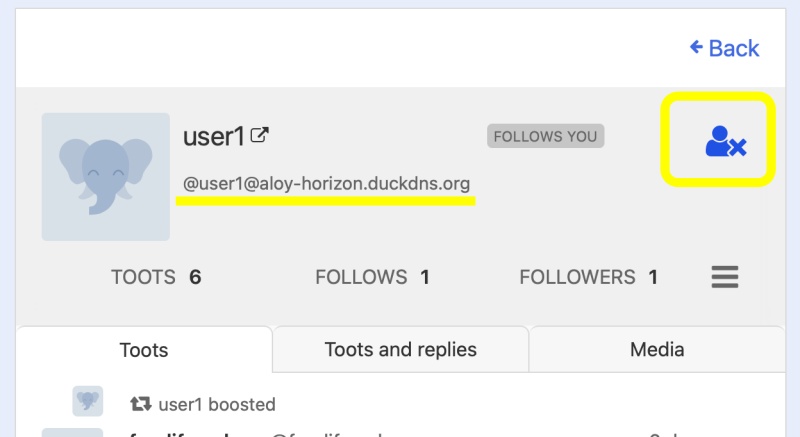
✔️ 마스토돈 서버에서 aloy-horizon-duckdns.org를 언팔로우하고 다시 팔로우 하기
✔️ 키 검증 로그 확인하기 / Checking Key Verification Logs
요한복음 8장 32절 / John 8:32
“그리고 너희는 진리를 알게 될 것이며, 진리가 너희를 자유롭게 할 것이다.”
“Then you will know the truth ,and the truth will set you free”


