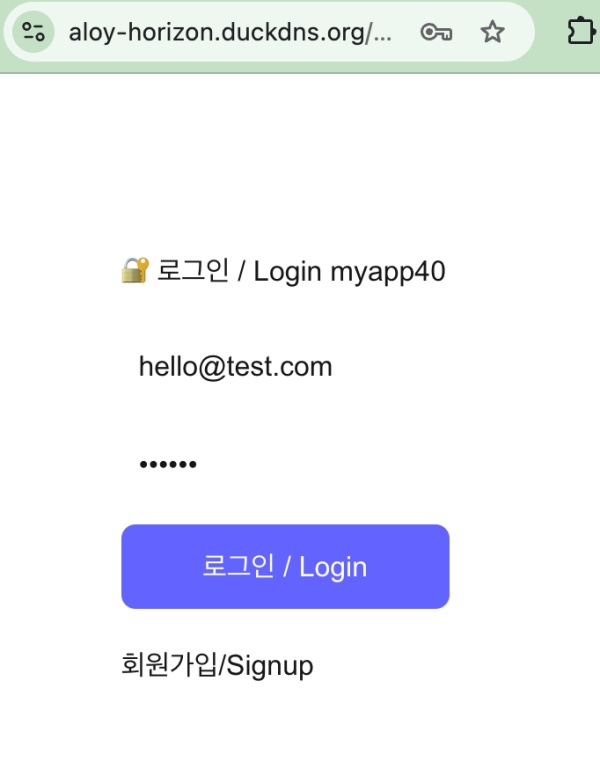
👉🏻 회원가입 및 로그인 기능입니다.
These are the sign-up and login functions.
👉🏻 pinafore에 로그인하는 기능(OAuth)을 추가합니다.
Add a login feature (OAuth) to Pinafore.
👉🏻 아이디 패스워드 입력없이 user1으로 로그인합니다.
Log in as user1 without entering an ID or password.
👉🏻 전체 코드는 깃허브에서 확인 할 수 있습니다.
You can find the full code on GitHub.
https://github.com/gideonslife01/flm-nextjs
📁 전체 프로젝트 구조 / Overall Project Structure
myapp project/
├── app/  (Next.js App Router)
│   ├── .well-known/webfinger/route.ts  -> webfinger
│   ├── api/follow/route.ts    -> Follow API(temporary)
│   ├── api/announce/route.ts  -> Boost(Announcement)
│   ├── api/like/route.ts.     -> Like API
│   ├── api/posts/route.ts     -> Writing API
│   ├── api/timeline/route.ts  -> Timeline API
│   ├── api/v1/instance/route.ts -> auth
│   ├── api/v1/apps/route.ts.    -> auth
│   ├── api/v1/accounts/verify_credentials/route.ts -> auth
│   ├── api/v1/statuses/route.ts -> auth
│   ├── api/v1/timelines/home/route.ts -> auth
│   ├── oauth/authorize/route.ts -> auth
│   ├── oauth/token/route.ts -> auth
│   ├── users/[username]/
│   │   ├── statuses/[id]/route.ts -> Indivisual Post
│   │   ├── route.ts               -> Acotr Information
│   │   ├── followers/route.ts     -> Followers List
│   │   ├── following/route.ts     -> Following List
│   │   ├── inbox/route.ts         -> Inbox
│   │   └── outbox/route.ts        -> outbox
│   ├── usersui/[username]/
│   │   ├── page.tsx               -> Timeline UI
│   │   └── _components/themes/
│   │       ├── themeex/ThemeexTheme.tsx   -> Example Theme
│   │       ├── pinafore/PinaforeTheme.tsx -> Theme 1
│   │       ├── mastodon/MastodonTheme.tsx -> Theme 2
│   │       └── minimal/MinimaltTheme.tsx  -> Theme 3
│   ├── layout.tsx, page.tsx, globals.css
│   └── favicon.ico
├── lib/
│   ├── theme.tsx              -> Theme Provider
│   ├── watchThemes.ts         -> Check real-time theme changes
│   ├── auth.ts                -> Authentication, User Management
│   ├── ap.ts                  -> Follow,Undo,Create,Likes,Announce
│   └── db.ts                  -> DB connection
├── data/
│   ├── keys/userIDs/          -> private.pem, public.pem(New)
│   └── keys/                  -> private.pem, public.pem(legacy)
├── data.sqlite                -> Database(1/3)
├── data.sqlite-wal            -> Database(2/3)
├── data.sqlite-shm            -> Database(3/3)
├── Caddyfile                  -> https
├── instrumentation.ts         -> Background Server
└── package.json
📁 프로젝트 시작 / Project Start
📁 개요 / Overview
Pinafore (Mastodon 클라이언트) 로그인 개요
Pinafore (Mastodon Client) Login Overview

1. Pinafore에서 Instance에 https://aloy-horizon.duckdns.org 입력
Enter https://aloy-horizon.duckdns.org into the Instance field in Pinafore.

2. Pinafore가 진행하는 처리 과정
The process carried out by Pinafore

  - 내 서버 검색 / Search My Servers
   GET /.well-known/webfinger?resource=acct:user1@aloy-horizon.duckdns.org

  - 내 서버 정보 가져가기 / Retrieve My Server Information
   GET /api/v1/instance( 내 서버 정보를 Pinafore가 가져감)

  - 앱 등록 / App Registration
   (앱 등록하고 pinafore에 응답 / Register the app and respond to Pinafore.)
   POST /api/v1/apps

3. 브라우저 팝업(승인화면) / Browser pop-up (approval screen):
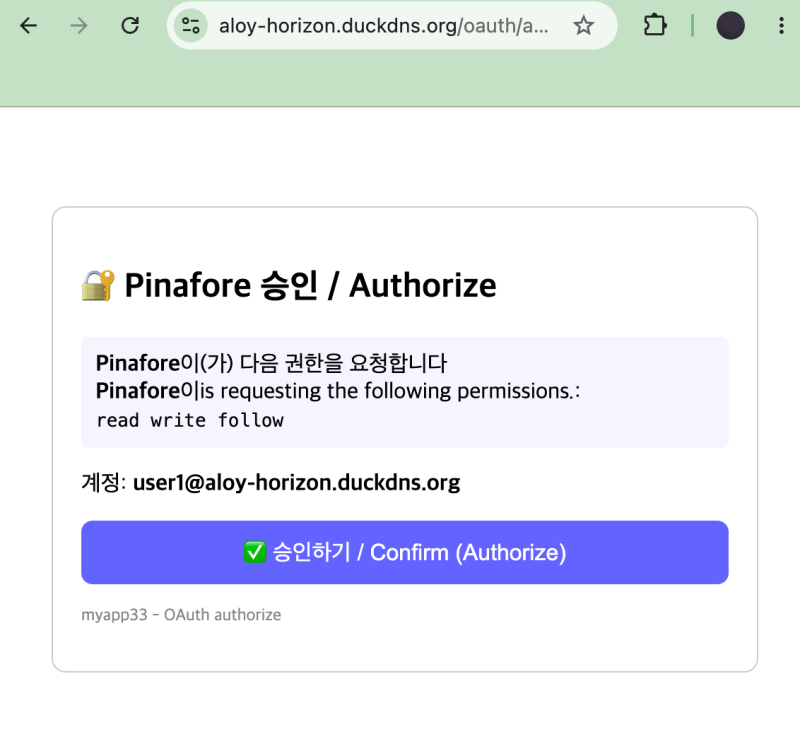
  - pinafore가 내 서버에서 아래의 라우트 GET으로 실행하여 승인화면 안내
    Pinafore displays the authorization screen when the GET route below is executed on my server.
   GET /oauth/authorize?client_id=...&scope=read write follow

4. 승인 버튼 누르기 / Press the approval button. :
  - 승인화면에서 승인버튼 누르면 POST /oauth/authorize 실행
    Clicking the approval button on the approval screen executes POST /oauth/authorize.

  - oauth_codes 발급하고 코드를 DB에 저장
    Issue oauth_codes and store the codes in the database.

  - 다시 pinafor.social로 리다이렉트 실행
    Redirecting back to pinafor.social

  - Pinafore가 POST /oauth/token 라우트 실행해서 access_token 발급하고 DB저장
    Pinafore executes the POST /oauth/token route to issue an access_token and save it to the DB.

5. Pinafore 로그인 성공 / Pinafore login successful :
   - /api/v1/accounts/verify_credentials 라우트 실행 내 서버 정보리턴
     Return server information upon execution of the /api/v1/accounts/verify_credentials route.

   - verify_credentials에서 리턴한 정보를 타임라인에 표시
     Display the information returned by verify_credentials on the timeline.

   - pinafore 타임라인에서 글쓰기 가능 Outbox POST 사용가능
     Posting is enabled on the Pinafore timeline; Outbox POST is supported.
✔️ 필요한 라우트 / route needed
| 순서 / order | 라우트 / route | 역할 / role | 파일 / file | 상태 / ststus |
|---|---|---|---|---|
| 1 | /.well-known/webfinger | – Pinafore가 user@도메인 존재하는지 확인!Pinafore checks if the user@domain exists! | app/.well-known/webfinger/route.ts | 이미 있음 Already exists |
| 2 | /api/v1/instance | – 서버 정보! version, titleServer Information! version, title | app/api/v1/instance/route.ts | myapp33 |
| 3 | /api/v1/apps POST | – 앱 등록! client_id/secret 발급App registration! Issue client_id/secret. | app/api/v1/apps/route.ts | myapp33 |
| 4 | /oauth/authorize GET | – 로그인승인 화면,승인버튼 Login approval screen, approval button | app/oauth/authorize/route.ts | myapp33 |
| 5 | /oauth/authorize POST | 승인 code 발급 | app/oauth/authorize/route.ts (POST) | myapp33 |
| 6 | /oauth/token POST | code -> access_token 교환 | app/oauth/token/route.ts | myapp33 |
| 7 | /api/v1/accounts/verify_credentials | 내 정보 리턴! 로그인 | app/api/v1/accounts/verify_credentials/route.ts | myapp33 |
| 8 | /api/v1/timelines/home | 로그인 후 타임라인 | app/api/v1/timelines/home/route.ts | myapp33 |
| 9 | /api/v1/statuses POST | 글쓰기(pinafore) Outbox 저장 | app/api/v1/statuses/route.ts | myapp33 |
✔️ 자동생성 테이블 / Automatically generated table
# 앱 등록 / App Registration
CREATE TABLE oauth_apps (
          client_id TEXT PRIMARY KEY,
          client_secret TEXT NOT NULL,
          client_name TEXT,
          redirect_uri TEXT,
          scopes TEXT,
          website TEXT,
          created_at INTEGER
        );

# Oauth codes
CREATE TABLE oauth_codes (
        code TEXT PRIMARY KEY,
        client_id TEXT,
        redirect_uri TEXT,
        scope TEXT,
        username TEXT,
        created_at INTEGER
      );

# OAuth tokens
CREATE TABLE oauth_tokens (
          access_token TEXT PRIMARY KEY,
          client_id TEXT,
          username TEXT,
          scope TEXT,
          created_at INTEGER
        );
💡
oauth_apps
- 앱등록(pinaafore에만 로그인 했으면 데이터 1개)
App registration (1 data entry if logged into Pinaafore only)
oauth_tokens
- 앱토큰(유저 100명이면 100명이 로그인한 횟수 만큼 ,즉 100+)
App tokens (based on the number of logins by the 100 users—i.e., 100+).
oauth_codes
- 쓰고 버리는 코드 항상 데이터 갯수는 0
Discarded code; the data count is always 0📁 라우트 및 파일 추가 / Add Routes and Files
✔️ app/api/v1/instance/route.ts
— 동작 개요 / Operation Overview
 /api/v1/instance GET
-> Pinafore가 내 서버정보를 가져갑니다.
Pinafore retrieves my server information.

-> 이때 내 서버는 마스토돈 서버로 인식하도록 설정을 합니다.
At this point, configure your server so that it is recognized as a Mastodon server.
— 코드 / Code
// app/api/v1/instance/route.ts
import { NextResponse } from 'next/server';

const DOMAIN = process.env.DOMAIN || 'aloy-horizon.duckdns.org';

export async function GET() {
  return NextResponse.json({ ... ...
})}
— 테스트 / Test
# 터미널에서 실행 / Run in the terminal

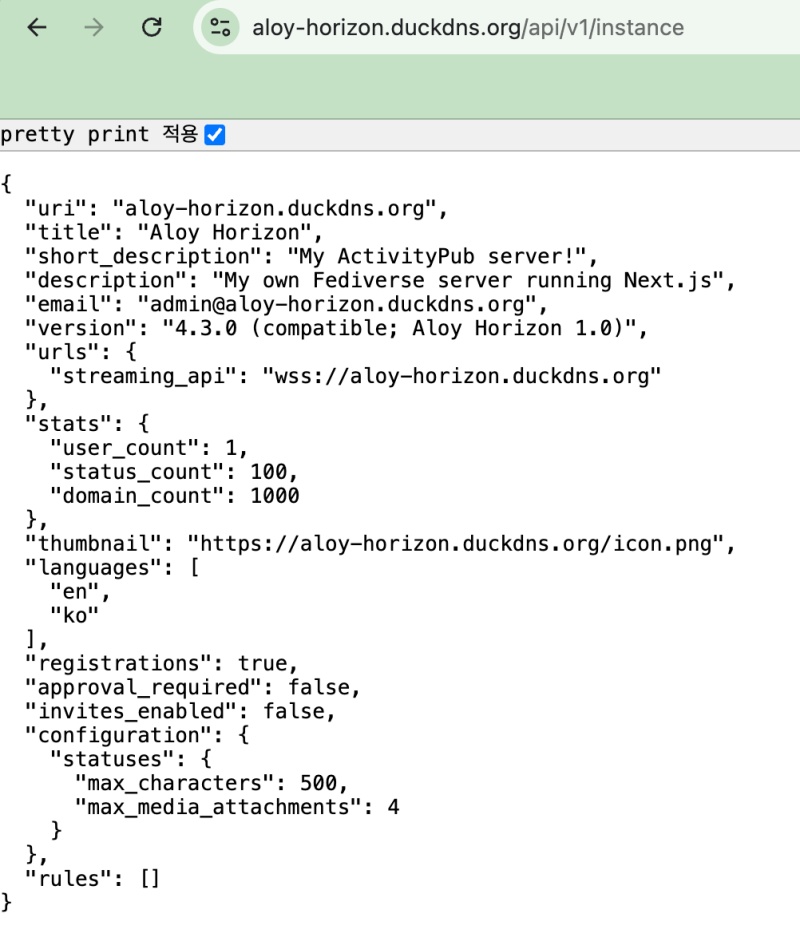
 % curl https://aloy-horizon.duckdns.org/api/v1/instance

# 응답 / Response
{"uri":"aloy-horizon.duckdns.org","title":"Aloy Horizon","short_description":"My ActivityPub server!","description":"My own Fediverse server running Next.js","email":"admin@aloy-horizon.duckdns.org","version":"4.3.0 (compatible; Aloy Horizon 1.0)","urls":{"streaming_api":"wss://aloy-horizon.duckdns.org"},"stats":{"user_count":1,"status_count":100,"domain_count":1000},"thumbnail":"https://aloy-horizon.duckdns.org/icon.png","languages":["en","ko"],"registrations":true,"approval_required":false,"invites_enabled":false,"configuration":{"statuses":{"max_characters":500,"max_media_attachments":4}},"rules":[]}

% 
✔️ /api/v1/apps POST
— 동작개요 / Operation Overview
# Pinafore 앱을 내 서버에 앱등록 하기
# Registering the Pinafore app on my server

# - /api/v1/apps POST -> Pinafore 앱 등록! client_id 발급!
# - /api/v1/apps POST -> Register Pinafore app! Issue client_id!

# Pinafore가 보내는 정보
# Information from Pinafore
POST /api/v1/apps
{
  "client_name": "Pinafore",
  "redirect_uris": "https://pinafore.social/settings/instances/add",
  "scopes": "read write follow push",
  "website": "https://pinafore.social"
}
— 코드 / Code
// app/api/v1/apps/route.ts - ✅ myapp33-2 - Pinafore 앱 등록 / Pinafore App Registration
import { NextResponse } from 'next/server';
import db from '@/lib/db';
import { randomUUID } from 'crypto';

const DOMAIN = process.env.DOMAIN || 'aloy-horizon.duckdns.org';

export async function POST(req: Request) { ... ... }
— 테스트 / Test
# 터미널에서 실행 / Run in the terminal

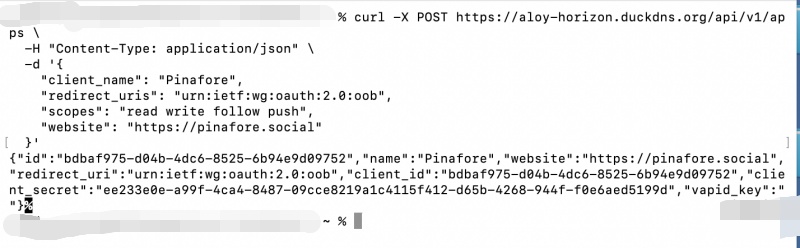
% curl -X POST https://aloy-horizon.duckdns.org/api/v1/apps \
  -H "Content-Type: application/json" \
  -d '{
    "client_name": "Pinafore",
    "redirect_uris": "urn:ietf:wg:oauth:2.0:oob",
    "scopes": "read write follow push",
    "website": "https://pinafore.social"
  }'

# 응답 / Response
{"id":"e6988bbc-3ef3-4e7d-8c28-620be9a2602b","name":"Pinafore","website":"https://pinafore.social","redirect_uri":"urn:ietf:wg:oauth:2.0:oob","client_id":"e6988bbc-3ef3-4e7d-8c28-620be9a2602b","client_secret":"c8b558db-7dc1-40dd-a711-9ff322ad29ccc1d71931-09d6-491c-8d59-17968d1f3f1c","vapid_key":""}

% 
✔️ app/oauth/authorize/route.ts
— 동작개요 / Operation Overview
# Pinafore에서 아래의 라우트 실행해서 브라우저 승인화면 팝업:
# Execute the route below in Pinafore to open the browser approval screen popup

https://aloy-horizon.duckdns.org/oauth/authorize?
  client_id=bdbaf975...
  &redirect_uri=urn:ietf:wg:oauth:2.0:oob
  &response_type=code
  &scope=read write follow push

# 화면의 승인 누르면 code 발급
# Press Approve on the screen to issue a code
— 코드 / Code
// app/oauth/authorize/route.ts - ✅ myapp33-3 - 로그인 승인 페이지! / Login Authorization Page!
import { NextResponse } from 'next/server';
import db from '@/lib/db';
import { randomUUID } from 'crypto';

export async function GET(req: Request) { ... ... }
export async function POST(req: Request) { ... ... }
— 테스트 / Test
# Terminal
% curl -X POST https://aloy-horizon.duckdns.org/oauth/token \
  -H "Content-Type: application/x-www-form-urlencoded" \
  -d "client_id=bdbaf975-d04b-4dc6-8525-6b94e9d09752&client_secret=ee233e0e-a99f-4ca4-8487-09cce8219a1c4115f412-d65b-4268-944f-f0e6aed5199d&code=df066428-3240-45cf-aa2a-6c4f809f875c&grant_type=authorization_code&redirect_uri=urn:ietf:wg:oauth:2.0:oob"

# 응답 / Response
{"access_token":"2f7f89d8-20e0-4e63-acac-5d3bea32deb11e323217-71b3-455a-8320-fc348e305611","token_type":"Bearer","scope":"read write follow","created_at":1788651972}

%
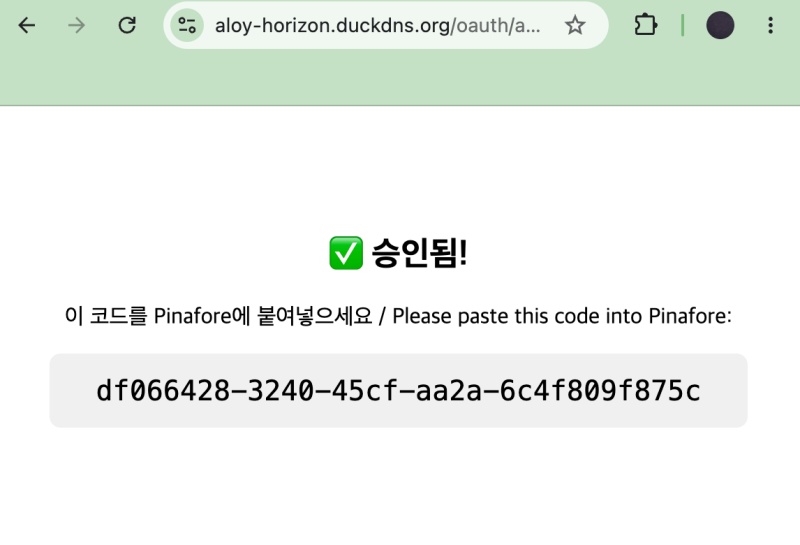
— 아래의 화면에서 pinafore의 정보가 없으면 auth 코드가 보입니다.(테스트 단계)
If there is no information for Pinafore on the screen below, the auth code will be displayed.(Testing phase)
— pinafore정보를 정상적으로 확인되면 pinafore 타임라인을 이동합니다.
Once the Pinafore information is successfully verified, you will navigate to the Pinafore timeline.
✔️ app/api/v1/accounts/verify_credentials/route.ts
— Pinafore가 보는 내 서버정보,타임라인에 표시되는 정보
My server information as seen by Pinafore, information displayed on the timeline
import { NextResponse } from 'next/server';
import db from '@/lib/db';

const DOMAIN = process.env.DOMAIN || 'aloy-horizon.duckdns.org';

export async function GET(req: Request) { ... }
export async function OPTIONS() { ... }
— 테스트 / Test
curl https://aloy-horizon.duckdns.org/api/v1/accounts/verify_credentials \
  -H "Authorization: Bearer 2f7f89d8-20e0-4e63-acac-5d3bea32deb11e323217-71b3-455a-8320-fc348e305611"
% curl https://aloy-horizon.duckdns.org/api/v1/accounts/verify_credentials \
-H "Authorization: Bearer 2f7f89d8-20e0-4e63-acac-5d3bea32deb11e323217-71b3-455a-8320-fc348e305611"
# 응답 / Response
{"id":"1","username":"user1","acct":"user1@aloy-horizon.duckdns.org","display_name":"user1","locked":false,"bot":false,"created_at":"2026-09-05T23:52:44.236Z","note":"My ActivityPub server!","url":"https://aloy-horizon.duckdns.org/users/user1","avatar":"https://aloy-horizon.duckdns.org/icon.png","avatar_static":"https://aloy-horizon.duckdns.org/icon.png","header":"https://aloy-horizon.duckdns.org/icon.png","header_static":"https://aloy-horizon.duckdns.org/icon.png","followers_count":1,"following_count":1,"statuses_count":100,"source":{"privacy":"public","sensitive":false,"language":"en","note":"","fields":[]}}
% ✔️ app/api/v1/timelines/home/route.ts
— 로그인 후 타임라인 (아직 빈 타임라인)
Timeline after logging in (currently empty)
export async function GET() {
  // ✅ 빈 타임라인! (나중에 Outbox 글 가져오게 할 수 있음!) / Empty timeline! (Later, you can fetch posts from the Outbox!)
  return NextResponse.json([]);
}
export async function OPTIONS() { ... }
✔️ app/api/v1/statuses/route.ts
— 로그인 후 타임라인에 보이는 내가 작성한글(아직 DB저장 구현 안함.)
Posts I’ve written that appear on the timeline after logging in (DB storage implementation not yet complete).
import { NextResponse } from 'next/server';
import db from '@/lib/db';
import { randomUUID } from 'crypto';

const DOMAIN = process.env.DOMAIN || 'aloy-horizon.duckdns.org';

export async function POST(req: Request) { ... }
export async function OPTIONS() { ... }
📁 CORS설정 추가 / Add CORS configuration
✔️ 프로젝트 루트에 middlewatre.ts 파일 추가
Add a middleware.ts file to the project root.
import { NextResponse } from 'next/server';
import type { NextRequest } from 'next/server';

export function middleware(req: NextRequest) { ... }
export const config = {
  matcher: ['/api/:path*', '/oauth/:path*', '/.well-known/:path*', '/users/:path*'],
};
✔️ OPTIONS 함수 추가 / Add OPTIONS function
— 아래의 파일들의 가장하단에 OPTIONS함수를 추가합니다.
Add the OPTIONS function to the very bottom of the files listed below.
1) OPTIONS 함수 / OPTIONS Function
// CORS 에러 방지용 OPTIONS 처리 / Handle OPTIONS to prevent CORS errors
export async function OPTIONS() {
  return new NextResponse(null, {
    status: 204,
    headers: {
      'Access-Control-Allow-Origin': '*',
      'Access-Control-Allow-Methods': 'GET, OPTIONS',
      'Access-Control-Allow-Headers': 'Content-Type, Authorization',
    },
  });
}
2)파일 / Files
app/api/v1/instance/route.ts
app/api/v1/apps/route.ts
app/api/v1/accounts/verify_credentials/route.ts
app/api/v1/timelines/home/route.ts
app/api/v1/statuses/route.ts
app/oauth/token/route.ts
app/oauth/authorize/route.ts
— 설정을 안하면 pinafore.social에서 아래와 같은 오류가 발생할 수 있습니다.
If you do not configure the settings, an error like the one below may occur on pinafore.social.
Error: FetchEvent.respondWith received an error: TypeError: Load failed. Is this a valid Mastodon instance? Is a browser extension blocking the request? Are you in private browsing mode? If you believe this is a problem with your instance, please send this link to the administrator of your instance.— 테스트 / Test
# preflight Test
curl -i -X OPTIONS https://aloy-horizon.duckdns.org/api/v1/instance \
  -H "Origin: https://pinafore.social" \
  -H "Access-Control-Request-Method: GET"

# 위의 curl을 터미널에서 실행하면 브라우저에 인증 허용 화면 실행 됨.
# Running the curl command above in the terminal triggers the authentication approval screen in your browser.
📁 최종 테스트 / Final Test
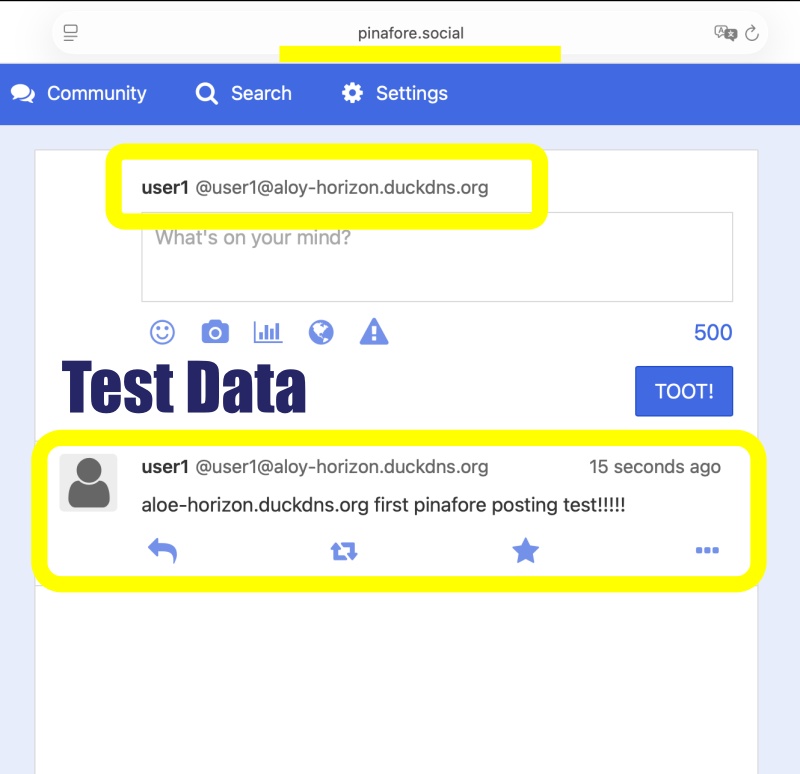
✔️ 위의 모든 테스트가 정상적으로 작동하면 로컬 서버를 실행하고 pinafore.social에서 로그인을 해봅니다.
If all the tests above run successfully, start the local server and try logging in at pinafore.social.
✔️ 로그인을 완료 하면 실제로 글쓰기가 실행되는지 확인해 봅니다.
After logging in, verify that the writing function actually works.
✔️ 글쓰기 데이터는 지금은 outbox에 저장하지 않고 pinafore에 보이는지만 확인합니다.
For now, writing data is not saved to the outbox; we only verify that it appears in Pinafore.
요한복음 8장 32절 / John 8:32
“그리고 너희는 진리를 알게 될 것이며, 진리가 너희를 자유롭게 할 것이다.”
“Then you will know the truth ,and the truth will set you free”