👉UR22C는 오디오인터페이스 입니다.
UR22C is an audio interface.
👉루프백기능이란 그냥 큐베이스에서 출력되는 소리를 OBS스튜디오에서 녹음가능하게 하는 기능으로 이해하시면됩니다.
You can think of the loopback function as a function that allows you to record the sound output from Cubase in OBS Studio.
👉오디오인터페이스에 루프백 기능이 있어야 큐베이스의 소리를 녹음 할 수 있습니다.
Your audio interface must have a loopback function to record sounds from Cubase.
👉UR22C는 루프백 기능을 지원합니다.
UR22C supports loopback function.
👉 드라이버와 프로그램은 아래의 링크에 있습니다.
Drivers and programs are available at the links below.
✔️ 중요한건 최신 프로그램을 설치할 경우 기능이 작동하지 않는 경우가 있습니다.
The important thing is that if you install the latest program, the function may not work.
✔️ 저의 경우에는 TOOLS for UR-C V2.0.1 · 455 MB 이거 설치하니까 제대로 동작합니다.
In my case, it works properly after installing TOOLS for UR-C V2.0.1 · 455 MB.
✔️UR-C프로그램 설치할때 dspMixFx UR-C를 반드시 같이 설치 하셔야 루프백 기능이 작동합니다.
When installing the UR-C program, you must install dspMixFx UR-C together for the loopback function to work.
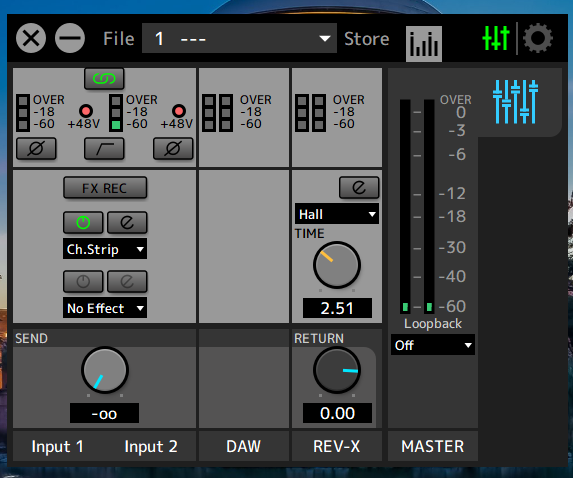
✔️아래는 dspMixFx UR-C 실행한 모습입니다.
Below is the dspMixFx UR-C running.
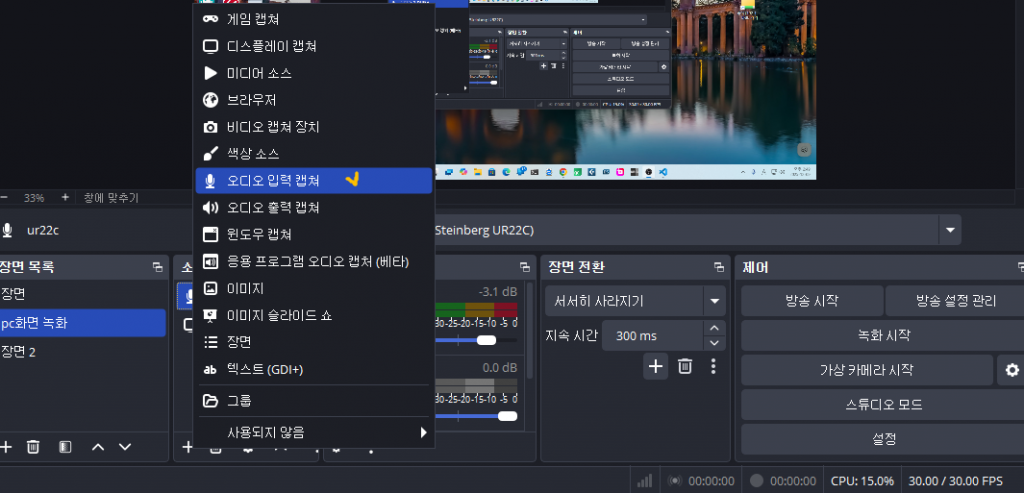
👉OBS에서는 다음과 같이 셋팅하시면 됩니다.
In OBS, you can set it as follows:
✔️오디오 입력 캡춰 / Audio input capture
✔️UR22C선택 / UR22C selection
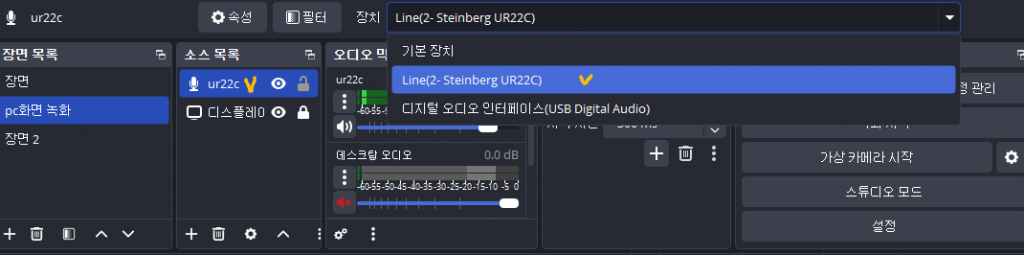
👉 여기까지 하시고 OBS에서 녹화를 하면 큐베이스에서 재생되는 음악이 녹음될겁니다.
If you do this and record in OBS, the music played in Cubase will be recorded.


