👉🏻 아래는 ip공유기에서 포트포워딩,아이피 주소고정 설정,ddns설정에 대한 내용입니다.
Below is information about port forwarding, fixed IP address settings, and DDNS settings on an IP router.
👉🏻 아래는 국산 공유기 중 iptime모델에만 해당합니다.
Below is only applicable to the iptime model among domestic routers.
👉🏻 국내 다른제폼이나 다른 나라 제품에도 동일한 기능이 있다고 알고 있습니다.
I know that other domestic and foreign products have the same function.
👉🏻 인터넷에 연결하려면 공인 아이피가 필요하며 전 세계에서 유일한 주소로, 인터넷 서비스 제공업체(ISP, 예: KT, SKT, LG U+)등으로부터 직접 할당받는 주소입니다.
To connect to the Internet, you need a public IP address, which is a unique address worldwide and is directly assigned by your Internet Service Provider (ISP, e.g. KT, SKT, LG U+).
👉🏻 그래서 원래는 192.168로 시작하는 아이피주소는 인터넷에 연결될 수 없고 이런 아이피 주소를 내부 아이피 주소라고 부릅니다.
So, originally, IP addresses starting with 192.168 cannot connect to the Internet, and these IP addresses are called internal IP addresses.
👉🏻 이런 내부아이피 주소는 인터넷이 되지 않는 환경에서 pc가 여러대 있을 경우 파일공유나 프린터 사용을 위해서 사용하는 주소입니다.
This internal IP address is used for file sharing or printer use when there are multiple PCs in an environment without Internet access.
👉🏻 인터넷 공유기는 공인아이피가 할당되고 이 공유기가 정보를 받아서 내부아이피에 정보를 전달해주는 기능을 가지고 있습니다.
Internet routers are assigned public IP addresses and have the function of receiving information and transmitting it to internal IP addresses.
👉🏻 공인아이피 주소 중에 고정아이피주소는 요금이 비싸고 대부분 가정집에서 사용하는 아이피 주소는 유동아이피 입니다.
Among public IP addresses, static IP addresses are expensive, and most IP addresses used in homes are dynamic IP addresses.
👉🏻 유동아이피는 아이피 주소가 고정 되어 있지않고 사용하지 않으면 다른 사람의 pc에 할당되게 됩니다.
A dynamic IP address is not fixed and if not used, it will be assigned to someone else’s PC.
👉🏻 우리가 보통 도메인을 사용하는 서버는 다 고정아이피가 할당되어 있습니다.
The servers we usually use for domains are all assigned static IP addresses.
👉🏻 내부 아이피 주소가 할당된 pc는 공유기와 연결되어 있고 공유기 외부의 인터넷 세상으로 나갈 수 있지만 인터넷에 속한 외부 세상(다른 pc나 서버)은 공유기까지만 접근 할 수 있습니다.
A PC assigned an internal IP address is connected to the router and can access the Internet world outside the router, but the outside world (other PCs or servers) belonging to the Internet can only access the router.
👉🏻 아이피주소를 자동으로 할당하고 관리해주는 서버를 DHCP(Dynamic Host Configuration Protocol)서버라고 합니다.
A server that automatically assigns and manages IP addresses is called a DHCP (Dynamic Host Configuration Protocol) server.
👉🏻 보통 일반가정집의 경우 공인아이피1개,공유기 1대,공유기에 연결된pc 및 모바일 폰 이런 경우가 많습니다.
In the case of a typical home, there is usually one public IP, one router, and a PC and mobile phone connected to the router.
👉🏻 이런 환경에서 pc한대를 서버로 사용하려면 위의 환경을 바꿔 줘야 합니다.
In this environment, if you want to use a PC as a server, you need to change the environment above.
👉🏻 그래서 포트포워딩,내부아이피 주소고정,ddns설정등의 방법이 필요 합니다.
So, you need methods such as port forwarding, fixing the internal IP address, and setting up DDNS.
👉🏻포트 포워딩 / port forwarding
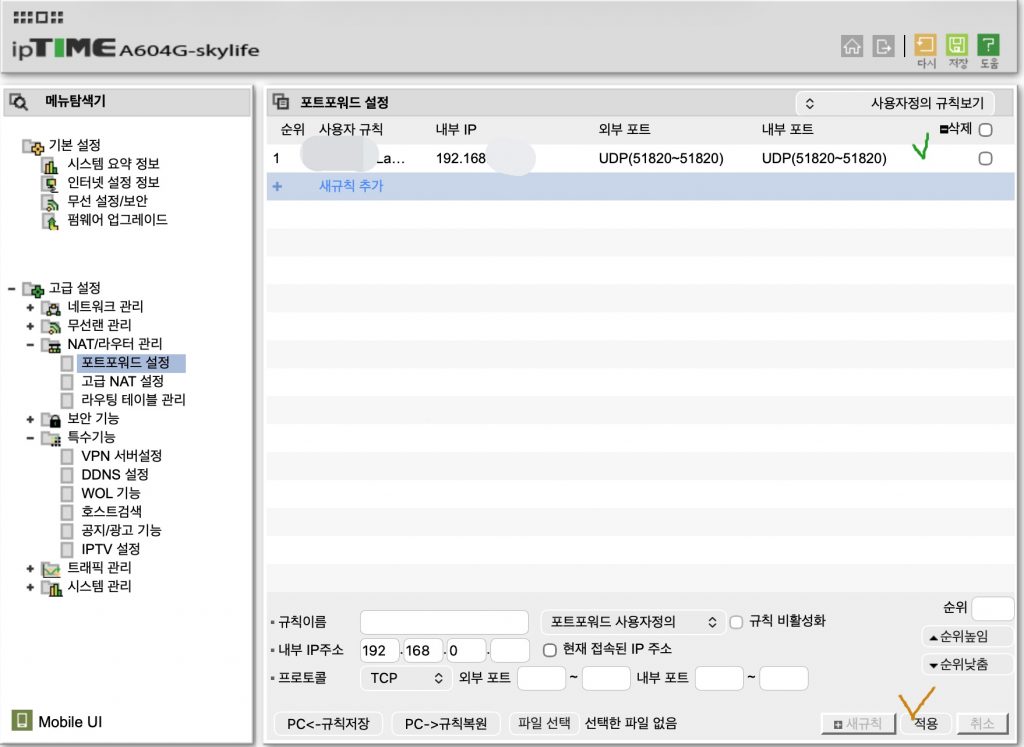
✔️ 아래는 iptime 공유기의 포트포워딩 설정입니다.
Below are the port forwarding settings for the iptime router.
✔️ 아래의 설정을 기입하고 적용을 클릭하면 상단 “포트포워드 설정” 아래 목록에 적용된 설정이 나타납니다.
After filling in the settings below and clicking Apply, the applied settings will appear in the list under “Port Forwarding Settings” at the top.
✔️ 저 같은 경우는 VPN을 사용하기 때문에 UDP51820을 포트 포워딩 했습니다.
In my case, I use a VPN, so I port forwarded UDP51820.
✔️ 여러분이 웹서버를 사용하시길 원한다면 80포트를 포워딩 하시면 됩니다.
If you want to use a web server, you can forward port 80.
👉🏻 내부 아이피 주소 고정 / Fixing the internal IP address
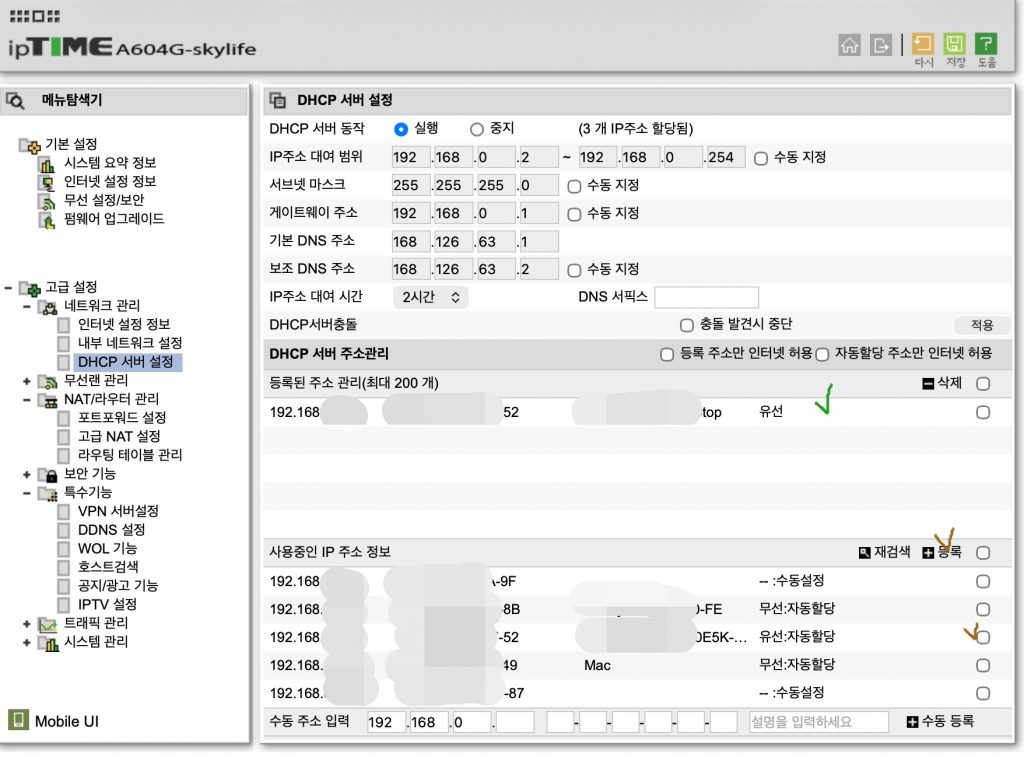
✔️ 내부 아이피주소도 dhcp방식이라서 아이피주소가 바뀔 수 있기때문에 주소를 고정 시켜야 합니다.
Since the internal IP address is also DHCP-based, the IP address can change, so the address must be fixed.
✔️ 사용중인 ip주소 정보 중에 고정하기 원하는 아이피 주소를 우측의 체크 박스 클릭하고 등록 버튼을 누르면 고정아이피주소로 등록됩니다.
Among the IP address information in use, click the checkbox on the right of the IP address you want to fix and press the register button to register it as a fixed IP address.
👉🏻 DDNS(Dynamic Domain Name System)설정/settings
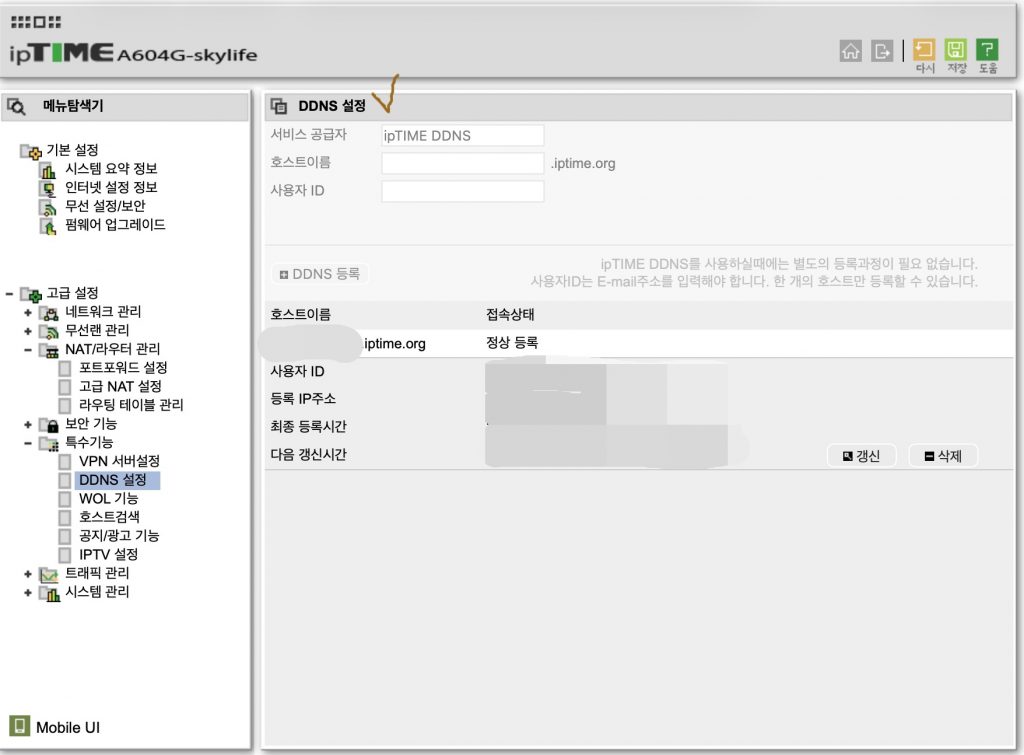
✔️ 공인아이피 주소가 유동적으로 바뀌어도 ddns를 사용하면 알아서 ddns가 도메인과 아이피 주소를 연결해 줍니다.
Even if the public IP address changes dynamically, if you use DDNS, DDNS will automatically connect the domain and IP address.
✔️ 아래는 제가 등록해서 사용중이기 때문에 상단 DDNS설정 부분이 비활성화 되어 있습니다.
Below, the DDNS settings section at the top is disabled because I registered and am using it.
✔️ 호스트이름을 등록하시면 yourhostname.iptime.org형식으로 도메인을 만들 수 있습니다.
Once you register your hostname, you can create a domain in the format yourhostname.iptime.org.
✔️ 모든 설정이 완료 되었으면 우측 상단의 저장을 클릭합니다.
Once all settings are complete, click Save in the upper right corner.
👉🏻 테스트 / test
✔️ 여러분이 웹서버가구축되어 있다면 브라우저에서 http://yourhostname.iptime.org 를 입력합니다.
If you have a web server set up, type http://yourhostname.iptime.org in your browser.
✔️ 모든 설정이 정상이면 여러분의 웹페이지가 브라우저에 표시될 것입니다.
If all settings are correct, your webpage will be displayed in your browser.


