👉🏻 클로저의 의미 / Meaning of closure
✔️ 코드 블록 그 자체를 변수처럼 전달하거나 사용할 수 있는 “이름 없는 함수”라고 이해하면됩니다.
You can think of it as an “unnamed function” where the code block itself can be passed or used like a variable.
👉🏻 클로저의 기본형식 / Basic format of closure
{ (매개변수/Parameters) -> 반환타입/conversion types in
    실행 코드/execution code
}
👉🏻 아래 코드에서 클로저의 사용 / Use of closure in the code below
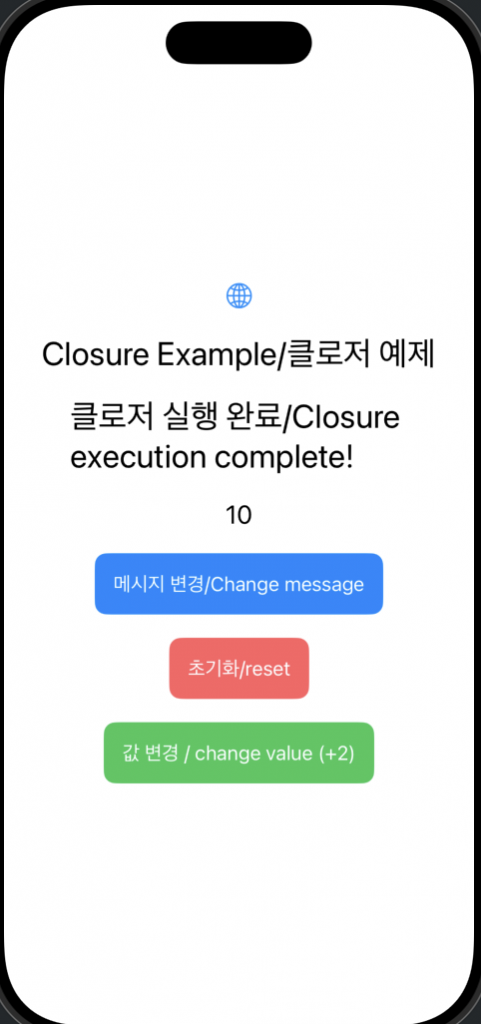
✔️ 버튼클릭시 메세지변경(일반적인 형태)
Change message when button is clicked (general form)
            Button(action: {
                self.message = "클로저 실행 완료/Closure execution complete!"
            }) {
                Text("메시지 변경/Change message")
                    .padding()
                    .background(Color.blue)
                    .foregroundStyle(.white)
                    .cornerRadius(10)
            }
✔️ 후행 클로저 / trailing closure
— Swift에서 함수의 마지막 인자가 클로저(함수 블록)일 때, 그 클로저를 소괄호 () 바깥으로 빼내어 중괄호 {}로 작성할 수 있게 해주는 문법입니다.
In Swift, when the last argument of a function is a closure (function block), this is a syntax that allows you to take the closure out of the parentheses () and write it in curly brackets {}.
— 일반적인형태 / general form
Button(title: "초기화/reset", action: {
    resetAll()
})
— 후행 클로저 적용 / Apply trailing closure
Button("초기화/reset") {
    resetAll()
}
✔️ 클로저 캡춰 / Closure Capture
— 클로저를 변수에 저장해서 호출하면 클로저 내부의 변수는 계속 기억됩니다.(클로저 캡춰)
When you call a closure by saving it in a variable, the variables inside the closure are remembered. (Closure capture)
— init() 함수 / init() function
    init() {
        // 초기화 시점에 2씩 증가하는 클로저를 생성하여 할당
        // 초기화 버튼 탭하기 전까지 작동

        // Create and assign a closure that increments by 2 at initialization time. // Works until the initialization button is pressed.
        _incrementByTwo = State(initialValue: {
            var total = 0
            return {
                total += 2
                return total
            }
        }())
    }
— 클로저 함수 호출 : incrementByTwo()를 실행하면 total함수의 값이 계속 누적됩니다.
Calling the closure function: When incrementByTwo() is executed, the value of the total function continues to accumulate.
            Button(action: {
                // 현재 할당된 클로저를 실행하여 UI 업데이트
                // Update the UI by executing the currently assigned closure
                message2 = String(incrementByTwo())
            }) {
                Text("값 변경 / change value (+2)")
                    .padding()
                    .background(Color.green)
                    .foregroundStyle(.white)
                    .cornerRadius(10)
            }
⭐️이 부분에서 @State로 선언된 incrementByTwo를 초기화 하며 아래는 우리가 사용하는 코드와 컴파일러가 어떻게 해석하는지를 보여주는 코드 입니다.
In this part, we initialize incrementByTwo declared with @State, and below is the code that we use and how the compiler interprets it.
// 우리가 쓰는 코드
@State var message: String = "Hello"

// 실제로 컴파일러가 해석하는 모습 (개념적)
var _message: State<String> = State(initialValue: "Hello")
👉🏻 전체 코드 / Full Code
✔️Contentview.swift
import SwiftUI

struct ContentView: View {
    @State private var message: String = "Hello, world!"
    @State private var message2: String = "0"

    // 이 변수는 "숫자를 증가시키는 함수" 자체를 담고 있습니다.
    // This variable contains the "function that increments the number" itself.
    @State private var incrementByTwo: () -> Int

    let apptitle = "Closure Example/클로저 예제"

    init() {
        // 초기화 시점에 2씩 증가하는 클로저를 생성하여 할당
        // 초기하 버튼 냅하기 전까지 작동

        // Create and assign a closure that increments by 2 at initialization time. // Works until the initialization button is pressed.
        _incrementByTwo = State(initialValue: {
            var total = 0
            return {
                total += 2
                return total
            }
        }())
    }

    var body: some View {
        VStack(spacing: 20) {
            Image(systemName: "globe")
                .imageScale(.large)
                .foregroundStyle(.tint)
            Text(apptitle)
                .font(.title)

            Text(message)
                .font(.title)
            Text(message2)
                .font(.title2)

            Button(action: {
                self.message = "클로저 실행 완료/Closure execution complete!"
            }) {
                Text("메시지 변경/Change message")
                    .padding()
                    .background(Color.blue)
                    .foregroundStyle(.white)
                    .cornerRadius(10)
            }

            // 초기화 버튼 수정
            // Modify reset button
            Button("초기화/reset") {
                resetAll()
            }
            .padding()
            .background(Color.red.opacity(0.8))
            .foregroundStyle(.white)
            .cornerRadius(10)

            Button(action: {
                // 현재 할당된 클로저를 실행하여 UI 업데이트
                // Update the UI by executing the currently assigned closure
                message2 = String(incrementByTwo())
            }) {
                Text("값 변경 (+2)")
                    .padding()
                    .background(Color.green)
                    .foregroundStyle(.white)
                    .cornerRadius(10)
            }
        }
        .padding()
    }

    // 모든 상태를 처음으로 되돌리는 함수
    // Function that returns all states to the beginning
    func resetAll() {
        self.message = "Hello, world!"
        self.message2 = "0"

        // incrementByTwo에 "새로운" 클로저를 할당합니다.
        // 기존 클로저 안에 있던 total 변수(메모리)를 버리고, 0부터 시작하는 새 total을 만듭니다.
        // Assign a "new" closure to incrementByTwo.
        // Discard the total variable (memory) inside the old closure, and create a new total that starts from 0.
        self.incrementByTwo = makeIncrementer(for: 2)
    }

    // 클로저를 생성해서 반환하는 팩토리 함수(초기화버튼 탭한 후 실행)
    // Factory function that creates and returns a closure (runs after tapping the initialize button)
    func makeIncrementer(for amount: Int) -> () -> Int {
        var total = 0
        return {
            total += amount
            return total
        }
    }
}
#Preview {
    ContentView()
}
👉🏻 스크린 샷 / ScreenShot