👉🏻 Swift에서는 구조체를 중요하게 다룹니다.
In Swift, structures are treated with great importance.
👉🏻 Swift를 사용해보면 struct를 클래스보다 더 많이 사용하는것을 볼 수 있습니다.
If you use Swift, you will see that structs are used more than classes.
👉🏻 struct와 class는 문법형식은 거의 비슷하지만 struct는 인스턴스를 복사하고 class는 인스턴스를 참조합니다.
struct and class have almost the same grammar, but struct copies instances and class references instances.
👉🏻 아래의 코드에서 구조체 모델의 복사본 인스턴스 name(user3.name)을 바꿔도 원본 인스턴스의 name(user.name)값이 바뀌지 않습니다.
In the code below, changing the name(user3.name) of the copy instance of the struct model does not change the name(user.name) value of the original instance.
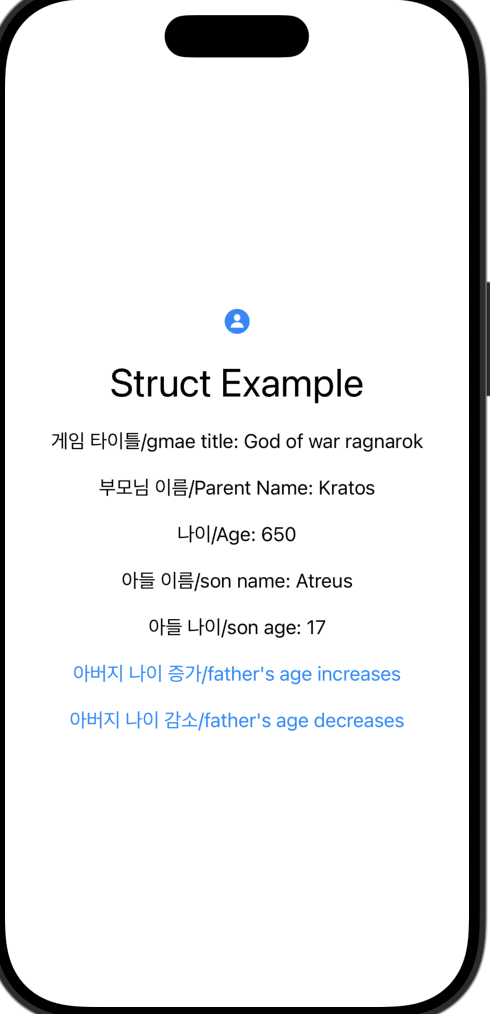
👉🏻 클래스 모델의 경우 초기 값이 “God of war”인데 복사본 인스턴스의 gametitle을 변경하면 “God of war ragnarok”로 원본 인스턴스 값이 변경되는 것을 확인 할 수 있습니다.
For the class model, the initial value is “God of war”, but if you change the gametitle of the copy instance, you can see that the value of the original instance changes to “God of war ragnarok”.
    init(user: User = User(name: "Atreus", age: 17)) {
        // 구조체 원본인스턴스 / Struct Original Instance
        user2 = user

        // 구조체 사본인스턴스 / struct copy instance
        user3 = user2
        user3.name = "Kratos"

        // 클래스 원본 인스턴스 / class original instance
        game = Game(title:"God of war")
        gameTitleChange = game

        // 클래스 복사본 인스턴스 / class copy instance
        gameTitleChange.gametitle = "God of war ragnarok"
    }
👉🏻전체 코드 / Full Code
import SwiftUI
// 구조체 모델 / struct model
struct User {
var name: String
var age: Int
}
// 클래스 모델 / class model
class Game {
var gametitle:String
init(title:String){
self.gametitle = title
}
}
struct ContentView: View {
// 구조체용 / For struct
@State private var user = User(name: "Kratos", age: 650)
var user2: User
var user3: User
let apptitle = "Struct Example"
// 클래스용 / For class
let game:Game
let gameTitleChange:Game
init(user: User = User(name: "Atreus", age: 17)) {
// 구조체 원본인스턴스 / Struct Original Instance
user2 = user
// 구조체 사본인스턴스 / struct copy instance
user3 = user2
user3.name = "Kratos"
// 클래스 원본 인스턴스 / class original instance
game = Game(title:"God of war")
gameTitleChange = game
// 클래스 복사본 인스턴스 / class copy instance
gameTitleChange.gametitle = "God of war ragnarok"
}
var body: some View {
VStack(spacing: 20) {
Image(systemName: "person.circle.fill")
.imageScale(.large)
.foregroundStyle(.tint)
// 앱 타이틀 / app title
Text("\(apptitle)")
.font(.largeTitle)
// 게임 타이틀,클래스,원본 값이 변경됨
// Game title, class, and original values have changed
Text("게임 타이틀/gmae title: \(game.gametitle)")
// 구조체 값 사용
// Using structure values
Text("부모님 이름/Parent Name: \(user.name)")
Text("나이/Age: \(user.age)")
Text("아들 이름/son name: \(user2.name)")
Text("아들 나이/son age: \(user2.age)")
// 구조체 값 변경
// Change structure value
Button("아버지 나이 증가/father's age increases") {
user.age += 1
}
Button("아버지 나이 감소/father's age decreases") {
user.age -= 1
}
}
.padding()
}
}
#Preview {
ContentView()
}
👉🏻 스크린 샷 / ScreenShot