ReactExample6
👉🏻 아래는 버튼 클릭시 프론트엔드(React)와 데이터베이스 상태가 바뀌는 기능을 구현한 코드 입니다.
Below is the code that implements the function that changes the front-end (React) and database state when a button is clicked.
👉🏻 프로젝트 생성 / Create project
✔️ Nodejs express server
% cd ReactExample6
% mkdir server
% cd server
% npm init -y
% npm install express
% npm install cors
% npm install pg
✔️ vite+react project(Frontend)
% npm create vite@latest client --template react-ts👉🏻 1. PostgreSQL 테이블 생성 / Create PostgreSQL table
✔️ 먼저 터미널에서 psql에 접속한 뒤, 버튼의 상태를 저장할 테이블을 만듭니다.
First, connect to psql in the terminal and create a table to store the button state.
✔️ postgresql 접속 / postgresql connection
% psql postgres✔️ 테이블 생성 / Create Table
CREATE TABLE button_status (
    id SERIAL PRIMARY KEY,
    is_active BOOLEAN NOT NULL DEFAULT false
);

-- 초기 데이터 삽입 / Initial data insertion
INSERT INTO button_status (is_active) VALUES (false);
👉🏻2. Express 서버 설정 (server.js) / Express server setup (server.js)
✔️ server 디렉토리 내에 server.js파일을 만들고 아래의 코드를 입력합니다.
Create a server.js file in the server directory and enter the code below.
✔️pg 라이브러리를 사용하여 데이터베이스와 통신합니다.
Communicate with the database using the pg library.
✔️ MacOS에서 postgresql 설정을 하지 않은 경우 user는 자신의 MacOS계정이며 패스워드는 공백입니다.
If you have not configured postgresql on MacOS, user is your MacOS account and password is blank.
const express = require('express');
const { Pool } = require('pg');
const cors = require('cors');

const app = express();
app.use(cors());
app.use(express.json());

const pool = new Pool({
  user: 'yourid', // 본인의 계정명 / Your account name
  host: 'localhost',
  database: 'postgres', // 본인의 DB명 / Your DB name
  password: '', // 본인의 비밀번호 / your password
  port: 5432,
});

// 현재 상태 가져오기 / Get current status
app.get('/status', async (req, res) => {
  try {
    const result = await pool.query('SELECT is_active FROM button_status WHERE id = 1');
    res.json(result.rows[0]);
  } catch (err) {
    res.status(500).send(err.message);
  }
});

// 상태 업데이트하기 / Update your status
app.post('/toggle', async (req, res) => {
  const { isActive } = req.body;
  try {
    const result = await pool.query(
      'UPDATE button_status SET is_active = $1 WHERE id = 1 RETURNING *',
      [isActive]
    );
    res.json(result.rows[0]);
  } catch (err) {
    res.status(500).send(err.message);
  }
});

app.listen(3000, () => console.log('Server running on http://localhost:3000'));
✔️ 서버가 실행되는지 확인 하기 / Check if the server is running
⭐️ 서버가 바로 실행 종료되면 포트번호를 바꾸세요 저는 5000번쓰면 서버가 실행종료되네요.
If the server stops running immediately, change the port number. When I use 5000, the server stops running.
% node server.js
Server running on http://localhost:3000
👉🏻 3. Vite + React 프론트엔드 (App.jsx) / Vite + React frontend (App.jsx)
✔️ axios모듈을 설치합니다.( client/ )
Install the axios module ( client/ )
% npm install axios✔️ axios를 사용해 서버와 통신하며 버튼의 UI를 변경합니다.
Communicate with the server using axios and change the UI of the button.
import { useState, useEffect } from 'react';
import axios from 'axios';

function App() {
  const [isActive, setIsActive] = useState(false);

  // 처음 로드될 때 서버에서 상태 가져오기
  // Get state from server when first loaded
  useEffect(() => {
    axios.get('http://localhost:3000/status')
      .then(res => setIsActive(res.data.is_active))
      .catch(err => console.error(err));
  }, []);

  // 버튼 클릭 시 토글 요청 / Request toggle when button is clicked
  // Request toggle when button is clicked
  const handleToggle = async () => {
    try {
      const nextState = !isActive;
      const res = await axios.post('http://localhost:3000/toggle', { isActive: nextState });
      setIsActive(res.data.is_active);
    } catch (err) {
      alert("서버 연결에 실패했습니다./Failed to connect to server.");
    }
  };

  return (
    <div
      style={{
        display: "flex",
        flexDirection: "column",
        justifyContent: "center", // 세로 중앙 정렬 / Vertical center alignment
        alignItems: "center", // 가로 중앙 정렬 / horizontal center alignment
        height: "100vh", // 화면 전체 높이 사용 / Use full screen height
        width: "100vw", // 화면 전체 너비 사용 / Use full screen width
        margin: 0, // 기본 여백 제거 / Remove default margins
      }}
    >
      <div style={{ textAlign: "center", marginTop: "50px" }}>
        <h2>
          현재 상태/Current Status:{" "}
          {isActive ? "🔵 활성/Active" : "🔴 비활성/inActive"}
        </h2>
        <button
          onClick={handleToggle}
          style={{
            padding: "10px 20px",
            fontSize: "16px",
            backgroundColor: isActive ? "#4CAF50" : "#f44336",
            color: "white",
            border: "none",
            borderRadius: "5px",
            cursor: "pointer",
          }}
        >
          {isActive ? "비활성화하기/InActivate" : "활성화하기/Activate"}
        </button>
      </div>
    </div>
  );
}

export default App;
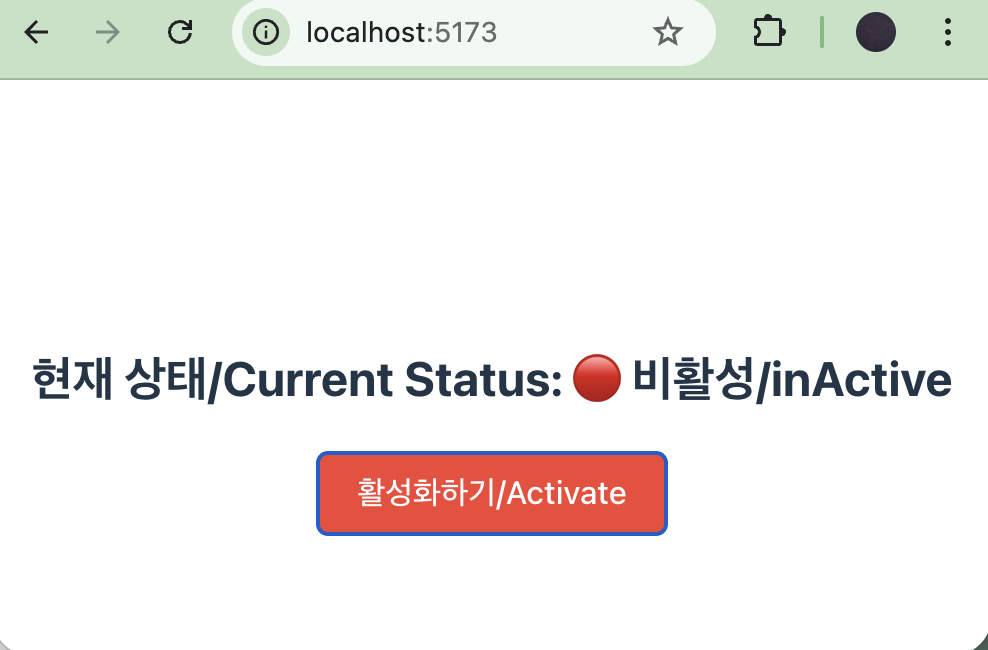
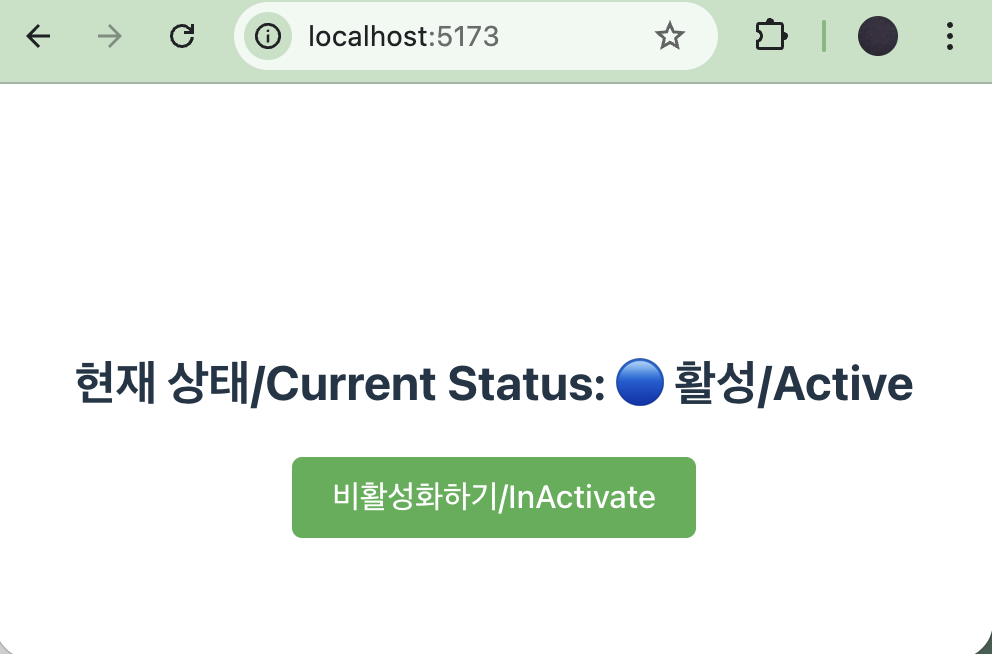
👉🏻 스크린 샷 / ScreenShot
✔️ InActive
✔️ Active
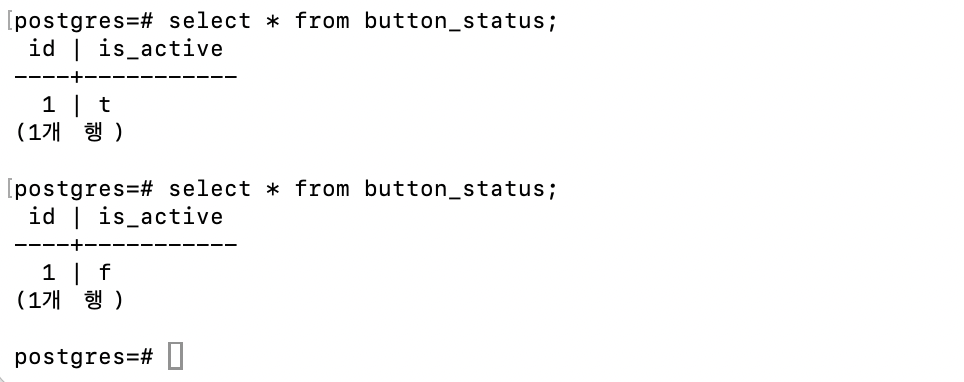
✔️ postgresql