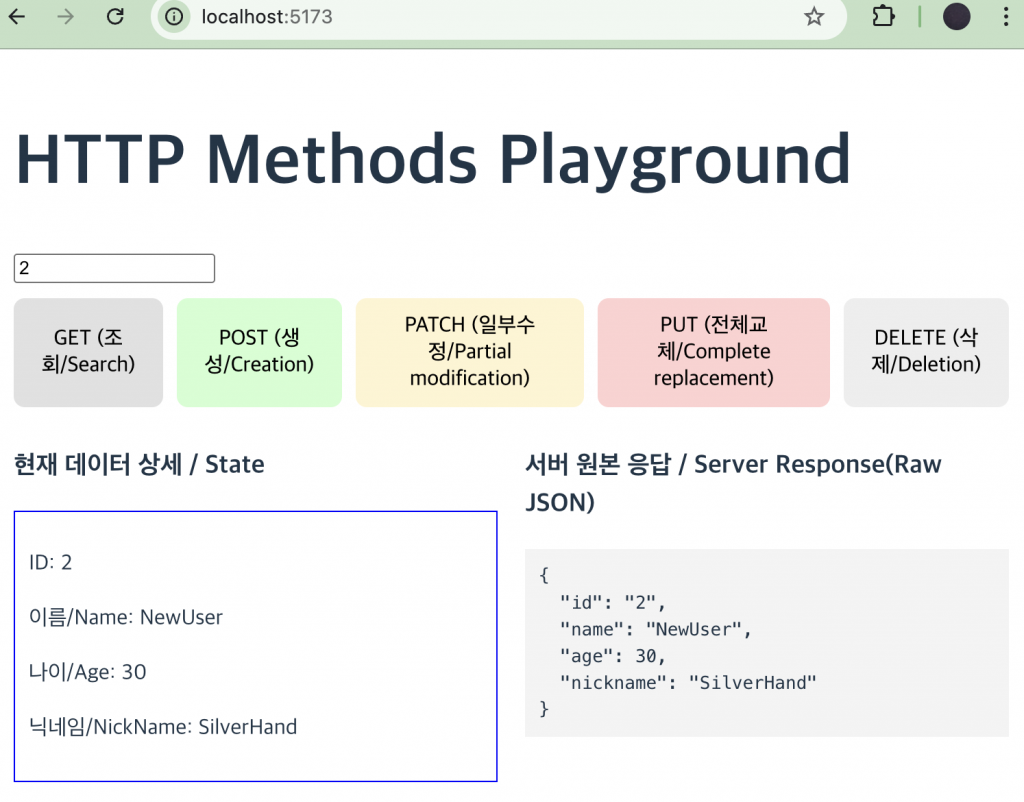
ReactExample7
👉🏻 아래는 Express서버에서 GET,POST,PATCH,PUT에 대한 설명입니다.
Below is an explanation of GET, POST, PATCH, and PUT on the Express server.
| 메서드/Method | 용도/Use | 특징/Characteristic |
| GET | 조회/Check | 리소스 가져오기 주소창에 데이터를 보냄 – /users/1?name=kim |
| POST | 생성/Creation | 새 리소스 추가 데이터를 바디에 숨겨서 보냄 – { “name”: “John”, “age”: 30 } |
| PATCH | 부분수정/Partial modification | 일부 속성만 변경 데이터를 바디에 숨겨서 보냄 |
| PUT | 전체수정/Edit all | 기존 리소스를 새 데이터로 완전히 교체 데이터를 바디에 숨겨서 보냄 |
👉🏻예를 들어, PATCH 요청에서는 { "nickname": "johnny" } 같은 일부 필드만 보내도 되지만, PUT 요청에서는 해당 유저의 전체 데이터를 { "name": "V", "age": 30, "nickname": "johnny" }처럼 모두 보내야 합니다.
👉🏻 프로젝트 생성 / Create project
✔️ Express Sever
% cd Example7/server/
% npm init -y
$ npm install express
✔️ React
% npm create vite@latest client --template react-ts👉🏻Nodejs Express Server
✔️ Sever.js
const express = require("express");
const app = express();
const PORT = 3000;

app.use(express.json());

// 가상의 데이터베이스 / Virtual Database
let users = [{ id: "1", name: "V", age: 20, nickname: "Cyberpunk2077" }];

// GET: 특정 유저 조회 / Specific user inquiry
app.get("/users/:id", (req, res) => {
  const user = users.find((u) => u.id === req.params.id);
  user
    ? res.json(user)
    : res.status(404).json({ message: "유저 없음/No user" });
});

// POST: 새로운 유저 생성 / Create new user
app.post("/users", (req, res) => {
  const newUser = { id: String(users.length + 1), ...req.body };
  users.push(newUser);
  res.status(201).json(newUser);
});

// PATCH: 데이터의 '일부'만 수정 (기존 데이터 유지)
// Modify only 'part' of the data (keep existing data)
app.patch("/users/:id", (req, res) => {
  const index = users.findIndex((u) => u.id === req.params.id);
  if (index !== -1) {
    // 기존 값 + 바뀐 값 합치기 / Merge existing value + changed value
    users[index] = { ...users[index], ...req.body };
    res.json(users[index]);
  } else {
    res.status(404).json({ message: "유저 없음/No user" });
  }
});

// PUT: 데이터 '전체'를 교체 (보내지 않은 필드는 사라짐)
// Replace 'all' data (unsent fields disappear)
app.put("/users/:id", (req, res) => {
  const index = users.findIndex((u) => u.id === req.params.id);
  if (index !== -1) {
    // 기존 내용 무시하고 덮어쓰기 / Ignore existing content and overwrite
    users[index] = { id: req.params.id, ...req.body };
    res.json(users[index]);
  } else {
    res.status(404).json({ message: "유저 없음/No user" });
  }
});

// DELETE: 데이터 삭제 / data deletion
app.delete("/users/:id", (req, res) => {
  users = users.filter((u) => u.id !== req.params.id);
  res.json({ message: `User ${req.params.id} 삭제 완료 / Deletion complete` });
});

app.listen(PORT, () => console.log(`Server: http://localhost:${PORT}`));
👉🏻React Code
✔️ 디렉토리이동 / move directory
% cd Example7/client/src✔️ vite.config.ts
import { defineConfig } from "vite";
import react from "@vitejs/plugin-react";

// https://vite.dev/config/
export default defineConfig({
  plugins: [react()],
  server: {
    proxy: {
      // '/users'로 시작하는 요청을 백엔드 서버로 보냅니다.
      // Send requests starting with '/users' to the backend server.
      "/users": {
        target: "http://localhost:3000",
        changeOrigin: true,
      },
    },
  },
});
✔️App.tsx
import React, { useState } from "react";

function UserComponent() {
  const [userId, setUserId] = useState("1"); // 기본값 1번 유저 / Default user number 1
  const [userData, setUserData] = useState(null);
  const [log, setLog] = useState("");

  const updateUI = async (res) => {
    const data = await res.json();
    setUserData(res.ok ? data : null);
    setLog(JSON.stringify(data, null, 2));
  };

  const getUser = () => fetch(`/users/${userId}`).then(updateUI);

  const createUser = () =>
    fetch("/users", {
      method: "POST",
      headers: { "Content-Type": "application/json" },
      body: JSON.stringify({
        name: "NewUser",
        age: 30,
        nickname: "SilverHand",
      }),
    }).then(updateUI);

  const patchUser = () =>
    fetch(`/users/${userId}`, {
      method: "PATCH",
      headers: { "Content-Type": "application/json" },
      // 닉네임만 변경 시도 / Try changing only your nickname
      body: JSON.stringify({ nickname: "Johnny" }),
    }).then(updateUI);

  const putUser = () =>
    fetch(`/users/${userId}`, {
      method: "PUT",
      headers: { "Content-Type": "application/json" },
      // 전체 교체 (nickname 누락 시 사라짐 확인용)
      // Replace all (to check if nickname disappears when missing)
      body: JSON.stringify({ name: "John", age: 25 }),
    }).then(updateUI);

  const deleteUser = () =>
    fetch(`/users/${userId}`, { method: "DELETE" }).then(async (res) => {
      const data = await res.json();
      setUserData(null);
      setLog(data.message);
    });

  return (
    <div style={{ padding: "20px", fontFamily: "sans-serif" }}>
      <h1>HTTP Methods Playground</h1>
      <input
        value={userId}
        onChange={(e) => setUserId(e.target.value)}
        placeholder="User ID"
      />

      <div style={{ margin: "10px 0", display: "flex", gap: "10px" }}>
        <button onClick={getUser} style={{ background: "#e1e1e1" }}>
          GET (조회/Search)
        </button>
        <button onClick={createUser} style={{ background: "#d1ffd1" }}>
          POST (생성/Creation)
        </button>
        <button onClick={patchUser} style={{ background: "#fff4d1" }}>
          PATCH (일부수정/Partial modification)
        </button>
        <button onClick={putUser} style={{ background: "#ffd1d1" }}>
          PUT (전체교체/Complete replacement)
        </button>
        <button onClick={deleteUser} style={{ background: "#eee" }}>
          DELETE (삭제/Deletion)
        </button>
      </div>

      <div
        style={{ display: "grid", gridTemplateColumns: "1fr 1fr", gap: "20px" }}
      >
        <section>
          <h3>현재 데이터 상세 / State </h3>
          {userData ? (
            <div style={{ border: "1px solid blue", padding: "10px" }}>
              <p>ID: {userData.id}</p>
              <p>이름/Name: {userData.name || "없음/none"}</p>
              <p>나이/Age: {userData.age || "없음/none"}</p>
              <p>닉네임/NickName: {userData.nickname || "없음/none"}</p>
            </div>
          ) : (
            <p>조회된 데이터가 없습니다./No data was retrieved.</p>
          )}
        </section>
        <section>
          <h3>서버 원본 응답 / Server Response(Raw JSON) </h3>
          <pre style={{ background: "#f4f4f4", padding: "10px" }}>{log}</pre>
        </section>
      </div>
    </div>
  );
}

export default UserComponent;
👉🏻 스크린샷/ScreenShot