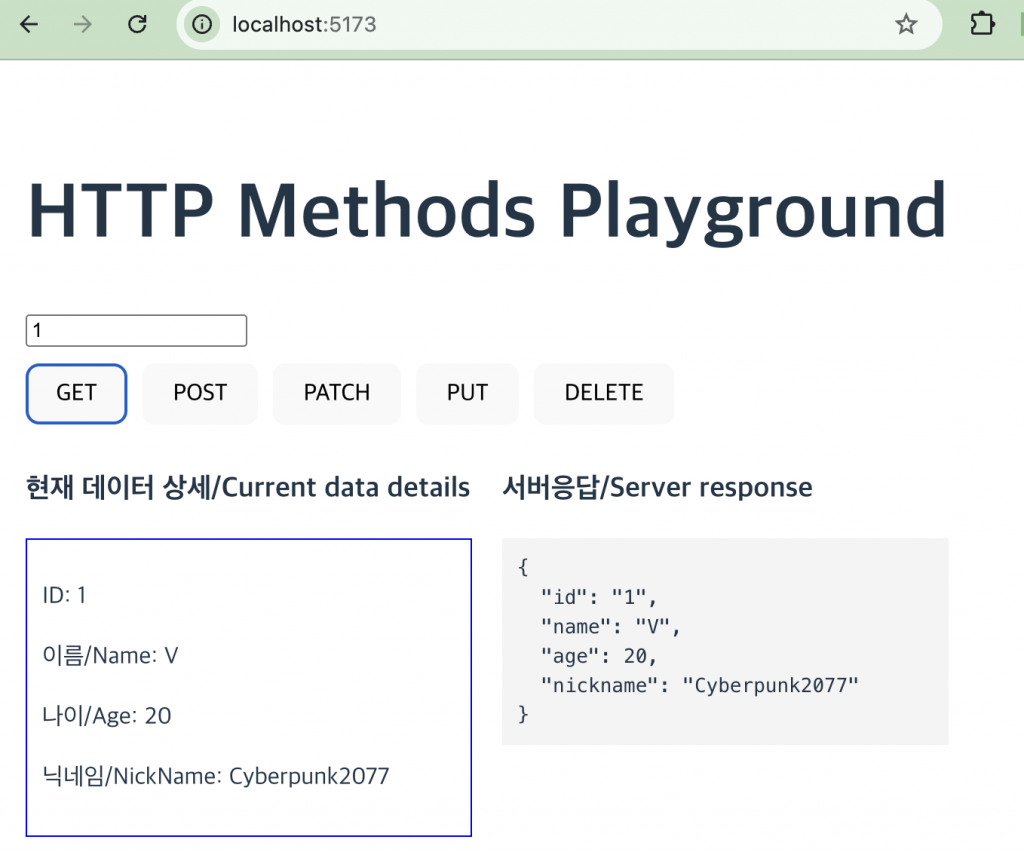
👉🏻 GET,POST,PATCH,PUT을 axios모듈을 사용하여 구현한 코드입니다.
This is the code that implements GET, POST, PATCH, and PUT using the axios module.
👉🏻 프로젝트 생성과 모듈 설치는 이전 포스트를 참조하세요
Please refer to the previous post for project creation and module installation.
👉🏻 브라우저에서 차단되는 오류를 방지하지 위해서 cors모듈도 설치합니다.
Also install the cors module to avoid browser blocking errors.
👉🏻 CORS
✔️ 모듈설치 / Module installation
% npm install cors✔️CORS란 Cross-Origin Resource Sharing의 줄임말입니다.
CORS stands for Cross-Origin Resource Sharing.
✔️ 브라우저는 보안상 이유로 다른 출처(도메인, 포트, 프로토콜)가 다른 서버에 요청하는 것을 기본적으로 차단합니다.
For security reasons, browsers block requests from other origins (domains, ports, protocols) to other servers by default.
✔️ 예를 들어 프론트엔드: http://localhost:3000 ,백엔드: http://localhost:5000 이 경우 포트가 다르기 때문에 다른 출처로 인식되어 요청이 차단됩니다.
For example, frontend: http://localhost:3000, backend: http://localhost:5000 In this case, since the ports are different, the requests are recognized as different origins and blocked.
✔️ 그래서 브라우저의 주소와 백엔드 서버의 주소가 다르면 백엔드 서버에서 허용을 해줘야합니다.
So, if the browser address and the backend server address are different, you need to allow it on the backend server.
✔️ 차단은 브라우저에서 하지만 백엔드 서버에 cors모듈을 설치한경우 브라우저에서 요청시 서버에서 헤더정보를 브라우저로 리턴하면 브라우저가 허용합니다.
Blocking is done in the browser, but if the CORS module is installed on the backend server, the browser allows it when the server returns header information to the browser when making a request.
✔️ 아래의 App.tsx에서는 다음처럼 cors모듈을 사용하고 있습니다.
In the App.tsx below, we are using the cors module as follows:
const cors = require("cors");
app.use(cors());
👉🏻 axios
✔️ 모듈설치 / Module installation
npm install axios✔️ axios는 HTTP 요청을 쉽게 보내는 라이브러리입니다.
Axios is a library that makes it easy to send HTTP requests.
✔️ promise기반이며 .then() / .catch() 또는 async/await 사용 가능합니다.
It is promise-based and can use .then() / .catch() or async/await.
✔️ JSON을 자동 변환합니다.
Automatically converts JSON.
✔️ 요청응답가로채기를 할 수 있습니다.
You can intercept request responses.
— 여기서는 사용하지 않으며 refreshToken,accessToken을 사용하여 인증 할 경우 사용합니다.
It is not used here, but is used when authenticating using refreshToken and accessToken.
— 아래의 형식으로 사용합니다.
Use the format below.
axios.interceptors.request.use(config => {
  config.headers.Authorization = "Bearer token";
  return config;
});
✔ timeout 설정이 가능합니다.
Timeout setting is possible.
— 여기서는 사용하지 않습니다.
Not used here.
axios.get("/api", { timeout: 5000 });✔️ 아래의 App.tsx(프론트엔드) 코드에 axios모듈을 사용해서 vite.config.ts대신에 다음 설정을 사용합니다.
In the server.js (frontend) code below, use the axios module and use the following configuration instead of vite.config.ts.
✔️ 아래의 App.tsx에서 동적 라우터 사용을 위해서 설정합니다.(vite.config.ts와 동일한 역할)
Configure the App.tsx below to use a dynamic router. (Same role as vite.config.ts)
  const api = axios.create({
    baseURL: "http://localhost:3000",
  });
👉🏻 프론트엔드 / Front-end
✔️ App.tsx
import React, { useState } from "react";
import axios from "axios";

function UserComponent() {
  const [userId, setUserId] = useState("1");
  const [userData, setUserData] = useState(null);
  const [log, setLog] = useState("");

  // vite.config.ts 대신 설정 할 수 있음.
  // 대신에 cors에러가 발생할 수 있으니 반드시 서버쪽에 cors모듈 설치 할 것
  // You can set it instead of vite.config.ts.
  // Instead, you must install the cors module on the server side to avoid a cors error.
  const api = axios.create({
    baseURL: "http://localhost:3000",
  });

  const handleResponse = (res) => {
    setUserData(res.data || null);
    setLog(JSON.stringify(res.data, null, 2));
  };

  const handleError = (err) => {
    const data = err.response?.data || { message: "Error occurred" };
    setUserData(null);
    setLog(JSON.stringify(data, null, 2));
  };

  const getUser = () =>
    api.get(`/users/${userId}`).then(handleResponse).catch(handleError);

  const createUser = () =>
    api
      .post("/users", {
        name: "NewUser",
        age: 30,
        nickname: "SilverHand",
      })
      .then(handleResponse)
      .catch(handleError);

  const patchUser = () =>
    api
      .patch(`/users/${userId}`, {
        nickname: "Johnny",
      })
      .then(handleResponse)
      .catch(handleError);

  const putUser = () =>
    api
      .put(`/users/${userId}`, {
        name: "John",
        age: 25,
      })
      .then(handleResponse)
      .catch(handleError);

  const deleteUser = () =>
    api
      .delete(`/users/${userId}`)
      .then((res) => {
        setUserData(null);
        setLog(res.data.message);
      })
      .catch(handleError);

  return (
    <div style={{ padding: "20px", fontFamily: "sans-serif" }}>
      <h1>HTTP Methods Playground</h1>

      <input
        value={userId}
        onChange={(e) => setUserId(e.target.value)}
        placeholder="User ID"
      />

      <div style={{ margin: "10px 0", display: "flex", gap: "10px" }}>
        <button onClick={getUser}>GET</button>
        <button onClick={createUser}>POST</button>
        <button onClick={patchUser}>PATCH</button>
        <button onClick={putUser}>PUT</button>
        <button onClick={deleteUser}>DELETE</button>
      </div>

      <div
        style={{ display: "grid", gridTemplateColumns: "1fr 1fr", gap: "20px" }}
      >
        <section>
          <h3>현재 데이터 상세/Current data details</h3>
          {userData ? (
            <div style={{ border: "1px solid blue", padding: "10px" }}>
              <p>ID: {userData.id}</p>
              <p>이름/Name: {userData.name || "없음"}</p>
              <p>나이/Age: {userData.age || "없음"}</p>
              <p>닉네임/NickName: {userData.nickname || "없음"}</p>
            </div>
          ) : (
            <p>조회된 데이터가 없습니다./Detailed search of current data.</p>
          )}
        </section>

        <section>
          <h3>서버응답/Server response</h3>
          <pre style={{ background: "#f4f4f4", padding: "10px" }}>{log}</pre>
        </section>
      </div>
    </div>
  );
}

export default UserComponent;
👉🏻 백엔드 / Back-end
const express = require("express");
const app = express();
const cors = require("cors");
const PORT = 3000;

// 서버와 요청하는 곳의 포트가 다르면 cors에러 발생함.
// 포트가 다르면 브라우저는 다른 출처(origin) 로 판단함.
// 브라우저 보안정책상 프로토콜,도메인,포트번호중 하나라도 틀리면 막음.
// If the port of the server and the requesting party are different, a CORS error occurs.
// If the ports are different, the browser considers them to be from different origins.
// According to browser security policy, if any of the protocol, domain, or port number is different, the request is blocked.
app.use(cors());
app.use(express.json());

// 가상의 데이터베이스 / Virtual Database
let users = [{ id: "1", name: "V", age: 20, nickname: "Cyberpunk2077" }];

// GET: 특정 유저 조회 / Specific user inquiry
app.get("/users/:id", (req, res) => {
  const user = users.find((u) => u.id === req.params.id);
  user
    ? res.json(user)
    : res.status(404).json({ message: "유저 없음/No user" });
});

// POST: 새로운 유저 생성 / Create new user
app.post("/users", (req, res) => {
  const newUser = { id: String(users.length + 1), ...req.body };
  users.push(newUser);
  res.status(201).json(newUser);
});

// PATCH: 데이터의 '일부'만 수정 (기존 데이터 유지)
// Modify only 'part' of the data (keep existing data)
app.patch("/users/:id", (req, res) => {
  const index = users.findIndex((u) => u.id === req.params.id);
  if (index !== -1) {
    // 기존 값 + 바뀐 값 합치기 / Merge existing value + changed value
    users[index] = { ...users[index], ...req.body };
    res.json(users[index]);
  } else {
    res.status(404).json({ message: "유저 없음/No user" });
  }
});

// PUT: 데이터 '전체'를 교체 (보내지 않은 필드는 사라짐)
// Replace 'all' data (unsent fields disappear)
app.put("/users/:id", (req, res) => {
  const index = users.findIndex((u) => u.id === req.params.id);
  if (index !== -1) {
    // 기존 내용 무시하고 덮어쓰기 / Ignore existing content and overwrite
    users[index] = { id: req.params.id, ...req.body };
    res.json(users[index]);
  } else {
    res.status(404).json({ message: "유저 없음/No user" });
  }
});

// DELETE: 데이터 삭제 / data deletion
app.delete("/users/:id", (req, res) => {
  users = users.filter((u) => u.id !== req.params.id);
  res.json({ message: `User ${req.params.id} 삭제 완료 / Deletion complete` });
});

app.listen(PORT, () => console.log(`Server: http://localhost:${PORT}`));
👉🏻 스크린 샷 / ScreenShot