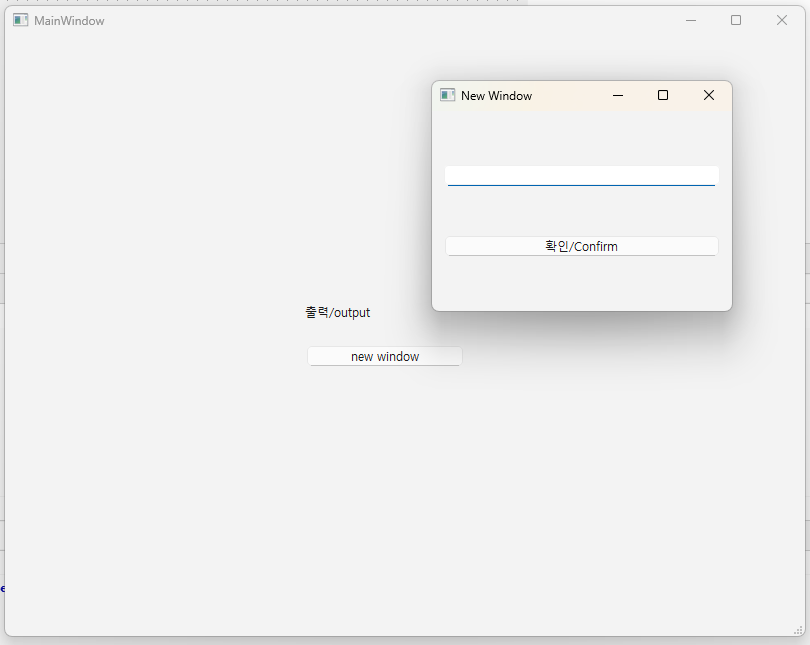
👉 버튼 클릭 할 경우 새 창을 띄울 수 있습니다.
Clicking the button will open a new window.
👉새 창에서 텍스트 입력 후 버튼 클릭할 경우 이전 윈도우에 표시됩니다.
When you enter text in a new window and click the button, it will be displayed in the previous window.
👉 새 윈도우에서 이전 윈도우로 값의 전달은 시그널 슬롯을 사용합니다.
Passing values from a new window to a previous window uses signal slots.
👉시그널과 슬롯을 연결하면, 시그널이 발생할 때 슬롯이 자동으로 실행된다는 겁니다.
When you connect a signal and a slot, the slot is automatically executed when the signal occurs.
👉창이 같든 다르든, 객체가 같든 다르든 시그널과 슬롯이 연결되어 있고, 시그널이 발생하면 슬롯은 무조건 실행됩니다.
Whether the windows are the same or different, whether the objects are the same or different, if a signal and a slot are connected, the slot is executed unconditionally when the signal occurs.
1.Header FIles
1)mainwindow.h
#ifndef MAINWINDOW_H
#define MAINWINDOW_H

#include <QMainWindow>

QT_BEGIN_NAMESPACE
namespace Ui {
class MainWindow;
}
QT_END_NAMESPACE

class MainWindow : public QMainWindow
{
    Q_OBJECT

public:
    MainWindow(QWidget *parent = nullptr);
    ~MainWindow();

    // slot추가 / Add slot
private slots:
    void openNewWindow();
    void updateLabel(const QString& text);  //  슬롯 추가


private:
    Ui::MainWindow *ui;


};
#endif // MAINWINDOW_H
2)newwindow.h
#ifndef NEWWINDOW_H
#define NEWWINDOW_H


#include <QWidget>

class QLineEdit;
class QPushButton;

class NewWindow : public QWidget {
    Q_OBJECT

    public:
        explicit NewWindow(QWidget *parent = nullptr);

    private:
        QLineEdit* inputField;
        QPushButton* confirmButton;

    signals:
        void textSubmitted(const QString& text);  // 메인창으로 보낼 시그널

};


#endif // NEWWINDOW_H
2.Source FIles
1)main.cpp
#include "mainwindow.h"

#include <QApplication>

int main(int argc, char *argv[])
{
    QApplication a(argc, argv);
    MainWindow w;
    w.show();
    return a.exec();
}
2)mainwindow.cpp
#include "mainwindow.h"
#include "./ui_mainwindow.h"
#include "newwindow.h"  // 새 창 헤더 포함
#include <QDebug> // cout <<과 같은 역할


MainWindow::MainWindow(QWidget *parent)
    : QMainWindow(parent)
    , ui(new Ui::MainWindow)
{
    ui->setupUi(this);

    // 버튼 클릭 시 새 창 띄우기
    // Open a new window when the button is clicked
    connect(ui->pushButton, &QPushButton::clicked, this, &MainWindow::openNewWindow);

}

void MainWindow::openNewWindow()
{
    qDebug() << "openNewWindow 슬롯 실행됨/openNewWindow slot executed!";
    NewWindow* window = new NewWindow(this);
    window->setWindowFlags(Qt::Window); // 독립된 창으로 설정 / Set as independent window

    // 부모 없이 독립 창(디버깅) / Independent window without parent (debugging)
    // NewWindow* window = new NewWindow(nullptr); //

    // 닫을 때 메모리 자동 해제 / Automatically free memory when closing
    window->setAttribute(Qt::WA_DeleteOnClose);

    // 시그널과 슬롯 연결 / Signal and slot connection
    connect(window, &NewWindow::textSubmitted, this, &MainWindow::updateLabel);


    window->show();
}

void MainWindow::updateLabel(const QString& text)
{
    // QLabel에 텍스트 설정 / Set text to QLabel
    ui->label->setText(text);
}


MainWindow::~MainWindow()
{
    delete ui;
}
3)newwindow.cpp
#include "newwindow.h"
#include <QVBoxLayout>
#include <QLineEdit>
#include <QPushButton>
#include <QDebug>


NewWindow::NewWindow(QWidget *parent)
    : QWidget(parent)
{
    setWindowTitle("New Window");
    resize(300, 200);

    inputField = new QLineEdit(this);
    confirmButton = new QPushButton("확인/Confirm", this);

    QVBoxLayout* layout = new QVBoxLayout(this);
    layout->addWidget(inputField);
    layout->addWidget(confirmButton);

    connect(confirmButton, &QPushButton::clicked, this, [this]() {
        QString text = inputField->text();

        // 콘솔 출력 / console output
        qDebug() << "입력된 텍스트/Entered text:" << text;

        // 시그널 발생 /signal generation
        emit textSubmitted(inputField->text());
        //close(); // 입력 후 창 닫기 (선택사항) / Close window after input (optional)

    });
}
3.실행 / run