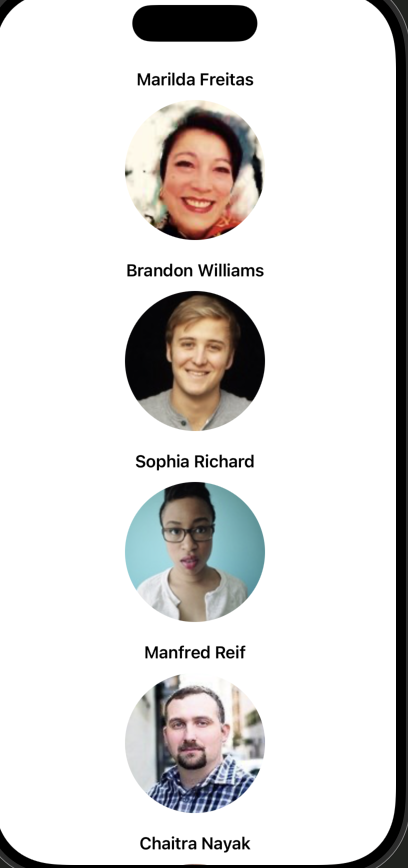
👉🏻 아래는 RandomUser API를 활용한 무한 스크롤을 구현한 내용입니다.
Below is an implementation of infinite scrolling using the RandomUser API.
👉🏻@MainActor 를 사용하는이유
Why use @MainActor
SwiftUI UI 업데이트는 반드시 메인 스레드에서 이뤄져야 합니다.
SwiftUI UI updates must always be done on the main thread.
@Published로 선언된 값들이 변경되면 UI를 업데이트합니다.
Updates the UI when values declared with @Published change.
뷰의 업데이트가 백그라운드 스레드에서 변경되면 런타임 경고 + UI 버그 발생 가능합니다.
If the view’s update is made on a background thread, runtime warnings + UI bugs may occur.
@MainActor를 클래스에 붙이면 이 클래스 안의 모든 프로퍼티 접근과 변경이 자동으로 메인 스레드에서 실행됩니다.
When you annotate a class with @MainActor, all property accesses and changes within that class will automatically be executed on the main thread.
👉🏻 다른 내용들은 이전 포스트내용과 코드 주석을 참조 하시면 될 것 같습니다.
For other details, please refer to the previous post and code comments.
👉🏻 코드 / Code
✔️ContentView
import SwiftUI

struct ContentView: View {

    @StateObject private var viewModel = RandomUserViewModel()

    var body: some View {
        ScrollView {
            LazyVStack(spacing: 20) {

                ForEach(viewModel.users.indices, id: \.self) { index in
                    let user = viewModel.users[index]

                    VStack {
                        // 유저네임
                        Text("\(user.name.first) \(user.name.last)")
                            .font(.headline)

                        // 이미지
                        AsyncImage(url: URL(string: user.picture.large)) { image in
                            image.resizable()
                                .scaledToFit()
                                .frame(width: 140, height: 140)
                                .clipShape(Circle())
                        } placeholder: {
                            ProgressView()
                        }
                    }
                    .onAppear { // 무한 스크롤 감지
                        // 마지막 셀에서 무한스크롤 호출
                        if index == viewModel.users.count - 1 {
                            viewModel.fetchMoreUsers()
                        }
                    }
                }// ForEach

                // @Published
                if viewModel.isLoadingMore {
                    ProgressView("불러오는 중… / Loading...")
                        .padding()
                }

            }
            .padding()
        }
        .refreshable {
            // 새로고침 / refresh
            await viewModel.refreshUsers()
        }
        .onAppear {
            // 최초 데이터 로드 / First data load
            if viewModel.users.isEmpty {
                viewModel.fetchMoreUsers()
            }
        }
    }

}

#Preview {
    ContentView()
}
✔️RandomUserInfiniteApp
import SwiftUI

@main
struct RandomUserInfiniteApp: App {
    var body: some Scene {
        WindowGroup {
            ContentView()
        }
    }
}
✔️RandomUserModel
import Foundation

// Codable을 쓰면 JSON ↔ Struct 변환이 자동
// If you use Codable, JSON ↔ Struct conversion is automatic.

struct RandomUserResponse: Codable {
    let results: [RandomUser]
}

struct RandomUser: Codable {
    let name: Name
    let picture: Picture

    struct Name: Codable {
        let first: String
        let last: String
    }

    struct Picture: Codable {
        let large: String
    }
}
✔️RandomUserViewModel
import Foundation
import Combine

@MainActor
class RandomUserViewModel: ObservableObject {
    @Published var users: [RandomUser] = []
    @Published var errorMessage: String?

    @Published var isLoadingMore = false       // 무한스크롤 로딩 / infinite scroll loading
    @Published var isRefreshing = false        // 새로고침 로딩 / refresh loading

    private var debounceTask: Task<Void, Never>?   // 무한스크롤 디바운스용 / For infinite scroll debounce

    // MARK: - 무한스크롤 / infinite scroll
    func fetchMoreUsers() {

        // 이미 새로고침 중이면 무한스크롤 금지
        // Disable infinite scrolling if already refreshing

        guard !isRefreshing else { return }

        // 디바운싱: 기존 작업 취소
        // Debounce: Cancel existing work

        debounceTask?.cancel()

        debounceTask = Task {
            try? await Task.sleep(nanoseconds: 400_000_000) // 0.4초 디바운스 / 0.4 second debounce

            // 이미 로딩 중이라면(fetch 중이면) 함수 실행하지 말고 바로 종료해라.
            // If it is already loading (fetching),
            //do not execute the function and exit immediately.

            guard !isLoadingMore else { return }
            isLoadingMore = true

            do {
                 // 절대 nil이 아닌경우
                 // if it is never nil

                let url = URL(string: "https://randomuser.me/api/?results=10")!
                let (data, _) = try await URLSession.shared.data(from: url)
                let decoded = try JSONDecoder().decode(RandomUserResponse.self, from: data)

                self.users.append(contentsOf: decoded.results)
                self.isLoadingMore = false

            } catch {
                self.errorMessage = error.localizedDescription
                self.isLoadingMore = false
            }
        }
    }


    // MARK: - 새로고침 / refresh
    func refreshUsers() async {

        guard !isLoadingMore else { return }

        do {
            let url = URL(string: "https://randomuser.me/api/?results=20")!
            let (data, _) = try await URLSession.shared.data(from: url)
            let decoded = try JSONDecoder().decode(RandomUserResponse.self, from: data)

            self.users.removeAll()
            self.users = decoded.results
            self.isRefreshing = false

        } catch {
            self.errorMessage = error.localizedDescription
            self.isRefreshing = false
        }
    }
👉🏻 스크린 샷 / ScreenShot