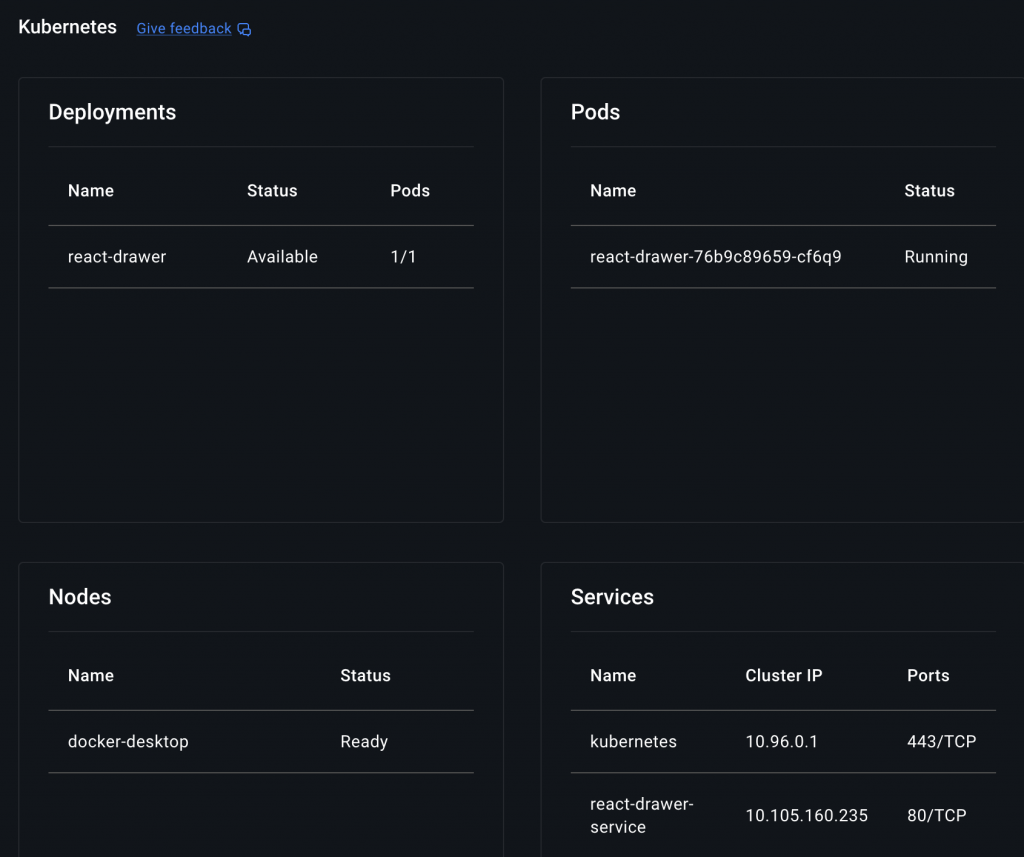
👉🏻 쿠버네티스에서 react Dreawer Menu를 적용한 예제입니다.
This is an example of applying React Dreawer Menu in Kubernetes.
👉🏻 vite+react Install / 설치
npm create vite@latest react-drawer
cd react-drawer
npm install
npm run dev
👉🏻/Appk8s/react-drawer/src/App.jsx
import { useState } from "react";
import "./App.css";

function App() {
  const [isOpen, setIsOpen] = useState(false);

  return (
    <>
      <header className="header">
        <button className="menu-btn" onClick={() => setIsOpen(true)}>
          ☰
        </button>
        <h2>Vite Drawer App</h2>
      </header>

      {isOpen && <div className="overlay" onClick={() => setIsOpen(false)} />}

      <aside className={`drawer ${isOpen ? "open" : ""}`}>
        <button className="close-btn" onClick={() => setIsOpen(false)}>
          ✕
        </button>
        <ul>
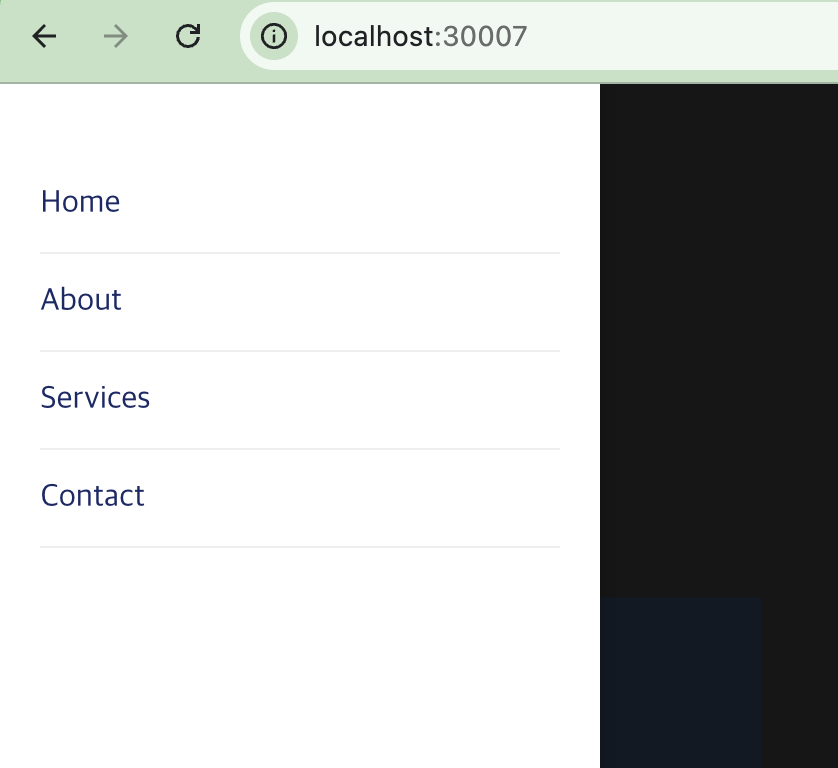
          <li>Home</li>
          <li>About</li>
          <li>Services</li>
          <li>Contact</li>
        </ul>
      </aside>

      <main className="content">
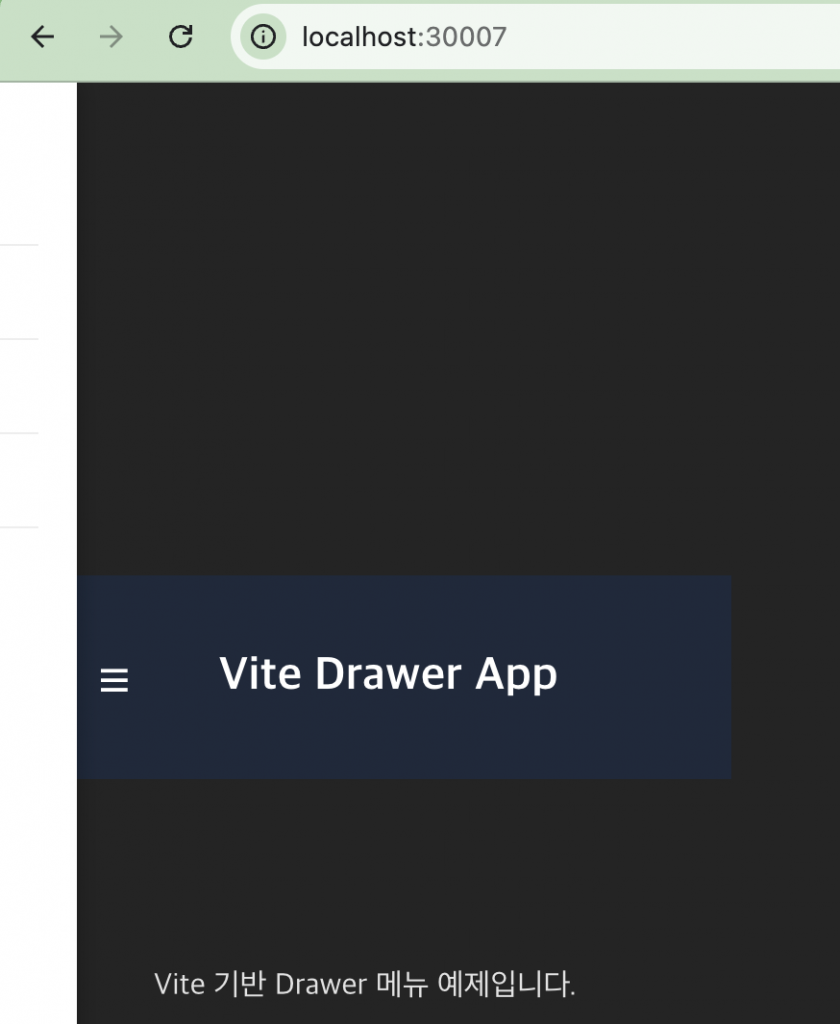
        <p>Vite 기반 Drawer 메뉴 예제입니다.</p>
      </main>
    </>
  );
}

export default App;👉🏻/Appk8s/react-drawer/src/App.css
body {
  margin: 0;
  font-family: sans-serif;
}

.header {
  display: flex;
  align-items: center;
  padding: 15px 20px;
  background: #1e293b;
  color: white;
}

.menu-btn {
  font-size: 24px;
  margin-right: 15px;
  background: none;
  border: none;
  color: white;
  cursor: pointer;
}

.drawer {
  position: fixed;
  top: 0;
  left: -260px;
  width: 260px;
  height: 100%;
  background: white;
  box-shadow: 2px 0 10px rgba(0,0,0,0.2);
  transition: left 0.3s ease;
  padding: 20px;
  z-index: 1000;
}

.drawer.open {
  left: 0;
}

.drawer ul {
  list-style: none;
  padding: 0;
}

.drawer li {
  padding: 12px 0;
  cursor: pointer;
  border-bottom: 1px solid #eee;
}

.close-btn {
  background: none;
  border: none;
  font-size: 18px;
  float: right;
  cursor: pointer;
}

.overlay {
  position: fixed;
  inset: 0;
  background: rgba(0,0,0,0.4);
  z-index: 999;
}

.content {
  padding: 20px;
}
👉🏻dist 빌드 / dist build
✔️ 위치 / location
— /Appk8s/react-drawer
✔️ 빌드 후 dist디렉토리가 생성되어 있어야하며 디렉토리 내에 파일이 생성되어 있어야합니다.
After building, a dist directory should be created and files should be created inside the directory.
npm run build👉🏻 Dockerfile
✔️ 위치 / location
— /Appk8s/react-drawer
# build node
FROM node:18 AS build
WORKDIR /app
COPY package*.json ./
RUN npm install
COPY . .
RUN npm run build

# build nginx
FROM nginx:alpine
COPY --from=build /app/dist /usr/share/nginx/html
COPY nginx.conf /etc/nginx/conf.d/default.conf
👉🏻nginx.conf
✔️ 위치 / location
— /Appk8s/react-drawer
server {
  listen 80;
  server_name _;

  location / {
    root /usr/share/nginx/html;
    try_files $uri /index.html;
  }
}
👉🏻 이미지로 빌드(도커데스크탑이 실행되어 있어야 합니다.)
Build from image (Docker Desktop must be running)
✔️ 위치 / location
— /Appk8s/react-drawer
— -t 옵션은 태그를 의미하며 이미지에 이름과 버전을 붙이겠다는 의미입니다.
The -t option means tag, which means to give the image a name and version.
docker build -t react-drawer-local:1.0 .✔️ 이미지 생성확인 / Confirm creation of image
% docker images
                                                           i Info →   U  In Use
IMAGE                           ID             DISK USAGE   CONTENT SIZE   EXTRA
docker/desktop-kubernetes:kubernetes-v1.34.1-cni-v1.7.1-critools-v1.33.0-cri-dockerd-v0.3.20-1-debian
                                12d6673564e0        552MB          169MB
docker/desktop-storage-provisioner:v3.0
                                57d2b6ad1c6f       75.4MB         21.9MB    U
docker/desktop-vpnkit-controller:v4.0
                                bdaff3408b1c         50MB         10.7MB    U
nginx:latest                    0236ee02dcbc        258MB         64.1MB
node:20-alpine                  09e2b3d97260        193MB           49MB
react-drawer-local:1.0          f5186d602216         92MB         25.9MB    U
👉🏻deployment.yaml
✔️ 위치 / location
— /Appk8s/react-drawer
✔️ 1. 기본 정보 및 관리 규칙 / Basic Information and Management Rules
–kind: Deployment -> 이 리소스가 ‘Deployment’임을 명시합니다.
Specifies that this resource is a ‘Deployment’.
–metadata: name: react-drawer -> 쿠버네티스 클러스터 안에서 이 배포 객체의 이름을 react-drawer라고 부르겠다는 뜻입니다.
This means that we will call this deployment object react-drawer within our Kubernetes cluster.
–spec: replicas: 1: 이 애플리케이션(Pod)을 항상 1개 유지하라는 명령입니다. 만약 컨테이너가 죽으면 쿠버네티스가 자동으로 다시 살려냅니다.
This command ensures that only one instance of this application (Pod) is always running. If the container dies, Kubernetes will automatically revive it.
✔️2. 셀렉터 / Selector
–selector: matchLabels: app: react-drawer:
이 Deployment가 어떤 Pod들을 관리할지 결정하는 기준입니다. 아래 template에 정의된 라벨과 일치해야 합니다.
This is the criterion that determines which Pods this Deployment will manage. It must match the labels defined in the template below.
✔️ 3. 포드 템플릿 / Pod Template
–image: react-drawer-local:1.0:
react-drawer-local:1.0 이 이미지를 사용합니다.
react-drawer-local:1.0 uses this image.
–imagePullPolicy: Never:
가장 중요한 부분입니다.이 설정은 “외부에서 찾지 말고, 현재 노드에 이미 빌드되어 있는 로컬 이미지를 사용해라”라는 의미입니다.
This is the most important part. This setting means “don’t look for it externally, use the local image that is already built on the current node.”
–ports: containerPort: 80
⭐️ 첫번째 spec은 전체 시스템(Deployment)을 어떻게 운영할지에 대한 명세
The first spec is a specification of how to operate the entire system (Deployment).
⭐️ 두번째 spec은 실제로 돌아갈 Pod이 어떻게 생겼는지에 대한 명세
The second spec is a specification of what the Pod that will actually return looks like.
apiVersion: apps/v1
kind: Deployment
metadata:
  name: react-drawer
spec:
  replicas: 1
  selector:
    matchLabels:
      app: react-drawer
  template:
    metadata:
      labels:
        app: react-drawer
    spec:
      containers:
        - name: react-drawer
          image: react-drawer-local:1.0
          imagePullPolicy: Never   #  로컬 이미지 사용하기 / Using local images
          ports:
            - containerPort: 80
👉🏻 service.yaml
✔️ 위치 / location
— /Appk8s/react-drawer
✔️ service.yaml은 Deployment(애플리케이션)를 외부에서 접속할 수 있도록 길을 열어주는 Service 설정입니다.
service.yaml is a service setting that opens the way for Deployment (application) to be accessed externally.
— kind: Service -> 이 설정이 네트워크 서비스(L4 로드밸런서 역할)임을 의미합니다.
This setting means that this is a network service (L4 load balancer role).
— type: NodePort -> 클러스터 외부에서 접속하기 위해 각 노드(컴퓨터)의 특정 포트를 개방하는 방식입니다.
This method opens a specific port on each node (computer) to allow access from outside the cluster.
— selector: app: react-drawer -> 이 서비스가 *어떤 배포물(Deployment)과 연결될지 결정합니다. 아까 만든 Deployment의 라벨과 일치해야 합니다.
Determines which deployment this service will be associated with. This must match the label of the deployment you created earlier.
— nodePort: 30007: 외부에서 접속하는 번호입니다. 브라우저에 http://<노드IP>:30007이라고 치면 접속됩니다. (범위는 보통 30000~32767 사이로 지정합니다.)
This is the number you access from outside. You can connect by entering http://:30007 in your browser. (The range is usually 30000 to 32767.)
— port: 80: 서비스 자체의 번호입니다. 클러스터 내부의 다른 앱들이 이 서비스를 찾을 때 사용하는 포트입니다.
This is the number of the service itself. This is the port that other apps within the cluster use to find this service.
— targetPort: 80: 컨테이너 내부의 번호입니다. 실제 React 앱(Nginx 등)이 컨테이너 안에서 기다리고 있는 포트입니다.
This is the number inside the container. This is the port that the actual React app (Nginx, etc.) is listening on inside the container.
⭐️ 포트 흐름 : nodePort(3007) -> service port(80) -> service targetport(80) -> deployment containerport(80)
apiVersion: v1
kind: Service
metadata:
  name: react-drawer-service
spec:
  type: NodePort
  selector:
    app: react-drawer
  ports:
    - port: 80
      targetPort: 80
      nodePort: 30007
👉🏻 적용 및 실행 / Apply and Run
✔️ 적용 / apply
kubectl apply -f deployment.yaml
kubectl apply -f service.yaml
✔️ 실행확인 / Check execution
% kubectl get pods
% kubectl get svc
% kubectl get pods
NAME READY STATUS RESTARTS AGE
react-drawer-76b9c89659-cf6q9 1/1 Running 0 4m26s
% kubectl get service
NAME TYPE CLUSTER-IP EXTERNAL-IP PORT(S) AGE
kubernetes ClusterIP 10.96.0.1 <none> 443/TCP 73d
react-drawer-service NodePort 10.105.160.235 <none> 80:30007/TCP 4m32s
✔️ 브라우저에서 접속 / Access from browser
http://localhost:30007👉🏻 스크린 샷 / ScreenShot
✔️ 브라우저 / Browser
✔️ 도커 데스크탑 / Docker Desktop