👉🏻nodejs가 대부분 웹사이트 만들기 위한 도구로 알고 계신 분이 많은 것 같습니다.
It seems like most people know nodejs as a tool for creating websites.
👉🏻아래는 nodejs를 서버로 사용하고 자바를 채팅 클라이언트로 사용하는 매우 간단한 프로그램입니다.
Below is a very simple program that uses nodejs as a server and java as a chat client.
👉🏻기초를 쌓는데 도움이 되리라 생각합니다.
I think it will help build a foundation.
👉🏻 여기에는 nodejs서버 하나와 터미널용과 gui용 두개의 클라이언트가 있습니다.
Here, we have one Node.js server and two clients: one for the terminal and one with a GUI.
👉🏻 파일 / Files
— class파일은 java파일을 컴파일 하면 생성됩니다.
.class file is generated when a .java file is compiled
— package.json은 npm init 명령을 실행하면 생성됩니다.
The package.json file is created when you run the npm init command.
ChatClientGUI.class	Client.class		package.json
ChatClientGUI.java	Client.java		server.js
👉🏻 모듈설치 / Install Module
✔️ 여기서는 따로 모듈을 설치하지 않습니다.
We do not install any separate modules here.
👉🏻 자바가 없다면 open jdk를 설치합니다.(MacOS)
If Java is not installed, install OpenJDK (macOS).
brew install openjdk👉🏻 자바 파일은 터미널에서 아래처럼 컴파일 합니다.
Compile Java files in the terminal as shown below.
# Terminal Version
javac Client.java

# GUI Version
javac ChatClientGUI.java
👉🏻 컴파일을 하면 class파일이 생성됩니다. 터미널에서 클래스파일은 아래와 같이 실행할 수 있습니다.
Compiling generates a class file. You can run the class file from the terminal as shown below.
# Terminal Version
java Client.java

# GUI Version
java ChatClientGUI.java
👉🏻 전체코드 / Full Code
✔️ server.js
const net = require('net');

const server = net.createServer((socket) => {
  console.log('클라이언트가 연결되었습니다.\nThe client is connected');

  socket.on('data', (data) => {
    console.log('클라이언트로부터 받은 데이터\nData received from client:', data.toString());
    socket.write('서버가 받은 데이터를 다시 보냅니다\nThe server sends back the data it received.: ' + data);
  });

  socket.on('end', () => {
    console.log('클라이언트 연결이 끊어졌습니다.\nThe client connection was lost.');
  });

  socket.on('error', (err) => {
    console.error('클라이언트 소켓 에러\nclient socket error:', err);
  });
});

const port = 3000;
server.listen(port, () => {
  console.log(`서버가 포트 ${port}에서 리스닝 중입니다.\nThe server is listening on port ${port}.`);
});

server.on('error', (err) => {
  console.error('서버 에러server error:', err);
});
✔️ Client.java
import java.io.BufferedReader;
import java.io.IOException;
import java.io.InputStreamReader;
import java.io.PrintWriter;
import java.net.Socket;
import java.util.Scanner;

public class Client {
    public static void main(String[] args) {
        String serverAddress = "localhost";
        int serverPort = 3000;

        try {
            Socket socket = new Socket(serverAddress, serverPort);
            System.out.println("서버에 연결되었습니다. / Connected to the server.");

            // 최초 1회만 입력 프롬프트 출력
            // Print the input prompt only once initially
            System.out.print("보낼 메시지 / Send message: ");
            System.out.flush();

            // 1. 서버로부터 메시지를 실시간으로 받는 스레드 시작
            // 1. Start a thread to receive messages from the server in real-time
            Thread receiveThread = new Thread(() -> {

                try (BufferedReader in = new BufferedReader(new InputStreamReader(socket.getInputStream()))) {
                    String serverResponse;

                    while ((serverResponse = in.readLine()) != null) {
                        // ANSI 이스케이프 코드 트릭 / ANSI Escape Code Trick
                        // \r: 커서를 줄 맨 앞으로 이동 / Move cursor to start of line
                        // \033[K: 현재 커서가 있는 줄 지우기 / Clear current line
                        System.out.print("\r\033[K");

                        // 서버 메시지 출력 / Print server message
                        System.out.println("[서버 응답 / Server Response]: " + serverResponse);

                        // 지워진 입력 프롬프트를 맨 아래에 다시 복구
                        // Restore the cleared input prompt at the bottom
                        System.out.print("보낼 메시지 / Send message: ");
                        System.out.flush();
                    }

                } catch (IOException e) {
                    System.out.println("\n수신 스레드 종료 / Receive thread terminated.");
                }

            });
            receiveThread.start();

            // 2. 메인 스레드: 사용자의 입력을 받아 서버로 전송
            // 2. Main Thread: Take user input and send it to the server
            try (
                PrintWriter out = new PrintWriter(socket.getOutputStream(), true);
                Scanner scanner = new Scanner(System.in)
            ) {
                while (true) {
                    String userInput = scanner.nextLine();

                    if ("exit".equalsIgnoreCase(userInput)) {
                        break;
                    }
                    out.println(userInput);

                    // 내가 엔터를 쳤을 때 화면에 남아있는 프롬프트를 지우고 다시 깔끔하게 출력하게 만듦
                    // Clears the lingering prompt when Enter is pressed and cleanly reprints it
                    System.out.print("\r\033[K보낼 메시지 / Send message: ");
                    System.out.flush();
                }
            }

            socket.close();
            System.out.println("연결을 종료합니다. / Connection terminated.");

        } catch (IOException e) {
            e.printStackTrace();
        }
    }
}
✔️ ChatClientGUI.java
import javax.swing.*;
import java.awt.*;
import java.awt.event.ActionEvent;
import java.awt.event.ActionListener;
import java.io.BufferedReader;
import java.io.IOException;
import java.io.InputStreamReader;
import java.io.PrintWriter;
import java.net.Socket;

public class ChatClientGUI extends JFrame implements ActionListener {

    private static final String SERVER_ADDRESS = "localhost";
    private static final int SERVER_PORT = 3000;

    private JTextArea chatArea;
    private JTextField messageInput;
    private JButton sendButton;
    private Socket socket;
    private BufferedReader in;
    private PrintWriter out;

    public ChatClientGUI() {
        setTitle("채팅 클라이언트/chat client");
        setDefaultCloseOperation(JFrame.EXIT_ON_CLOSE);
        setSize(400, 300);
        setLayout(new BorderLayout());

        chatArea = new JTextArea();
        chatArea.setEditable(false);
        JScrollPane scrollPane = new JScrollPane(chatArea);
        add(scrollPane, BorderLayout.CENTER);

        JPanel inputPanel = new JPanel(new BorderLayout());
        messageInput = new JTextField();
        sendButton = new JButton("보내기/send");
        sendButton.addActionListener(this);

        inputPanel.add(messageInput, BorderLayout.CENTER);
        inputPanel.add(sendButton, BorderLayout.EAST);
        add(inputPanel, BorderLayout.SOUTH);

        setVisible(true);

        connectToServer();
    }

    private void connectToServer() {
        try {
            socket = new Socket(SERVER_ADDRESS, SERVER_PORT);
            in = new BufferedReader(new InputStreamReader(socket.getInputStream()));
            out = new PrintWriter(socket.getOutputStream(), true);

            chatArea.append("서버에 연결되었습니다.\nsercer connected");

            // 서버로부터 메시지를 수신하는 스레드 시작
            Thread receiveThread = new Thread(this::receiveMessages);
            receiveThread.start();

        } catch (IOException e) {
            chatArea.append("서버 연결에 실패했습니다: " + e.getMessage() + "\n");
        }
    }

    private void receiveMessages() {
        String message;
        try {
            while ((message = in.readLine()) != null) {
                chatArea.append("서버server: " + message + "\n");
            }
        } catch (IOException e) {
            chatArea.append("서버 연결이 끊어졌습니다.\nFailed to connect to server.");
        } finally {
            closeConnection();
        }
    }

    @Override
    public void actionPerformed(ActionEvent e) {
        if (e.getSource() == sendButton) {
            String message = messageInput.getText();
            if (!message.isEmpty()) {
                out.println(message);
                chatArea.append("나Me: " + message + "\n");
                messageInput.setText("");
            }
        }
    }

    private void closeConnection() {
        try {
            if (out != null) out.close();
            if (in != null) in.close();
            if (socket != null && !socket.isClosed()) socket.close();
        } catch (IOException e) {
            e.printStackTrace();
        }
    }

    public static void main(String[] args) {
        SwingUtilities.invokeLater(ChatClientGUI::new);
    }
}
👉🏻 실행 / Run
✔️ 서버 실행 / Run Server
node server.js✔️ 클라이언트 실행 / Run Client
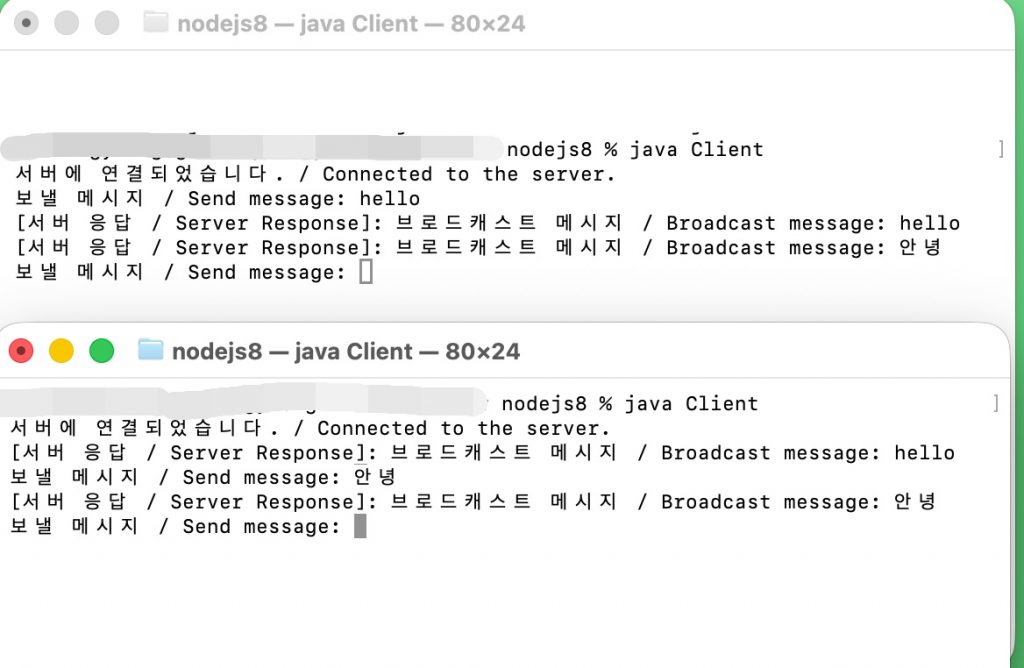
— Terminal Version
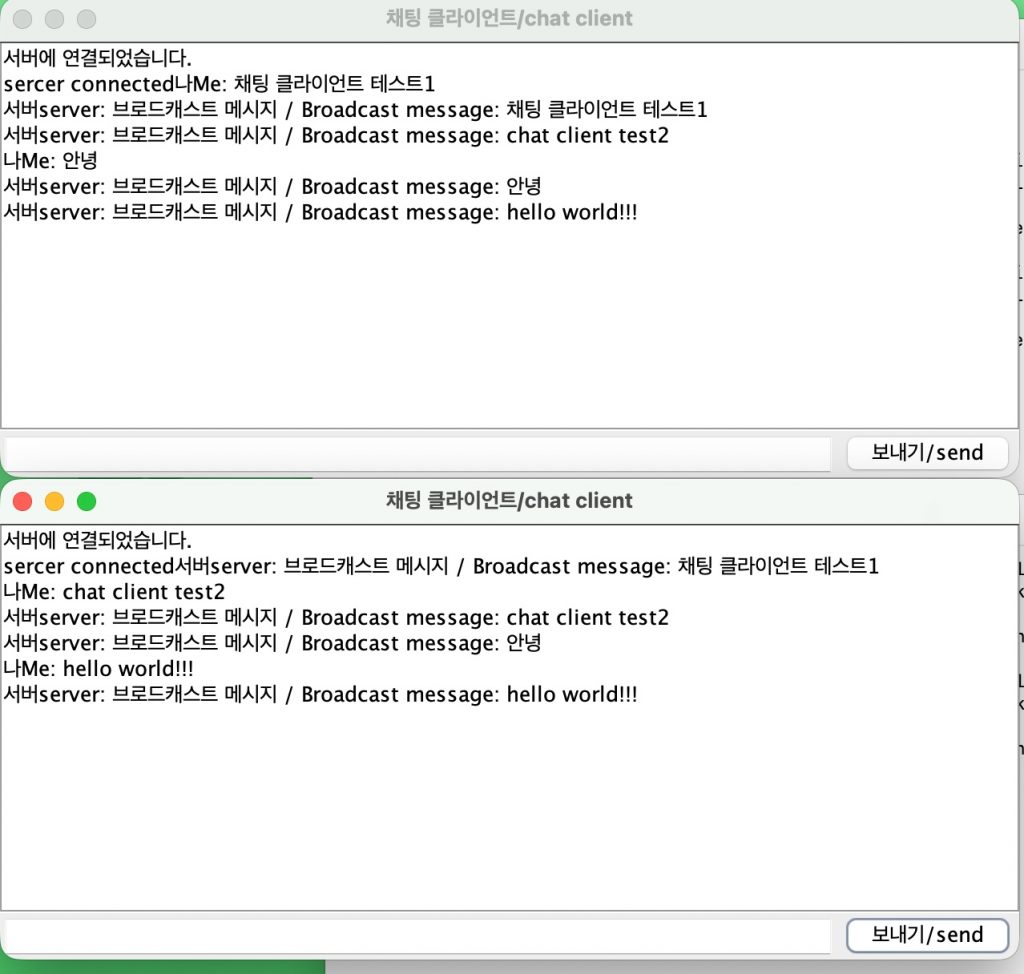
java Client— GUI Version
java ChatClientGUI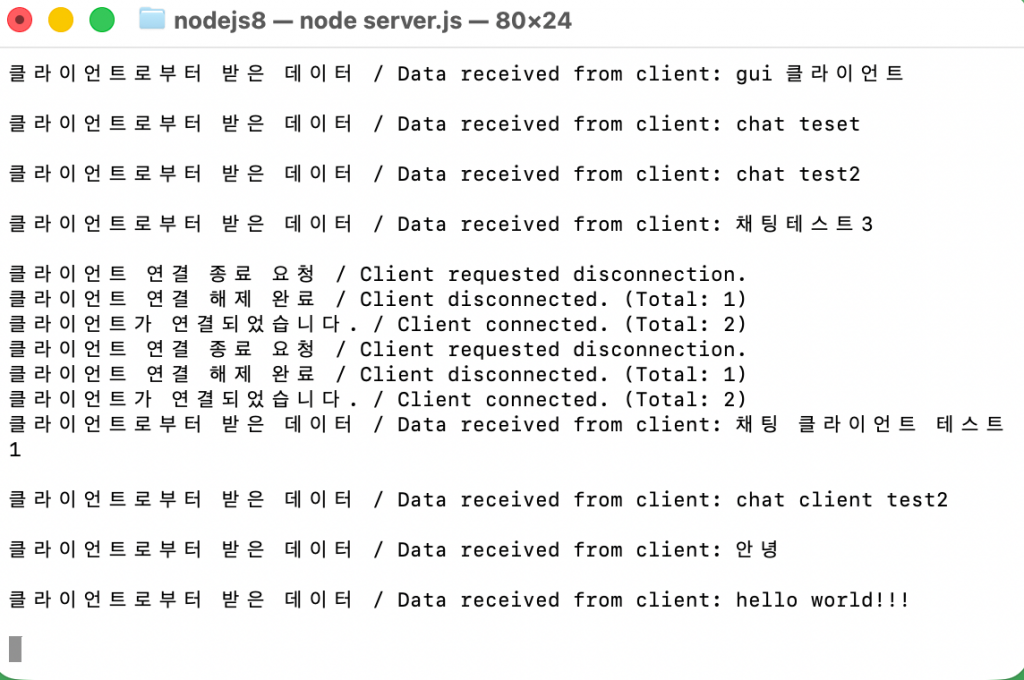
server.js
👉🏻 코드 설명 / Code Explanation
✔️ server.js
— net.Socket에서 socket.on()을 사용할 경우의 고정이벤트 설명입니다.
| 이벤트 이름 / Event Name | 발생 시점 , 설명 / Trigger , Description |
| ‘data’ | 클라이언트가 서버로 데이터를 보냈을 때 When data is received |
| ‘end’ | 클라이언트가 연결을 끊겠다고 신호를 보냈을 때 When client signals disconnection |
| ‘close’ | 소켓 연결이 완전히 닫혔을 때 When socket is completely closed |
| ‘error’ | 네트워크 통신 중 에러가 발생했을 때 When a network error occurs |
| ‘connect’ | 소켓이 서버와 연결 성공했을 때 When connection is successfully established |
— 클라이언트 접속 처리 / Client Connection Handling
const clients = [];

const server = net.createServer((socket) => {
  // 새 클라이언트가 접속하면 배열에 추가
  // Add new client to the array upon connection
  clients.push(socket);
  console.log(`클라이언트가 연결되었습니다. / Client connected. (Total: ${clients.length})`);

  socket.on('data', (data) => {
    const message = data.toString();
    console.log('클라이언트로부터 받은 데이터 / Data received from client:', message);

    // 브로드캐스트: 배열에 있는 모든 클라이언트에게 메시지 전송
    // Broadcast: Send message to all clients in the array
    clients.forEach((client) => {
      // 소켓이 정상적으로 열려있는 상태인지 확인 후 전송
      // Check if the socket is writable before sending
      if (client.writable) {
        client.write('브로드캐스트 메시지 / Broadcast message: ' + message);
      }
    });
  });
1)클라이언트가 접속하면 client배열에 클라이언트를 배열에 추가합니다.
When a client connects, it is added to the client array.
clients.push(socket);2)클라이언트로 받은 메세지를 터미널에 출력합니다.
Prints the message received by the client to the terminal.
console.log('클라이언트로부터 받은 데이터 / Data received from client:', message);3)접속된 모든클라이언트에게 메세지를 보냅니다.
Sends a message to all connected clients.
if (client.writable) {
   client.write('브로드캐스트 메시지 / Broadcast message: ' + message);
}
— 클라이언트 접속 해제 처리
Handling client disconnection
  socket.on('end', () => {
    console.log('클라이언트 연결 종료 요청 / Client requested disconnection.');
  });

  socket.on('close', () => {
    // 연결이 완전히 끊어지면 배열에서 해당 소켓 제거
    // Remove the socket from the array when completely closed
    const index = clients.indexOf(socket);
    if (index !== -1) {
      clients.splice(index, 1);
    }
    console.log(`클라이언트 연결 해제 완료 / Client disconnected. (Total: ${clients.length})`);
  });
1)클라이언트가 서버와 접속이 해제될때 처리 되는 부분입니다.
This section handles the process when the client disconnects from the server.
2)클라이언트가 서버와 접속해제되면 client배열에서 클라이언트 소켓 정보를 삭제합니다.
When a client disconnects from the server, the client socket information is removed from the client array.
    const index = clients.indexOf(socket);
    if (index !== -1) {
      clients.splice(index, 1);
    }
✔️ Client.java
— \033[K (ChatClient.java)
1)터미널 화면을 제어하는 ANSI 이스케이프 시퀀스(ANSI Escape Sequence) 표준 명령어입니다.
These are standard ANSI escape sequence commands used to control the terminal screen.
2)현재 커서가 있는 줄을 지웁니다.
Deletes the line where the cursor is currently located.
✅ 나머지는 다음 포스트에서 설명합니다.
I will explain the rest in the next post.