👉🏻아래는 miniMediaserver 서버에 대한 설명입니다.
Below is a description of the miniMediaserver server.
👉🏻 로컬에서 테스트 가능한 미디어서버의 가장 기본형입니다.
This is the most basic type of media server that can be tested locally.
👉🏻 디렉토리 구조 /
directory structure
✔️ CMakeLists.txt : 빌드도구 / Build Tools
✔️ main.cpp : 앱 진입점 cpp파일 / App entry point cpp file
✔️ src : cpp및 h파일 디렉토리 / cpp and h file directories
mini_mediaserver_1/
├── CMakeLists.txt
├── main.cpp
└── src/
    ├── rtmp_server.h
    ├── rtmp_server.cpp
    ├── rtmp_session.h
    ├── rtmp_session.cpp
    ├── amf0.h
    ├── amf0.cpp
    ├── flv_writer.h
    └── flv_writer.cpp
👉🏻 여기서는 obs에서 rtmp프로토콜로 서버에 접속하고 flv파일로 저장하고 VLC Player로 재생까지 확인해봅니다.
Here, we connect to the server using the RTMP protocol in OBS, save it as an FLV file, and verify playback using VLC Player.
👉🏻 rtmp(Real-Time Messaging Protocol)는 어도비가 Flash용으로 만든 실시간 스트리밍 프로토콜입니다.
RTMP (Real-Time Messaging Protocol) is a real-time streaming protocol created by Adobe for Flash.
👉🏻 rtmp프로토콜은 OBS에서 서버로 영상 송출할 때 사용됩니다.
The RTMP protocol is used to send video from OBS to the server.
👉🏻 flv파일은 플래시 비디오 포맷입니다.
FLV files are Flash video formats.
👉🏻 아래의 도구들을 설치합니다. / Install the tools below.
✔️openssl : 보안,암호화 담당 도구 / Security and encryption tools
✔️ FFmpeg(ffmpeg + ffprobe + ffplay) :
영상, 음성, 이미지 파일 변환/편집하는 도구 / A tool for converting/editing video, audio, and image files
— ffmpeg , ffprobe , ffplay)
ffmpeg  : 변환, 인코딩, 자르기, 합치기, 압축 / Convert, Encode, Crop, Merge, Compress.
ffprobe : 파일 정보 분석. 코덱, 해상도, 비트레이트 확인용 /
          File information analysis. For checking codec, resolution, and bitrate.
ffplay  : 간단한 재생기, 테스트용 / Simple player, for testing
✔️ VLC Player : 대부분의 미디어파일 재생 가능한 플레이어(flv파일 재생가능)
Player capable of playing most media files (plays FLV files)
👉🏻 빌드 / Build
project dir/
cd build
cmake ..
make
👉🏻 실행 / Run
./media_server✔️ 접속대기 / Waiting for connection
MacBookAir build % ./media_server
RTMP Server listening on 1935...
✔️ OBS에서접속하기 / Connecting from OBS
— OBS설정 / OBS Settings
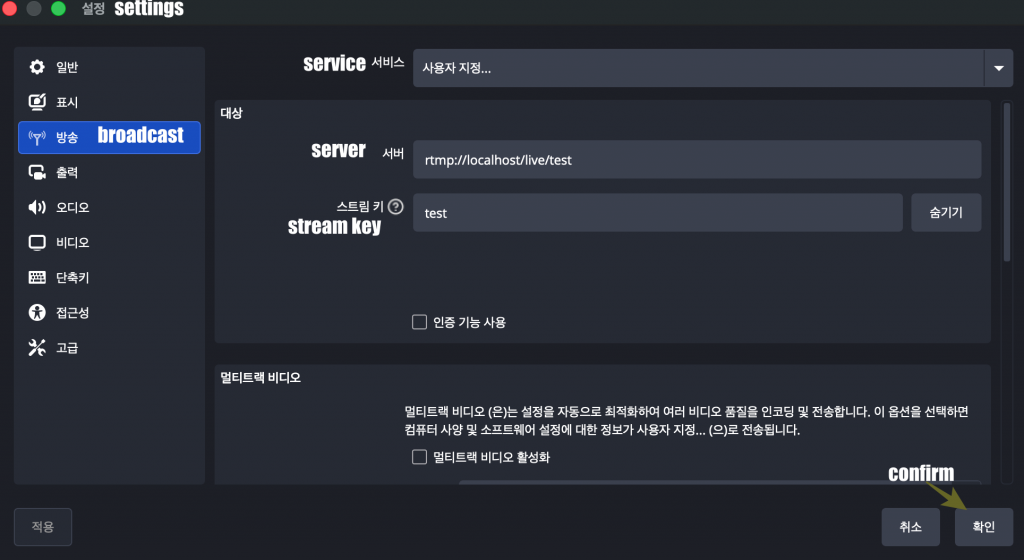
— OBS에서 서버에 접속하면 터미널에 로그가 프린트 됩니다.
When you connect to the server in OBS, logs are printed in the terminal.
[Server] Ack sent: 16149755 bytes
[Server] Ack sent: 16153851 bytes
[Server] Ack sent: 16157947 bytes
[Server] Ack sent: 16162043 bytes
[Server] Ack sent: 16166139 bytes
[Server] Ack sent: 16170235 bytes
[Server] Ack sent: 16174331 bytes
[Server] Ack sent: 16178427 bytes
[Server] Ack sent: 16182523 bytes
[Server] Ack sent: 16186619 bytes
[Server] Ack sent: 16190715 bytes
[Server] Ack sent: 16194811 bytes
–10~20초정도 방송후에 서버와 obs를 종료합니다.
Close the server and OBS after broadcasting for about 10 to 20 seconds.
— project dir/build디렉토리 내에 test.flv파일이 생성된 것을 확인 할 수 있습니다.
You can verify that the test.flv file has been created in the project dir/build directory.
MacBookAir build % ls -hl
total 43112
-rw-r--r--   1 user  staff   2.0K  5월 16 13:43 cmake_install.cmake
-rw-r--r--   1 user  staff    16K  5월 16 13:42 CMakeCache.txt
drwxr-xr-x  13 user  staff   416B  5월 16 13:43 CMakeFiles
-rw-r--r--   1 user  staff   8.8K  5월 16 13:43 Makefile
-rwxr-xr-x   1 user  staff   975K  5월 16 13:43 media_server
-rw-r--r--@  1 user  staff    20M  5월 16 14:34 test.flv
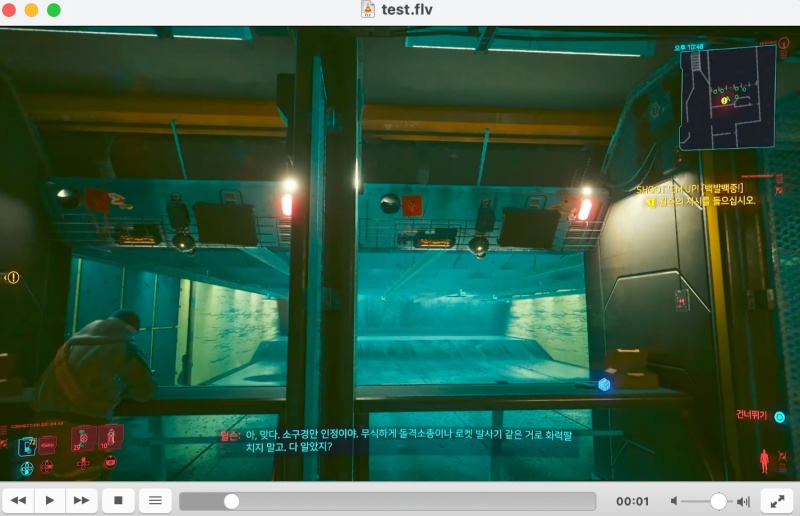
— VLC 플레이어에서 이 test.flv파일을 재생해 봅니다.
Try playing this test.flv file in VLC Player.