👉🏻 c++의 Asio(또는 Bootst.asio) 라이브러리를 이해하기 위한 코드입니다.
This is code to understand the C++ Asio (or Bootst.asio) library.
👉🏻 아래의 코드는 이전에 업로드한 mini_mediaserver_1 의 일부로직을 사용합니다.
The code below uses some of the logic from the previously uploaded mini_mediaserver_1.
👉🏻 테스트 환경은 MacOS입니다.
The test environment is MacOS.
👉🏻 mini_mediaserver_1은 standalone방식의 asio를 사용합니다.
mini_mediaserver_1 uses standalone asio.
👉🏻 여기서는 Boosta.asio를사용합니다.
Here, we use Boosta.asio.
👉🏻 설치 및 사용 / Install and Usage
✔️ Boost.Asio 전체 설치 / full installation
— 설치 / Installatioon
# macOS brew - boost.asio
brew install boost
— 사용 / Usage
#include "boost/asio" ✔️ Asio Standalone
— 설치 / Installation
# macOS brew - asio standalone
brew install asio
— 사용 / Usage
#include "asio.hpp" 👉🏻 코드 / Code
✔️코드 설명 / Code Description
— 함수 실행 흐름 / Function execution flow
main() -> Server Class- > do_accept() -> Session Class -> start { do_read {do_write()}}— 소켓,접속정보 공유 / Socket, connection information sharing
1.소켓은 복사 할 수 없기 때문에 소유권 이동을 합니다.
Since sockets cannot be copied, ownership is transferred.

std::make_shared<Session>(std::move(socket))->start();

2.접속 정보를 공유하기 위해 다음 코드를 사용합니다.
Use the following code to share connection information.

- make_shared는 하나만 공유할 수 있는 포인터를 만듭니다.
make_shared creates a pointer that can be shared by only one person.

std::make_shared<Session>(std::move(socket))->start();

- enable_shared_from_this를 상속받으면 shared_from_this(); 함수를 사용 할 수 있습니다.
If you inherit from enable_shared_from_this, you can use the shared_from_this(); function.

public std::enable_shared_from_this<Session>

- this(Session class) 정보가 사라질 수 있어서 안전한 연결을 위해 self에 Session Class 정보를 복하합니다.
Since the information in this (Session class) can be lost, the Session Class information is copied to self for a secure connection.

auto self = shared_from_this();
— echo
- 아래의 람다 코드에서 소켓에서 받은 data_의 내용을 출력하고 다시 소켓에 데이터를 작성합니다.
In the lambda code below, the contents of data_ received from the socket are printed, and data is written back to the socket.

[this, self](boost::system::error_code ec, size_t len) {
   if (!ec) {
     std::cout << "받음/Receive: " << std::string(data_, len) << "\n";
     do_write(len); // 에코 / echo
   }
});
✔️전체 코드 / Full Cdoe (tcpecho.cpp)
#include <iostream>
#include <memory>
#include <boost/asio.hpp>
using boost::asio::ip::tcp;

// --
/*
 - std::make_shared<Session>(std::move(socket)) :
   한 곳만 포인터 공유설정 / Pointer sharing settings for only one location

 - : public std::enable_shared_from_this<Session> :
   shared_from_this(); 사용을 위해 상속
   Inheritance for using shared_from_this();

 - shared_from_this :
   class Session 객체를 복사해서 저장
   Copy and save the class Session object
   ** this가 소멸될 수 있어서 안전한 세션연결 유지를 위해 Session클래스를 하나 더 복사함
      Since 'this' can be destroyed,
      an additional copy of the Session class is made to maintain a safe session connection. **
 */
class Session : public std::enable_shared_from_this<Session> {
    tcp::socket socket_;
    char data_[1024];

public:
    Session(tcp::socket socket) : socket_(std::move(socket)) {}

    void start() {
        do_read();
    }

private:
    void do_read() {

        // 람다 살아있는 동안 Session 안 죽음 / The Session does not die as long as Lambda is alive
        // 이 클래스 객체를 복사해서 저장 / Copy and save this class object
        auto self = shared_from_this();

        /*
         * async_read_some(buffer(data_), 람다/rambda)
         * 1) 데이터 오면 data_에 채워놓고 람다 실행 예약만 한다.
         * When data arrives, fill it into data_ and just schedule the Lambda execution.
         *
         * 2) OS가 소켓에 데이터 들어오는 거 감지 → data_ 배열에 len바이트만큼 복사해 둔다.
         * The OS detects incoming data in the socket and copies len bytes into the data_ array.
         *
         * 3) 복사가 끝났으면 람다 실행
         * Run Lambda once copying is finished
         *
         * 4) 이미 data_에 들어와 있는 변수를 람다에서 사용
         * Using variables already in data_ in Lambda
         */
        socket_.async_read_some(boost::asio::buffer(data_),
            [this, self](boost::system::error_code ec, size_t len) {
                if (!ec) {
                    std::cout << "받음/Receive: " << std::string(data_, len) << "\n";
                    do_write(len); // 에코 / echo
                }
            });
    }

    void do_write(size_t len) {
        auto self = shared_from_this();
        boost::asio::async_write(socket_, boost::asio::buffer(data_, len),
            [this, self](boost::system::error_code ec, size_t) {
                if (!ec) do_read(); // 읽기 / read
            });
    }
};

// --
class Server {
    // socket() + bind() + listen()수행 / Execute socket() + bind() + listen()
    tcp::acceptor acceptor_; // private
public:
    Server(boost::asio::io_context& io, short port)
        : acceptor_(io, tcp::endpoint(tcp::v4(), port)) {
        do_accept();
    }

private:
    void do_accept() {
        acceptor_.async_accept(
            // 람다함수 / Lambda function
            [this](boost::system::error_code ec, tcp::socket socket) {
                if (!ec) {
                    // 에러가 없으면 소켓을 세션에 넘기고 start 호출, 소켓은 복사 안됨
                    // If there are no errors, pass the socket to the session and call start;
                    // the socket is not copied
                    std::make_shared<Session>(std::move(socket))->start();
                }
                // 다음 클라이언트 계속 받음
                // Continue accepting next client
                //
                // 무한루프 / infinite loop
                do_accept();
            });
    }
};

int main() {
    try {
        boost::asio::io_context io;
        Server s(io, 12345);
        std::cout << "서버 시작. 포트 12345 / Start server. Port 12345\n";
        io.run();
    } catch (std::exception& e) {
        std::cerr << "에러/Error: " << e.what() << "\n";
    }
    return 0;
}
👉🏻컴파일 / Compiling
— boot라이브러리의 경로를 포함합니다.
Includes the path to the boot library.
g++ tcpecho.cpp -o server -std=c++17 -pthread \
  -I/opt/homebrew/include \
  -L/opt/homebrew/lib \
  -lboost_system
👉🏻실행 / Run
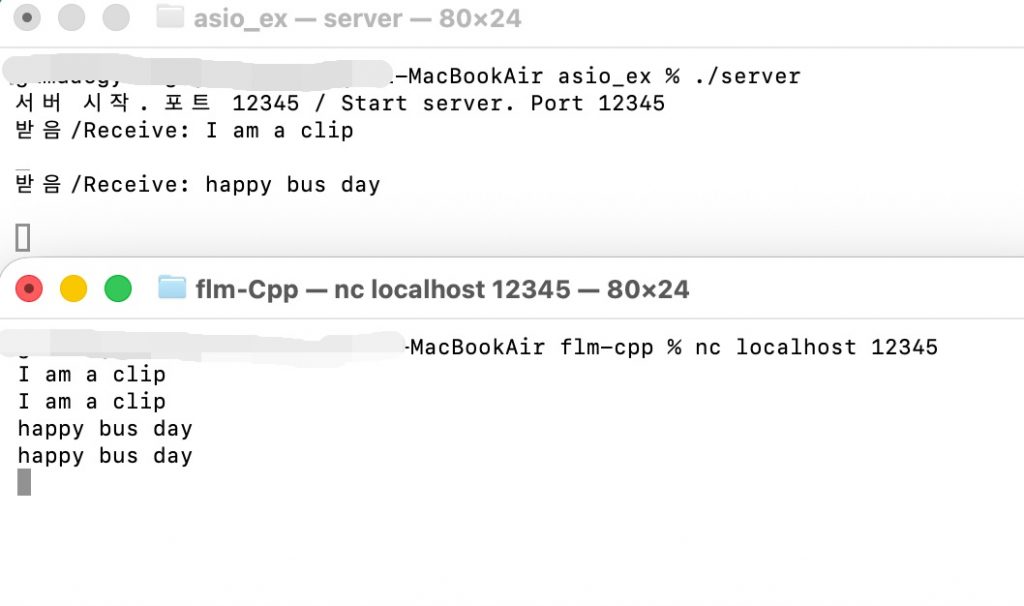
✔️ 터미널을 두개 열어서 하나는 서버 하나는 클라이언트를 실행합니다.
Open two terminals and run the server and the client in one.
✔️nc(netcat)는 TCP/UDP 통신 테스트 도구입니다.
nc(netcat) is a TCP/UDP communication test tool.
✔️ 클라이언트는 nc localhost 12345를 실행합니다.
The client runs nc localhost 12345.
# server
./server

# client
 nc localhost 12345
👉🏻실행 결과 / Execution result