👉️ help,clear이 외에 version을 확인 할 수 있는 명령어를 추가해 봅니다.
Let’s add a command to check the version, in addition to help and clear.
👉️ 기존 코드에서 추가되거나 변경된 부분만 설명합니다.나머지는 이전과 동일합니다.
Only the parts added to or modified from the existing code are explained here; the rest remains the same.
👉️ 컴파일 할 파일은 boot.asm과 sector2.asm 두개입니다.
The files to be compiled are boot.asm and sector2.asm.
👉️ boot.asm기존과 동일하기 때문에 설명을 생략합니다.
I will skip the explanation for boot.asm, as it remains the same as before.
👉️ 전체코드 / Full code
[org 0x8000]
bits 16

start:
    ; 웰컴 메시지 출력
    ; Print welcome message
    mov si, msg_welcome
    call print_string

; 프롬프트(miniOS> )를 출력하고 입력을 준비하는 곳
; The place to print the prompt (miniOS> ) and prepare for input
prompt:
    mov si, msg_prompt
    call print_string

    ; 입력 버퍼를 가리킬 포인터(DI)를 버퍼의 시작 주소로 초기화
    ; Initialize the pointer (DI) pointing to the input buffer with the starting address of the buffer
    mov di, cmd_buffer
    mov cx, 0           ; 입력된 글자 수를 세기 위한 카운터
                        ; Counter to count the number of entered characters

; 키보드 입력을 한 글자씩 받는 루프
; A loop that receives keyboard input character by character
key_loop:
    mov ah, 0x00
    int 0x16            ; 키보드 입력 받기 (AL에 ASCII 코드 저장)
                        ; Get keyboard input (Store ASCII code in AL)

    ; 엔터 키(13)를 눌렀는지 확인
    ; Check if the Enter key (13) was pressed
    cmp al, 13
    je check_command

    ; 백스페이스 키(8) 처리 (글자 지우기)
    ; Process Backspace key (8) (Erase character)
    cmp al, 8
    je backspace

    ; 버퍼 넘침 방지 (최대 15글자만 입력 가능)
    ; Prevent buffer overflow (Max 15 characters allowed)
    cmp cx, 15
    je key_loop

    ; 화면에 글자 출력 (에코)
    ; Output character to screen (Echo)
    mov ah, 0x0e
    int 0x10

    ; 입력받은 문자를 버퍼에 저장하고 포인터(DI) 이동
    ; Save the received character to the buffer and move the pointer (DI)
    mov [di], al
    inc di
    inc cx              ; 글자 수 증가
                        ; Increment character count
    jmp key_loop

; 백스페이스 처리 루틴
; Backspace processing routine
backspace:
    cmp cx, 0           ; 입력된 글자가 없으면 무시
                        ; Ignore if no characters are entered
    je key_loop

    ; 화면에서 글자 지우기 (왼쪽 이동 -> 공백 출력 -> 다시 왼쪽 이동)
    ; Erase character from screen (Move left -> Output space -> Move left again)
    mov ah, 0x0e
    mov al, 8
    int 0x10
    mov al, ' '
    int 0x10
    mov al, 8
    int 0x10

    dec di              ; 버퍼 포인터 1 감소
                        ; Decrement buffer pointer by 1
    dec cx              ; 글자 수 1 감소
                        ; Decrement character count by 1
    jmp key_loop

; 엔터를 쳤을 때 입력된 명령어를 비교하는 곳
; The place to compare the entered command when Enter is pressed
check_command:
    ; 문자열의 끝을 표시하기 위해 버퍼의 현재 위치에 0(Null) 삽입
    ; Insert 0 (Null) at the current location of the buffer to mark the end of the string
    mov byte [di], 0

    ; 줄바꿈 출력
    ; Output newline
    call print_newline

    ; 입력된 글자가 아예 없으면 그냥 다음 프롬프트로
    ; If no characters are entered at all, just go to the next prompt
    cmp cx, 0
    je prompt

    ; 1. 'help' 명령어 비교
    ; 1. Compare 'help' command
    mov si, cmd_buffer
    mov di, cmd_help
    call compare_string
    je do_help          ; 같으면 do_help로 점프
                        ; If equal, jump to do_help

    ; 2. 'clear' 명령어 비교
    ; 2. Compare 'clear' command
    mov si, cmd_buffer
    mov di, cmd_clear
    call compare_string
    je do_clear         ; 같으면 do_clear로 점프
                        ; If equal, jump to do_clear

    ; ----------------------------------------------------
    ; 👏 [추가된 부분 /] 3. 'version' 명령어 비교
    ;     [ Added Part ] 3. 'version' Command Comparison
    ; ----------------------------------------------------
    mov si, cmd_buffer
    mov di, cmd_version
    call compare_string
    je do_version       ; 같으면 do_version으로 점프
                        ; If equal, jump to do_version
    ; ----------------------------------------------------

    ; 일치하는 명령어가 없으면 에러 메시지 출력
    ; If no matching command is found, print error message
    mov si, msg_unknown
    call print_string
    jmp prompt

; [명령어 처리] help 구현
; [Command Processing] Implement help
do_help:
    mov si, msg_help_text
    call print_string
    jmp prompt

; [명령어 처리] clear 구현
; [Command Processing] Implement clear
do_clear:
    ; BIOS 화면 스크롤 기능을 이용해 화면 지우기
    ; Clear screen using BIOS screen scroll function
    mov ah, 0x06        ; 스크롤 업 기능
                        ; Scroll up function
    mov al, 0           ; 0 = 화면 전체 지우기
                        ; 0 = Clear entire screen
    mov bh, 0x07        ; 바탕색 검정, 글자색 흰색
                        ; Background black, Foreground white
    mov ch, 0           ; 좌상단 행
                        ; Upper left row
    mov cl, 0           ; 좌상단 열
                        ; Upper left column
    mov dh, 24          ; 우하단 행
                        ; Lower right row
    mov dl, 79          ; 우하단 열
                        ; Lower right column
    int 0x10

    ; 커서를 맨 위 좌상단(0,0)으로 이동
    ; Move cursor to the top-left corner (0,0)
    mov ah, 0x02
    mov bh, 0
    mov dh, 0
    mov dl, 0
    int 0x10

    jmp prompt


; ----------------------------------------------------
; 👏 [추가된 부분] [명령어 처리] version 구현
;     [Added Part] [Instruction processing] version implementation
; ----------------------------------------------------
do_version:
    mov si, msg_version_text
    call print_string
    jmp prompt
; ----------------------------------------------------

; [함수] 두 문자열이 같은지 비교 (SI와 DI 주소의 문자열 비교)
; [Function] Compare if two strings are equal (Compare strings at SI and DI addresses)
compare_string:
.loop:
    mov al, [si]
    mov bl, [di]
    cmp al, bl          ; 두 글자가 같은지 비교
                        ; Compare if two characters are equal
    jne .not_equal      ; 다르면 탈출
                        ; If not equal, escape
    cmp al, 0           ; 문자열이 끝났는지 확인 (둘 다 0인 상황)
                        ; Check if the string ended (Both are 0 case)
    je .equal           ; 끝났으면 완벽히 일치
                        ; If ended, perfect match
    inc si
    inc di
    jmp .loop
.not_equal:
    clc                 ; Carry Flag 클리어 (같지 않음 표시, 억지 flag 세팅용으로 cmp 활용)
                        ; Clear Carry Flag (Indicate not equal, use cmp for forced flag setting)
    mov al, 1
    cmp al, 0           ; Zero Flag를 0으로 만들어 '다름'을 알림
                        ; Set Zero Flag to 0 to notify 'Not Equal'
    ret
.equal:
    cmp al, 0           ; Zero Flag를 1로 만들어 '같음'을 알림 (AL이 0이므로)
                        ; Set Zero Flag to 1 to notify 'Equal' (Since AL is 0)
    ret

; [함수] 문자열 출력
; [Function] Print string
print_string:
    lodsb
    cmp al, 0
    je .done
    mov ah, 0x0e
    int 0x10
    jmp print_string
.done:
    ret

; [함수] 줄바꿈 출력
; [Function] Print newline
print_newline:
    mov ah, 0x0e
    mov al, 13
    int 0x10
    mov al, 10
    int 0x10
    ret

; ----------------------------------------------------
; 데이터 및 변수 선언 영역 (전역 변수)
; Data and variable declaration area (Global variables)
; ----------------------------------------------------
msg_welcome   db '3. Hello from Sector 2! miniOS Shell Started.', 13, 10, 0
msg_prompt    db 'miniOS> ', 0
msg_unknown   db 'Unknown command! Type "help".', 13, 10, 0

; 👏 [수정된 부분] help 텍스트 목록에 version 명시
;     [Modified] Specified the version in the help text list.
msg_help_text db 'Available commands: help, clear, version', 13, 10, 0
; ----------------------------------------------------
; 👏 [추가된 부분 ] version 출력용 변수 선언
;     [Added Part] Variable declaration for version output
; ----------------------------------------------------
msg_version_text db 'miniOS version 1.0.0 (Compiled in 2026)', 13, 10, 0
; ----------------------------------------------------

; 비교할 명령어 기준 문자열 (상수)
; Reference command strings for comparison (Constants)
cmd_help      db 'help', 0
cmd_clear     db 'clear', 0
; ----------------------------------------------------
; 👏 [ 추가된 부분 ] 비교할 명령어 기준 변수 선언
;     [ Added Part ] Declare a variable to serve as the basis for the command comparison.
; ----------------------------------------------------
cmd_version   db 'version', 0
; ----------------------------------------------------

; 사용자가 입력한 글자들을 담을 '빈 변수 공간' (버퍼)
; 'Empty variable space' to hold characters entered by the user (Buffer)
; 16바이트 크기만큼 공간을 미리 확보해 둡니다.
; Pre-allocate space of 16 bytes.
cmd_buffer    times 16 db 0

; 512바이트 크기 맞추기
; Fill up to 512 bytes
times 512 - ($ - $$) db 0
👉️ 빌드 / build
# 1번 섹터 컴파일
# Sector 1 Compilation
# nasm -f bin boot.asm -o boot.bin

# 1. 2번 섹터 새로 컴파일
# 1. Recompile Sector 2
nasm -f bin sector2.asm -o sector2.bin

# 2. 합치기 및 1.44MB 이미지 규격화
# 2. Merging and Standardizing to 1.44MB Image Format
cat boot.bin sector2.bin > temp.bin
dd if=temp.bin of=os.img bs=512 count=2880 conv=sync

# 3. QEMU 부팅순서 강제 지정 실행
# 3. Running QEMU with a Forced Boot Order
qemu-system-x86_64 -drive file=os.img,format=raw,if=floppy -boot a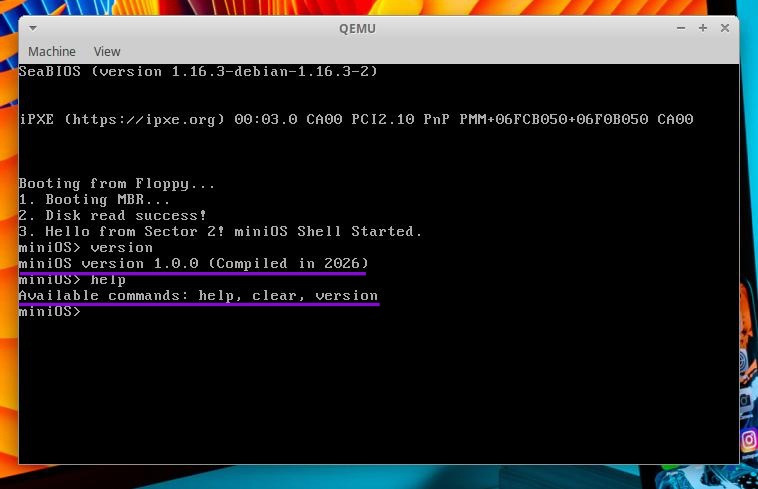
👉️ 코드설명 / Code Explanation
✔️ cmd_buffer에 입려된 내용과 cmd_version의 내용과 비교해서 일치하면(compare_string) do_version으로 점프합니다.
The content entered into cmd_buffer is compared with the content of cmd_version; if they match (via compare_string), the execution jumps to do_version.
    mov si, cmd_buffer
    mov di, cmd_version
    call compare_string
    je do_version       ; 같으면 do_version으로 점프
                        ; If equal, jump to do_version
cmd_version db 'version', 0✔️ 화면에 실제로 버전을 표시합니다.
It actually displays the version on the screen.
— si레지스터에 msg_version_text 변수를 입력합니다.
Load the msg_version_text variable into the si register.
— print_string함수를 실행해서화면에 버전을 출력합니다.
Execute the print_string function to display the version on the screen.
— prompt라벨로 점프합니다.
Jump to the prompt label.
do_version:
    mov si, msg_version_text
    call print_string
    jmp prompt
msg_version_text db 'miniOS version 1.0.0 (Compiled in 2026)', 13, 10, 0✔️ 아래는 help명령어를 실행할때 사용가능한 명령어로 version을 추가했습니다.
The ‘version’ command has been added to the list of available commands shown when running the ‘help’ command.
msg_help_text db 'Available commands: help, clear, version', 13, 10, 0


