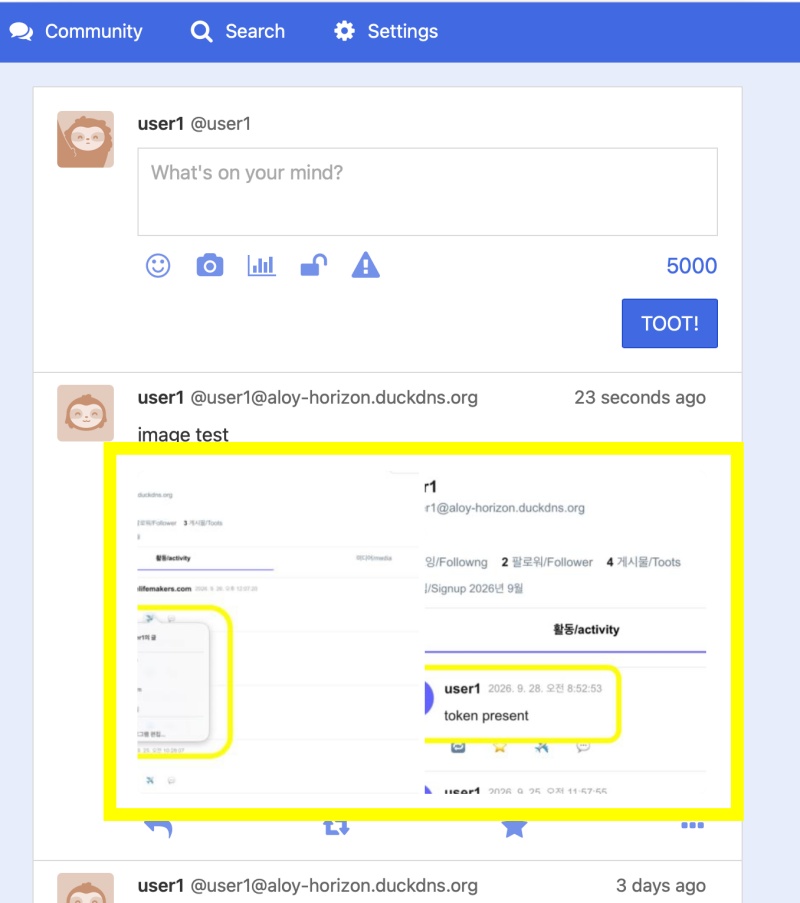
👉🏻 myapp27에는 스킨 디렉토리 실시간 자동인식을 구현합니다.
Real-time automatic detection of the skin directory is implemented in myapp27.
👉🏻 디렉토리를 mv 명령어로 이동할경우 오류 로그가 출력될 수 있습니다.
An error log may be displayed when moving a directory using the mv command.
👉🏻 하지만 1초내 바로 복구 완료 됩니다.
However, recovery is completed within one second.
👉🏻 전체 코드는 깃허브에서 확인 할 수 있습니다.
You can find the full code on GitHub.
https://github.com/gideonslife01/flm-nextjs
📁 전체 프로젝트 구조 / Overall Project Structure
myapp26/
├── app/  (Next.js App Router)
│   ├── .well-known/webfinger/route.ts  -> webfinger
│   ├── api/follow/route.ts    -> Follow API(temporary)
│   ├── api/announce/route.ts  -> Boost(Announcement)
│   ├── api/like/route.ts.     -> Like API
│   ├── api/posts/route.ts     -> Writing API
│   ├── api/timeline/route.ts  -> Timeline API
│   ├── users/[username]/
│   │   ├── statuses/[id]/route.ts -> Indivisual Post
│   │   ├── route.ts               -> Acotr Information
│   │   ├── followers/route.ts     -> Followers List
│   │   ├── following/route.ts     -> Following List
│   │   ├── inbox/route.ts         -> Inbox
│   │   └── outbox/route.ts        -> outbox
│   ├── usersui/[username]/
│   │   ├── page.tsx               -> Timeline UI
│   │   └── _components/themes/
│   │       ├── themeex/ThemeexTheme.tsx   -> Example Theme
│   │       ├── pinafore/PinaforeTheme.tsx -> Theme 1
│   │       ├── mastodon/MastodonTheme.tsx -> Theme 2
│   │       └── minimal/MinimaltTheme.tsx  -> Theme 3
│   ├── layout.tsx, page.tsx, globals.css
│   └── favicon.ico
├── lib/
│   ├── theme.tsx              -> Theme Provider
│   ├── watchThemes.ts         -> Check real-time theme changes
│   ├── ap.ts                  -> Follow Accept
│   └── db.ts                  -> DB connection
├── data/
│   └── keys/                  -> private.pem, public.pem
├── data.sqlite                -> Database
├── Caddyfile                  -> https
├── instrumentation.ts         -> Background Server
└── package.json
📁 프로젝트 시작(myapp27)
Project Start (myapp27)
npx create-next-app@latest📁 SQLite설치 / Installing SQLite
cd ~/myapp27
npm install better-sqlite3
npm install -D @types/better-sqlite3
📁 DDNS,https설정 / DDNS,https settings
📁 도메인허용, @userid 사용하기
Allowing domains, using @userid
— next.config.ts
import type { NextConfig } from "next";

const nextConfig: NextConfig = {
  /* allow domain*/
  allowedDevOrigins: ['aloy-horizon.duckdns.org', '*.duckdns.org'],

  /* host.domain.org/@userid */
  async rewrites() {
    return [
      {
        source: '/@:username',
        destination: '/usersui/:username',
      },
    ]
  }
};


export default nextConfig;
📁 테마 디렉토리 실시간 자동인식
Real-time automatic detection of theme directories
✔️ 모듈설치 / module installation
— 실시간 파일 및 폴더변경 감시기능
Real-time file and folder change monitoring function
npm install -D chokidar📁 코드 수정 및 파일 생성
Code modification and file creation
✔️ myapp27/lib/watchTheme.ts -> 파일 생성 / Create file
— 실시간 폴더 및 파일변경을 감지합니다.
It detects real-time changes to folders and files.
— _components디렉토리내에 index.ts,themeNames.ts파일을 생성하고 수정합니다.
Create and modify the index.ts and themeNames.ts files within the _components directory.
import fs from 'fs';
import path from 'path';
import chokidar from 'chokidar';

let started = false;

export function watchThemes() {
... ...
}
1)이 파일에서 해당 디렉토리내의 파일이나 디렉토리 변경이 있으면 테마파일(index.ts,themeNames.ts)을 업데이트 합니다.
This file updates the theme files (index.ts, themeNames.ts) whenever there are changes to files or directories within the specified directory.
2)index.ts,themeNames.ts파일이 없으면 자동생성합니다.
If the index.ts and themeNames.ts files do not exist, they are automatically generated.
3)파일의 내용이나 디렉토리가 변경되면 감지하고 index.ts,themeNames.ts파일의 내용을 업데이트합니다.
It detects changes to file contents or directories and updates the contents of index.ts and themeNames.ts.
✔️ myapp27/instrumentation.ts -> 파일 생성 / Create file
— Nextjs의 기능으로 watchTheme.ts를 백그라운드에서 실행하도록합니다.
Use Next.js features to run watchTheme.ts in the background.
// ✅ myapp27/instrumentation.ts - Next.js 시작 시 자동 실행  / Automatic execution upon Next.js startup
export async function register() {
  if (process.env.NEXT_RUNTIME === 'nodejs') {
    const { watchThemes } = await import('./lib/watchThemes');
    // 백그라운드에서 조용히 감시 시작 / Start monitoring quietly in the background.
    watchThemes();
    console.log('👀 Theme watcher started in background');
  }
}
✔️app/usersui/[username]/_components/themes/page.tsx -> 수정 / modify
— 이 파일에서 각 테마디렉토리의 파일을 불러 옵니다.
This file loads the files from each theme directory.
— theme디렉토리의 테마를 자동으로 불러오도록 코드 변경했습니다.
I modified the code to automatically load the theme from the theme directory.
//✅ myappp27
import { themeRegistry, getThemeComponent } from './_components/themes'; // ✅ registry만 여기서 가져오기 / Import only the registry from here.
import { themeNames } from './_components/themes/themeNames'; // ✅ names는 분리된 파일에서 가져오기 / names are imported from a separate file

... ...

  if (loading) return <div style={{ padding: 20 }}>Loading...</div>;

  const props = { timeline, username, onBoost: handleBoost, onLike: handleLike };

  // 테마 자동분기로 변경 / Changed to automatic theme switching.
  const ActiveTheme = getThemeComponent(theme as any) || themeRegistry.pinafore?.component || themeRegistry[themeNames[0]]?.component;

  if (!ActiveTheme) return <div>No themes found</div>;

  return <ActiveTheme {...props} />;
✔️ app/usersui/[username]/_components/themes/index.js
— 이 파일은 만들지 않아도 됩니다. 자동생성됩니다.
You do not need to create this file; it is generated automatically.
import { MastodonTheme } from './mastodon/MastodonTheme';
import { MinimalTheme } from './minimal/MinimalTheme';
import { PinaforeTheme } from './pinafore/PinaforeTheme';
import { ThemeexTheme } from './themeex/ThemeexTheme';

export const themeRegistry = {
 mastodon: { component: MastodonTheme, label: 'mastodon' },
 minimal: { component: MinimalTheme, label: 'minimal' },
 pinafore: { component: PinaforeTheme, label: 'pinafore' },
 themeex: { component: ThemeexTheme, label: 'themeex' },
} as const;
export type ThemeName = keyof typeof themeRegistry;
export function getThemeComponent(name: ThemeName) {
  return themeRegistry[name]?.component;
}
✔️ app/usersui/[username]/_components/themes/themeNames.ts
— 이 파일은 만들지 않아도 됩니다. 자동생성됩니다.
You do not need to create this file; it is generated automatically.
export const themeNames = ["mastodon","minimal","pinafore","themeex"] as const;
export type ThemeName = typeof themeNames[number];
✔️ app/usersui/[username]/_components/themes/pinafore/PinaforeTheme.tsx -> 파일 수정 / Modify file
— 다른 테마파일은 수정하지 않았습니다. myapp26의 내용과 같습니다.
I did not modify any other theme files. They are identical to the contents of myapp26.
— themeex는 테스트용 테마로 PinaforeTheme.tsx와 거의 같습니다.
themeex is a test theme that is almost identical to PinaforeTheme.tsx.
— PinaforeTheme.tsx에는 select메뉴부분을 themeNames에서 읽어 옵니다.
In PinaforeTheme.tsx, the select menu section reads from themeNames.
'use client';
import { useTheme } from '@/lib/theme';
import { themeNames } from '../themeNames'; // ✅ myapp27
import { ThemeName } from '..';

... ...

          {/* ✅myapp27 - ../themeNames.ts*/}
          <select value={theme || themeNames[0]} onChange={handleChange}>
            {themeNames.map(name => (
              <option key={name} value={name}>{name}</option>
            ))}
          </select>
📁 테스트 / Test
— 신규 테마 파일 업로드 / Upload New Theme File
etc % mv themeex /Users/gimdaegyeong/Desktop/app/NextJS/myapp27/app/usersui/[username]/_components/themes/
/Users/gimdaegyeong/Desktop/app/NextJS/myapp27/app/usersui/[username]/_components/themes/

etc % mv themeex /Users/gimdaegyeong/Desktop/app/NextJS/myapp27/app/usersui/'[username]'/_components/themes/
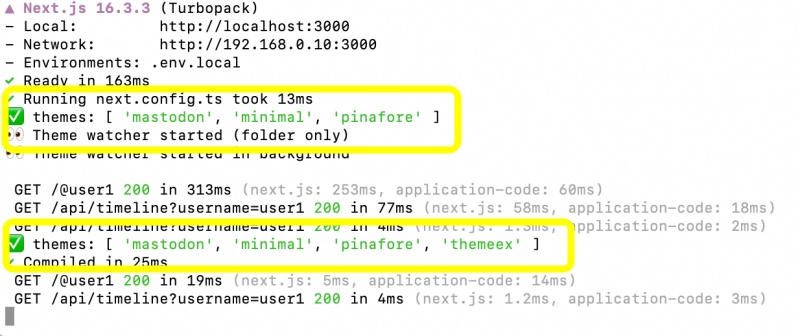
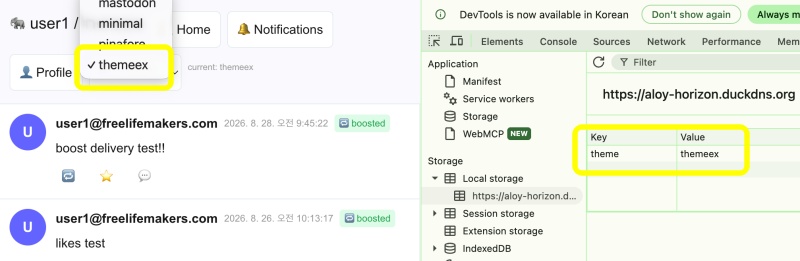
— 서버 운영중 테마 업로드시 테마에 자동반영됩니다.
📁 과정정리 / Process Summary
- 실시간 파일 및 디렉토리 변경 감기 확인 모듈설치(chokidar)
Install the module for real-time file and directory change monitoring (chokidar). - ./lib/watchTheme.ts 파일생성(실시간 파일 변경 감시 서버)
Create the ./lib/watchTheme.ts file (a server for monitoring real-time file changes). - watchTheme.ts를 백그라운드에서 실행하기 위해서 instrument.ts 파일생성
Create the instrument.ts file to run watchTheme.ts in the background. - watchThems.ts실행시 _components/themes디렉토리내에 index.ts와 themeNames.ts파일을 생성하고 수정합니다.
When watchTheme.ts runs, it generates and updates the index.ts and themeNames.ts files within the _components/themes directory. - theme/page.tsx파일에서 생성된 파일(index.ts,themeNames.ts)을 불러옵니다.
Import the generated files (index.ts, themeNames.ts) into theme/page.tsx. - 불러온 파일의 내용과 일치하는 테마를 불러오고 테마 select메뉴에도 반영합니다.
Load the theme corresponding to the content of the imported files and reflect it in the theme selection menu.
요한복음 8장 32절 / John 8:32
“그리고 너희는 진리를 알게 될 것이며, 진리가 너희를 자유롭게 할 것이다.”
“Then you will know the truth ,and the truth will set you free”