👉🏻 이전 프로젝트는 inbox_posts테이블의 개별글 API를 보려면 터미널을 사용해야했습니다.
In the previous project, you had to use the terminal to view the API for individual posts in the inbox_posts table.
👉🏻 myapp20 프로젝트에서는 브라우저에서 posts나 inbox_posts테이블의 API값도 볼 수 있게 수정합니다.
In the myapp20 project, we are modifying the setup so that API values from the posts or inbox_posts tables can also be viewed in the browser.
📁 전체 프로젝트 구조 / Overall Project Structure
myapp20/
├── app/  (Next.js App Router)
│   ├── .well-known/webfinger/route.ts  -> webfinger
│   ├── api/posts/route.ts     -> Writing API
│   ├── api/follow/route.ts    -> Follow API(temporary)
│   ├── api/timeline/route.ts  -> Timeline API
│   ├── users/[username]/
│   │   ├── statuses/[id]/route.ts -> Indivisual Post
│   │   ├── route.ts               -> Acotr Information
│   │   ├── followers/route.ts     -> Followers List
│   │   ├── following/route.ts     -> Following List
│   │   ├── inbox/route.ts         -> Inbox
│   │   └── outbox/route.ts        -> outbox
│   ├── usersui/[username]/page.tsx  -> Timeline UI
│   ├── layout.tsx, page.tsx, globals.css
│   └── favicon.ico
├── lib/
│   ├── ap.ts                  -> Follow Accept
│   └── db.ts                  -> DB connection
├── data/
│   └── keys/                  -> private.pem, public.pem
├── data.sqlite                -> Database
├── Caddyfile                  -> https
└── package.json
📁 프로젝트 시작(myapp20)
Project Start (myapp20)
npx create-next-app@latest📁 SQLite설치 / Installing SQLite
cd ~/myapp20
npm install better-sqlite3
npm install -D @types/better-sqlite3
📁 DDNS,https설정 / DDNS,https settings
📁 데이터베이스 스키마 확인 및 수정
Review and modify database schema
✔️ 다른 서버에서 받는 글(inbox_posts) 테이블에서 id가 너무 길어서 짧게 줄이기 위한 작업입니다.
This task aims to shorten the id in the inbox_posts table, which stores posts received from other servers, because the current ID is too long.
✔️ URL부분을 포함한 전체를 id를 original_id 필드에 따로 저장합니다.
The entire string, including the URL portion, is stored separately in the original_id field.
✔️ original_id는 gotosocial이나 mastodon서버와 통신하기 위해서 사용하고 id는 관리용으로 사용합니다.original_id is used for communication with GoToSocial or Mastodon servers, while id is used for administrative purposes.
✔️ inbox_post의 스키마(테이블)가 다음과 같지 않다면 수정합니다.
Modify the schema (table) for inbox_post if it does not match the following.
CREATE TABLE inbox_posts (
  id TEXT PRIMARY KEY,
  actor TEXT,
  content TEXT,
  username TEXT,
  created_at DATETIME DEFAULT CURRENT_TIMESTAMP
, original_id TEXT);
— 테이블 수정하기(이전에 수정하지 않았다면…)
Modify the table (if you haven’t already…)
ALTER TABLE inbox_posts ADD COLUMN original_id TEXT;📁 코드 수정 / Code modification
✔️ myapp20/app/users/[username]/inbox
    if (body.type === 'Create') {
      const note = body.object;
      if (note && note.type === 'Note') {
        console.log(`📝 [${username}] 새 글 도착 / New post received from ${actorId}`);
        console.log(`내용/content: ${note.content?.slice(0, 100)}`);

        // ✅ myapp20 -inbox_posts주소 줄이기 / Shorten inbox_posts URL
        try {
          const longId = note.id || `https://remote/${Date.now()}-${Math.random()}`;
          const shortId = longId.split('/').pop()!; // 마지막 부분만 잘라내기 / Cut off only the last part
          const content = note.content || '';

          db.prepare(`
            INSERT OR IGNORE INTO inbox_posts (id, actor, content, username, original_id, created_at)
            VALUES (?, ?, ?, ?, ?, ?)
          `).run(shortId, actorId, content, username, longId, note.published || new Date().toISOString());
          console.log(`✅ [${username}] inbox_posts 저장 완료/inbox_posts saved successfully. : ${shortId} (원본/original: ${longId})`);

        } catch (e) {
          console.error(`❌ 글 저장 실패 / Failed to save post`, e);
        }

      }
      return new Response('', { status: 202 });
    }
✔️ /myapp20/app/usersui/[username]/page.tsx
... ...

// ✅ myapp20
function getDisplayName(actorOrUsername: string) {
  if (!actorOrUsername) return 'unknown';
  // https://freelifemakers.com/users/user1 -> user1@freelifemakers.com
  if (actorOrUsername.startsWith('https://')) {
    try {
      const url = new URL(actorOrUsername);
      const username = url.pathname.split('/').pop() || 'user';
      return `${username}@${url.hostname}`;
    } catch {
      return actorOrUsername.split('/').pop() || actorOrUsername;
    }
  }
  return actorOrUsername;
}

... ...

  return (
    <div style={{ padding: 20, maxWidth: 900, margin: '0 auto' }}>
      <h1 style={{ fontSize: 24, marginBottom: 16 }}>{username} 타임라인 / Timeline</h1>
      <ul style={{ listStyle: 'none', padding: 0 }}>
        {timeline.map((p:any) => (
          <li key={`${p.source}-${p.id}`} style={{
            display: 'flex',
            alignItems: 'center',
            gap: 6,
            padding: '10px 0',
            borderBottom: '1px solid #eee',
            flexWrap: 'wrap'
          }}>
            <span style={{ background: p.source === 'mine'? '#dbeafe' : '#fef3c7', padding: '2px 6px', borderRadius: 4, fontSize: 11 }}>
              {p.source}
            </span>
            <b>{getDisplayName(p.actor)}:</b>
            <span dangerouslySetInnerHTML={{__html: p.content}} />
            <span style={{ color: '#999', fontSize: 11, marginLeft: 'auto' }}>
              {new Date(p.created_at).toLocaleString()}
            </span>
          </li>
        ))}
      </ul>
    </div>
  );
📁 테스트 / Test
✔️ inbox_posts에 기존의 글이 있다면 다 지웁니다.(https:// 때문에…)
Delete any existing posts in inbox_posts (due to https://…)
— gotosocial서버(freelifemakers.com)서버의 글도 지웁니다.
Posts on the GoToSocial server (freelifemakers.com) are also being deleted.
sqlite> select * from inbox_posts;
https://freelifemakers.com/users/user1/statuses/01M0EJPP57WC47FAK0N395S7MB|https://freelifemakers.com/users/user1|<p>inbox_posts table test</p>|user1|2026-07-10 01:16:15|
https://freelifemakers.com/users/user1/statuses/01M0KMS8K1XRFW703S32MX6V25|https://freelifemakers.com/users/user1|<p>actor test</p>|user1|2026-07-19T10:20:10+02:00|https://freelifemakers.com/users/user1/statuses/01M0KMS8K1XRFW703S32MX6V25
sqlite> delete from inbox_posts;
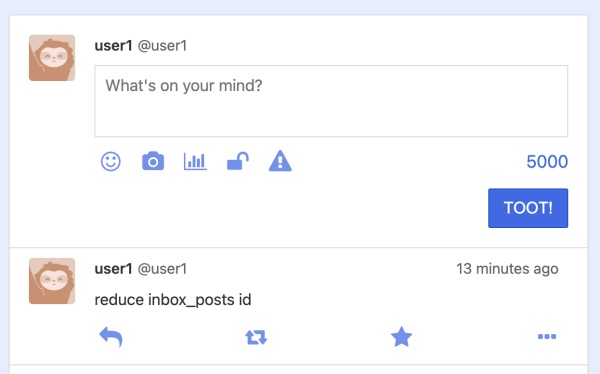
✔️ pinafore에서 새로 글을 쓰고 데이터베이스를 확인합니다.
Write a new post in Pinafore and check the database.
— pinafore.socical
— sqlite database(aloy-horizon.duckdns.org)
sqlite> select * from inbox_posts;
01M0P8VYEQTFW28N97W6MG8PY5|https://freelifemakers.com/users/user1|<p>reduce inbox_posts id</p>|user1|2026-07-20T06:10:11+03:00|https://freelifemakers.com/users/user1/statuses/01M0P8VYEQTFW28N97W6MG8PY5
sqlite>
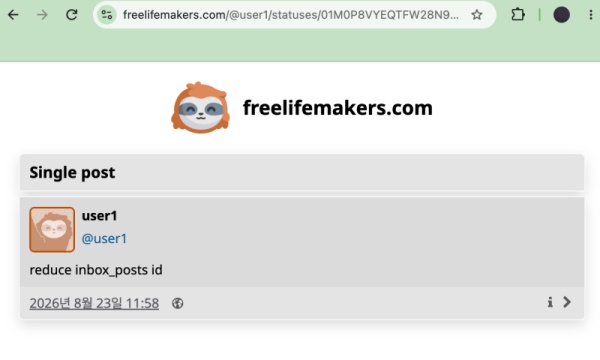
— gotosocial server( freelifemakers.com )
✔️ 브라우저에서 다음 주소를 실행합니다.
Open the following address in your browser.
— inbox_posts 테이블의 글 보기
View posts from the inbox_posts table
https://aloy-horizon.duckdns.org/users/user1/statuses/01M0P8VYEQTFW28N97W6MG8PY5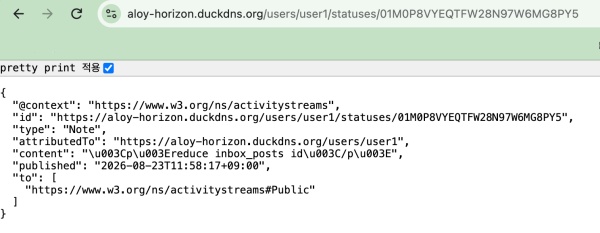
— posts 테이블의 글 보기
View a post from the ‘posts’ table
https://aloy-horizon.duckdns.org/users/user1/statuses/e6c99652-572f-491a-9e61-05e67b0d58fc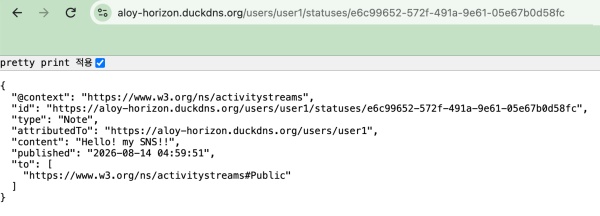
— 타임라인UI / Timeline UI
https://aloy-horizon.duckdns.org/@user1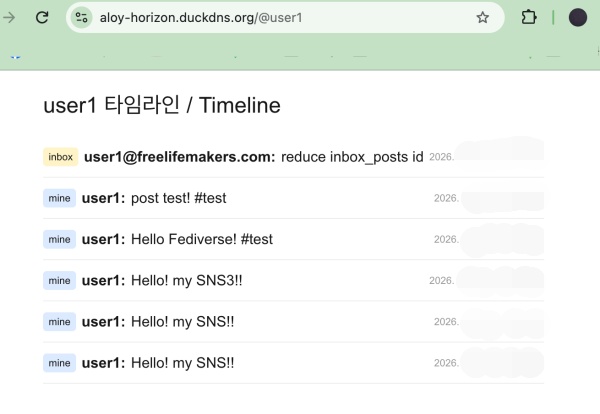
📁 지금까지 작업한 내용과 라우트 입니다.
Here is the work done so far and the routes.
✔️ 브라우저에서 테스트 할 수 있는 라우트
Routes that can be tested in a browser
1. WebFinger
https://aloy-horizon.duckdns.org/.well-known/webfinger?resource=acct:user1@aloy-horizon.duckdns.org

2. Actor (프로필 / Profile)
https://aloy-horizon.duckdns.org/users/user1

3. Followers (남이 나 팔로우 / Someone follows me)
https://aloy-horizon.duckdns.org/users/user1/followers

4. Following (내가 남을 팔로우 / I follow others)
https://aloy-horizon.duckdns.org/users/user1/following

5. Outbox (내 글 목록 / My post list)
https://aloy-horizon.duckdns.org/users/user1/outbox

6. 타임라인 / Timeline

- 타임라인UI / Timeline UI
https://aloy-horizon.duckdns.org/usersui/user1
or
https://aloy-horizon.duckdns.org/@user1

- 타임라인API / Timeline API
https://aloy-horizon.duckdns.org/api/timeline?username=user1

7. 개별 글(글 상세) / indivisual posts(Post Details)[posts, inbox_posts]
https://aloy-horizon.duckdns.org/users/user1/statuses/[ID]

ex)
# posts table
https://aloy-horizon.duckdns.org/users/user1/statuses/e6c99652-572f-491a-9e61-05e67b0d58fc

# inbox_posts table
https://aloy-horizon.duckdns.org/users/user1/statuses/01M0P8VYEQTFW28N97W6MG8PY5
✔️ 터미널에서만 테스트 가능한 라우트
Routes that can only be tested in the terminal
# 팔로우 (following 1로 증가)
# Follow (following increased to 1)

curl -X POST https://aloy-horizon.duckdns.org/api/follow \
  -H "Content-Type: application/json" \
  -d '{"username":"user1","target":"https://freelifemakers.com/users/user1"}'

# 언팔로우 (following 0으로 감소)
# Unfollow (following count reduced to 0)

curl -X DELETE https://aloy-horizon.duckdns.org/api/follow \
  -H "Content-Type: application/json" \
  -d '{"username":"user1","target":"https://freelifemakers.com/users/user1"}'

# 글 쓰기 (outbox 7로 증가 + 팔로워들에게 배달)
# Writing a post (added to outbox 7 + delivered to followers)

curl -X POST https://aloy-horizon.duckdns.org/api/posts \
  -H "Content-Type: application/json" \
  -d '{"username":"user1","content":"Hello Fediverse! #test"}'
요한복음 8장 32절 / John 8:32
“그리고 너희는 진리를 알게 될 것이며, 진리가 너희를 자유롭게 할 것이다.”
“Then you will know the truth ,and the truth will set you free”


