👉🏻 Nodejs에서 C++ 애드온(Native Addons)을 사용하는 이유는 Node.js의 성능 제한을 극복하고, 기존의 C++ 생태계와 자원을 활용하기 위함입니다.
The reason for using C++ addons (Native Addons) in nodejs is to overcome the performance limitations of Node.js and to leverage the existing C++ ecosystem and resources.
👉🏻 아래는 맥os에서 실행되었습니다.
Below was run on macOS.
1.코드작성 / Write code
1.1 sersver.js
// server.js
const express = require("express");
const app = express();
const port = 3000;

// 1. C++ 애드온 로드 / Loading C++ add-ons
// node-gyp 빌드 후 생성되는 .node 파일의 경로를 지정합니다.
// Specifies the path to the .node file generated after building node-gyp.
// (빌드가 성공하면 build/Release/addon_module.node 파일이 생성됩니다.)
// (If the build is successful, the build/Release/addon_module.node file will be created.)
const cppAddon = require("./build/Release/addon_module");

app.use(express.json());

// 2. C++ 애드온을 사용하는 API 엔드포인트 정의
//    Defining API endpoints using C++ add-ons
app.get("/calculate", (req, res) => {
  // 쿼리 파라미터에서 두 숫자를 추출
  // Extract two numbers from query parameters
  const num1 = parseFloat(req.query.a);
  const num2 = parseFloat(req.query.b);

  if (isNaN(num1) || isNaN(num2)) {
    return (
      res
        .status(400)
        //Please enter valid numbers for query parameters 'a' and 'b'.
        .send("쿼리 파라미터 'a'와 'b'에 유효한 숫자를 입력하세요.")
    );
  }

  try {
    // 3. C++ 애드온의 함수 호출 / Calling functions in C++ add-ons
    const result = cppAddon.multiply(num1, num2);

    // 4. 결과를 클라이언트에게 응답 / Reply the results to the client
    res.json({
      input_a: num1,
      input_b: num2,
      source: "C++ Addon",
      result: result,
    });
  } catch (error) {
    console.error("C++ add-on call error:", error.message);
    res.status(500).send("Server internal error occurred");
  }
});

app.listen(port, () => {
  console.log(`Node.js server is running at http://localhost:${port} .`);
  console.log(`Test URL: http://localhost:${port}/calculate?a=123&b=4.5`);
});
1.2 addon.cpp
// addon.cpp
/*
 * 이 코드는 "현재 Node.js 환경(env)에서 C++ 변수 result를 이용하여 새로운 JavaScript 숫자 객체를 만들어 반환하라"는 의미가 됩니다.
 * This code means "Create a new JavaScript numeric object
 * using the C++ variable result in the current Node.js environment (env) and return it."
 *
 * C++ 애드온은 main함수가 없는 이유:Node.js 자체에 이미 거대한 main 함수가 포함되어 있기 때문입니다.
 * Why C++ addons don't have a main function: Because Node.js itself already contains a huge main function.
 *
 * Napi::Number는 node-addon-api 라이브러리에서 제공하는 C++ 클래스로, Node.js 환경에서 통신할 때 JavaScript의 number 타입을 나타냅니다.
 * Napi::Number is a C++ class provided by the node-addon-api library that represents the JavaScript number type when communicating in a Node.js environment.
 *
 * Napi::Number 클래스는 내부적으로 C++의 기본 숫자 타입을 JavaScript가 이해하는 숫자 객체 포맷으로 변환해 줍니다.
 * The Napi::Number class internally converts C++'s basic number type into a numeric object format that JavaScript understands.
*/

// C++ 개발자가 Node.js의 고성능 네이티브 기능을 사용하기위한 헤더
// Header for C++ developers to use high-performance native features of Node.js
#include <napi.h>
#include <iostream>

// JavaScript에서 호출될 C++ 함수 정의
// Define a C++ function to be called from JavaScript
Napi::Number Multiply(const Napi::CallbackInfo& info) {

    // env: 현재 Node.js의 실행 환경(Napi::Env)을 나타냅니다.
    // env: Represents the current Node.js execution environment (Napi::Env).
    Napi::Env env = info.Env();

    // 인자 개수 확인 / Check number of arguments
    if (info.Length() < 2 || !info[0].IsNumber() || !info[1].IsNumber()) {
        Napi::TypeError::New(env, "두 개의 숫자를 입력해야 합니다.").ThrowAsJavaScriptException();
        return env.Null().As<Napi::Number>();
    }

    // JavaScript 인자를 C++ 숫자로 변환
    // Convert JavaScript arguments to C++ numbers
    double a = info[0].As<Napi::Number>().DoubleValue();
    double b = info[1].As<Napi::Number>().DoubleValue();

    // C++ 로직 실행
    // Execute C++ logic
    double result = a * b;
    std::cout << "C++ 애드온에서 곱셈 로직 실행됨: " << a << " * " << b << std::endl;

    // 결과를 JavaScript Number 타입으로 변환하여 반환
    // Convert the result to JavaScript Number type and return it
    // New()는 새로운 JavaScript 객체를 생성하는 메서드
    // New() is a method that creates a new JavaScript object.
    return Napi::Number::New(env, result);
}

// 모듈 초기화 (exports 객체에 함수 등록)
// Initialize module (register functions in exports object)
Napi::Object Init(Napi::Env env, Napi::Object exports) {
    exports.Set(
        // 자바스크립트에서 addon.multiply(a, b);로 사용됨.
        // Used in JavaScript as addon.multiply(a, b);
        Napi::String::New(env, "multiply"),

        // Function타입은 자바스크립트에서 함수로 사용 할 수 있게 해줌.
        // The Function type allows you to use it as a function in JavaScript.
        // 실제로 실행될 c++ 함수입니다. / This is the c++ function that will actually be executed.
        Napi::Function::New(env, Multiply)
    );
    return exports;
}

// Node.js 모듈로 등록
// Register as a Node.js module
NODE_API_MODULE(NODE_GYP_MODULE_NAME, Init)
1.3 binding.gyp
# GYP (Generate Your Projects): 이 형식은 Google에서 개발되었으며,
# 원래는 Chromium 프로젝트를 위해 사용되었습니다.
# 이는 다양한 플랫폼(macOS, Linux, Windows)에서 C++ 프로젝트를 빌드하기 위한 빌드 시스템 설정 언어입니다.

# GYP (Generate Your Projects): This format was developed by Google and was originally used for the Chromium project.
# It is a build system configuration language for building C++ projects on various platforms (macOS, Linux, Windows).

# binding.gyp
{
  "targets": [
    {
      # target_name : 최종적으로 생성될 .node 파일의 이름 / The name of the .node file that will ultimately be created
      # sources : 빌드할 소스 코드 파일 목록을 지정합니다. / Specifies a list of source code files to build.
      # include_dirs : C++ 코드에서 #include <napi.h>를 사용할 수 있도록 합니다. / Enables you to use #include <napi.h> in your C++ code.

      "target_name": "addon_module",
      "sources": [ "addon.cpp" ],
      "include_dirs": [
        "<!@(node -p \"require('node-addon-api').include\")"
      ],
      "defines": [ "NAPI_CPP_EXCEPTIONS" ],

      # C++ 컴파일러 플래그 설정: 예외 처리 활성화 / Setting C++ Compiler Flags: Enable Exception Handling
      # -- C++의 핵심 기능인 try, catch, throw 구문이 컴파일되어 런타임에 제대로 작동할 수 있도록 만듭니다.
      #    The try, catch, and throw statements, which are core features of C++, are compiled so that they work properly at runtime.

      "cflags_cc": [
          "-fexceptions"
      ],

      # (macOS 전용) XCode/Darwin 빌드 설정 오버라이드
      # (macOS only) Override XCode/Darwin build settings

      # 예외처리 기능이 비활성화되면 오류가 발생합니다.
      # 아래의 코드는 맥os의 예외처리 기능을 활성화하는 코드 입니다.
      # An error will occur if exception handling is disabled.
      # The code below enables exception handling in macOS.

      'xcode_settings': {
          'GCC_ENABLE_CPP_EXCEPTIONS': 'YES', # C++ 예외 활성화
          'OTHER_CPLUSPLUSFLAGS': [ '-fexceptions' ] # 추가 플래그
      },

      # 안전을 위해 기본 -fno-exceptions를 제거 (만약 node-gyp 기본 설정에 있다면)
      # Remove default -fno-exceptions for safety (if it's in node-gyp default config)

      # cflags! : C 컴파일러의 예외 비활성화 옵션 제거 / Removed the option to disable exceptions from the C compiler.
      # cflags_cc! : C++ 컴파일러의 예외 비활성화 옵션 제거 / Removed the option to disable exceptions from the C++ compiler.

      "cflags!": [ "-fno-exceptions" ],
      "cflags_cc!": [ "-fno-exceptions" ]
    }
  ]
}
2.1.의존성 설치 / install dependencies
npm install node-gyp node-addon-api express --save2.2.C++ 애드온 빌드 / C++ add-on build
npx node-gyp configure
npx node-gyp build
2.3.서버실행 / server run
node server.js2.4 터미널에서 테스트 / Test in terminal
curl http://localhost:3000/calculate?a=123&b=4.52.5 브라우저 테스트 결과 / Browser test results
{
  "input_a": 123,
  "input_b": 4.5,
  "source": "C++ Addon",
  "result": 553.5
}
3. 실행 / Run
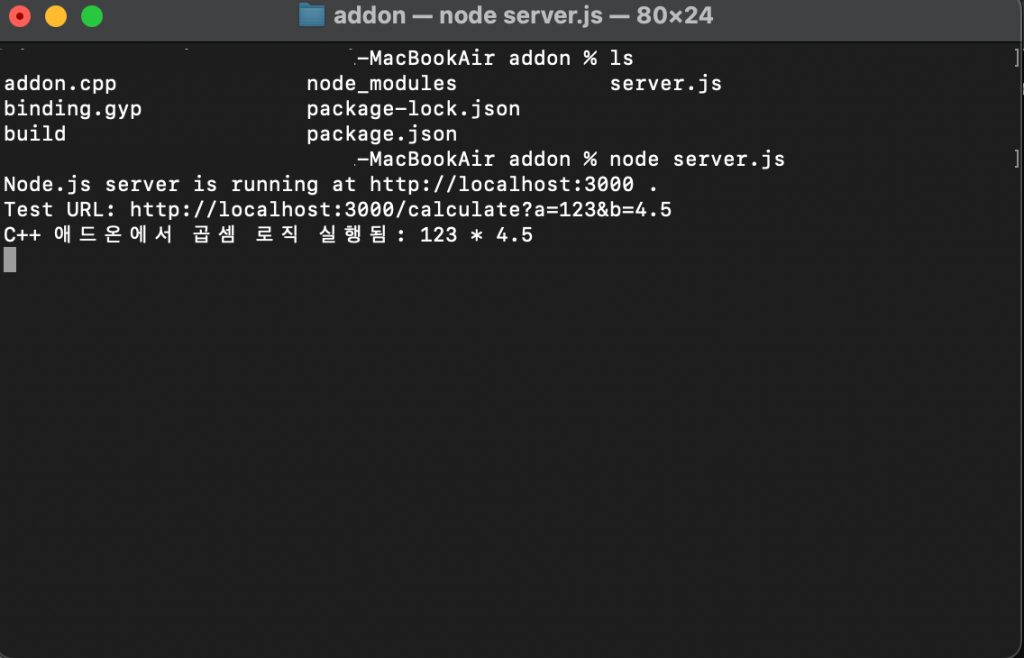
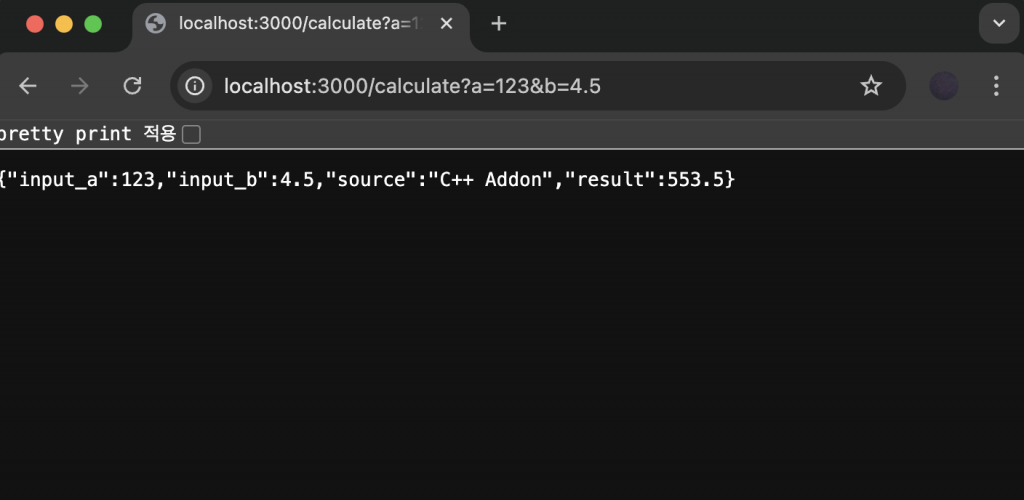
4.설정파일을 수정한 경우 / If you have modified the settings file
4.1 빌드파일정리 / Build file organization
npx node-gyp clean4.2 구성 재실행 / Rerun configuration
npx node-gyp configure4.3 빌드 재실행 / Rerun the build
npx node-gyp build


