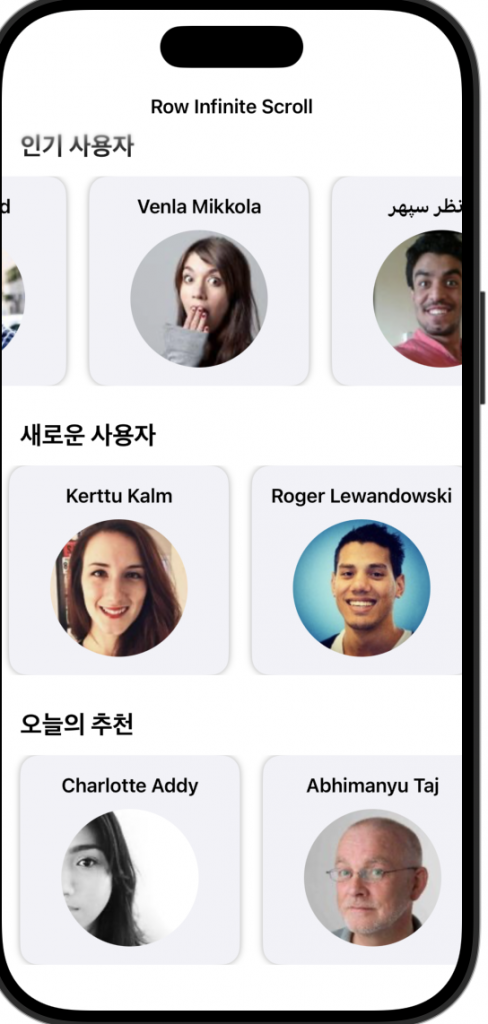
👉🏻 Randomuser API를 사용해서 가로 무한 스크롤을 구현한 컴포넌트 입니다.
This is a component that implements horizontal infinite scrolling using the Randomuser API.
👉🏻 코드설명은 주석을 참조하세요 그리고 부족한 설명은 아래의 포스트를 참조하시면 됩니다.
Please refer to the comments for code explanations, and for any missing explanations, please refer to the post below.
👉🏻 코드 / Code
✔️ContentView.swift
import SwiftUI

struct ContentView: View {
    var body: some View {
        NavigationStack {
            ScrollView {
                VStack(spacing: 30) {

                    // 섹션 1: 인기 사용자
                    // Section 1: Popular Users
                    HorizontalUserScrollView(
                        title: "인기 사용자",
                        url:"https://randomuser.me/api/?results=20",
                        viewModel: RandomUserViewModel()
                    )

                    // 섹션 2: 새로운 사용자
                    // Section 2: New Users
                    HorizontalUserScrollView(
                        title: "새로운 사용자",
                        url:"https://randomuser.me/api/?results=20",
                        viewModel: RandomUserViewModel()
                    )

                    // 섹션 3: 추천 사용자
                    // Section 3: Recommended Users
                    HorizontalUserScrollView(
                        title: "오늘의 추천",
                        url:"https://randomuser.me/api/?results=20",
                        viewModel: RandomUserViewModel()
                    )

                }
                .padding(.vertical)
            }
            .navigationTitle("Horizontal Infinite Scroll")
            .refreshable {
                // 전체 새로고침 원하면 여기서 모든 ViewModel 리프레시
                // 현재는 각 섹션이 독립적이므로 pull-to-refresh는 생략하거나 커스텀 처리

                // If you want a full refresh, refresh all ViewModels here.
                // Currently, each section is independent, so either omit pull-to-refresh or handle it customally.
            }
        }
    }
}

#Preview {
    ContentView()
}
✔️ HorizaontalUserScrollView
import SwiftUI

// 가로 무한 스크롤 컴포넌트
// Horizontal infinite scroll component
struct HorizontalUserScrollView: View {
    let title: String
    let url: String
    @StateObject var viewModel: RandomUserViewModel

    var body: some View {
        VStack(alignment: .leading) {
            // 섹션 제목 / section title
            Text(title)
                .font(.title2)
                .fontWeight(.bold)
                .padding(.horizontal)

            ScrollView(.horizontal, showsIndicators: false) {
                LazyHStack(spacing: 20) {
                    ForEach(viewModel.users) { user in
                        VStack {
                            Text("\(user.name.first) \(user.name.last)")
                                .font(.headline)
                                .multilineTextAlignment(.center)

                            AsyncImage(url: URL(string: user.picture.large)) { phase in
                                switch phase {
                                case .success(let image):
                                    image
                                        .resizable()
                                        .scaledToFit()
                                        .frame(width: 120, height: 120)
                                        .clipShape(Circle())
                                case .empty, .failure:
                                    ProgressView()
                                        .frame(width: 120, height: 120)
                                @unknown default:
                                    EmptyView()
                                }
                            }
                        }
                        .frame(width: 160)
                        .padding()
                        .background(Color(.secondarySystemBackground))
                        .cornerRadius(16)
                        .shadow(radius: 3)
                        // 마지막 사용자 카드가 나타날 때 추가 로드
                        // Load additional cards when the last user card appears
                        .onAppear {
                            if user == viewModel.users.last {
                                viewModel.fetchMoreUsers(url:url)  // 추가 로드 (append)
                                // viewModel.fetchMoreUsers(url: "https://randomuser.me/api/?results=20")  // 추가 로드 (append)
                            }
                        }
                    }

                    // 로딩 인디케이터 / loading indicator
                    if viewModel.isLoadingMore {
                        ProgressView("불러오는 중…")
                            .frame(width: 160, height: 240)
                            .padding()
                    }
                }
                .padding(.horizontal)
            }
        }
        // 섹션이 화면에 나타날 때 초기 데이터 로드 (한 번만!)
        // Load initial data when the section appears on screen (only once!)
        .onAppear {
            if viewModel.users.isEmpty {
                Task {
                    // 전체 교체 (초기 로드 전용)
                    // Full replacement (initial load only)
                    await viewModel.loadInitialUsers(url:url)
                    // await viewModel.loadInitialUsers(url:"https://randomuser.me/api/?results=20")  // 전체 교체 (초기 로드 전용)
                }
            }
        }
    }
}
✔️ RandomUserModel
import Foundation

struct RandomUserResponse: Codable {
    let results: [RandomUser]
}

struct RandomUser: Codable, Identifiable, Equatable {

    let login: Login

    let name: Name
    let picture: Picture

    // Identifiable
    var id: String { login.uuid }

    // MARK: - 내부 구조체
    struct Login: Codable, Equatable {
        let uuid: String
        // 필요하면 username, password 등 추가 가능
        // You can add username, password, etc. if needed.
    }

    struct Name: Codable, Equatable {
        let title: String?   // "Mr", "Mrs" ...
        let first: String
        let last: String
    }

    struct Picture: Codable, Equatable {
        let large: String
        let medium: String?
        let thumbnail: String?
    }
}
✔️ RandomUserRowInfiniteApp
import SwiftUI

@main
struct RandomUserRowInfiniteApp: App {
    var body: some Scene {
        WindowGroup {
            ContentView()
        }
    }
}
✔️ RandomUserViewModel
import Foundation
import Combine

@MainActor
class RandomUserViewModel: ObservableObject {
    @Published var users: [RandomUser] = []
    @Published var errorMessage: String?
    @Published var isLoadingMore = false

    private var debounceTask: Task<Void, Never>?

    // 처음 데이터 로드용 (뷰가 나타날 때 호출)
    // For initial data load (called when the view appears)
    func loadInitialUsers(url: String = "https://randomuser.me/api/?results=20") async {
        guard users.isEmpty else { return } // 이미 데이터 있으면 중복 로드 방지

        isLoadingMore = true
        await fetchUsers(from: url, append: false)
        isLoadingMore = false
    }

    // 양쪽 끝에서 추가 로드 (좌우 무한 스크롤용)
    // Additional loads from both ends (for infinite left and right scrolling)
    func fetchMoreUsers(url: String = "https://randomuser.me/api/?results=10") {
        debounceTask?.cancel()

        debounceTask = Task {
            try? await Task.sleep(nanoseconds: 300_000_000) // 0.3초 디바운스 /0.3 second debounce

            guard !isLoadingMore else { return }
            isLoadingMore = true

            await fetchUsers(from: url, append: true)

            isLoadingMore = false
        }
    }

    // 공통 네트워크 메서드 (이전과 동일) /
    // Common network methods (same as before)
    private func fetchUsers(from urlString: String, append: Bool) async {
        guard let url = URL(string: urlString) else {
            self.errorMessage = "잘못된 URL입니다."
            return
        }

        do {
            let (data, _) = try await URLSession.shared.data(from: url)
            let decoded = try JSONDecoder().decode(RandomUserResponse.self, from: data)

            if append {
                self.users.append(contentsOf: decoded.results)
            } else {
                self.users = decoded.results
            }
        } catch {
            self.errorMessage = error.localizedDescription
        }
    }
}
👉🏻 스크린 샷 / ScreenShot