👉️ 이번에는 간단한 명령어를 입력받고 실행할 수 있는 쉘을 만들어봅시다.
Now, let’s create a shell that can accept and execute simple commands.
👉️ boot.asm은 기존 코드와 같습니다.
boot.asm is the same as the existing code.
👉️ 전체파일은 boot.asm과 sector2.asm입니다.
The complete files are boot.asm and sector2.asm.
👉️ 전체코드 / Full Code(secotor2.asm)
[org 0x8000]
bits 16

start:
    ; 웰컴 메시지 출력
    ; Print welcome message
    mov si, msg_welcome
    call print_string

; 프롬프트(miniOS> )를 출력하고 입력을 준비하는 곳
; The place to print the prompt (miniOS> ) and prepare for input
prompt:
    mov si, msg_prompt
    call print_string

    ; 입력 버퍼를 가리킬 포인터(DI)를 버퍼의 시작 주소로 초기화
    ; Initialize the pointer (DI) pointing to the input buffer with the starting address of the buffer
    mov di, cmd_buffer
    mov cx, 0           ; 입력된 글자 수를 세기 위한 카운터
                        ; Counter to count the number of entered characters

; 키보드 입력을 한 글자씩 받는 루프
; A loop that receives keyboard input character by character
key_loop:
    mov ah, 0x00
    int 0x16            ; 키보드 입력 받기 (AL에 ASCII 코드 저장)
                        ; Get keyboard input (Store ASCII code in AL)

    ; 엔터 키(13)를 눌렀는지 확인
    ; Check if the Enter key (13) was pressed
    cmp al, 13
    je check_command

    ; 백스페이스 키(8) 처리 (글자 지우기)
    ; Process Backspace key (8) (Erase character)
    cmp al, 8
    je backspace

    ; 버퍼 넘침 방지 (최대 15글자만 입력 가능)
    ; Prevent buffer overflow (Max 15 characters allowed)
    cmp cx, 15
    je key_loop

    ; 화면에 글자 출력 (에코)
    ; Output character to screen (Echo)
    mov ah, 0x0e
    int 0x10

    ; 입력받은 문자를 버퍼에 저장하고 포인터(DI) 이동
    ; Save the received character to the buffer and move the pointer (DI)
    mov [di], al
    inc di
    inc cx              ; 글자 수 증가
                        ; Increment character count
    jmp key_loop

; 백스페이스 처리 루틴
; Backspace processing routine
backspace:
    cmp cx, 0           ; 입력된 글자가 없으면 무시
                        ; Ignore if no characters are entered
    je key_loop

    ; 화면에서 글자 지우기 (왼쪽 이동 -> 공백 출력 -> 다시 왼쪽 이동)
    ; Erase character from screen (Move left -> Output space -> Move left again)
    mov ah, 0x0e
    mov al, 8
    int 0x10
    mov al, ' '
    int 0x10
    mov al, 8
    int 0x10

    dec di              ; 버퍼 포인터 1 감소
                        ; Decrement buffer pointer by 1
    dec cx              ; 글자 수 1 감소
                        ; Decrement character count by 1
    jmp key_loop

; 엔터를 쳤을 때 입력된 명령어를 비교하는 곳
; The place to compare the entered command when Enter is pressed
check_command:
    ; 문자열의 끝을 표시하기 위해 버퍼의 현재 위치에 0(Null) 삽입
    ; Insert 0 (Null) at the current location of the buffer to mark the end of the string
    mov byte [di], 0

    ; 줄바꿈 출력
    ; Output newline
    call print_newline

    ; 입력된 글자가 아예 없으면 그냥 다음 프롬프트로
    ; If no characters are entered at all, just go to the next prompt
    cmp cx, 0
    je prompt

    ; 1. 'help' 명령어 비교
    ; 1. Compare 'help' command
    mov si, cmd_buffer
    mov di, cmd_help
    call compare_string
    je do_help          ; 같으면 do_help로 점프
                        ; If equal, jump to do_help

    ; 2. 'clear' 명령어 비교
    ; 2. Compare 'clear' command
    mov si, cmd_buffer
    mov di, cmd_clear
    call compare_string
    je do_clear         ; 같으면 do_clear로 점프
                        ; If equal, jump to do_clear

    ; 일치하는 명령어가 없으면 에러 메시지 출력
    ; If no matching command is found, print error message
    mov si, msg_unknown
    call print_string
    jmp prompt

; [명령어 처리] help 구현
; [Command Processing] Implement help
do_help:
    mov si, msg_help_text
    call print_string
    jmp prompt

; [명령어 처리] clear 구현
; [Command Processing] Implement clear
do_clear:
    ; BIOS 화면 스크롤 기능을 이용해 화면 지우기
    ; Clear screen using BIOS screen scroll function
    mov ah, 0x06        ; 스크롤 업 기능
                        ; Scroll up function
    mov al, 0           ; 0 = 화면 전체 지우기
                        ; 0 = Clear entire screen
    mov bh, 0x07        ; 바탕색 검정, 글자색 흰색
                        ; Background black, Foreground white
    mov ch, 0           ; 좌상단 행
                        ; Upper left row
    mov cl, 0           ; 좌상단 열
                        ; Upper left column
    mov dh, 24          ; 우하단 행
                        ; Lower right row
    mov dl, 79          ; 우하단 列
                        ; Lower right column
    int 0x10

    ; 커서를 맨 위 좌상단(0,0)으로 이동
    ; Move cursor to the top-left corner (0,0)
    mov ah, 0x02
    mov bh, 0
    mov dh, 0
    mov dl, 0
    int 0x10

    jmp prompt

; [함수] 두 문자열이 같은지 비교 (SI와 DI 주소의 문자열 비교)
; [Function] Compare if two strings are equal (Compare strings at SI and DI addresses)
compare_string:
.loop:
    mov al, [si]
    mov bl, [di]
    cmp al, bl          ; 두 글자가 같은지 비교
                        ; Compare if two characters are equal
    jne .not_equal      ; 다르면 탈출
                        ; If not equal, escape
    cmp al, 0           ; 문자열이 끝났는지 확인 (둘 다 0인 상황)
                        ; Check if the string ended (Both are 0 case)
    je .equal           ; 끝났으면 완벽히 일치
                        ; If ended, perfect match
    inc si
    inc di
    jmp .loop
.not_equal:
    clc                 ; Carry Flag 클리어 (같지 않음 표시, 억지 flag 세팅용으로 cmp 활용)
                        ; Clear Carry Flag (Indicate not equal, use cmp for forced flag setting)
    mov al, 1
    cmp al, 0           ; Zero Flag를 0으로 만들어 '다름'을 알림
                        ; Set Zero Flag to 0 to notify 'Not Equal'
    ret
.equal:
    cmp al, 0           ; Zero Flag를 1로 만들어 '같음'을 알림 (AL이 0이므로)
                        ; Set Zero Flag to 1 to notify 'Equal' (Since AL is 0)
    ret

; [함수] 문자열 출력
; [Function] Print string
print_string:
    lodsb
    cmp al, 0
    je .done
    mov ah, 0x0e
    int 0x10
    jmp print_string
.done:
    ret

; [함수] 줄바꿈 출력
; [Function] Print newline
print_newline:
    mov ah, 0x0e
    mov al, 13
    int 0x10
    mov al, 10
    int 0x10
    ret

; ----------------------------------------------------
; 데이터 및 변수 선언 영역 (전역 변수)
; Data and variable declaration area (Global variables)
; ----------------------------------------------------
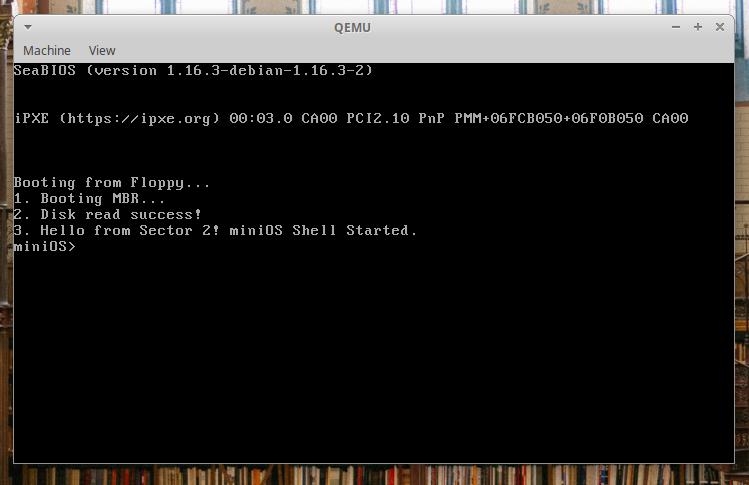
msg_welcome   db '3. Hello from Sector 2! miniOS Shell Started.', 13, 10, 0
msg_prompt    db 'miniOS> ', 0
msg_unknown   db 'Unknown command! Type "help".', 13, 10, 0
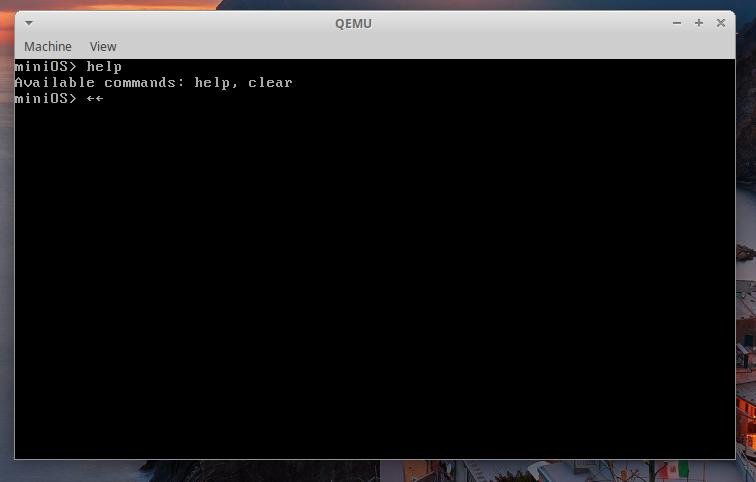
msg_help_text db 'Available commands: help, clear', 13, 10, 0

; 비교할 명령어 기준 문자열 (상수)
; Reference command strings for comparison (Constants)
cmd_help      db 'help', 0
cmd_clear     db 'clear', 0

; 사용자가 입력한 글자들을 담을 '빈 변수 공간' (버퍼)
; 'Empty variable space' to hold characters entered by the user (Buffer)
; 16바이트 크기만큼 공간을 미리 확보해 둡니다.
; Pre-allocate space of 16 bytes.
cmd_buffer    times 16 db 0

; 512바이트 크기 맞추기
; Fill up to 512 bytes
times 512 - ($ - $$) db 0
👉️ 코드설명(sector2.asm)
✔️ boot.asm 코드설명은 이전과 같아서 생략합니다.
I will skip the explanation of the boot.asm code, as it is the same as before.
✔️ 메세지 출력등 이전과 구조같은 부분의 설명은 생략합니다.
Explanations regarding aspects where the structure remains the same as before—such as message output—are omitted.
✔️ 저장할 목적지 주소 지정(prompt:)
Specify destination address to save (prompt:)
— DI (Destination Index) 레지스터는 CPU가 메모리에 데이터를 ‘저장(기록)’할 때 주로 사용하는 대표적인 포인터(화살표) 레지스터입니다.
The DI (Destination Index) register is a representative pointer register primarily used by the CPU when storing (writing) data to memory.
— cmd_buffer:
출발점(0x8000)에서 코드 길이만큼 뒤로 떨어진 버퍼 전용 방 번호(실제 메모리 주소)입니다.
This is the buffer-specific room number (actual memory address) located a distance equal to the code length behind the starting point (0x8000).
— 아래에서 mov [di], al 이렇게 사용합니다.
Below, it is used like this: mov [di], al.
mov di, cmd_buffer✔️ 입력한 글자 수 세는 카운터
Counter that counts the number of characters entered
mov cx, 0 ✔️ 키보드 입력을 한 글자씩 받는 루프(key_loop:)
A loop that accepts keyboard input one character at a time (key_loop:)
— 키보드 입력 읽기 기능 선택 (바이오스 서비스 인터럽트)
Select Keyboard Input Read Function (BIOS Service Interrupt)
mov ah, 0x00— 인터럽트 실행
Interrupt execution
— AH = 0x00 정보를 가지고 BIOS 키보드 인터럽트를 최종 호출합니다.
Finally, the BIOS keyboard interrupt is called with AH = 0x00.
— 화면 출력(int 0x10), 디스크 읽기(int 0x13), 키보드 입력(int 0x16)
Screen output (int 0x10), disk read (int 0x13), keyboard input (int 0x16)
— 사용자입력을 받기 위해 블로킹 상태가 됩니다.
It enters a blocking state to receive user input.
int 0x16— 엔터키가 입력되면 check_command라벨을 실행 합니다.
When the Enter key is pressed, the check_command label is executed.
    cmp al, 13
    je check_command
— 백스페이스 키를 입력시 backspace라벨을 실행합니다.
Pressing the Backspace key executes the ‘backspace’ label.
    cmp al, 8
    je backspace
— 버퍼 오버플로우 방지 기능 입니다.
This is a buffer overflow prevention feature.
— 사용자가 키보드를 한 글자씩 칠 때마다 inc cx 명령어를 통해 현재 버퍼에 쌓인 글자 수를 기억하고 있습니다.
Each time the user types a character, the inc cx instruction tracks the number of characters accumulated in the current buffer.
— cmp (Compare) 명령어를 통해 “현재 글자 수(CX)가 15와 같은지” 비교합니다.
The cmp (Compare) instruction is used to compare whether the current character count (CX) is equal to 15.
— cmd_buffer의 크기는 16바이트이며 마지막에 종료표시 신호 0이들어가므로 글자수를 15바이트까지로 제한합니다.
The size of cmd_buffer is 16 bytes; since a null terminator (0) is placed at the end, the character count is limited to 15 bytes.
— 15자를 초과하면 key_loop라벨로 점프합니다.
If it exceeds 15 characters, it jumps to the key_loop label.
— 추가 입력하면 화면상에는 계속 같은자리에 커서가 있고 변화가 없습니다.
If you enter more input, the cursor remains in the same position on the screen, and there is no change.
    cmp cx, 15
    je key_loop
— 화면에 글자를 출력합니다.
It outputs text to the screen.
    mov ah, 0x0e
    int 0x10
— 사용자가 누른 글자가 저장된 al레지스터의 내용을 cmd_buffer에 저장합니다.
The contents of the AL register, which holds the character pressed by the user, are stored in cmd_buffer.
mov [di], al— 다음 저장 위치로 이동합니다.
Navigate to the following save location.
— inc (Increment): 값을 1 증가시키는 명령어입니다.
inc (Increment): An instruction that increments a value by 1.
— DI 레지스터에 들어있는 메모리 주소 숫자를 1 늘려줍니다. (예: 0x8064 ➔ 0x8065)
Increments the memory address value stored in the DI register by 1. (e.g., 0x8064 ➔ 0x8065)
— 주소를 1 늘려주어야 다음번에 사용자가 새로운 키를 누를 때, 방금 쓴 글자 위에 겹쳐 쓰지 않고 그 바로 옆 칸(다음 바이트)에 새 글자를 저장할 수 있기 때문입니다.
This is because the address must be incremented by 1 so that the next time the user presses a key, the new character can be stored in the adjacent cell (the next byte) instead of overwriting the character just written.
inc di — 글자 수를 세는 카운터를 증가시킵니다.
Increments the character count.
inc cx— 여기까지가 실제 메인 로직입니다.
This covers the actual main logic.
✔️ 백스페이스 처리루틴(backspace:)
Backspace handling routine (backspace:)
— 입력된 글자가 0인지 확인합니다. 입력된 글자가 없는데 백스페이스 키를 누른경우 key_loop라벨(키보드 입력받기)로 점프합니다.
It checks whether the input string is empty. If the Backspace key is pressed when there is no input, it jumps to the key_loop label (to receive keyboard input).
cmp cx, 0
je key_loop
— 화면에서 글자를 지우는 부분입니다.
This is the part where text is erased from the screen.
— 컴퓨터 내부의 화면 제어 시스템(BIOS)에는 ‘방금 쓴 글자를 지우는 편리한 삭제 기능’이 따로 없습니다. 오직 새로운 글자를 위에 덮어쓰는 기능만 있습니다.
The screen control system (BIOS) inside the computer does not have a dedicated, convenient delete function for erasing the characters just written; it only has a function to overwrite them with new characters.
— 따라서 글자를 지우려면 “지우고 싶은 위치로 커서를 옮긴 뒤, ‘공백(스페이스바)’ 문자를 강제로 덮어써서 글자를 안 보이게 가립니다.
Therefore, to erase a character, move the cursor to the desired position and overwrite the character with a space (using the spacebar) to hide it from view.
— 바이오스 텔레그래프 기능을 선택합니다.
Select the BIOS Telegraph function.
mov ah, 0x0e— al레지스터에 8을 대입합니다.ASCII 코드 8번은 ‘백스페이스(Backspace)’ 문자입니다.
Assign 8 to the AL register. ASCII code 8 represents the ‘Backspace’ character.
— int 0x10로 BIOS 비디오 인터럽트를 실행합니다.(기능 실행)
Executes the BIOS video interrupt using int 0x10 (executes the function).
mov al, 8
int 0x10
— 현재위치를 공백으로 바꿉니다.
Changes the current location to a blank space.
 mov al, ' '
 int 0x10
— 왼쪽으로 커서를 한칸 옮깁니다.
Moves the cursor one space to the left.
mov al, 8
int 0x10
— 버퍼메모리(di)를 1 감소하고, 글자수 카운터를 1감소합니다.
Decrement the buffer memory (di) by 1 and decrement the character count counter by 1.
— key_loop라벨로 점프합니다.
Jump to the key_loop label.
 dec di
 dec cx
 jmp key_loop
✔️ 엔터를 쳤을 때 입력된 명령어를 비교하는 곳
The place where the entered command is compared when the Enter key is pressed.
— 현재 위치에 0을 입력해서 명령어의 끝임을 표시합니다.
Enter 0 at the current position to indicate the end of the command.
— DI 주소가 가리키는 곳에 딱 1바이트 크기만큼만 0을 대입하라는 크기 지정 키워드 입니다.
This is a size-specifying keyword that instructs to assign a zero value of exactly one byte in size to the location pointed to by the DI register.
byte: 1바이트 크기 (8비트) / 1-byte size (8 bits) ➔ mov byte [di],
word: 2바이트 크기 (16비트) / 2-byte size (16-bit) ➔ mov word [di], 0
dword: 4바이트 크기 / 4-byte size (32비트/32 bit, Double Word) ➔ mov dword [di], 0
mov byte [di], 0— 줄 바꿈을 실행합니다.
Performs a line break.
call print_newline— 아래에 print_newline:라벨이 있습니다.
There is a print_newline: label below.
— mov ah, 0x0e :
텔레타이프 방식 출력을 설정합니다.
Configures teletype-style output.
— mov al, 13 & int 0x10
현재 위치한 줄의 맨 왼쪽(첫 번째 칸)으로 이동 합니다.(케리지리턴,\r)
Moves to the leftmost position (the first cell) of the current line (Carriage Return, \r).
–mov al, 10 & int 0x10 :
커서를 한 줄 아래로 이동시킵니다.(라인피드,\n)
Moves the cursor down one line (Line Feed, \n).
— ref
이 함수를 호출했던 메인 로직의 자리로 이동합니다.
Navigate to the location in the main logic where this function was called.
print_newline:
    mov ah, 0x0e
    mov al, 13
    int 0x10
    mov al, 10
    int 0x10
    ret
👉🏻 스크린 샷 / ScreenShot
✅ 나머지 설명은 다음 포스트에서이어가겠습니다.
I will continue with the rest of the explanation in the next post.


