👉🏻 이 부분에서는 웹사이트 로그인 부분의 구조를 살펴봅니다.
In this section, we examine the structure of the website’s login area.
👉🏻 이번 파트에서는 웹사이트 부분의 로그인 구조만 살펴보고 외부앱 부분의 로그인은 다음 포스트에서 살펴봅니다.
In this part, we will look only at the login structure for the website; the login process for external apps will be covered in the next post.
📁 외부 앱 및 로컬 UI부분 인증 부분 구조
Authentication-related structure for external apps and the local UI
app/api/auth/
  ├── signup/route.ts      -> 웹사이트 회원가입 / website signup
  ├── login/route.ts       -> 웹사이트 로그인 / website login
  ├── logout/route.ts      -> 로그아웃 / logout
  ├── refresh/route.ts     -> refresh_token으로 access token재발급
  |                        -> Reissuing an access token using a refresh token
  └── me/route.ts          -> 로그인 체크 / Login check

app/auth/
  ├── signup/page.tsx      -> 회원가입 UI / Sign-up UI
  └── login/page.tsx       -> 로그인 UI / Login UI

oauth/authorize/route.ts   -> OAuth 동의 화면 / OAuth consent screen
oauth/token/route.ts       -> access_token 발급 / Issuance of an access token

lib/auth.ts                -> 실제 유저 검증 로직 (getUser, 세션 확인)
                           -> Actual user verification logic (getUser, session check)
📁 웹사이트 로그인 / Website Login
✔️ 라우트 / route
https://aloy-horizon.duckdns.org/auth/login✔️ 로그인 체크 함수 / Login check function
  useEffect(() => {
    async function checkLogin() {
      try {
        const res = await fetch('/api/auth/me', { credentials: 'include' });
        if (res.ok) {
          const data = await res.json();
          if (data.username) {
            setCurrentUser(data.username);
          }
        }
      } catch {}
      setLoading(false);
    }
    checkLogin();
  }, []);
1)라우트 실행시 한번 실행됩니다.
It is executed once when the route is triggered.
2)/api/auth/me 라우트를 실행해서(쿠키포함 전송 -> credentials :’include’) 엑세스 토큰을 업데이트합니다.
Execute the /api/auth/me route (sending it with cookies—i.e., credentials: 'include') to update the access token.
const res = await fetch('/api/auth/me', { credentials: 'include' });3)/api/auth/me 라우트에서 리턴되는 username을 currentUser변수에 설정합니다.
Set the username returned from the /api/auth/me route to the currentUser variable.
... ...
 const [currentUser, setCurrentUser] = useState('');
... ...
       if (res.ok) {
          const data = await res.json();
          if (data.username) {
            setCurrentUser(data.username);
          }
        }
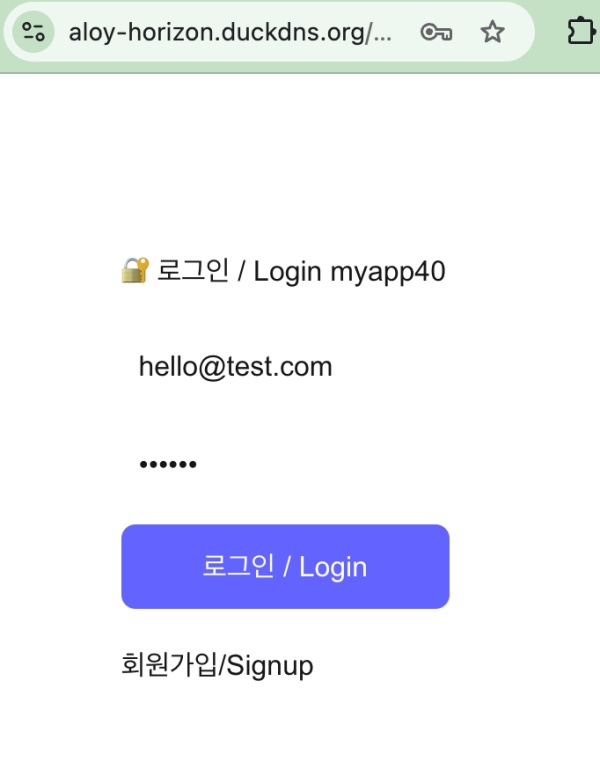
4)currentUser가 없으면 즉 기존에 로그인되어 있지 않은 경우 아래 UI에서 로그인 폼을 보여줍니다.
If currentUser is absent—meaning no user is currently logged in—the UI below displays a login form.
      {currentUser ? (
        <>
          <p style={{ color: 'green', fontSize: 18 }}>현재 로그인: <strong>{currentUser}</strong></p>
          {next && next !== '/' ? (
            <>
              <p>승인 페이지로 이동해야 합니다 / You need to go to the approval page.</p>
              <button
                onClick={() => { window.location.href = next; }}
                style={{ marginTop: 20, padding: 12, width: '100%', background: '#6364ff', color: 'white', border: 0, borderRadius: 8, fontSize: 16 }}
              >
                🔐 승인 페이지로 가기 / Go to Approval Page
              </button>
            </>
          ) : (
            <p>이미 로그인됨 / Already logged in</p>
          )}
          <button
            onClick={handleLogout}
            style={{ marginTop: 20, padding: 12, width: '100%', background: '#ff4444', color: 'white', border: 0, borderRadius: 8, fontSize: 16 }}
          >
            로그아웃 / Log out
          </button>
          <p style={{ marginTop: 20 }}><a href="/">홈으로 가기 / Go to Home</a></p>
        </>
      ) : ( ... )}
✔️ 로그인 함수 / Login function
async function handleLogin(e: React.FormEvent) {
    e.preventDefault();
    setError('');

    try {
      const res = await fetch('/api/auth/login', {
        method: 'POST',
        headers: { 'Content-Type': 'application/json' },
        credentials: 'include',
        body: JSON.stringify({ email: loginId, username: loginId, password })
      });

      const data = await res.json();
      if (!res.ok) {
        setError(data.error || '로그인 실패/Login failed');
        return;
      }

      localStorage.setItem('username', data.username || loginId);

      console.log('✅ 로그인 성공 / login success next:', next);

      // - router.push 대신 window.location.href사용(렌더링 딜레이 때문에)
      //  Use window.location.href instead of router.push (due to rendering delays).
      if (next && next !== '/') {
        if (next.startsWith('http')) {
          window.location.href = next;
        } else {
          window.location.href = next;
        }
      } else {
        window.location.href = '/';
      }
    } catch (err) {
      setError('네트워크 오류 / Network error');
    }
  }
1)/api/auth/login 라우트로 로그인 폼에서 입력된 값을 전송해서 로그인을 진행합니다.
Log in by sending the values entered in the login form to the /api/auth/login route.
      const res = await fetch('/api/auth/login', {
        method: 'POST',
        headers: { 'Content-Type': 'application/json' },
        credentials: 'include',
        body: JSON.stringify({ email: loginId, username: loginId, password })
      });
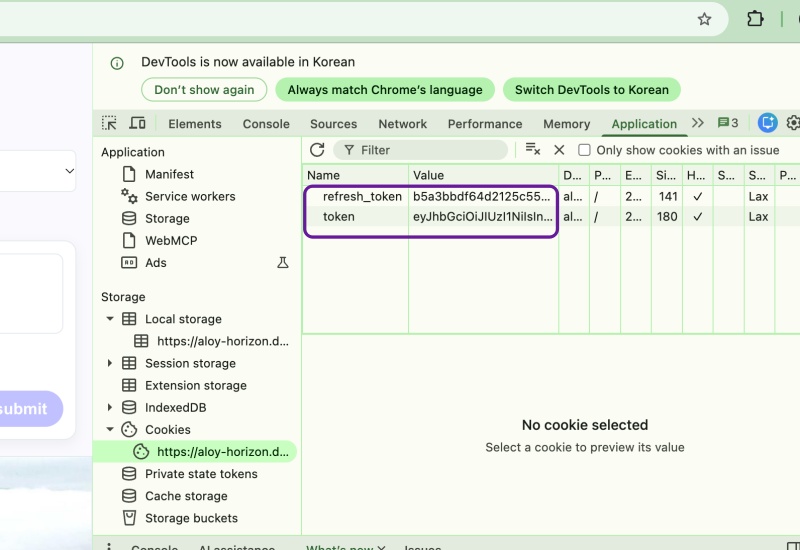
A.app/api/auth/login/route.ts 라우트에서 로그인 정보가 일치하면쿠키에 토큰을 저장합니다.
In the app/api/auth/login/route.ts route, if the login credentials match, the token is stored in a cookie.
— 쿠키에 저장될 토큰은 엑세스토큰과 리프레시토큰입니다.
The tokens to be stored in the cookie are the access token and the refresh token.
   // ✅ Access Token - 15분 - 모든 경로에서 사용 / Use for all routes
    res.cookies.set('token', accessToken, {
      httpOnly: true, // ✅ true - JS에서 못 읽음 XSS 방어 / XSS protection: Unreadable by JS
      secure: IS_PROD, // only https
      sameSite: 'lax',//'lax', // 다른 사이트에서 POST요청시 쿠키 안보냄 / Cookies are not sent during POST requests from other sites.
      maxAge: 60*15, // 15분 / 15minute
      path: '/'
    });

    // ✅ Refresh Token - 7일! - /api/auth/refresh 에서만 사용
    // Refresh Token - 7 days! - Used only at /api/auth/refresh
    res.cookies.set('refresh_token', refreshToken, {
      httpOnly: true,
      secure: IS_PROD, // only https
      sameSite: 'lax',//'lax', // 다른 사이트에서 POST요청시 쿠키 안보냄 / Cookies are not sent during POST requests from other sites.
      maxAge: 60*60*24*7, // 7일 / 7days
      path: '/'
    });
2)로그인이 성공하면 사용자 이름을 브라우저 로컬 스토리지에 저장합니다.
Upon successful login, the username is saved to the browser’s local storage.
const data = await res.json();
... ...
localStorage.setItem('username', data.username || loginId);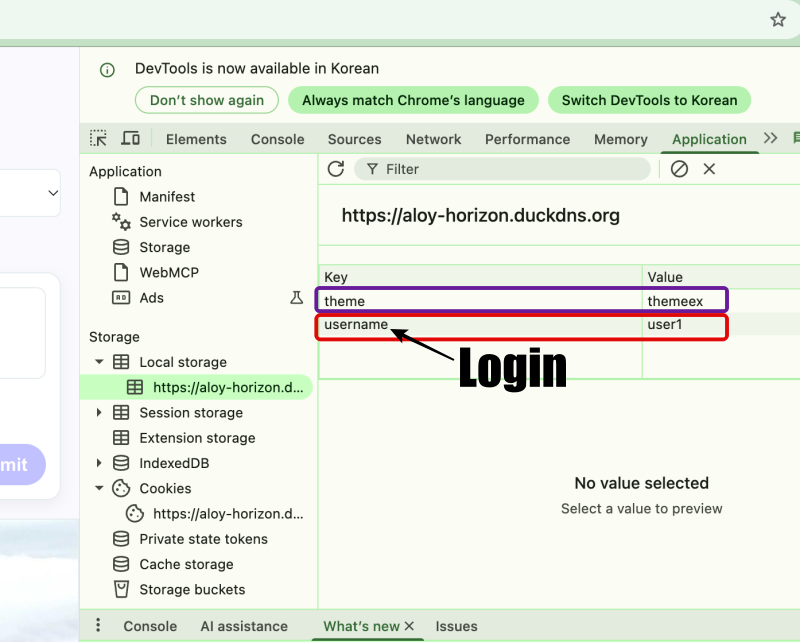
✔️ 로그아웃 함수 / Logout function
  async function handleLogout() {
    await fetch('/api/auth/logout', { method: 'POST', credentials: 'include' });
    localStorage.removeItem('token');
    localStorage.removeItem('username');
    setCurrentUser('');
    window.location.href = '/auth/login';
  }
1)/api/auth/logout라우트를 실행시켜서 쿠키와 데이터베이스의 테이블에서 로그인한 정보를 삭제합니다.
Execute the /api/auth/logout route to remove login information from both the cookies and the database table.
1.데이터베이스에서 삭제 / Delete from database
- app/api/auth/logout/route.ts
deleteSessionByRefreshToken(refreshToken);

- lib/auth.ts
export function deleteSessionByRefreshToken(refreshToken: string) {
  return db.prepare('DELETE FROM sessions WHERE refresh_token =?').run(refreshToken);
}

- app/api/auth/logout/route.ts
 db.prepare('DELETE FROM oauth_tokens WHERE access_token =?').run(decodeURIComponent(tokenMatch[1]));

2.토큰 초기화 / Token Initialization
- app/api/auth/logout/route.ts
  res.cookies.set('token', '', { maxAge: 0, path: '/' });
  res.cookies.set('refresh_token', '', { maxAge: 0, path: '/' });
A.sessions테이블은 로컬 UI용으로 사용되고 oauth_tokens는 외부앱 용으로 사용됩니다.
The sessions table is used for the local UI, while oauth_tokens is used for external apps.
2)fetch가 끝나면 로컬스토리지에서 username을 삭제하고 currentUser변수를 초기화 합니다.
Once the fetch operation is complete, remove the username from local storage and reset the currentUser variable.
    localStorage.removeItem('token');
    localStorage.removeItem('username');
    setCurrentUser('');
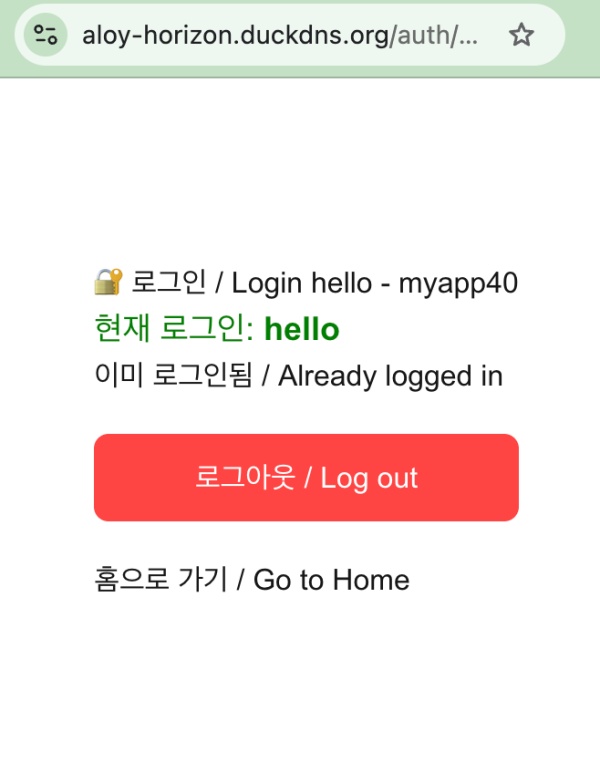
3)로그아웃이 완료되면 /auth/login(https://aloy-horizon.duckdns.org/auth/login) 라우트를 실행 시켜서 로그인정보 입력폼 UI를 보여줍니다.
Once logout is complete, the /auth/login (https://aloy-horizon.duckdns.org/auth/login) route is triggered to display the login form UI.
{currentUser ? (
... ...
) : (
        <>
          {next && next !== '/' && (
            <p style={{ background: '#f5f5ff', padding: 10, borderRadius: 5, fontSize: 13 }}>
              로그인 후 <code>{next.substring(0, 60)}...</code>로 이동!
            </p>
          )}
          <form onSubmit={handleLogin} style={{ display: 'flex', flexDirection: 'column', gap: 12, marginTop: 20 }}>
            <input placeholder="email or username" value={loginId} onChange={e => setLoginId(e.target.value)} style={{ padding: 10, fontSize: 16 }} required />
            <input type="password" placeholder="password" value={password} onChange={e => setPassword(e.target.value)} style={{ padding: 10, fontSize: 16 }} required />
            {error && <p style={{ color: 'red' }}>{error}</p>}
            <button type="submit" style={{ padding: 12, fontSize: 16, background: '#6364ff', color: 'white', border: 0, borderRadius: 8 }}>
              로그인 / Login
            </button>
          </form>
          <p style={{ marginTop: 20 }}><a href="/auth/signup">회원가입/Signup</a></p>
        </>
      )}
✔️ 페이지이동 / Navigate to page
... ...
const next = searchParams.get('next') || '/';
... ...
     if (next && next !== '/') {
        if (next.startsWith('http')) {
          window.location.href = next;
        } else {
          window.location.href = next;
        }
      } else {
        // ✅ myapp61+
        // 지금은 proxy.ts에 next설정이 업어서 무조건 '/'라우트 실행됨
        // Currently, there is no 'next' configuration in proxy.ts, so the '/' route is always executed.
        window.location.href = '/';
      }
1)지금은 proxy.ts부분에 next설정이 없어서 로그인 완료후 무조건 ‘/’라우트가 실행됩니다.
Currently, there is no next configuration in proxy.ts, so the / route is always executed after a successful login.
마태복음 21장 22절 / Matthew 21: 22
“너희가 기도할 때에 무엇이든지 믿고 구하는 것은 다 받으리라 하시니라”
“And everything you ask in prayer, believing, you will receive.”


