👉🏻 회원가입 및 로그인과 관련된 기능입니다.
These are features related to sign-up and login.
👉🏻 myapp40에서는 기존 로그인 보안을 업그레이드합니다.
myapp40 is upgrading its existing login security.
👉🏻 기존 access token외에 refresh token을 추가하고 session 테이블에 저장합니다.
In addition to the existing access token, a refresh token is added and stored in the session table.
👉🏻 access token은 15분 refresh token은 7일로 설정하고 로그인하면 access token과 refresh token을 발급하고 session 테이블에 저장합니다.
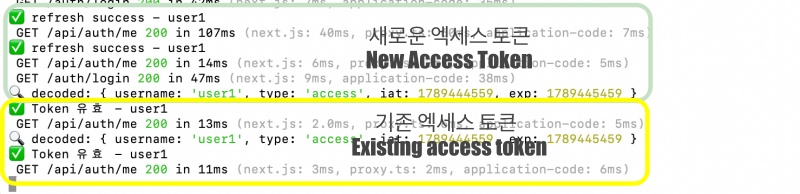
👉🏻 로그인한 상태에서 access token이 만료되면(15분) session테이블에 refresh token(7일)이 있는지 확인하고 access token을 재발급합니다.
If the access token expires (after 15 minutes) while logged in, the system checks the session table for a refresh token (valid for 7 days) and issues a new access token.
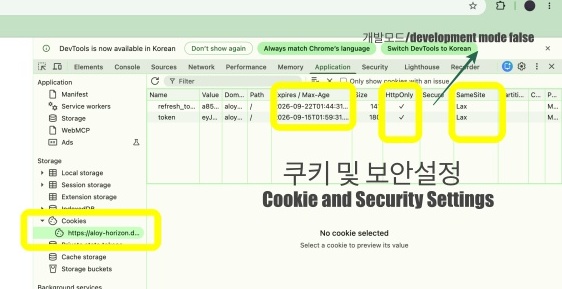
👉🏻 자바스크립트에서는 쿠키를 읽을 수 없도록 설정하고(httpOnly: true) 프로덕션모드에서 https만 허용하고(secure: IS_PROD) 다른 사이트에서 글쓰기를 막는 설정을 추가합니다.(sameSite: ‘lax’)
In JavaScript, configure settings to prevent cookies from being read (httpOnly: true), allow only HTTPS in production mode (secure: IS_PROD), and add a setting to block write operations from other sites (sameSite: 'lax').
👉🏻 전체 코드는 깃허브에서 확인 할 수 있습니다.
You can find the full code on GitHub.
https://github.com/gideonslife01/flm-nextjs
📁 전체 프로젝트 구조 / Overall Project Structure
myapp project/
├── app/  (Next.js App Router)
│   ├── .well-known/webfinger/route.ts  -> webfinger
│   ├── api/follow/route.ts    -> Follow API(temporary)
│   ├── api/announce/route.ts  -> Boost(Announcement)
│   ├── api/like/route.ts.     -> Like API
│   ├── api/posts/route.ts     -> Writing API
│   ├── api/timeline/route.ts  -> Timeline API
│   ├── api/v1/instance/route.ts -> auth
│   ├── api/v1/apps/route.ts.    -> auth
│   ├── api/v1/accounts/verify_credentials/route.ts -> auth
│   ├── api/v1/statuses/route.ts -> Write Post
│   ├── api/v1/timelines/home/route.ts -> timeline
│   ├── oauth/authorize/route.ts -> auth
│   ├── oauth/token/route.ts -> auth
│   ├── api/v1/search/home/route.ts -> search
│   ├── api/v2/search/home/route.ts -> search
│   ├── api/v1/accounts/[id]/followers/route.ts -> followers
│   ├── api/v1/accounts/[id]/following/route.ts -> following
│   ├── api/auth/signup/route.ts        -> Signup
│   ├── api/auth/login/route.ts         -> Login
│   ├── api/auth/logout/route.ts        -> Logout
│   ├── api/auth/refresh/route.ts       -> Refresh Token
│   ├── api/auth/me/route.tsx           -> Login Check
│   ├── auth/signup/page.tsx            -> Signup UI
│   ├── auth/signup/page.tsx            -> Login UI
│   ├── users/[username]/
│   │   ├── statuses/[id]/route.ts -> Indivisual Post
│   │   ├── route.ts               -> Acotr Information
│   │   ├── followers/route.ts     -> Followers List
│   │   ├── following/route.ts     -> Following List
│   │   ├── inbox/route.ts         -> Inbox
│   │   └── outbox/route.ts        -> outbox
│   ├── usersui/[username]/
│   │   ├── page.tsx               -> Timeline UI
│   │   └── _components/themes/
│   │       ├── themeex/ThemeexTheme.tsx   -> Example Theme
│   │       ├── pinafore/PinaforeTheme.tsx -> Theme 1
│   │       ├── mastodon/MastodonTheme.tsx -> Theme 2
│   │       └── minimal/MinimaltTheme.tsx  -> Theme 3
│   ├── layout.tsx, page.tsx, globals.css
│   └── favicon.ico
├── lib/
│   ├── theme.tsx              -> Theme Provider
│   ├── watchThemes.ts         -> Check real-time theme changes
│   ├── auth.ts                -> Authentication, User Management
│   ├── ap.ts                  -> Follow,Undo,Create,Likes,Announce
│   └── db.ts                  -> DB connection
├── data/
│   ├── keys/userIDs/          -> private.pem, public.pem(New)
│   └── keys/                  -> private.pem, public.pem(legacy)
├── data.sqlite                -> Database(1/3)
├── data.sqlite-wal            -> Database(2/3)
├── data.sqlite-shm            -> Database(3/3)
├── Caddyfile                  -> https
├── instrumentation.ts         -> Background Server
└── package.json
📁 프로젝트 시작 / Project Start
📁 테이블 추가 / Add Table
  CREATE TABLE IF NOT EXISTS sessions (
    id TEXT PRIMARY KEY,
    username TEXT NOT NULL,
    refresh_token TEXT NOT NULL UNIQUE,
    access_token TEXT,
    user_agent TEXT,
    ip TEXT,
    created_at DATETIME DEFAULT CURRENT_TIMESTAMP,
    expires_at DATETIME NOT NULL,
    last_used_at DATETIME DEFAULT CURRENT_TIMESTAMP
  );

  CREATE INDEX IF NOT EXISTS idx_sessions_refresh ON sessions(refresh_token);
  CREATE INDEX IF NOT EXISTS idx_sessions_username ON sessions(username);
  CREATE INDEX idx_sessions_expires ON sessions(expires_at);
📁 session테이블 필드 설명 / Description of session table fields
— 기존 oauth_tokens테이블은 pinafore등 외부 앱용
The existing oauth_tokens table is for external apps such as pinafore.
— session테이블은 로컬 전용
The session table is local-only
| 컬럼 / Column | 값 예시 / Value Example | 설명 / Explanation |
|---|---|---|
id | a1b2c3d4-... | 세션 고유ID Session Unique ID |
username | user1 | 로그인한 사람 Logged-in user |
refresh_token | 9f8e7d... (128글자!) | 7일짜리 토큰- DB에서 직접 확인용 7-day token – for direct verification in the DB |
access_token | eyJ... (JWT) | 15분짜리 토큰 – 지금 사용하고 있는 토큰 15-minute token – the token currently in use |
user_agent | Mozilla/5.0... Chrome | 크롬에서 로그인했는지 Pinafore!에서!했는지 확인용 To check if you logged in on Chrome or on Pinafore! |
ip | 1.2.3.4 | 어디서 로그인 했는지 (해킹 확인용) Where the login occurred (to check for hacking) |
expires_at | 2026-09-22 10:00:00 | 만료 시간은 7일 후 The expiration time is 7 days later |
📁 코드 수정 / Code Modification
✔️ lib/db.ts
— 데이터베이스 초기화 / Initialize Database
db.exec(`
... ...
  -- myapp40 ✅ Session
    CREATE TABLE IF NOT EXISTS sessions (
    id TEXT PRIMARY KEY,
    username TEXT NOT NULL,
    refresh_token TEXT NOT NULL UNIQUE,
    access_token TEXT,
    user_agent TEXT,
    ip TEXT,
    created_at DATETIME DEFAULT CURRENT_TIMESTAMP,
    expires_at DATETIME NOT NULL,
    last_used_at DATETIME DEFAULT CURRENT_TIMESTAMP
  );

`);

db.exec(`
... ...
  -- session -- ✅ myapp40
  CREATE INDEX IF NOT EXISTS idx_sessions_refresh ON sessions(refresh_token);
  CREATE INDEX IF NOT EXISTS idx_sessions_username ON sessions(username);
  CREATE INDEX IF NOT EXISTS idx_sessions_expires ON sessions(expires_at);
`);
✔️ lib/auth.ts
// ✅ myapp40 - 15분짜리 Access Token / 15-minute access token
export function createAccessToken(username: string) {
  return jwt.sign({ username, type: 'access' }, JWT_SECRET, { expiresIn: '15m' });
}

// ✅ myapp40 - 7일짜리 Refresh Token (랜덤 문자열 + DB 저장용)
// 7-day Refresh Token (random string + for DB storage)
export function createRefreshToken() {
  return crypto.randomBytes(64).toString('hex'); // 128글자 랜덤 / 128-character random string
}

// - 기존 호환용 (Pinafore OAuth는 아직 7일짜리 써도 됨)
export function createToken(username: string) {
  return jwt.sign({ username }, JWT_SECRET, { expiresIn: '7d' });
}

... ...

// ✅ myapp40 - sessions 테이블에 저장 / Save to the sessions table.
export function createSession(username: string, userAgent: string | null, ip: string | null) {
  const id = crypto.randomUUID();
  const refreshToken = createRefreshToken();
  const accessToken = createAccessToken(username);

  db.prepare(`
    INSERT INTO sessions (id, username, refresh_token, access_token, user_agent, ip, expires_at)
    VALUES (?,?,?,?,?,?, datetime('now', '+7 days'))
  `).run(id, username, refreshToken, accessToken, userAgent, ip);

  return { id, refreshToken, accessToken };
}
✔️ app/api/auth/login/route.ts
— 이 부분에서 보안설정 / Security settings in this section
Security settings in this section
    // ✅ Access Token - 15분 - 모든 경로에서 사용 / Use for all routes
    res.cookies.set('token', accessToken, {
      httpOnly: true, // ✅ true - JS에서 못 읽음 XSS 방어 / XSS protection: Unreadable by JS
      secure: IS_PROD, // only https
      sameSite: 'lax', // 다른 사이트에서 POST요청시 쿠키 안보냄 / Cookies are not sent during POST requests from other sites.
      maxAge: 60*15, // 15분 / 15minute
      path: '/'
    });

    // ✅ Refresh Token - 7일! - /api/auth/refresh 에서만 사용
    res.cookies.set('refresh_token', refreshToken, {
      httpOnly: true,
      secure: IS_PROD,
      sameSite: 'lax',
      maxAge: 60*60*24*7, // 7일 / 7days
      path: '/'
    });
✔️ app/api/auth/refresh/route.ts – 라우트 추가 / Add route
export async function POST(req: Request) {
... ...
  if (!result) {
    const res = NextResponse.json({ error: 'refresh_token 만료 다시 로그인 / Refresh token expired; please log in again.' }, { status: 401 });
    res.cookies.set('token', '', { maxAge: 0, path: '/' });
    res.cookies.set('refresh_token', '', { maxAge: 0, path: '/' });
    return res;
  }
... ...
}
✔️ app/api/auth/logout/route.ts
export async function POST(req: Request) {
... ...
  // oauth_tokens도 삭제 (Pinafore 토큰)
  // Delete oauth_tokens as well (Pinafore tokens)
  const tokenMatch = cookie.match(/token=([^;]+)/);
  if (tokenMatch) {
    try {
      const db = (await import('@/lib/db')).default;
      db.prepare('DELETE FROM oauth_tokens WHERE access_token =?').run(decodeURIComponent(tokenMatch[1]));
    } catch {}
  }
... ...
}
✔️ app/auth/login/page.tsx
— 로그인 적용 / Apply login
— useEffect에서 checkLogin으로 로그인 확인
Check login status using checkLogin within useEffect.
— 로그인되어 있으면 currentUser 셋팅
Set currentUser if logged in.
— currentUser변수 값의 존재 여부에 따라 보여줄 페이지 설정
Configure the page to be displayed based on the presence of the currentUser variable.
'use client';
import { useState, useEffect, Suspense } from 'react';
import { useRouter, useSearchParams } from 'next/navigation';

function LoginForm() {
  const [loginId, setLoginId] = useState('');
  const [password, setPassword] = useState('');
  const [error, setError] = useState('');
  const [currentUser, setCurrentUser] = useState('');
  const [loading, setLoading] = useState(true);
  const router = useRouter();
  const searchParams = useSearchParams();
  const next = searchParams.get('next') || '/';

  useEffect(() => {
    async function checkLogin() {
      try {
        const res = await fetch('/api/auth/me', { credentials: 'include' });
        if (res.ok) {
          const data = await res.json();
          if (data.username) {
            setCurrentUser(data.username);
          }
        }
      } catch {}
      setLoading(false);
    }
    checkLogin();
  }, []);

... ...

 return (
    <div style={{ maxWidth: 400, margin: '80px auto', padding: 20 }}>
      <h1>🔐 로그인 / Login {currentUser ? `${currentUser} - ` : ''} myapp40</h1>

      {currentUser ? (
        <>
        <p style={{ color: 'green', fontSize: 18 }}>현재 로그인: <strong>{currentUser}</strong></p>

      ) : (

        <form onSubmit={handleLogin} style={{ display: 'flex', flexDirection: 'column', gap: 12, marginTop: 20 }}>

... ...

       </form>
      )}
... ...
}
✔️ app/api/auth/me/route.tsx – 라우트 추가 / Add route
// ✅ myapp40 -  app/api/auth/me/route.ts
import { NextResponse } from 'next/server';
import { verifyToken } from '@/lib/auth';

export async function GET(req: Request) {
  const cookie = req.headers.get('cookie') || '';
  const m = cookie.match(/token=([^;]+)/);

  if (!m) {
    return NextResponse.json({ error: 'Not logged in' }, { status: 401 });
  }

  const token = decodeURIComponent(m[1]);
  const decoded = verifyToken(token);

  if (!decoded?.username) {
    return NextResponse.json({ error: 'Token expired' }, { status: 401 });
  }

  return NextResponse.json({ ok: true, username: decoded.username });
}
✔️ middleware.ts
— 로그인하지않으면 페이지 차단기능 사용할 경우
If you use the page blocking function without logging in…
export function middleware(req: NextRequest) {
  const origin = req.headers.get('origin') || '';
  const path = req.nextUrl.pathname;
  const DOMAIN = process.env.DOMAIN;

  // ✅ 허용할 origin 목록!
  const allowedOrigins = [
    `https://${DOMAIN}`,
    `https://pinafore.social`,
    `http://localhost:3000`,
    `http://localhost:3001`
  ];
  const isAllowedOrigin = allowedOrigins.includes(origin) ||!origin;

  // // ===== 1. 로그인 체크 (페이지 보호) / Login check (page protection) =====

  // const token = req.cookies.get('token')?.value;
  // const refreshToken = req.cookies.get('refresh_token')?.value;

  // 로그인이 필요한 페이지 / Page requiring login
  // const protectedPaths = ['/admin', '/settings', '/oauth/authorize'];
  // const isProtected = protectedPaths.some(p => path.startsWith(p));

  // if (isProtected &&!token &&!refreshToken) {
  //   // 토큰 없으면 로그인 페이지로 / Redirect to the login page if there is no token.
  //   const loginUrl = new URL('/auth/login', req.url);
  //   loginUrl.searchParams.set('next', path);
  //   return NextResponse.redirect(loginUrl);
  // }

... }
📁 테스트 / Test
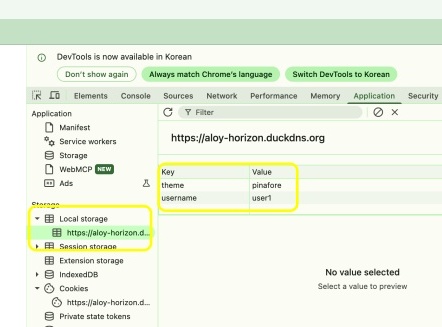
✔️ 쿠키 저장 및 보안설정 상태
Cookie storage and security settings status
— https://aloy-horizon.duckdns.org/auth/login 이 라우트에서 로그인이 완료되면 쿠키와 로컬스토리지에 저장된 토큰 및 아이디를 확인 할 수 있습니다.
Once login is completed at the route https://aloy-horizon.duckdns.org/auth/login, you can verify the tokens and IDs stored in cookies and local storage.
— cmd+option+I(macOS)로 확인 할 수 있습니다.
You can check it using Cmd+Option+I (macOS).
✔️ 서버로그 / Server Log
— 엑세스 토큰 만료시 새로운 엑세스 토큰을 발급합니다.
A new access token is issued when the access token expires.
요한복음 8장 32절 / John 8:32
“그리고 너희는 진리를 알게 될 것이며, 진리가 너희를 자유롭게 할 것이다.”
“Then you will know the truth ,and the truth will set you free”


