더 친절한 코틀린 앱프로그래밍 책에 있는 코드 입니다.
This is code from the Friendlier Kotlin App Programming book
함수 예제입니다.
This is an example of function.
이 코드는 뷰바인딩을 사용하지 않았습니다.
This code does not use view binding.
Test : compileSdk = 34 targetSdk = 34
MainActivity.kt
package com.example.funtion2

import android.os.Bundle
import android.widget.Button
import android.widget.TextView
import androidx.activity.enableEdgeToEdge
import androidx.appcompat.app.AppCompatActivity
import androidx.core.view.ViewCompat
import androidx.core.view.WindowInsetsCompat

class MainActivity : AppCompatActivity() {
    private lateinit var button: Button
    private lateinit var button2:Button
    private lateinit var button3:Button
    private lateinit var button4:Button
    private lateinit var button5:Button
    private lateinit var output1: TextView

    override fun onCreate(savedInstanceState: Bundle?) {
        super.onCreate(savedInstanceState)
        enableEdgeToEdge()
        setContentView(R.layout.activity_main)
        ViewCompat.setOnApplyWindowInsetsListener(findViewById(R.id.main)) { v, insets ->
            val systemBars = insets.getInsets(WindowInsetsCompat.Type.systemBars())
            v.setPadding(systemBars.left, systemBars.top, systemBars.right, systemBars.bottom)
            insets
        }

        button = findViewById(R.id.button)
        button2 = findViewById(R.id.button2)
        button3 = findViewById(R.id.button3)
        button4 = findViewById(R.id.button4)
        button5 = findViewById(R.id.button5)
        output1 = findViewById(R.id.output1)

        button.setOnClickListener() {

            val addFunc = { a: Int, b: Int -> a + b }
            val result = addFunc(10,10)
            output1.text = "결과result: $result"

        }
        button2.setOnClickListener {
            val addFunc = { a: Int, b: Int -> a + b }
            val result = calc(30, 10, addFunc)
            output1.text = "결과result: $result"

        }

        button3.setOnClickListener {
            // 함수를 리턴하는 함수
            // a function that returns a function
            val oper = getOperator("subtract")
            if(oper != null){
                val result = calc(30,10,oper)
                output1.text = "결과result: $result"

            }
        }
        button4.setOnClickListener {
            // 람다식의 다른 형태
            // Other forms of lambda expressions
            val multiply = { a:Int,b:Int -> a + b }
            val multiply2:( Int,Int)->Int = {a, b -> a + b}
            val multiply3:(Int,Int)->Int = {a, b -> a * b}

            val result = calc(30,10,multiply3)
            output1.text = "결과result: ${result}"
        }

        button5.setOnClickListener {
            val sum = fun(a:Int,b:Int):Int{
                var result = 0
                result = a + b
                return result
            }

            val result2 = sum(10,20)
            output1.text= "결과result:${result2}"


            //첫번쨰 형태
            // First form
            doAction(fun ():Int {
                println("전달된 함수 호출됨 Passed function called")
                return 10
            })

            //두번째 형태:간소화된 형태
            // second form
            doAction {
                println("전달된 함수 호출됨 Passed function called")
                10
            }

            // 세번쨰 형태
            // third form
            doAction {
                println("전달된 함수 호출됨 Passed function called")
                return@doAction 10
            }
        }

    }

    fun doAction(action:()->Int){
        println("doAction실행")
        val result = action()
    }

    fun show():Unit{
        println("show함수 호출됨")
    }

    fun getOperator(name: String): ((Int, Int) -> Int)? {
        var oper: ((Int, Int) -> Int)? = null

        if (name == "add") {
            oper = { a: Int, b: Int -> a + b }
        } else if (name == "subtract") {
            oper = { a:Int,b:Int -> a - b }
        }
        return oper
    }

    fun calc(first:Int,second:Int,oper:(Int,Int)->Int):Int{
        return oper(first,second)
    }

}
active_main.xml
-xml design
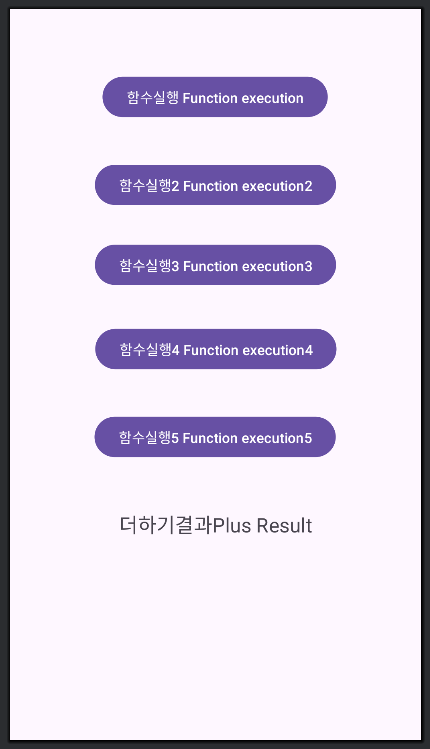
-xml code
<?xml version="1.0" encoding="utf-8"?>
<androidx.constraintlayout.widget.ConstraintLayout xmlns:android="http://schemas.android.com/apk/res/android"
    xmlns:app="http://schemas.android.com/apk/res-auto"
    xmlns:tools="http://schemas.android.com/tools"
    android:id="@+id/main"
    android:layout_width="match_parent"
    android:layout_height="match_parent"
    tools:context=".MainActivity">

    <TextView
        android:id="@+id/output1"
        android:layout_width="wrap_content"
        android:layout_height="wrap_content"
        android:layout_marginTop="48dp"
        android:text="더하기결과Plus Result"
        android:textSize="20sp"
        app:layout_constraintEnd_toEndOf="parent"
        app:layout_constraintStart_toStartOf="parent"
        app:layout_constraintTop_toBottomOf="@+id/button5" />

    <Button
        android:id="@+id/button"
        android:layout_width="wrap_content"
        android:layout_height="wrap_content"
        android:layout_marginTop="64dp"
        android:text="함수실행 Function execution"
        app:layout_constraintEnd_toEndOf="parent"
        app:layout_constraintHorizontal_bias="0.497"
        app:layout_constraintStart_toStartOf="parent"
        app:layout_constraintTop_toTopOf="parent" />

    <Button
        android:id="@+id/button2"
        android:layout_width="wrap_content"
        android:layout_height="wrap_content"
        android:layout_marginTop="40dp"
        android:text="함수실행2 Function execution2"
        app:layout_constraintEnd_toEndOf="parent"
        app:layout_constraintStart_toStartOf="parent"
        app:layout_constraintTop_toBottomOf="@+id/button" />

    <Button
        android:id="@+id/button3"
        android:layout_width="wrap_content"
        android:layout_height="wrap_content"
        android:layout_marginTop="32dp"
        android:text="함수실행3 Function execution3"
        app:layout_constraintEnd_toEndOf="parent"
        app:layout_constraintStart_toStartOf="parent"
        app:layout_constraintTop_toBottomOf="@+id/button2" />

    <Button
        android:id="@+id/button4"
        android:layout_width="wrap_content"
        android:layout_height="wrap_content"
        android:layout_marginTop="36dp"
        android:text="함수실행4 Function execution4"
        app:layout_constraintEnd_toEndOf="parent"
        app:layout_constraintHorizontal_bias="0.502"
        app:layout_constraintStart_toStartOf="parent"
        app:layout_constraintTop_toBottomOf="@+id/button3" />

    <Button
        android:id="@+id/button5"
        android:layout_width="wrap_content"
        android:layout_height="wrap_content"
        android:layout_marginTop="40dp"
        android:text="함수실행5 Function execution5"
        app:layout_constraintEnd_toEndOf="parent"
        app:layout_constraintHorizontal_bias="0.497"
        app:layout_constraintStart_toStartOf="parent"
        app:layout_constraintTop_toBottomOf="@+id/button4" />

</androidx.constraintlayout.widget.ConstraintLayout>


