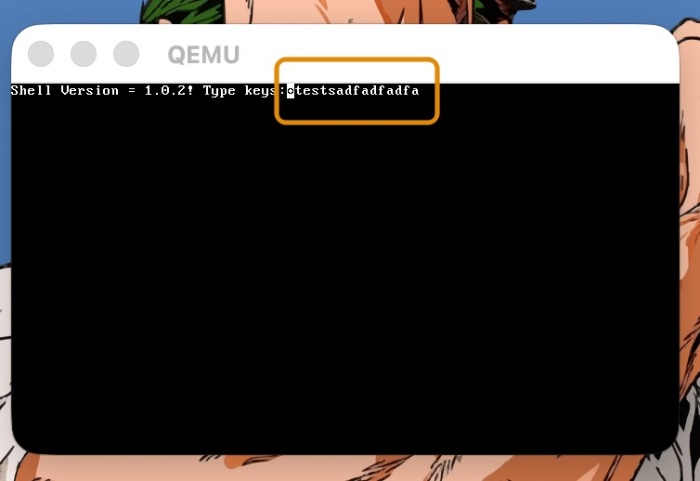
👉🏻 miniOS-Text-2에서는 키보드에 타이핑 하는 글자를 터미널에 표현합니다.
In miniOS-Text-2, the characters typed on the keyboard are displayed in the terminal.
👉🏻 기존의 어셈블러코드는 동일하고 kernel.c코드만 수정되었습니다.
The existing assembler code remains the same; only the kernel.c code has been modified.
📁 kernel.c
✔️ 데이터 타입 정의 / Data Type Definition
typedef unsigned char byte;
typedef unsigned short word;
1)byte
-1 바이트 크기의 데이터 타입(unsigned char)으로 정의
Defined as a 1-byte-sized data type (unsigned char)
-하드웨어에서 읽어오는 데이터나 포트 상태값을 담을 때 사용함.
Used for storing data read from hardware or the status values of ports.
2)word
-2바이트(16비트) 크기의 데이터 타입(unsigned short)으로 정의
Defined as a 2-byte (16-bit) data type (unsigned short)
-x86 아키텍처의 I/O 포트 주소 범위(0 ~ 65535)를 안전하게 담기 위해 사용함.
Used to safely accommodate the I/O port address range (0–65535) of the x86 architecture.
✔️ I/O 포트에서 1바이트를 읽어오는 함수
Read 1 byte from I/O port
static inline byte inb(word port) {
    byte ret;
    __asm__ __volatile__("inb %1, %0" : "=a"(ret) : "Nd"(port));
    return ret;
}
1)함수에 static 키워드가 붙어 있으면 이 파일 내부용으로 사용되는 함수라는 의미입니다. 그래서 다른 파일에서는 static 키워드가 붙은 함수를 사용할 수 없음.
When a function is marked with the static keyword, it means the function is intended for use only within that file. Consequently, such a function cannot be accessed from other files.
자바나 코틀린 같은 경우 static키워드는 클래스와 달리 컴파일 시점에 함수를 실행시켜서 메모리에 올리는 방식을 의미함.
In languages like Java or Kotlin, the static keyword signifies that a function is executed and loaded into memory at compile time, rather than being associated with an instance of a class.
클래스는 인스턴스가 생성될때 메모리에 함수를 실행방식.
A class functions by executing its methods in memory when an instance is created.
같은 static 키워드를 사용해도 c언어의 static의 개념과 자바,코틀린에서의 static의 개념은 다름.
Although the same static keyword is used, the concept of static in C differs from its concept in Java or Kotlin.
2)함수에 inline 키워드가 붙어 있으면, 다른 곳에서 이 함수를 호출할 때 점프(call)하지 말고, 이 함수의 내부 코드를 호출한 그 자리에 그대로 복사해서 붙여넣으라는 의미로 성능 손실을 없애는 최적화 기법입니다.
When a function is marked with the inline keyword, it serves as an optimization technique that eliminates performance overhead: instead of performing a jump (a function call) when the function is invoked elsewhere, the code inside the function is copied and pasted directly into the location where it is called.
1.일반점프 방식의 코드
// 메모리 주소 0x1000 번지 / memory address 0x1000
void say_hello() {
    print("안녕하세요/Hello!");
}

// 메모리 주소 0x2000 번지 (main 함수) / Memory address 0x2000 (main function)
int main() {
// 여기서 CPU는 0x1000번지로 '점프(call)'했다가 돌아옵니다.
// Here, the CPU 'jumps' (calls) to address 0x1000 and then returns.
    say_hello();
    print("끝/End!");
}

2.inline 함수/function
// 컴파일러가 직접 say_hello() 내부의 알맹이를 복사해서 main 함수 안의 그 자리에 그대로 끼워 넣습니다.
// The compiler directly copies the contents of say_hello() and inserts them right into that spot within the main function.

// 컴파일 후 실제 메모리에 만들어지는 모양 (점프가 사라짐)
// How it appears in actual memory after compilation (jumps are removed)

int main() {

// say_hello()의 내용이 그 자리에 통째로 박힘
// The contents of say_hello() are inserted in their entirety at that spot.

    print("안녕하세요/Hello!");
    print("끝/End!");
}
3)__asm__ 은 C코드가 아닌 어셈블러를 실행한다는 의미함.__asm__ indicates that the code following it is assembler, not C code.
4)__volatile__은 C언어의 volatile 키워드와 같은 맥락으로 C언어는 똑같은 코드가 반복되면 이전 결과값을 재사용하거나 코드 순서를 바꿀 수 있음.__volatile__ follows the same logic as the volatile keyword in the C language; in C, when the same code is repeated, the compiler may reuse a previously calculated result or reorder the code.
하드웨어 포트(0x60 등)는 우리가 읽을 때마다 상태가 실시간으로 변할 수 있어서 코드 재사용이나 코드순서 바꾸기를 금지하는 키워드
Hardware ports (such as 0x60) are locations where the state can change in real time whenever they are read; therefore, a specific keyword is used to prohibit code reuse or the reordering of code operations.
5)(“inb %1, %0″ : “=a”(ret) : “Nd”(port))
A.”inb %1, %0″%1번 포트에서 1바이트를 읽어서 %0에 집어넣기 (inb = Input Byte).
Read 1 byte from port 1 and store it in %0
B. : “=a”(ret)
출력부로 inb 명령어가 끝난 뒤 하드웨어 규칙에 따라 AL(또는 EAX) 레지스터에 담긴 결과값을 C언어 변수 ret에 집어넣기(=a는 레지스터 지정 코드)
After the inb instruction completes, the result—stored in the AL (or EAX) register according to hardware conventions—is assigned to the C variable ret (where =a is a code specifying the register to be used).
C. : “Nd”(port)
입력부로 C언어 변수 port에 들어 있는 포트 번호(예: 0x60)를 어셈블리 명령어가 쓸 수 있도록 적절한 레지스터나 상수로 전달하기
Pass the port number (e.g., 0x60) contained in the C variable port to an appropriate register or constant so that it can be used by assembly instructions.
D. 결국 위의 코드는 어셈블러 inb명령어로 port에서 값을 읽어와서 ret변수에 저장하는 역할을 함.
Ultimately, the code above performs the task of reading a value from a port using the assembler inb instruction and storing it in the ret variable.
E.%0,%1은 순서대로 0번부터 번호를 매기기 시작함.
%0 and %1 are numbered sequentially, starting from 0.
✔️ 키보드에서 입력받은 스캔코드를 기본 ASCII 문자로 변환하기
Converting scan codes received from the keyboard into standard ASCII characters
char scancode_to_ascii(byte scancode) {
    // 키보드 Set 1 주요 키 매핑 (영문 소문자, 숫자, 일부 특수문자)
    // Key mappings for Keyboard Set 1 (lowercase English letters, numbers, and select special characters)
    char table[128] = {
        0,  27, '1', '2', '3', '4', '5', '6', '7', '8', '9', '0', '-', '=', '\b',
        '\t', 'q', 'w', 'e', 'r', 't', 'y', 'u', 'i', 'o', 'p', '[', ']', '\n',
        0, 'a', 's', 'd', 'f', 'g', 'h', 'j', 'k', 'l', ';', '\'', '`',
        0, '\\', 'z', 'x', 'c', 'v', 'b', 'n', 'm', ',', '.', '/', 0,
        '*', 0, ' '
    };

    if (scancode < 128) {
        return table[scancode];
    }
    return 0;
}
1)키보드에서 a를 누른경우
If you press ‘a’ on the keyboard
A.키보드 ‘a’는 0x1E(십진수로 30)입니다.
The keyboard key ‘a’ is 0x1E (30 in decimal).
B.’a’는 배열 30번에 있습니다.
‘a’ is at index 30 of the array.
C.ASCII문자라고 하는 규칙에 의하면 30번은 ‘a’라는 문자입니다.
According to the rules known as ASCII, the number 30 corresponds to the character ‘a’.
D.그래서 배열 30번에서 문자를 찾으면 ‘a’라는 문자를 찾을 수 있고 이 값을 리턴해 줍니다.
So, if you look for a character at index 30 of the array, you will find the character ‘a’, and this value is then returned.
2)\b는 백스페이스(Backspace), \t는 탭(Tab), \n은 엔터(Enter) 키를 의미합니다.
\b represents the Backspace key, \t represents the Tab key, and \n represents the Enter key.
3)중간에 0이 들어 있는 부분은 문자로 출력되지 않는 특수 키(예: Shift, Ctrl, F키 등)이거나 아직 매핑되지 않은 코드여서 무시하도록 처리한 것입니다.
Entries containing a 0 have been ignored because they either represent special keys that do not produce printable characters (such as Shift, Ctrl, or F-keys) or correspond to codes that have not yet been mapped.
4)키보드에서 키를 누를 때 발생하는 스캔코드는 0부터 127 사이의 값입니다. (키를 뗄 때는 이보다 128이 더 큰 값이 들어옵니다.)
The scan code generated when a key is pressed on a keyboard is a value between 0 and 127. (When the key is released, a value 128 greater than this is received.)
5)입력받은 스캔코드가 128보다 작다면, 배열에서 곧바로 문자를 찾아 반환(table[scancode])합니다.
If the input scancode is less than 128, the corresponding character is retrieved directly from the array and returned (table[scancode]).
6)범위를 벗어나거나 잘못된 값이면 0(Null)을 반환하여 문자로 처리하지 않습니다.
If a value is out of range or incorrect, it returns 0 (Null) and is not treated as a character.
✔️ 키보드 입력 감지 / Detect keyboard input
while (1) {
    byte status = inb(0x64);
... ...
}
1)무한루프로 키보드 입력(0x64번 포트)을 감지
Detect keyboard input (port 0x64) in an infinite loop
2)0x64번 포트의 값(status)을 1바이트 읽어와서 status변수에 저장
Read a 1-byte value (status) from port 0x64 and store it in the variable ‘status’.
✔️ 읽을 데이터가 있는지 확인하기
Check if there is data to read
1)0x64번 키보드 상태 포트에서 읽어온 값의 가장 우측 값이 1번인지 확인
Check whether the rightmost bit of the value read from the keyboard status port (0x64) is 1.
if (status & 0x01) { ... }1)&은 비트 연산자 &&는 논리연산자
& is a bitwise operator, while && is a logical operator.
2)status의 값이 0x25 (이진수로 0010 0101)인경우 비트 연산하면 1이됨(AND연산이므로 두 값모두 1인 경우만 1이됨.)
If the value of status is 0x25 (0010 0101 in binary), performing a bitwise operation results in 1 (since it is an AND operation, the result is 1 only if both values are 1).
0010 0101 & 0000 0001 = 0000 00014)가장 우측 값이 1인건 출력 버퍼가 꽉 찼는지 알려주는 OBF 비트를 확인하는 코드
The value 1 in the rightmost position is for checking the OBF bit, which indicates whether the output buffer is full.
5)즉 CPU에서 가져갈 데이터가 있다는 의미
In other words, it means there is data for the CPU to retrieve.
6)키보드로 타이핑하는 순간 출력버퍼에 스캔코드가 채워짐.
The moment you type on the keyboard, the output buffer is filled with scan codes.
✔️ 데이터 읽어오기 / Reading data
byte scancode = inb(0x60); 1)데이터 포트(0x60)에서 스캔코드를 읽어오기
Read a scan code from the data port (0x60)
2)이때 출력버퍼가 비워지고 상태 포트(0x64)의 OBF(Output Buffer Full) 비트도 다시 0이됨.
At this point, the output buffer is cleared, and the OBF (Output Buffer Full) bit in the status port (0x64) is also reset to 0.
✔️ 화면에 글자 출력 / Display text on the screen
            if (!(scancode & 0x80)) {
                char c = scancode_to_ascii(scancode);
                if (c != 0) {
                    // 화면에 글자 출력 / Display text on the screen
                    vram[cursor * 2]     = c;
                    vram[cursor * 2 + 1] = 0x0F; // 흰색 글자 / White text
                    cursor++;
                }
            }
1)!(scancode & 0x80)
지금 들어온 스캔코드가 손을 떼서 발생한 신호가 아니라면(즉, 누른 신호가 맞다면) 다음 로직을 실행
If the scan code received is not a signal generated by releasing the hand (i.e., if it is a pressed signal), execute the next logic.
키를 누를때와 손을뗄떼 다른 스캔코드를 보냄
Different scan codes are sent when a key is pressed and when it is released.
0x80은 이진수로 1000 0000 최상위비트(가장 좌측 값)만 1 나머지는 모두 0
0x80 is 1000 0000 in binary, where only the most significant bit (the leftmost bit) is 1, and all other bits are 0.
아래는 ‘a'(0x1E)키를 누를 때의 과정
Below is the process when pressing the ‘a’ (0x1E) key
A.키를 누를 때 / When pressing a key
0001 1110  (0x1E, a 키 누를 때 스캔코드 / Scan code when the 'a' key is pressed)
& 1000 0000  (0x80, 필터 / filter)
------------
  0000 0000  (결과 / result: 0)
a)(scancode & 0x80) 이 값이 0즉 false가 됨.
The value of (scancode & 0x80) becomes 0, which is false.
b)실제코드에서는 !(scancode & 0x80) 이므로 true가 됨.
In the actual code, it evaluates to true because of !(scancode & 0x80).
B.키에서 손을 뗼 떄
When you take your hand off the key
1001 1110  (0x9E, a 키 뗄 때 스캔코드 / Scan code when the 'a' key is released)
& 1000 0000  (0x80, 필터 / filter)
------------
  1000 0000  (결과/result : 0x80, 즉 0이 아닌 값 / In other words, a non-zero value)
a) 결과가 0이 아닌값은 모두 true가 됨.
Any result with a non-zero value is considered true.
b)실제코드에서는 !(scancode & 0x80) 이므로 false가 됨.
In the actual code, !(scancode & 0x80) evaluates to false.
2)키보드 입력값과 필터값(0x80,)을 AND연산 결과 값으로 true,false를 결정
Determine true or false based on the result of an AND operation between the keyboard input value and the filter value (0x80).
3)위의 결과 값으로 키보드를 누른경우 코드 실행,손을 떼면 코드를 실행하지 않음
Based on the results above, the code executes when a key is pressed, and does not execute when the key is released.
4)키보드의 키를 누른경우 화면에 문자 출력
Characters are displayed on the screen when a keyboard key is pressed.
                char c = scancode_to_ascii(scancode);
                if (c != 0) {
                    // 화면에 글자 출력 / Display text on the screen
                    vram[cursor * 2]     = c;
                    vram[cursor * 2 + 1] = 0x0F; // 흰색 글자 / White text
                    cursor++;
                }
A. 짝수배열에 문자의 ASCII 코드 값 입력
Store the ASCII code values of characters in the even-indexed positions of the array.
B.홀수배열에는 글자의 색상 및 속성 정보가 입력됨
The odd-indexed arrays contain information regarding character color and attributes.
C.0x0F는 바이트를 반으로 나누어 색상을 표현
0x0F divides the byte in half to represent the color.
앞의 0은 배경색 (검은색),뒤의 F는 글자색 (밝은 흰색)
The ‘0’ at the beginning represents the background color (black), and the ‘F’ at the end represents the text color (bright white).
✔️ 컴파일 / Compile
— 쉘스크립트로 build.sh파일을 만들어서 컴파일하면 매우 편합니다.
Creating a build.sh shell script to handle compilation makes things very convenient.
1)build.sh
#!/bin/bash

# 1. 기존 빌드 파일 및 이미지 정리
# Clean up existing build files and images
echo "[*] Cleaning old build files..."
rm -f *.bin *.o *.img temp.bin sector2.bin

# 2. 부트로더 컴파일
# Bootloader compilation
echo "[*] Compiling boot.asm..."
nasm -f bin boot.asm -o boot.bin

# 3. 어셈블리 스텁 컴파일 (ELF32)
# Assembly Stub Compilation (ELF32)
echo "[*] Compiling sector2.asm..."
nasm -f elf32 sector2.asm -o sector2.o

# 4. C 커널 컴파일
# C Kernel Compilation
echo "[*] Compiling kernel.c..."
i686-elf-gcc -m32 -c kernel.c -o kernel.o -nostdlib -fno-builtin -fno-stack-protector -fno-pic -fno-PIE

# 5. 링커 실행
# Run linker
echo "[*] Linking objects..."
i686-elf-ld -m elf_i386 -Ttext 0x8000 -e start -o sector2.bin sector2.o kernel.o --oformat binary

# 6. 바이너리 병합 및 디스크 이미지 생성
# Binary Merging and Disk Image Creation
echo "[*] Creating floppy disk image..."
cat boot.bin sector2.bin > temp.bin
dd if=temp.bin of=os.img bs=512 count=2880 conv=sync

# 7. QEMU 실행
# Running QEMU
echo "[*] Running QEMU..."
qemu-system-x86_64 -drive file=os.img,format=raw,if=floppy -boot a -display cocoa
2)쉘스크립트 실행
chmod +x build.sh
./build.sh
📁 테스트 / Test
마태복음 21장 22절 / Matthew 21: 22
“너희가 기도할 때에 무엇이든지 믿고 구하는 것은 다 받으리라 하시니라”
“And everything you ask in prayer, believing, you will receive.”


