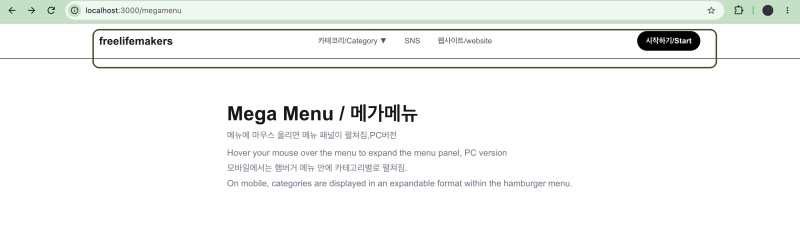
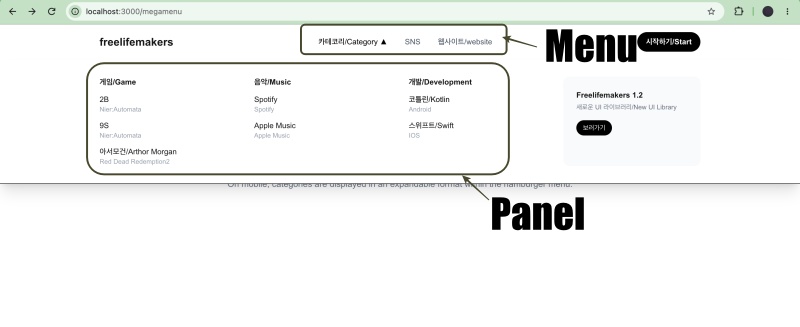
👉🏻 메가메뉴는 기본 메뉴를 마우스 선택하면 아래에 메뉴패널이 나타납니다.
A mega menu is one where a menu panel appears below the main menu item when you select it with your mouse.
👉🏻 메가메뉴를 사용하면 더 많은 링크 항목을 사용할 수 있습니다.
Using a mega menu allows for a greater number of link items.
📁 디렉토리 구조 / Directory structure
tailwindcss-nextjs/
└── app/
    ├── layout.tsx
    ├── page.tsx (root, /)
    ├── globals.css
    ├── favicon.ico
    │
    ├── ui/                              ← UI Components
    │   ├── page.tsx                     ← /ui
    │   └── _components/
    │       ├── button.tsx               ← Button
    │       ├── dropdown.tsx             ← Select/Dropdown
    │       └── navigation/
    │           ├── HorizontalNavMenu.tsx  ← Horizontal Nav Menu
    │           └── MegaMenu.tsx           ← Mega Menu
    │
    ├── megamenu/
    │   ├── page.tsx                     ← /megamenu -> Main route
    │   └── 2b/page.tsx -> page.tsx      ← /megamenu/2b
    │
    ├── button-css/ , button-tailwind/
    ├── card-css/ , card-tailwind/
    └── form-css/ , form-tailwind/
📁 메뉴 컴포넌트 / Menu Component
✔️ MegaMenu.tsx
1)메뉴 데이터(배열) / Menu data (array)
const MEGA_DATA = [
  {
    title: '카테코리/Category',
    id: 'category',
    columns: [
      {
        heading: '게임/Game',
        links: [
          { label: '2B', desc: 'Nier:Automata', href: '/megamenu/2b' },
          { label: '9S', desc: 'Nier:Automata', href: '/megamenu/branding' },
          { label: '아서모건/Arthor Morgan', desc: 'Red Dead Redemption2', href: '/megamenu/branding' },
        ],
      },
      {
        heading: '음악/Music',
        links: [
          { label: 'Spotify', desc: 'Spotify', href: '/megamenu/web' },
          { label: 'Apple Music', desc: 'Apple Music', href: '/megamenu/ui' },
        ],
      },
      {
        heading: '개발/Development',
        links: [
          { label: '코틀린/Kotlin', desc: 'Android', href: '/megamenu/sns' },
          { label: '스위프트/Swift', desc: 'IOS', href: '/megamenu/seo' },
        ],
      },
    ],
    banner: { title: 'Freelifemakers 1.2 ', desc: '새로운 UI 라이브러리/New UI Library', href: '/megamenu/new' },
  },
  { title: 'SNS', href: 'https://freelifemakers.org', id: 'sns' },
  { title: '웹사이트/website', href: 'https://freelifemakers.org', id: 'website' },
]
A.화면에 실제로 표시되는 메뉴부분입니다.
This is the part of the menu that is actually displayed on the screen.
2)PC용 메뉴 입니다. / This is the menu for PC.
        {/* PC - 메가메뉴 메인 / Mega menu main */}
        <nav className="hidden md:flex items-center h-16">
          {MEGA_DATA.map((item) => (
            <div
              key={item.id}
              className="h-16 flex items-center"
              onMouseEnter={() => setOpenId(item.id)}
              onMouseLeave={() => setOpenId(null)}
            >
              {item.columns ? (
                <button className={`px-4 text-sm font-medium ${openId === item.id ? 'text-black font-bold' : 'text-gray-600'}`}>
                  {item.title} {openId === item.id ? '▲' : '▼'}
                </button>
              ) : (
                <Link href={item.href!} className="px-4 text-sm font-medium text-gray-600">
                  {item.title}
                </Link>
              )}
            </div>
          ))}
        </nav>
A.MEGA_DATA의 데이터를 map함수로 꺼내서 출력합니다.(MEGA_DATA.map((item) =>)
Extract the data from MEGA_DATA using the map function and output it.
B.버튼을 클릭하면 삼각형 모양이 바뀝니다.
Clicking the button changes the shape of the triangle.
{item.title} {openId === item.id ? '▲' : '▼'}C.item.colums에 아무 값이 없으면 링크가 표시됩니다.
If there are no values in item.columns, a link is displayed.
 <Link href={item.href!} className="px-4 text-sm font-medium text-gray-600">
    {item.title}
 </Link>
2)PC용 메뉴패널 / Menu panel for PC
            {MEGA_DATA.find(i => i.id === openId)!.columns!.map((col) => (
              <div key={col.heading}>
                <h4 className="font-bold text-sm mb-3">{col.heading}</h4>
                <div className="flex flex-col gap-3">
                  {col.links.map((link) => (
                    <Link key={link.label} href={link.href} className="group">
                      <div className="text-sm font-medium group-hover:text-black">{link.label}</div>
                      <div className="text-xs text-gray-400">{link.desc}</div>
                    </Link>
                  ))}
                </div>
              </div>
            ))}
A.메뉴를 클릭하면 나타나는 메뉴 패널입니다.
This is the menu panel that appears when you click the menu.
B.MEGA_DATA에 있는 정보를 col.links.map((link) => (… …)로 꺼내서 화면에 출력합니다.
Extract the information from MEGA_DATA using col.links.map((link) => (... ...)) and display it on the screen.
3)모바일 메뉴 버튼 / Mobile menu button
<button onPointerUp={() => setMobileOpen(v => !v)} className="md:hidden w-11 h-11 bg-gray-100 rounded-full">
    {mobileOpen ? '✕' : '☰'}
</button>
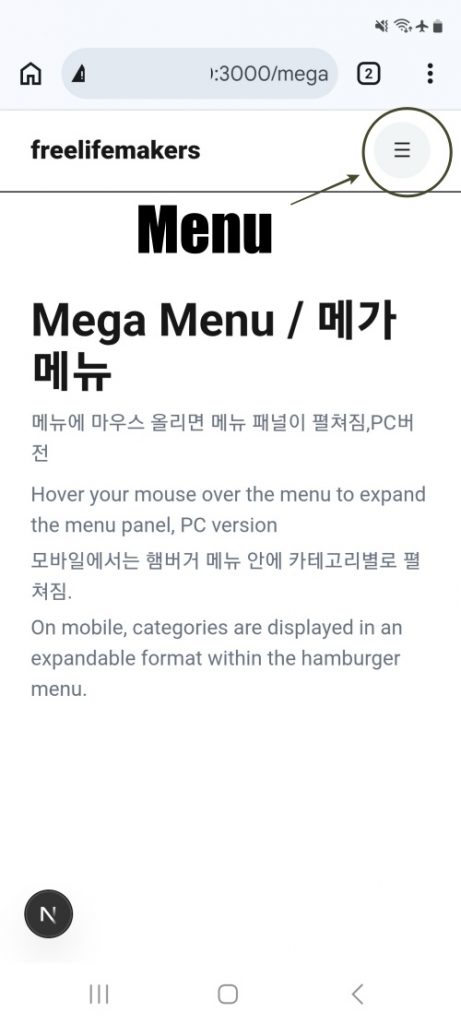
A.md(768px)보다 화면이 작아지면 버튼이 나타납니다.
The button appears when the screen size becomes smaller than md(768px).
4)모바일 메뉴 패널 / Mobile Menu Panel
      {mobileOpen && (
        <div className="md:hidden absolute top-16 left-0 w-full bg-white border-t px-6 py-6 flex flex-col gap-6 shadow-xl">
          {MEGA_DATA.map(item => (
            <div key={item.id}>
              {item.columns ? (
                <>
                  <div className="font-bold mb-2">{item.title}</div>
                  <div className="ml-4 flex flex-col gap-2">
                    {item.columns.flatMap(c => c.links).map(l => (
                      <Link key={l.label} href={l.href} onClick={() => setMobileOpen(false)} className="text-sm text-gray-600 py-1">{l.label}</Link>
                    ))}
                  </div>
                </>
              ) : (
                <Link href={item.href!} onClick={() => setMobileOpen(false)} className="font-bold">{item.title}</Link>
              )}
            </div>
          ))}
        </div>
      )}
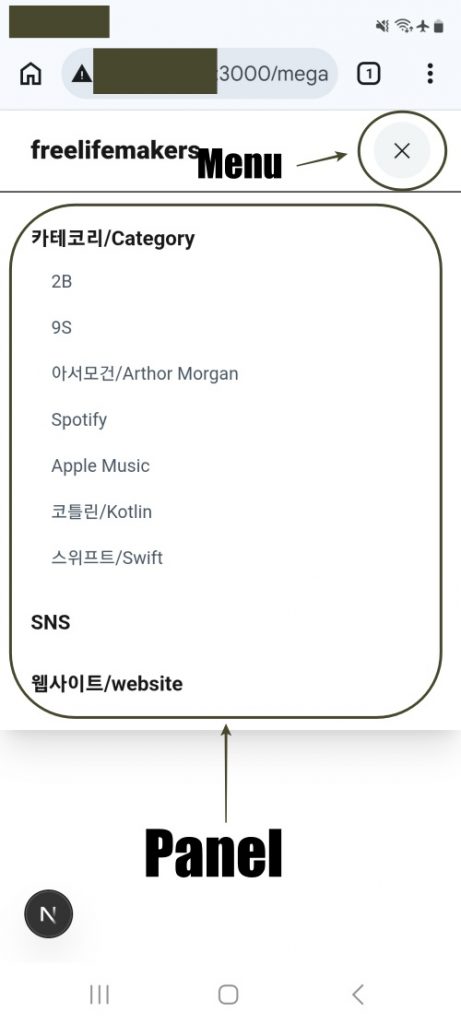
A.화면이 768px보다 작은 경우만 보여지고 모바일 메뉴 버튼을 클릭하면 화면에 보여집니다.
It is displayed only when the screen width is less than 768px, and it appears on the screen when the mobile menu button is clicked.
📁 라우트 / Route
✔️/megamenu
— http://localhost:3000/megamenu
import { MegaMenu } from '../ui/_components/navigation/MegaMenu'

export default function MegaMenuPage() {
  return (
    <>
      <MegaMenu />
      <main className="mx-auto max-w-6xl px-6 py-20">
        <h1 className="text-4xl font-bold">Mega Menu / 메가메뉴</h1>
        <p className="text-gray-500 mt-2">메뉴에 마우스 올리면 메뉴 패널이 펼쳐짐,PC버전</p>
        <p className="text-gray-500 mt-2">Hover your mouse over the menu to expand the menu panel, PC version</p>
        <p className="text-gray-500 mt-1">모바일에서는 햄버거 메뉴 안에 카테고리별로 펼쳐짐.</p>
        <p className="text-gray-500 mt-1">On mobile, categories are displayed in an expandable format within the hamburger menu.</p>
      </main>
    </>
  )
}
1) 위의 주소를 실행시 메가메뉴를 실행하는 코드입니다.
This is the code that triggers the mega menu when the address above is accessed.
2)Layout.tsx는 만들지않고 페이지마다 <MegaMenu />코드를 입력해야합니다.
You should not create a Layout.tsx file; instead, you must include the code on every page.
3)/megamenu/2b 라우트가 있는데 이 부분에도 동일하게 <MegaMenu />코드가 있습니다.
There is a route at /megamenu/2b, which also contains the code.
1./megamenu
export default function MegaMenuPage() {
  return (
    <>
      <MegaMenu />
      <main className="mx-auto max-w-6xl px-6 py-20">
        <h1 className="text-4xl font-bold">Mega Menu / 메가메뉴</h1>
        <p className="text-gray-500 mt-2">메뉴에 마우스 올리면 메뉴 패널이 펼쳐짐,PC버전</p>
        <p className="text-gray-500 mt-2">Hover your mouse over the menu to expand the menu panel, PC version</p>
        <p className="text-gray-500 mt-1">모바일에서는 햄버거 메뉴 안에 카테고리별로 펼쳐짐.</p>
        <p className="text-gray-500 mt-1">On mobile, categories are displayed in an expandable format within the hamburger menu.</p>
      </main>
    </>
  )
}

2./megamenu/2b
export default function Page() {
  return (
    <>
      <MegaMenu />
      <main className="mx-auto max-w-6xl px-6 py-20">
        <h1 className="text-3xl font-bold">2B</h1>
        <p className="text-gray-500 mt-2">여기는 /megamenu/2B 페이지.</p>
        <p className="text-gray-500 mt-2">This is the /megamenu/2B page.</p>
      </main>
    </>
  )
}
📁 테스트 / Test
✔️ PC
✔️ Mobile
마태복음 21장 22절 / Matthew 21: 22
“너희가 기도할 때에 무엇이든지 믿고 구하는 것은 다 받으리라 하시니라”
“And everything you ask in prayer, believing, you will receive.”


