👉🏻 DB어뎁터 부분 추가 설명입니다.
Here is some additional information regarding the DB adapter component.
📁 프로젝트 디렉토리 구조 / Project Directory Structure
myapp62/
├── app/
│   ├── layout.tsx
│   ├── page.tsx
│   ├── globals.css
│   ├── favicon.ico
│   └── api/
│       └── users/
│           ├── route.ts
│           └── [id]/
│               └── route.ts
│
├── lib/
│   └── db/
│       ├── adapter.ts
│       ├── index.ts
│       └── drivers/
│           ├── sqlite.ts
│           └── mysql.ts
│
├── data.sqlite                   # SQLite DB
├── data.sqlite-wal               # WAL 로그 (임시) / WAL Log (Temporary)
├── data.sqlite-shm               # 공유 메모리 (임시) / Shared Memory (Temporary)
├── Caddyfile                     # https 설정 (duckdns) / HTTPS setup (DuckDNS)
├── next.config.ts
├── package.json
└── tsconfig.json
✔️ mysql 설치 위치 / MySQL installation location
% which mysql
/opt/homebrew/bin/mysql
1)위의 경우는 맥OS의 M3인경우 입니다.
The case above applies to the M3 version on macOS.
2)운영체제마다 설치 경로가 다를 수 있습니다.
The installation path may vary depending on the operating system.
📁 DB 선택 / Select DB
✔️ lib/db/index.ts
— env.local에서 지장된 데이터베이스를 선택하고 해당 어댑터를 호출하는 부분입니다.
This is the part that selects the database specified in env.local and invokes the corresponding adapter.
import type { DbAdapter } from './adapter.ts';
import { SqliteAdapter } from './drivers/sqlite';
import { MysqlAdapter } from './drivers/mysql';
1) 이 부분에서 DB어뎁터 인터페이스와 해당 데이터베이스 어댑터를 호출합니다.
In this section, the DB adapter interface and the corresponding database adapter are invoked.
2) 현재 지원되는 데이터베이스는 sqlite와 mysql임을 확인 할 수 있습니다.
You can see that the currently supported databases are SQLite and MySQL.
— 선택된 데이터베이스 어댑터로 객체를 생성합니다.
Create an object using the selected database adapter.
... ...
let instance: DbAdapter | null = null;

export function getDb(): DbAdapter {
  if (instance) return instance;

  const type = process.env.DB_TYPE || 'mysql';

  if (type === 'mysql') {
    console.log(`[DB] Using MySQL -> ${process.env.DB_USER}@${process.env.DB_HOST}/${process.env.DB_DATABASE}`);
    instance = new MysqlAdapter();
  } else {
    const url = process.env.DATABASE_URL || './data.sqlite';
    console.log(`[DB] Using SQLite -> ${url}`);
    instance = new SqliteAdapter(url);
  }

  return instance;
}

export default getDb;
1) MysqlAdapter와 SqliteAdapter는 클래스입니다.
MysqlAdapter and SqliteAdapter are classes.
2)DbAdpater는 인터페이스로 getDB()함수의 타입으로 사용됩니다.
DbAdapter is an interface used as the return type for the getDB() function.
📁 DB 사용 / Using a DB
✔️ app/api/users/route.ts
— 선택된 데이터베이스를 사용 할 때는 아래와 같이 사용합니다.
When using the selected database, proceed as follows:
... ...
export async function GET() {
  const db = getDb();
  await db.init();
  const users = await db.listUsers();
  return NextResponse.json(users);
}
... ...
1)위의 코드는 API로 데이터를 json형태로 보여주는 부분입니다
The code above displays data in JSON format via an API.
2)브라우저에서 실행시 아래와같이 실행하면 됩니다.
When running it in a browser, you can do so as shown below.
https://localhoste:3000/api/users/
or
https://aloy-horizon.duckdns.org/api/users/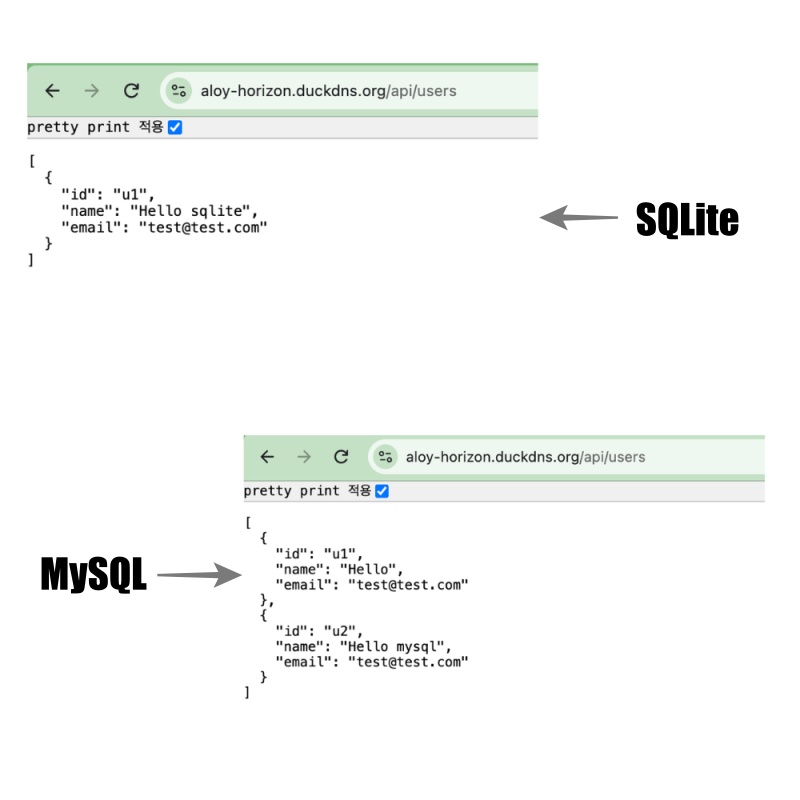
📁 인터페이스 / Interface
✔️ lib/db/adapter.ts
— 사용되는 함수이름,형식,파라메터,리턴 형태,타입등을 설정합니다.
Define the function names, formats, parameters, return types, and other related specifications.
// lib/db/adapter.ts

export type User = {
  id: string;
  name: string;
  email: string;
};

export type NewUser = User;

export interface DbAdapter {
  init(): Promise<void>;
  close(): Promise<void>;
  createUser(data: NewUser): Promise<User>;
  getUserById(id: string): Promise<User | null>;
  getUserByName(name: string): Promise<User | null>;
  listUsers(): Promise<User[]>;
  deleteUser(id: string): Promise<void>;
}
1)lib/db/drivers/sqlite 또는 lib/db/drivers/mysql에서 사용되는 함수의 이름, 파라메터,리턴,타입을 정의합니다.
Defines the names, parameters, return values, and types of the functions used in lib/db/drivers/sqlite or lib/db/drivers/mysql.
2)interface를 통해서 어떤 데이터베이스를 사용하던 코드 수정 없이 사용가능 합니다.
By using an interface, you can work with any database without needing to modify your code.
A.mysql.ts
  async init(): Promise<void> {
    await this.pool.execute(`
      CREATE TABLE IF NOT EXISTS \`user\` (
        id VARCHAR(255) PRIMARY KEY,
        name VARCHAR(255) NOT NULL,
        email VARCHAR(255) NOT NULL
      )
    `);
  }

  async createUser(data: NewUser): Promise<User> {
... ...
    return data;
  }

  async getUserById(id: string): Promise<User | null> {
... ...
    return (rows as User[])[0] || null;
  }

  async getUserByName(name: string): Promise<User | null> {
... ...
    return (rows as User[])[0] || null;
  }

  async listUsers(): Promise<User[]> {
... ...
    return rows as User[];
  }

  async deleteUser(id: string): Promise<void> {
... ...
  }

  async close(): Promise<void> {
... ...
  }
B.sqlite.ts
... ...
  async init(): Promise<void> {
    this.db.exec(`
      CREATE TABLE IF NOT EXISTS user (
        id TEXT PRIMARY KEY,
        name TEXT NOT NULL,
        email TEXT NOT NULL
      )
    `);
  }

  async createUser(data: NewUser): Promise<User> {
... ...
    return data;
  }

  async getUserById(id: string): Promise<User | null> {
    return this.db.prepare('SELECT * FROM user WHERE id = ?').get(id) as User || null;
  }

  async getUserByName(name: string): Promise<User | null> {
    return this.db.prepare('SELECT * FROM user WHERE name = ?').get(name) as User || null;
  }

  async listUsers(): Promise<User[]> {
    return this.db.prepare('SELECT * FROM user').all() as User[];
  }

  async deleteUser(id: string): Promise<void> {
    this.db.prepare('DELETE FROM user WHERE id = ?').run(id);
  }

  async close(): Promise<void> {
... ...
  }
📁 라우트 / route
✔️ 실제로 호출되는 라우트는 글저장,글목록,삭제 라우트입니다.
The routes that are actually called are those for saving a post, listing posts, and deleting a post.
— app/api/users/route.ts -> 글저장, 글목록 / Save post, Post list
— app/api/users/[id]/route.ts -> 글 삭제 / Delete post
✔️ 글 저장 및 글 목록 / Save Post and Post List
... ...

export async function GET() {
  const db = getDb();
  await db.init();
  const users = await db.listUsers();
  return NextResponse.json(users);
}

export async function POST(req: NextRequest) {
  const db = getDb();
  await db.init();
  const { id, name, email } = await req.json();

  const user = await db.createUser({ id, name, email });
  return NextResponse.json(user);
}
1)굵게 표시된 글자를 mysql.ts와 sqlite.ts파일에서 함수를 볼 수 있습니다.
You can find the functions corresponding to the text in bold within the mysql.ts and sqlite.ts files.
✔️ 글 삭제 / Delete post
... ...
export async function DELETE(_: Request, { params }: { params: { id: string } }) {
  const db = getDb();
  await db.init();
  await db.deleteUser(params.id);
  return NextResponse.json({ ok: true });
}
1)함수이름과 파라메터가 모두 mysql.ts와 sqlite.ts파일의 내용과 일치하고 adapter.ts에서 설정한 내용과 모두 일치합니다.
The function names and parameters all match the contents of the mysql.ts and sqlite.ts files, as well as the configurations defined in adapter.ts.
마태복음 21장 22절 / Matthew 21: 22
“너희가 기도할 때에 무엇이든지 믿고 구하는 것은 다 받으리라 하시니라”
“And everything you ask in prayer, believing, you will receive.”