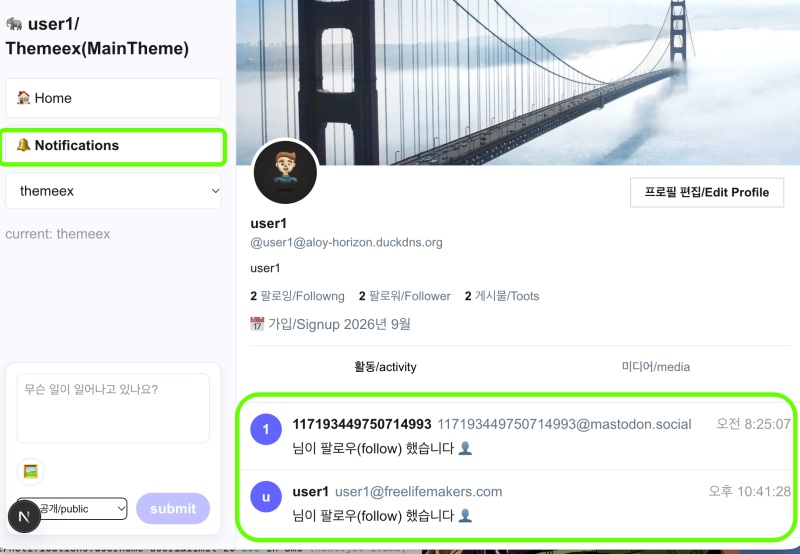
👉🏻 이번에는 알림 기능에 대해서 살펴 봅니다.
Next, we will take a look at the notification feature.
👉🏻 이전에 페이지네이션을 위해 다루었던 타임라인 구조와 매유 유사합니다.
It is very similar to the timeline structure we previously covered for pagination.
👉🏻 API부분의 페이지네이션은 아직 완전히 구현되지 않았습니다.
Pagination for the API section has not yet been fully implemented.
📁 UI부분 / UI section
✔️ themeex를 테마로 사용하는 경우 알림 UI부분은 프로젝트 루트로 부터 아래의 경로에 있습니다.
If you are using the ‘themeex’ theme, the notification UI components can be found at the following path, relative to the project root:
app/usersui/[username]/_components/themes/themeex/NotificationsList.tsx1)tsx파일의 위치는 타임라인 파일의 위치와 동일합니다.
The location of the .tsx file is the same as the location of the timeline file.
✔️ 페이지네이션 / Pagination(userCursorPagination)
  const {
    flatData: notis,
    fetchNextPage,
    hasNextPage,
    isFetchingNextPage,
    isLoading
  } = useCursorPagination({
    key: ['notifications', username],
    fetcher: async (cursor) => {
      const params = new URLSearchParams();
      params.set('username', username);
      params.set('limit', '20');
      if (cursor) params.set('max_id', cursor);

      const r = await fetch(`/api/v1/notifications?${params.toString()}`, { credentials: 'include' });
      const data = await r.json();
      const list = Array.isArray(data)? data : data.data || [];

      return {
        data: list,
        nextCursor: list.length === 30? list[list.length - 1]?.id || list[list.length - 1]?.created_at : null,
        hasMore: list.length === 30,
      };
    },
  });
1)페이지네이션 구현을 위해서useCursorPagination 훅을 호출하고 fetcher에 익명함수를 전달합니다.
To implement pagination, call the useCursorPagination hook and pass an anonymous function to the fetcher.
✔️ 페이지네이션(무한스크롤 옵저버)
Pagination (Infinite Scroll Observer)
... ...
  const loaderRef = useRef<HTMLDivElement>(null);
  useEffect(() => {
    const el = loaderRef.current;
    if (!el ||!hasNextPage) return;
    const observer = new IntersectionObserver(
      ([entry]) => {
        if (entry.isIntersecting &&!isFetchingNextPage) fetchNextPage();
      },
      { threshold: 0.3 }
    );
    observer.observe(el);
    return () => observer.disconnect();
  }, [hasNextPage, isFetchingNextPage, fetchNextPage]);
... ...

      <div ref={loaderRef} className="h-10 flex items-center justify-center text-sm text-[#999]">
        {isFetchingNextPage && <span>불러오는 중 / Loading ...</span>}
        {!hasNextPage && notis.length > 0 && <span className="text-xs">끝 / No more</span>}
      </div>
1)사용자가 화면 스크롤을 내리면 무한스크롤 옵저버가 <div ref={loaderRef}를 확인하면 fetchNextPage()함수를 실행합니다.
When the user scrolls down the screen, the infinite scroll observer detects the <div ref={loaderRef}> element and triggers the fetchNextPage() function.
2)fetchNextPage()함수는 userCursorPagination훅에서 리턴되는 함수입니다.
The fetchNextPage() function is a function returned by the userCursorPagination hook.
// app/usersui/[username]/_components/themes/themeex/NotificationsList.tsx
... ...
  const {
    flatData: notis,
    fetchNextPage,
    hasNextPage,
    isFetchingNextPage,
    isLoading
  } = useCursorPagination({
    key: ['notifications', username],
    fetcher: async (cursor) => {
... ....

      const r = await fetch(`/api/v1/notifications?${params.toString()}`, { credentials: 'include' });
... ...
      };
    },
  });
// app/hooks/useCursorPagination.ts
... ...
const fetchNextPage = useCallback(async () => {
... ...
const res: any = await fetcher(nextCursorRef.current || undefined);
... ...
setPages(prev => {
// Set : 중복 없는 집합 / Set with no duplicates
const seen = new Set(prev.flat().map((p:any) => p.id));
const filtered = data.filter((p:any) => p.id &&!seen.has(p.id));
if (filtered.length === 0) {
setHasNextPage(false);
return prev;
}
return [...prev, filtered];
});
... ...
}
... ...
return {
flatData,
pages: pages.map(data => ({ data })),
fetchNextPage, // 다음 페이지 가져오는 함수 / Function to fetch the next page
hasNextPage, // 다음 페이지가 있는지 / Whether there is a next page
isFetchingNextPage, // 다음 페이지 로딩중인지 / Checking if the next page is loading...
isLoading, // 첫 로딩중인지 / Is it loading for the first time?
};✔️ 데이터를 UI에 출력 / Display data in the UI
  return (
    <div style={style} className="bg-white">
... ...

{notis.map((n: any, idx: number) => (
... ...
              <div className="text- mt-1">
                {n.type === 'follow' && <span>님이 팔로우(follow) 했습니다 <span className="text-[#6364ff]">👤</span></span>}
                {n.type === 'favourite' && <span>님이 좋아요(like) 했습니다 ❤</span>}
                {n.type === 'reblog' && <span>님이 부스트(boost) 했습니다 🔁</span>}
                {!['follow','favourite','reblog'].includes(n.type) && <span>{n.type}</span>}
              </div>
... ...
 ))}
... ...
    </div>
  );
📁 API
✔️app/api/v1/notifications/route.ts
✔️ Notification.tsx에서 useCursorPagination()훅의 파라메터로 전달되는 콜백함수(fetcher)에서 실행됩니다.
It is executed within the callback function (fetcher) that is passed as a parameter to the useCursorPagination() hook in Notification.tsx.
✔️ 삭제예정 코드 / Code scheduled for deletion
    const max_id = searchParams.get('max_id');
    if (max_id) {
      return NextResponse.json([], {
        headers: { 'Access-Control-Allow-Origin': '*', 'Content-Type': 'application/json' }
      });
    }
1)페이지네이션이 아직 API에서 구현되지않아 Tursky앱에서 max_id를 호출하면 무한 로딩되는 부분을 막아놓은 코드입니다.
This code prevents an infinite loading state in the Tursky app that occurs when max_id is called, as pagination has not yet been implemented in the API.
2)max_id는 max_id를 기준으로 데이터 베이스에서 글 작성 날짜를 검색합니다. max_id is used to retrieve the post creation date from the database, based on the max_id value.
3)그리고 검색된 날짜 보다 더 이전 날짜의 글을 검색을 합니다.
And it searches for posts with a date earlier than the date found.
3)max_id는 페이지네이션 구현을 위해 어디부터 글을 호출할것인지에 대한 기준이 됩니다.max_id serves as a reference point for determining where to begin fetching posts when implementing pagination.
4)위의 코드는 페이지네이션이 완전히 구현되면 삭제 됩니다.
The code above will be removed once pagination is fully implemented.
✔️ 데이터 수집 및 리턴 / Data Collection and Return
... ...
const notifications: any[] = [];
... ...
    return NextResponse.json(notifications.slice(0, limit), {
      headers: { 'Access-Control-Allow-Origin': '*', 'Content-Type': 'application/json' }
    });
1)notifications 배열은 알림 데이터를 수집해서 json데이터로 리턴합니다.
The notifications array collects notification data and returns it as JSON data.
2)첫 배열(0)부텅 limit까지 값을 리턴합니다.
Returns values from the first index (0) up to the limit.
✔️ Follow알림,Like알림,Reblog(=boost)알림
Follow notifications, Like notifications, Reblog (=boost) notifications
— 아래의코드를 보면 각 알림의 값을 notifications배열에 추가하는 것을 볼 수 있습니다.(notifications.push)
Looking at the code below, you can see that the value of each notification is added to the notifications array.
1.Follow알림 / Follow notifications


    try {
      const follows = db.prepare(`SELECT id, actor, inbox, username, created_at FROM followers WHERE username =? ORDER BY created_at DESC LIMIT 20`).all(username) as any[];
      for (let i=0; i<follows.length; i++) {
        const row = follows[i];
        const actor = row.actor || '';
        if (actor.includes(myActor)) continue; // 자기 제외!
        const parsed = parseActor(actor, i);
        notifications.push({
          id: `follow_${i}_${row.id}`,
          type: 'follow',
          created_at: row.created_at? new Date(row.created_at).toISOString() : new Date().toISOString(),
          account: makeAccount(parsed, i, row.created_at),
          status: null,
        });
      }
    } catch(e){ console.error('follow', e); }
2.Like알림 / Like notifications

    try {
      const likes = db.prepare(`SELECT id, actor, object, username, created_at FROM likes WHERE username =? ORDER BY created_at DESC LIMIT 30`).all(username) as any[];
      console.log(`❤ likes table rows=${likes.length} for ${username}`);
      for (let i=0; i<likes.length; i++) {
        const row = likes[i];
        const actor = row.actor || '';
        const objectId = row.object || '';
        console.log(` like: actor=${actor} object=${objectId}`);

        // 자기 자신 좋아요 제외 / Excludes your own "likes."
        if (actor.includes(myActor) || actor.includes(`/users/${username}`) && actor.includes(DOMAIN)) {
          console.log(` -> self like skip!`);
          continue;
        }

        const parsed = parseActor(actor, i+100);

        const isMyPost = objectId.includes(DOMAIN) || objectId.includes('aloy-horizon');
        if (!isMyPost) {
          console.log(` -> not my post, skip (outgoing like)`);
          continue;
        }

        // 원본 글 찾기 / Find the original post
        let statusObj: any = null;
        try {
          const shortId = objectId.split('/').pop()?.split('?')[0];
          const post = db.prepare(`SELECT id, content, created_at FROM posts WHERE id =? OR id LIKE? LIMIT 1`).get(objectId, `%${shortId}%`) as any;
          if (post) {
            statusObj = {
              id: post.id,
              uri: objectId,
              url: objectId,
              content: post.content || '<p>내 글</p>',
              created_at: post.created_at? new Date(post.created_at).toISOString() : new Date().toISOString(),
              account: { id: '1', username, acct: `${username}@${DOMAIN}`, display_name: username, avatar: `https://${DOMAIN}/icon.png` },
              visibility: 'public', reblogs_count: 0, favourites_count: 0, replies_count: 0,
            };
          } else {
... ...
          }
        } catch {}

        notifications.push({
          id: `fav_${i}_${row.id}`,
          type: 'favourite',
          created_at: row.created_at? new Date(row.created_at).toISOString() : new Date().toISOString(),
          account: makeAccount(parsed, i+100, row.created_at),
          status: statusObj,
        });
      }
    } catch(e){ console.error('likes notif', e); }
3.Reblog / Reblog notifications
try {
const boosts = db.prepare(`SELECT id, actor, object, username, created_at FROM announces WHERE username =? ORDER BY created_at DESC LIMIT 20`).all(username) as any[];
for (let i=0; i<boosts.length; i++) {
const row = boosts[i];
const actor = row.actor || '';
if (actor.includes(myActor)) continue;
const parsed = parseActor(actor, i+200);
notifications.push({
id: `reblog_${i}_${row.id}`,
type: 'reblog',
created_at: row.created_at? new Date(row.created_at).toISOString() : new Date().toISOString(),
account: makeAccount(parsed, i+200, row.created_at),
status: null,
});
}
} catch(e){}✔️ 데이터 내림차순 정렬 / Sort data in descending order
notifications.sort((a,b)=> new Date(b.created_at).getTime() - new Date(a.created_at).getTime());1)b – a 내림차순, a – b 오름차순
b – a for descending order, a – b for ascending order
2)위의 코드는 내림차순 정렬 입니다.
The code above sorts in descending order.
3)sort함수는 자체 내부 알고리즘에 따라 정렬기능을 수행합니다.
The sort function performs sorting based on its own internal algorithm.
📁 테스트 / Test
마태복음 21장 22절 / Matthew 21: 22
“너희가 기도할 때에 무엇이든지 믿고 구하는 것은 다 받으리라 하시니라”
“And everything you ask in prayer, believing, you will receive.”


