👉🏻 이번에는 외부앱 로그인 부분에 대해서 살펴봅니다.
Next, we will look at the section regarding logging in via external apps.
👉🏻 회원가입은 로컬에서만 가능하고 외부앱 로그인을 위해서 /oauth/authorize 라우트를 사용합니다.
User registration is only possible locally, and the /oauth/authorize route is used for logging in via external applications.
📁 외부 앱 및 로컬 UI부분 인증 부분 구조
Authentication-related structure for external apps and the local UI
app/api/auth/
  ├── signup/route.ts      -> 웹사이트 회원가입 / website signup
  ├── login/route.ts       -> 웹사이트 로그인 / website login
  ├── logout/route.ts      -> 로그아웃 / logout
  ├── refresh/route.ts     -> refresh_token으로 access token재발급
  |                        -> Reissuing an access token using a refresh token
  └── me/route.ts          -> 로그인 체크 / Login check

app/auth/
  ├── signup/page.tsx      -> 회원가입 UI / Sign-up UI
  └── login/page.tsx       -> 로그인 UI / Login UI

oauth/authorize/route.ts   -> OAuth 동의 화면 / OAuth consent screen
oauth/token/route.ts       -> access_token 발급 / Issuance of an access token

lib/auth.ts                -> 실제 유저 검증 로직 (getUser, 세션 확인)
                           -> Actual user verification logic (getUser, session check)
📁 외부 앱 로그인(pinafore)
https://aloy-horizon.duckdns.org/oauth/authorize?client_id=5dc45054-beb... ... &redirect_uri=https%3A%2F%2Fpinafore.social%2Fsetting... ...1)pinafore.social에서 로그인시 위와 같은 url로 /oauth/authorize 라우트에 요청합니다.
When logging in via pinafore.social, a request is made to the /oauth/authorize route using the URL shown above.
2)회원가입은 로컬 웹사이트에서만 가능합니다.
Registration is only possible on the local website.
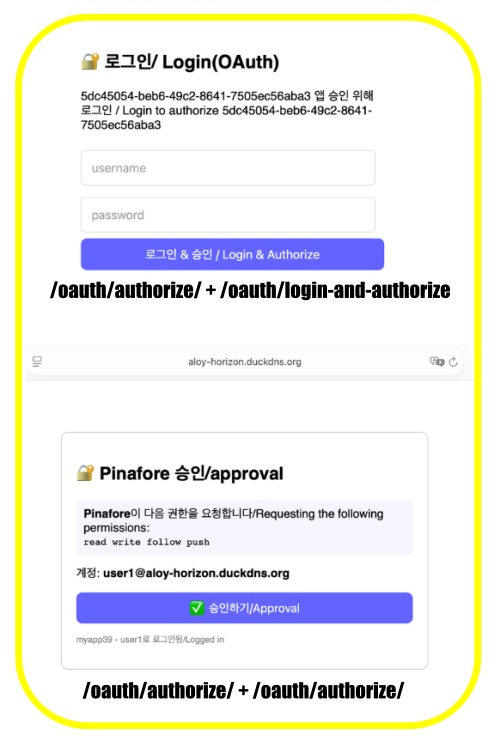
📁 /oauth/authorize/route.ts – 로그인 폼 / Login Form
✔️ 로그인하지 않은 경우 / If not logged in
  if (!username) {
    const html = `
    <!DOCTYPE html><html><head><meta charset="utf-8"><meta name="viewport" content="width=device-width, initial-scale=1">
    <title>Login</title>
    <style>body{font-family:sans-serif;max-width:400px;margin:50px auto;padding:20px}input{width:90%;padding:12px;margin:8px 0;font-size:16px}button{width:100%;padding:12px;background:#6364ff;color:white;border:0;border-radius:8px;font-size:16px}</style>
    </head><body>
      <h2>🔐 로그인/ Login(OAuth)</h2>
      <p>${clientId} 앱 승인 위해 로그인 / Login to authorize ${clientId}</p>
      <form method="POST" action="/oauth/login-and-authorize">
        <input type="hidden" name="client_id" value="${clientId}">
        <input type="hidden" name="redirect_uri" value="${redirectUri}">
        <input type="hidden" name="scope" value="${scope}">
        <input name="username" placeholder="username" required>
        <input name="password" type="password" placeholder="password" required>
        <button type="submit">로그인 & 승인 / Login & Authorize</button>
      </form>
    </body></html>`;
    return new NextResponse(html, { headers: { 'Content-Type': 'text/html; charset=utf-8' } });
  }
1) 로그인 폼을 보여주는 부분입니다. / This is the section that displays the login form.
2)fetch로 로그인 시도시 의도대로 동작하지 않는 경우가 있어서 HTML의 form action을 사용합니다.
Since login attempts via ‘etch’ may not always function as intended, we use an HTML form action instead.
3) /oauth/login-and-authorize 라우트로 폼 데이터를 전송합니다.
Submit the form data to the /oauth/login-and-authorize route.
✔️ 로그인한 경우 / If logged in
  let clientName = 'Unknown App';
  try {
    const app = db.prepare('SELECT client_name FROM oauth_apps WHERE client_id =?').get(clientId) as any;
    if (app) clientName = app.client_name;
  } catch {}

  const html = `
  <!DOCTYPE html>
  <html>
  <head>
    <meta charset="utf-8">
    <meta name="viewport" content="width=device-width, initial-scale=1">
    <title>Authorize ${clientName}</title>
    <style>
      body { font-family: sans-serif; max-width: 500px; margin: 50px auto; padding: 20px; }
     .card { border: 1px solid #ccc; border-radius: 10px; padding: 20px; }
      button { background: #6364ff; color: white; border: none; padding: 12px 20px; border-radius: 8px; font-size: 16px; cursor: pointer; width: 100%; }
      button:hover { background: #5354ee; }
     .info { background: #f5f5ff; padding: 10px; border-radius: 5px; margin: 15px 0; }
    </style>
  </head>
  <body>
    <div class="card">
      <h2>🔐 ${clientName} 승인</h2>
      <div class="info">
        <strong>${clientName}</strong>이 다음 권한을 요청합니다:<br>
        <code>${scope}</code>
      </div>
      <p>계정: <strong>${username}@aloy-horizon.duckdns.org</strong></p>
      <form method="POST" action="/oauth/authorize">
        <input type="hidden" name="client_id" value="${clientId}">
        <input type="hidden" name="redirect_uri" value="${redirectUri}">
        <input type="hidden" name="scope" value="${scope}">
        <button type="submit">✅ 승인하기/Approval</button>
      </form>
      <p style="font-size:12px; color:#888; margin-top:15px;">myapp39 - ${username}로 로그인됨</p>
    </div>
  </body>
  </html>
  `;

  return new NextResponse(html, {
    headers: { 'Content-Type': 'text/html; charset=utf-8' }
  });
1)이미 로그인되어 있는 경우 앱 승인 요청화면을 보여줍니다.
If the user is already logged in, the app authorization request screen is displayed.
2)승인하기 버튼(submit)을 누르면 /oauth/authorize 라우트로 폼 데이터를 전송합니다.
Clicking the “submit” button sends the form data to the /oauth/authorize route.
📁 /oauth/authorize/route.ts – 앱 승인 처리 / App Approval Process
✔️ randomUUID를 만들어서 oauth_codes테이블에 저장합니다.
Generate a random UUID and store it in the oauth_codes table.
... ...
  const code = randomUUID();

  try {
    db.prepare(`
      CREATE TABLE IF NOT EXISTS oauth_codes (
        code TEXT PRIMARY KEY,
        client_id TEXT,
        redirect_uri TEXT,
        scope TEXT,
        username TEXT,
        created_at INTEGER
      )
    `).run();

    db.prepare(`
      INSERT INTO oauth_codes (code, client_id, redirect_uri, scope, username, created_at)
      VALUES (?,?,?,?,?,?)
    `).run(code, clientId, redirectUri, scope, username, Date.now());
... ...
📁 /oauth/authorize/route.ts – 앱으로 다시 돌아가기 / Return to the app
1.리다이렉트 URI가 없는 경우
When there is no redirect URI

if (!redirectUri || redirectUri === 'urn:ietf:wg:oauth:2.0:oob' || redirectUri.includes('oob')) { ... }

2.Tursky앱인 경우 / In the case of the Tursky app

if (redirectUri.startsWith('oauth2redirect://') || redirectUri.includes('tusky') ||         redirectUri.includes('com.keylesspalace')) { ... }

3.PC웹 브라우저인 경우 / For PC web browsers

 const redirectUrl = new URL(redirectUri);
 redirectUrl.searchParams.set('code', code);
 return NextResponse.redirect(redirectUrl.toString());
1)앱에서 로그인시도하는건지 PC 웹브라우저에서 로그인 시도하는건지에 따라서 리다이렉트 실행
Execute a redirect based on whether the login attempt is made from an app or a PC web browser.
2)리다이렉트 실행 중 /oauth/token 라우트 실행(외부 앱에서 실행함)
Executing redirect; invoking the /oauth/token route (triggered by an external app)
... ...
    // ✅ access_token 발급 / Issue access_token
    const accessToken = randomUUID() + randomUUID();
... ...
      db.prepare(`
        INSERT INTO oauth_tokens (access_token, client_id, username, scope, created_at)
        VALUES (?,?,?,?,?)
      `).run(accessToken, clientId, oauthCode.username, oauthCode.scope, Date.now());

      // ✅ code는 한번 쓰면 삭제 (재사용 방지) / The code should be deleted after one use! (Prevent reuse!)
      db.prepare('DELETE FROM oauth_codes WHERE code = ?').run(code);
... ...
💡
/oauth/authorize 또는 /oauth/logiin-and-authorize에서 oauth_codes테이블에 code,cliend_id를 입력함
/oauth/token라우트를 외부앱에서 실행해서 access token을 발급하고 oauth_codes에서 cliend_id를 삭제함.
그래서 /oauth/authorize 또는 /oauth/logiin-and-authorize에서 데이터를 oauth_codes테이블에 입력하지만
실제로 데이터가 늘어나지는 않음
외부 앱(pinafore)에서 로그인시 /oauth/token을 실행해서 oauth_codes의 값을 지움
그래서 oauth_codes는 항상 0개 유지가 정상✔️ /oauth/login-and-authorize/route.ts
– 로그인시 앱승인처리와 쿠키 저장을 동시 처리함.(로그인되어 있지 않은 경우)
Handles app authorization and cookie storage simultaneously upon login (if not already logged in).
... ...

 // 세션 테이블에 토큰저장 / Storing tokens in session tables
  // oauth대신에 ip주소 입력 가능함,일반로그인은 ip 외부앱 로그인은 oauth로 구분해서 저장하기 위함
  // You can enter an IP address instead of using OAuth;
  // this allows for distinguishing between standard logins (via IP) and external app logins (via OAuth) when storing the data.

const { refreshToken, accessToken } = createSession(user.username, req.headers.get('user-agent'), 'oauth');
... ...


// 앱승인,데이터베이스에 저장하기
// App approval, saving to the database

  const insertResult = db.prepare(`INSERT INTO oauth_codes VALUES (?,?,?,?,?,?)`).run(code, clientId, redirectUri, scope, user.username, Date.now());
  // console.log('INSERT result:', insertResult.changes, insertResult.lastInsertRowid);
... ...

// 쿠키 저장 / Save cookies

  res.cookies.set('token', accessToken, { httpOnly: true, secure: true, sameSite: 'lax', maxAge: 60*15, path: '/' });
  res.cookies.set('refresh_token', refreshToken, { httpOnly: true, secure: true, sameSite: 'lax', maxAge: 60*60*24*7, path: '/' });
... ...
-Tursky앱인 경우와 일반 PC앱인 경우 리다이렉트 설정
Redirect settings for Tursky apps versus standard PC apps
... ...
  if (finalUrl.startsWith('oauth2redirect://') || finalUrl.includes('tusky') || finalUrl.includes('com.keylesspalace')) {
    html = `<!DOCTYPE html><html><head><meta charset="utf-8"><meta name="viewport" content="width=device-width, initial-scale=1"></head>
    <body style="font-family:sans-serif;max-width:500px;margin:50px auto;padding:20px;text-align:center">
      <h3>✅ ${user.username} 승인됨 / Authorized</h3>
      <p>Tusky로 돌아가는 중 / Transferring to Tusky...</p>
      <p><a href="${finalUrl}" style="word-break:break-all">${finalUrl}</a></p>
      <script>setTimeout(()=>{window.location.href="${finalUrl}"},300)</script>
    </body></html>`;
  } else {
    try {
      const u = new URL(redirectUri);
      u.searchParams.set('code', code);
      html = `<!DOCTYPE html><html><body><script>window.location.href="${u.toString()}"</script><a href="${u.toString()}">Continue</a></body></html>`;
    } catch {
      html = `<!DOCTYPE html><html><body><script>window.location.href="${finalUrl}"</script><a href="${finalUrl}">${finalUrl}</a></body></html>`;
    }
  }
... ...
📁 결과 / Result
1.로그인이 되어 있지 않은 경우 / If you are not logged in
- /oauth/authorize/route.ts 라우트 실행(GET)
Execution of the /oauth/authorize/route.ts route(GET)

- /oauth/login-and-authorize 라우트에서 앱승인 및 로그인처리(POST)
Handle app authorization and login in the /oauth/login-and-authorize route(POST)

2.로그인 되어 있는 경우 / If logged in
- /oauth/authorize/route.ts 라우트 실행(GET)
Execution of the /oauth/authorize/route.ts route (GET)

- /oauth/authorize/route.ts 라우트에서 앱승인 및 로그인처리(POST)
Handling app authorization and login in the /oauth/authorize/route.ts route
📁 테스트 / Test
마태복음 21장 22절 / Matthew 21: 22
“너희가 기도할 때에 무엇이든지 믿고 구하는 것은 다 받으리라 하시니라”
“And everything you ask in prayer, believing, you will receive.”


