👉🏻 myapp26에는 스킨기능을 구현합니다.
Skin functionality is implemented in myapp26.
👉🏻 코드 양이 많아서 주요 부분만 설명합니다 .
Due to the large volume of code, I will explain only the key parts.
👉🏻 전체코드는 깃허브 코드를 참조하세요
Please refer to the GitHub repository for the full code.
https://github.com/gideonslife01/flm-nextjs
📁 전체 프로젝트 구조 / Overall Project Structure
myapp26/
├── app/  (Next.js App Router)
│   ├── .well-known/webfinger/route.ts  -> webfinger
│   ├── api/follow/route.ts    -> Follow API(temporary)
│   ├── api/announce/route.ts  -> Boost(Announcement)
│   ├── api/like/route.ts.     -> Like API
│   ├── api/posts/route.ts     -> Writing API
│   ├── api/timeline/route.ts  -> Timeline API
│   ├── users/[username]/
│   │   ├── statuses/[id]/route.ts -> Indivisual Post
│   │   ├── route.ts               -> Acotr Information
│   │   ├── followers/route.ts     -> Followers List
│   │   ├── following/route.ts     -> Following List
│   │   ├── inbox/route.ts         -> Inbox
│   │   └── outbox/route.ts        -> outbox
│   ├── usersui/[username]/
│   │   ├── page.tsx               -> Timeline UI
│   │   └── _components/themes/
│   │       ├── pinafore/Pinaforetheme.tsx  -> Theme 1
│   │       ├── mastodon/Mastodontheme.tsx  -> Theme 2
│   │       └── minimal/Minimaltheme.tsx    -> Theme 3
│   ├── layout.tsx, page.tsx, globals.css
│   └── favicon.ico
├── lib/
│   ├── theme.tsx              -> Theme Provider
│   ├── ap.ts                  -> Follow Accept
│   └── db.ts                  -> DB connection
├── data/
│   └── keys/                  -> private.pem, public.pem
├── data.sqlite                -> Database
├── Caddyfile                  -> https
└── package.json
📁 프로젝트 시작(myapp26)
Project Start (myapp26)
npx create-next-app@latest📁 SQLite설치 / Installing SQLite
cd ~/myapp26
npm install better-sqlite3
npm install -D @types/better-sqlite3
📁 DDNS,https설정 / DDNS,https settings
📁 도메인허용, @userid 사용하기
Allowing domains, using @userid
— next.config.ts
import type { NextConfig } from "next";

const nextConfig: NextConfig = {
  /* allow domain*/
  allowedDevOrigins: ['aloy-horizon.duckdns.org', '*.duckdns.org'],

  /* host.domain.org/@userid */
  async rewrites() {
    return [
      {
        source: '/@:username',
        destination: '/usersui/:username',
      },
    ]
  }
};


export default nextConfig;
📁 코드수정 / Code Modification
✔️ myapp26/lib/theme.tsx파일을 불러와 컨텍스트 프로바이더를 적용합니다.
Import the myapp26/lib/theme.tsx file and apply the context provider.
💡 컨텍스트 프로바이더는 하나의 이벤트로 전체 상태를 변경하는 기능으로 테마적용이나 언어 적용 설정에 많이 사용됩니다.
A Context Provider is a feature that allows the entire state to be updated via a single event; it is commonly used for settings such as applying themes or languages.
— myapp26/app/usersui/[username]/Layout.tsx
import { ThemeProvider } from "@/lib/theme"; // ✅ myapp26

... ...

export default function RootLayout({ children }: LayoutProps<"/">) {
  return (
    <html
      lang="en"
      className={`${geistSans.variable} ${geistMono.variable} h-full antialiased`}
    >
      <body className="min-h-full flex flex-col">
        {/* ✅ myapp26 - Add ThemeProvide */}
        <ThemeProvider>
          {children}
        </ThemeProvider>
      </body>
    </html>
  );
}
✔️ 여기서 테마파일을 불러오고 테마(스킨)을적용합니다.
Here, you load the theme file and apply the theme (skin).
— myapp26/app/paget.tsx
... ...
import { PinaforeTheme } from './_components/themes/pinafore/Pinaforetheme';
import { MastodonTheme } from './_components/themes/mastodon/Mastodontheme';
import { MinimalTheme } from './_components/themes/minimal/Minimaltheme';
... ...

  // ✅ timeline fetch
  useEffect(() => {
    params.then(p => {
      setUsername(p.username);
      fetch(`/api/timeline?username=${p.username}`)
        .then(r => r.json())
        .then(data => {
          setTimeline(data);
          setLoading(false);
        });
    });
  }, [params]);
... ...
  if (loading) return <div style={{ padding: 20 }}>Loading...</div>;

  // ✅ theme 분기 + props 전달 / Theme branching + props passing
  const props = { timeline, username, onBoost: handleBoost, onLike: handleLike };

  // apply theme
  if (theme === 'pinafore') return <PinaforeTheme {...props} />
  if (theme === 'mastodon') return <MastodonTheme {...props} />
  if (theme === 'minimal') return <MinimalTheme {...props} />

  return <PinaforeTheme {...props} />;
📁 디렉토리 및 파일 추가 / Add directories and files
✔️ 타임라인 스킨(테마) UI / Timeline Skin (Theme) UI
— 아래의 파일은 모두 테마 디자인으로 좋아요,부스트기능은 빠져있습니다.
The files below are all theme designs; the boost function is not included.
myapp26/app/usersui/[username]/_components/themes/pinafore/Pinaforetheme.tsx

myapp26/app/usersui/[username]/_components/themes/mastodon/Mastodontheme.tsx

myapp26/app/usersui/[username]/_components/themes/minimal/Minimaltheme.tsx
— 세 파일 모두 동일하며 테마의 구분이 가능하게 테마 이름만 표시줬습니다.
All three files are identical; only the theme names are displayed to distinguish between them.
<h2>🐘 {username}/ Pinafore</h2> {/* 테마이름 / Theme Name */}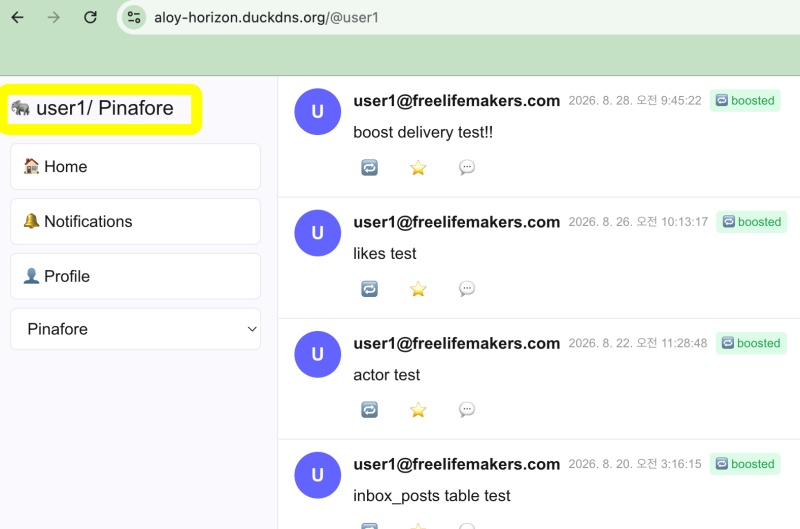
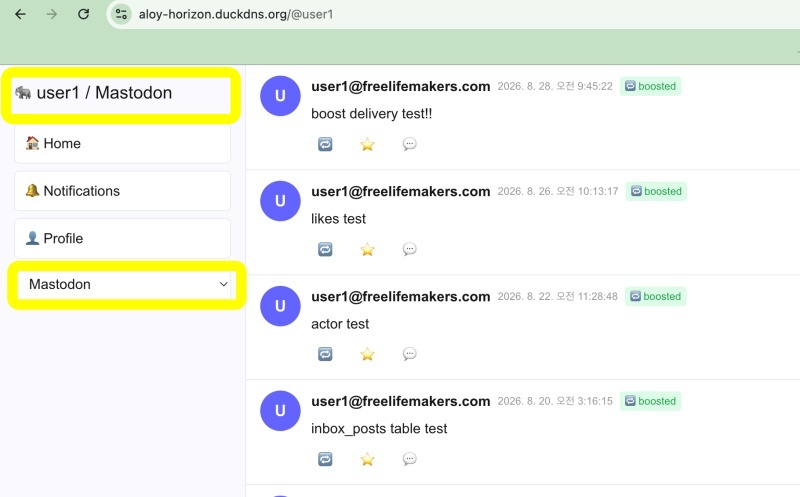
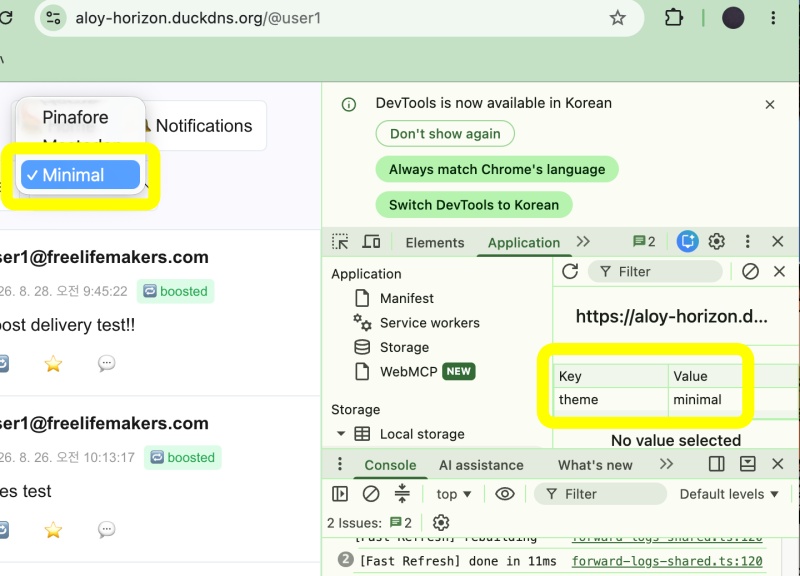
— 테마 변수의 값이 변하면 컨텍스트 프로바이더에서 로컬 스토리지의 값을 변경합니다.
When the value of the theme variable changes, the context provider updates the value in local storage.
... ...
const [theme, setTheme] = useState<ThemeName>('pinafore');
... ...
<select
            value={theme} //  현재 로컬스토리지 값 표시 / Display current local storage value
            onChange={(e) => {
            setTheme(e.target.value as any);
         }}>
            <option value="pinafore">Pinafore</option>
            <option value="mastodon">Mastodon</option>
            <option value="minimal">Minimal</option>
          </select>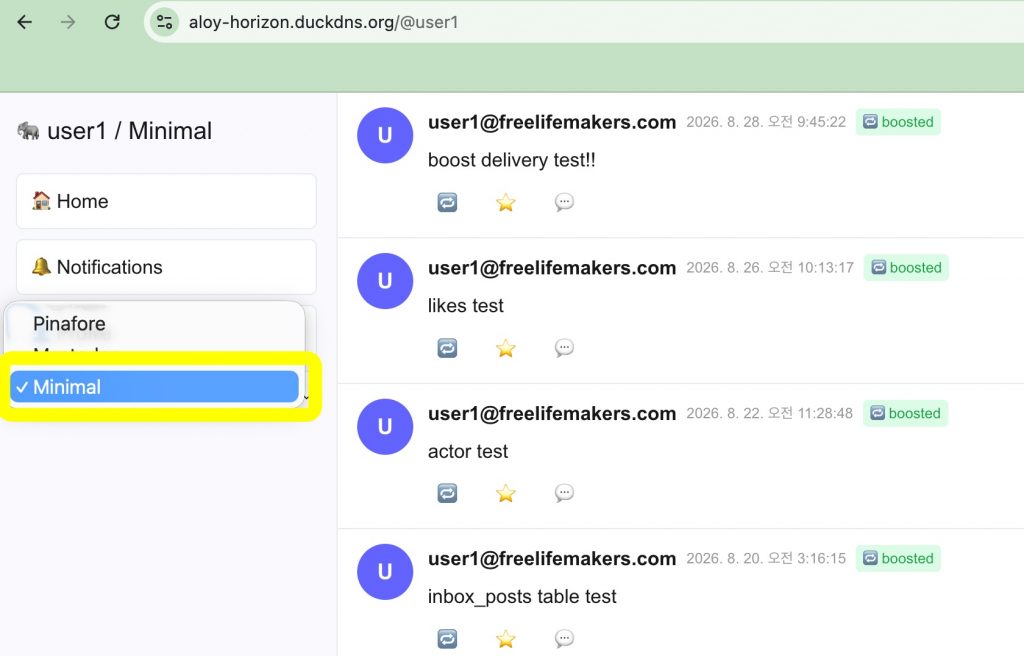
✔️ 컨텍스트 프로바이더 / Context Provider
— myapp26/lib/theme.tsx
... ...
  useEffect(() => {
    const saved = localStorage.getItem('theme') as ThemeName;
    if (saved) setTheme(saved);
  }, []);
... ...

return (
    <ThemeContext.Provider value={{ theme, setTheme: updateTheme }}>
      <div data-theme={theme} style={{ minHeight: '100%', display: 'flex', flexDirection: 'column', flex: 1 }}>
        {children}
      </div>
    </ThemeContext.Provider>
  );
1)컨텍스트 프로바이더에 theme변수를 파라메터로 적용합니다.
Apply the theme variable as a parameter to the context provider.
2)theme 값이 변경되면 다른 테마파일을 불러오기 위해서 사용됩니다.
It is used to load a different theme file when the theme value changes.
3)테마이름은 브라우저의 로컬 스토리지에 저장됩니다.
The theme name is stored in the browser’s local storage.
요한복음 8장 32절 / John 8:32
“그리고 너희는 진리를 알게 될 것이며, 진리가 너희를 자유롭게 할 것이다.”
“Then you will know the truth ,and the truth will set you free”


