1.QML
— 성능이 중요한 부분은 C++로 구현하고 다자인이나 자바스크립트 문법을 사용합니다.
Performance-critical parts are implemented in C++ and design or JavaScript syntax is used.
— 자바스크립트를 QML내에서 실행할 수 있습니다.
You can run JavaScript within QML.
— 터치 기반 및 임베디드 장치의 UI장치 개발에 강력한 도구로 활용됩니다.
It is used as a powerful tool for developing UI devices for touch-based and embedded devices.
— 주요기능 및 특징은 아래와 같습니다.
Key features and characteristics are as follows:
| 분류 / Classification | 설명 / Description |
|---|---|
| 선언형 문법 / declarative syntax | UI 구성요소를 트리형 구조로 “선언”함 (Rectangle, Text, Button 등)“Declare” UI components in a tree-like structure (Rectangle, Text, Button, etc.) |
| JS 통합 / JS integration | JavaScript 코드를 자연스럽게 포함 가능 (이벤트 처리, 수식 계산, 조건 등) Ability to naturally include JavaScript code (event handling, formula calculations, conditions, etc.) |
| 속성 바인딩 / Property Binding | 값이 자동으로 연결되어 동적으로 반응 (ex. width: parent.width / 2)Values are automatically concatenated and react dynamically (e.g. width: parent.width / 2) |
| 시그널/슬롯 ( Signal & Slot) | Qt의 이벤트 시스템을 QML에서 사용 (onClicked, onTextChanged 등)Using Qt’s event system in QML (onClicked, onTextChanged, etc.) |
| C++ 연동 가능 (C++ interoperable) | QML에서 C++ 객체/함수/변수를 호출하거나 접근 가능 Ability to call or access C++ objects/functions/variables from QML |
| 애니메이션 지원 (Animation support) | Transition, Behavior, Animation 등을 통해 부드러운 효과 구현 가능 Smooth effects can be achieved through Transition, Behavior, and Animation. |
| 컴포넌트 재사용 (Component reuse) | 사용자 정의 QML 컴포넌트 생성 가능 (MyButton.qml 등)Ability to create custom QML components (e.g. MyButton.qml) |
| 상태,트랜지션 시스템 (State and transition system) | State와 Transition으로 UI 상태 변화 제어 Control UI state changes with State and Transition |
— QML에서 완전히 사용 가능한 JavaScript 기능
| 범주 / Category | 사용 가능 예시 / Available examples |
|---|---|
| 변수/함수/객체 (Variable/Function/Object) | var, let, const, function, 객체 리터럴 {}var,let,const,function,object literal{} |
| 제어문 (Control Statement) | if, for, while, switch … |
| 수학 연산 (math operations) | Math.pow(), Math.random() |
| 문자열 처리 (String processing) | String, .substring(), .split() … |
| 날짜 처리 (Date processing) | Date() |
| 배열 관련 (Array related) | Array, .map(), .filter(), .reduce() |
| 에러 처리 (Error handling) | try/catch, throw |
| 타이머 (Timer) | Timer QML 타입 또는 JS setTimeout() (일부 환경만)Timer QML type or JS setTimeout() (some environments only) |
| 함수형 패턴 (Functional pattern) | 콜백, 클로저, 스코프, 익명 함수 등 Callbacks, closures, scopes, anonymous functions, etc. |
| 모듈화 (Modularization) | .js 파일을 import "myutils.js" as Utils 로 불러오기 가능You can import .js files with import “myutils.js” as Utils |
— QML에서 자바스크립트의 모든 기능을 사용 할 수 없습니다.
You can’t use all the features of JavaScript in QML.
— 그래서 나머지 기능은 C++로 구현해야 합니다.
So the rest of the functionality needs to be implemented in C++.
— 아래는 C++로 QML의 부족한 기능을 해결하는 방법입니다.
Below is how to work around QML’s shortcomings with C++.
| 목적 / Purpose | 해결책 / Solution |
|---|---|
| 파일 입출력 (file input/output) | C++에서 QFile, QIODevice 사용하고 QML에 노출 |
| HTTP 통신 (HTTP communication) | Qt.labs.network 또는 C++ QNetworkAccessManager |
| 비동기 처리 (Asynchronous processing) | QML의 Timer, C++ Signal/Slot, WorkerScript |
| 데이터 저장 (Data storage) | Qt.labs.settings 또는 C++ SQLite |
| 복잡한 로직 (Complex logic) | C++로 구현 후 QML에 setContextProperty() 로 전달 |
2.전체코드 / Full Code
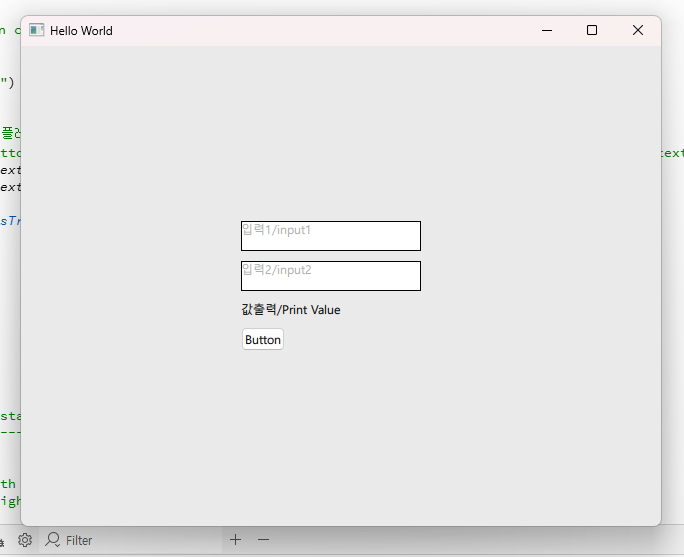
— 아래는 이전에 example1에서 다뤘던 프로그램에 기능을 추가한 QML코드 입니다
Below is the QML code that adds functionality to the program previously covered in example1.
— 플레이스홀더 기능이 추가되어 있습니다.
Added placeholder functionality.
/*
This is a UI file (.ui.qml) that is intended to be edited in Qt Design Studio only.
It is supposed to be strictly declarative and only uses a subset of QML. If you edit
this file manually, you might introduce QML code that is not supported by Qt Design Studio.
Check out https://doc.qt.io/qtcreator/creator-quick-ui-forms.html for details on .ui.qml files.
*/
import QtQuick
import QtQuick.Controls


Rectangle {
    id: mainBackground // ID 추가 / Add ID

    // 상수 직접 선언 / Declare constants directly
    property int widthConst: 1920
    property int heightConst: 1080
    property color backgroundColorConst: "#EAEAEA"

    // === 플레이스홀더 색상 상수 (#AAAAAA: 연회색) ===
    // === Placeholder color constant (#AAAAAA: light gray) ===
    property color placeholderColor: "#AAAAAA"

    // 실제 입력 텍스트 색상 / Actual input text color
    property color inputTextColor: "black"

    width: widthConst
    height: heightConst
    color: backgroundColorConst

    // === 배경 클릭 시 포커스를 가져와 TextEdit의 포커스 상실 이벤트 (onActiveFocusChanged)를 트리거합니다. ===
    // === When clicking on the background, it brings focus and triggers the TextEdit's focus-lost event (onActiveFocusChanged). ===
    focus: true
    MouseArea {
        anchors.fill: parent
        onClicked: {
            // 배경을 클릭하면 TextEdit에서 포커스를 명시적으로 해제
            // Clicking on the background explicitly releases focus from the TextEdit
            mainBackground.forceActiveFocus();
        }
    }
    // ==========================================================================================================

    Column {
        id: column
        width: 200
        anchors.centerIn: parent
        spacing: 10

        // 입력 필드 1 / input field 1
        Rectangle {
            width: 180
            height: 30
            color: "white"
            border.color: "black"

            TextEdit {
                id: textEdit

                // === [핵심 수정 1] 탭/포커스 활성화: 첫 번째 요소에 포커스를 설정합니다. ===
                // === [Core Fix 1] Enable tab/focus: Set focus to the first element. ===
                focus: true

                // 마우스로 선택 가능하게 설정하여 사용성 개선
                // Improve usability by enabling selection with the mouse
                selectByMouse: true

                // === [기능] 텍스트 내용에 따라 색상을 동적으로 바인딩합니다. ===
                // === [Function] Dynamically bind colors based on text content. ===
                color: text === placeholderText ? mainBackground.placeholderColor : mainBackground.inputTextColor

                // === [핵심 수정] Tab 키 입력 시 다음 컴포넌트를 명시적으로 호출합니다. ===
                // === [Core fix] Explicitly call the following components when pressing the Tab key. ===
                Keys.onPressed: {
                    if (event.key === Qt.Key_Tab) {

                        // 텍스트 필드에서 탭 문자 입력을 막습니다.
                        // Prevents tab character entry in text field.
                        event.accepted = true;

                        // 다음 입력 필드인 textEdit2로 포커스를 강제 이동합니다.
                        // Force focus to the next input field, textEdit2.
                        textEdit2.forceActiveFocus();
                    }
                }

                // === 표준 Placeholder 로직 ===
                // === Standard Placeholder Logic ===
                property string placeholderText: qsTr("입력1/input1")
                text: placeholderText

                onActiveFocusChanged: {
                    // .trim()을 사용하여 공백 문제를 방지하고 정확하게 비교
                    // Use .trim() to avoid whitespace issues and compare accurately
                    if (activeFocus && text.trim() === placeholderText.trim()) {
                        text = ""
                    } else if (!activeFocus && text.trim() === "") {
                        text = placeholderText
                    }
                }
                // ===============================

                anchors.fill: parent
                font.pixelSize: 12
            }
        }

        // 입력 필드 2 / input field 2
        Rectangle {
            width: 180
            height: 30
            color: "white"
            border.color: "black"

            TextEdit {
                id: textEdit2

                // 마우스로 선택 가능하게 설정하여 사용성 개선
                // Improve usability by enabling selection with the mouse
                selectByMouse: true

                // === [기능] 텍스트 내용에 따라 색상을 동적으로 바인딩합니다. ===
                // === [Function] Dynamically bind colors based on text content. ===
                color: text === placeholderText ? mainBackground.placeholderColor : mainBackground.inputTextColor

                // === [핵심 수정] Tab 키 입력 시 다음 컴포넌트를 명시적으로 호출합니다. ===
                // === [Core fix] Explicitly call the following components when pressing the Tab key. ===
                Keys.onPressed: {
                    if (event.key === Qt.Key_Tab) {
                        // 텍스트 필드에서 탭 문자 입력을 막습니다.
                        // Prevents tab character entry in text field.
                        event.accepted = true;

                        // 다음 컴포넌트인 button으로 포커스를 강제 이동합니다.
                        // Force focus to the next component, button.
                        button.forceActiveFocus();
                    }
                }

                // === 표준 Placeholder 로직 ===
                // === Standard Placeholder Logic ===
                property string placeholderText: qsTr("입력2/input2")
                text: placeholderText

                onActiveFocusChanged: {
                    if (activeFocus && text.trim() === placeholderText.trim()) {
                        text = ""
                    } else if (!activeFocus && text.trim() === "") {
                        text = placeholderText
                    }
                }
                // ===============================

                anchors.fill: parent
                font.pixelSize: 12
            }
        }

        // 값 출력 필드 / value output field
        Text {
            id: text1
            text: qsTr("값출력/Print Value")
            font.pixelSize: 12
        }

        // 버튼 컴포넌트 / Button component
        Button {
            id: button
            text: qsTr("값 출력/Print Value")

            onClicked: {
                // 버튼 클릭 시 플레이스홀더 텍스트를 제외하고 실제 입력값만 출력합니다.
                // When the button is clicked, only the actual input value is output, excluding the placeholder text.
                let input1 = textEdit.text.trim() === textEdit.placeholderText.trim() ? "" : textEdit.text;
                let input2 = textEdit2.text.trim() === textEdit2.placeholderText.trim() ? "" : textEdit2.text;

                text1.text = qsTr("출력값/output value: ") + input1 + input2
            }
        }
    }
}
3.실행 / Run