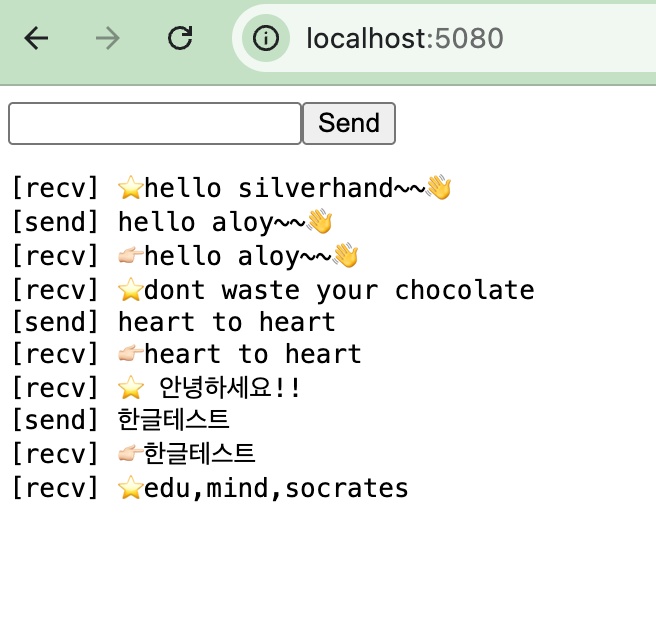
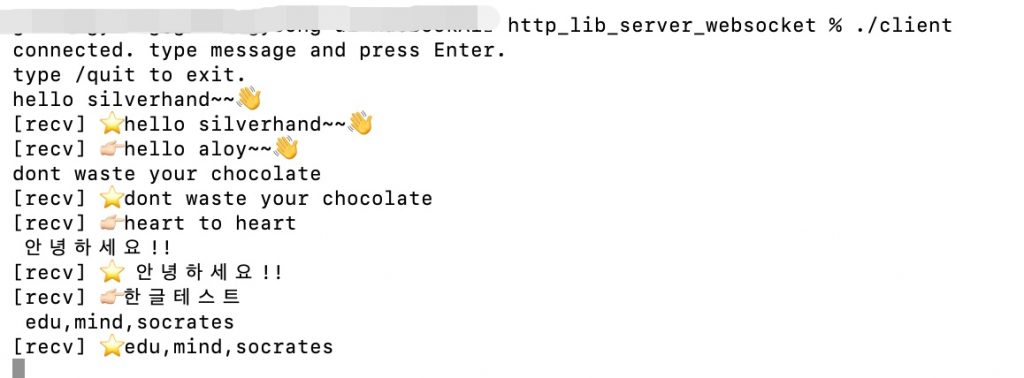
👉🏻 아래는 웹소켓에 대한 설명입니다.
Below is an explanation of WebSockets.
👉🏻 웹소켓은 서버와 클라이언트간의 양방향 통신을 가능하게 합니다.
WebSockets enable bidirectional communication between a server and a client.
👉🏻 아래의 코드는 웹소켓을 사용해서 간단한 채팅기능을 구현한 것입니다.
The code below implements a simple chat function using WebSockets.
👉🏻 터미널과 브라우저간의 채팅이 가능합니다.
Chatting between the terminal and the browser is possible.
👉🏻 bc_server.cpp
✔️서버와 브라우저 클라이언트에 대한 설정이 있습니다.
There are settings for the server and the browser client.
✔️ 코드 / Code
#include "httplib.h"
#include <algorithm>
#include <iostream>
#include <mutex>
#include <string>
#include <vector>

/* ---- 모든 소켓 접속자에게 메세지 전송 / Send message to all socket connected users---- */
std::mutex g_mtx;

// g_clients 모든 웹소켓 클라이언트 / g_clients all WebSocket clients
std::vector<httplib::ws::WebSocket*> g_clients;

void broadcast(const std::string& msg) {

    // 스레드에서 같은데이터 건드릴때 충돌막는 안전장치
    // A safety mechanism to prevent conflicts when threads access the same data
    std::lock_guard<std::mutex> lock(g_mtx);
    // 모든 소켓 접속자에게 메세지전달 / Deliver message to all socket users
    for (auto* c : g_clients) {
        c->send(msg);
    }
}

int main() {
    httplib::Server svr;

    svr.Get("/", [](const httplib::Request&, httplib::Response& res) {
        res.set_content(R"(
        <!doctype html><html><body>
        <input id="msg" value="hello aloy~~👋"><button id="send">Send</button>
        <pre id="log"></pre>
        <script>
        const log = document.getElementById('log');
        const ws = new WebSocket('ws://localhost:5080/ws');
        ws.onmessage = (e) => log.textContent += '[recv] ' + e.data + '\n';
        document.getElementById('send').onclick = () => {
        const v = document.getElementById('msg').value;
        const vplus = "👉🏻" +  v;

        //ws.send(v);
        ws.send(vplus);
        log.textContent += '[send] ' + v + '\n';
        };
        </script></body></html>
        )", "text/html; charset=utf-8");
    });

    svr.WebSocket("/ws", [](const httplib::Request&, httplib::ws::WebSocket& ws) {
        {
            std::lock_guard<std::mutex> lock(g_mtx);
            g_clients.push_back(&ws);
        }

        std::string msg;
        while (ws.read(msg)) {
            broadcast(msg); // 모두에게 전송 / send to everyone
        }

        {
            std::lock_guard<std::mutex> lock(g_mtx);
            g_clients.erase(std::remove(g_clients.begin(), g_clients.end(), &ws), g_clients.end());
        }
    });

    std::cout << "ws server: http://localhost:5080\n";
    svr.listen("0.0.0.0", 5080);
}
✔️ 컴파일 / Compiling
g++ bc_server.cpp -o bc_server -std=c++17 -pthread✔️ 서버실행 / Run Server

👉🏻 client.cpp
✔️ 터미널에서 실행가능한 클라이언트입니다.
This is a client executable in the terminal.
✔️ 코드 / Code
#include "httplib.h"
#include <atomic>
#include <iostream>
#include <string>
#include <thread>

int main() {
    httplib::ws::WebSocketClient ws("ws://localhost:5080/ws");
    if (!ws.connect()) {
        std::cerr << "connect failed\n";
        return 1;
    }

    std::atomic<bool> running{true};

    // 수신 스레드 / receive thread
    std::thread reader([&]() {
        std::string msg;
        while (running && ws.read(msg)) {
            std::cout << "[recv] " << msg << '\n';
        }
        running = false;
    });

    std::cout << "connected. type message and press Enter.\n";
    std::cout << "type /quit to exit.\n";

    // 송신 루프 / Send loop
    std::string line;
    while (running && std::getline(std::cin, line)) {
        if (line == "/quit") break;
        // ws.send(line);
        ws.send("⭐️" + line);
    }

    running = false;
    ws.close();
    if (reader.joinable()) reader.join();

    std::cout << "closed\n";
    return 0;
}
✔️ 컴파일 / Compiling
g++ client.cpp -o client -std=c++17 -pthread✔️ 실행 / Run