👉🏻 myapp42에서는 존재하지 않는 계정으로 sns페이지 접근시 404페이지로 안내합니다.
In myapp42, users are directed to a 404 page when attempting to access an SNS page for a non-existent account.
👉🏻 팔로워 목록,팔로잉 목록을 구현합니다.
Implement the follower and following lists.
👉🏻 전체 코드는 깃허브에서 확인 할 수 있습니다.
You can find the full code on GitHub.
https://github.com/gideonslife01/flm-nextjs
📁 전체 프로젝트 구조 / Overall Project Structure
myapp project/
├── app/  (Next.js App Router)
│   ├── .well-known/webfinger/route.ts  -> webfinger
│   ├── api/follow/route.ts    -> Follow API(temporary)
│   ├── api/announce/route.ts  -> Boost(Announcement)
│   ├── api/like/route.ts.     -> Like API
│   ├── api/posts/route.ts     -> Writing API
│   ├── api/timeline/route.ts  -> Timeline API
│   ├── api/v1/instance/route.ts -> auth
│   ├── api/v1/apps/route.ts.    -> auth
│   ├── api/v1/accounts/verify_credentials/route.ts -> auth
│   ├── api/v1/statuses/route.ts -> Write Post
│   ├── api/v1/timelines/home/route.ts -> timeline
│   ├── oauth/authorize/route.ts -> auth
│   ├── oauth/token/route.ts -> auth
│   ├── api/v1/search/home/route.ts -> search
│   ├── api/v2/search/home/route.ts -> search
│   ├── api/v1/accounts/[id]/followers/route.ts -> followers
│   ├── api/v1/accounts/[id]/following/route.ts -> following
│   ├── api/auth/signup/route.ts        -> Signup
│   ├── api/auth/login/route.ts         -> Login
│   ├── api/auth/logout/route.ts        -> Logout
│   ├── api/auth/refresh/route.ts       -> Refresh Token
│   ├── api/auth/me/route.tsx           -> Login Check
│   ├── auth/signup/page.tsx            -> Signup UI
│   ├── auth/signup/page.tsx            -> Login UI
│   ├── users/[username]/
│   │   ├── statuses/[id]/route.ts -> Indivisual Post
│   │   ├── route.ts               -> Acotr Information
│   │   ├── followers/route.ts     -> Followers List
│   │   ├── following/route.ts     -> Following List
│   │   ├── inbox/route.ts         -> Inbox
│   │   └── outbox/route.ts        -> outbox
│   ├── usersui/[username]/
│   │   ├── page.tsx               -> Timeline UI
│   │   ├── followers/page.tsx.      -> Followers list
│   │   ├── followers/ClientList.tsx -> Followers,Following list UI
│   │   ├── following/page.tsx       -> Following list
│   │   └── _components/themes/
│   │       ├── themeex/ThemeexTheme.tsx   -> Example Theme
│   │       ├── pinafore/PinaforeTheme.tsx -> Theme 1
│   │       ├── mastodon/MastodonTheme.tsx -> Theme 2
│   │       └── minimal/MinimaltTheme.tsx  -> Theme 3
│   ├── layout.tsx, page.tsx, globals.css
│   └── favicon.ico
├── lib/
│   ├── theme.tsx              -> Theme Provider
│   ├── watchThemes.ts         -> Check real-time theme changes
│   ├── auth.ts                -> Authentication, User Management
│   ├── ap.ts                  -> Follow,Undo,Create,Likes,Announce
│   └── db.ts                  -> DB connection
├── data/
│   ├── keys/userIDs/          -> private.pem, public.pem(New)
│   └── keys/                  -> private.pem, public.pem(legacy)
├── data.sqlite                -> Database(1/3)
├── data.sqlite-wal            -> Database(2/3)
├── data.sqlite-shm            -> Database(3/3)
├── Caddyfile                  -> https
├── instrumentation.ts         -> Background Server
└── package.json
📁 프로젝트 시작 / Project Start
📁 코드수정 / Code Modification
✔️ 가입되지 않는 페이지로 접근시 404 not found 메세지 안내
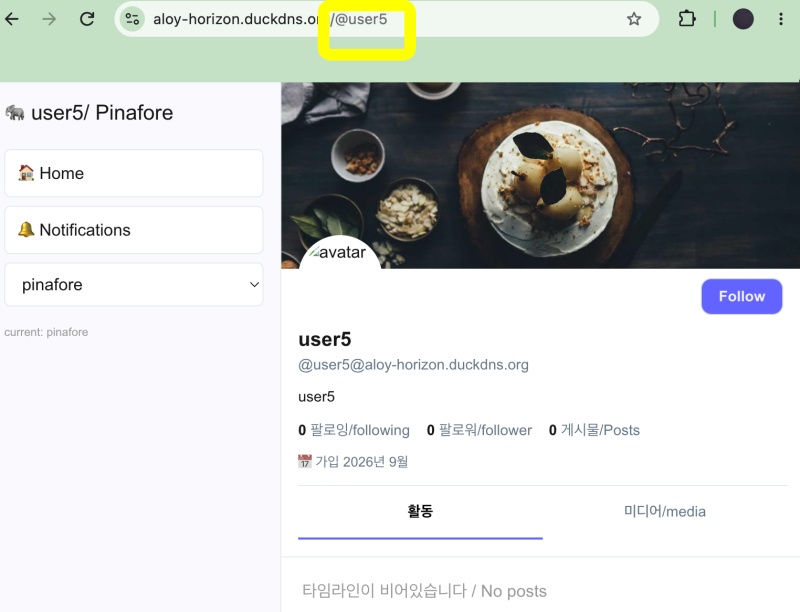
— https://aloy-horizon.duckdns.org/@user5 처럼 존재하지 않는 계정으로 접근시 지금은 빈 데이터 페이지를 보여줍니다.
Currently, accessing a non-existent account—such as https://aloy-horizon.duckdns.org/@user5—displays a page with empty data.
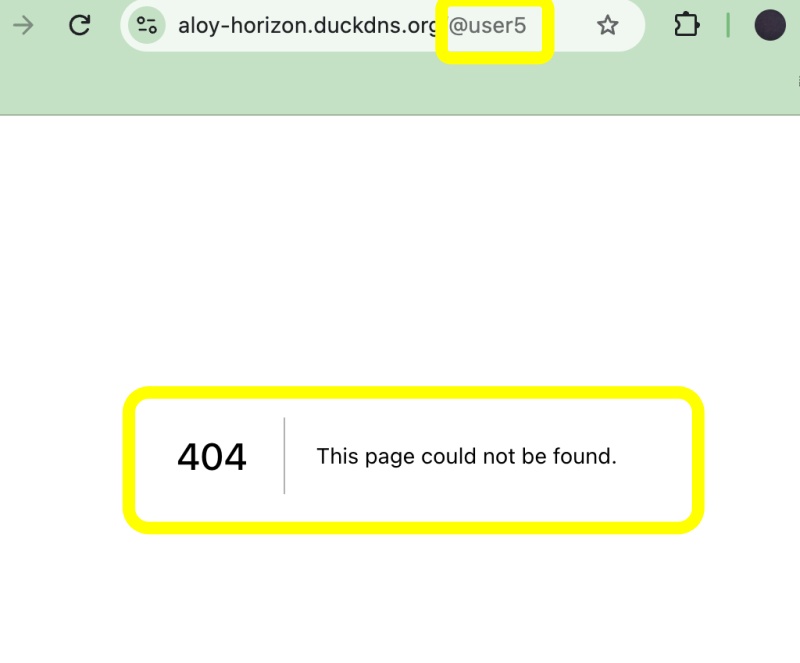
— 존재하지 않는 계정으로 SNS 페이지를 접근시 404 not found 페이지로 안내 하는 설정입니다.
This setting redirects users to a “404 Not Found” page when they attempt to access an SNS page for a non-existent account.
1)page.tsx(server part)를 새로 만들고 기존의 page.tsx를 ClientPage.tsx로 이름 바꾸고 코드 수정합니다.
Create a new page.tsx (server component), rename the existing page.tsx to ClientPage.tsx, and modify the code.
A.app/usersui/[username]/page.tsx
// ✅ app/usersui/[username]/page.tsx - only server
import { notFound } from 'next/navigation';
import db from '@/lib/db';
import ClientPage from './ClientPage';
// daynamic과 runtime은 nextjs가 읽는 값 / `dynamic` and `runtime` are values read by Next.js.
// force-dynamic : 캐시 적용하지 않음 / Do not use cache
// runtime : DB사용하기 위한 설정 / Configuration for Using the Database
export const dynamic = 'force-dynamic'; // no cache
export const runtime = 'nodejs'; // fot db
type Props = {
params: Promise<{ username: string }>;
};
export default async function Page({ params }: Props) {
const { username } = await params;
// DB 체크 / Check DB
const user = db.prepare('SELECT username FROM users WHERE username = ?').get(username) as { username: string } | undefined;
// 404
if (!user) {
notFound();
}
// - 이전의 page.tsx였던 ClientPage.tsx파일 불러오기 , 기존의 params없애고 username 직접 입력
// call client
return <ClientPage username={username} />;
}B.app/usersui/[username]/ClientPage.tsx(이름 변경 / Change Name)
a.기존의 params부분을 지우고 파라메터로 입력된 username 변수 처리 형태로 바꿉니다.
Remove the existing params section and modify it to handle the username variable passed as a parameter.
... ...
export default function ClientPage({ username }: { username: string }) {
... ...
  // ✅ myapp42 - delete params then
  useEffect(() => {
    if (!username) return;
    setLoading(true);
    fetch(`/api/timeline?username=${username}`, { cache: 'no-store' })
     .then(r => r.json())
     .then(data => {
        console.log('📦 timeline', data[0]);
        setTimeline(data);
        setLoading(false);
      })
     .catch(() => setLoading(false));
  }, [username]);
... ...
}
... ...
📁 라우트 추가 / Add route
✔️ follow,follwers 리스트 부분입니다.
This is the section for the following and followers list.
–먼저 next.config.ts에서 @user/following @user/follwers로 접근시 usersui/username/folloing 또는 followers로 접근하도록 설정합니다.
First, configure next.config.ts so that accessing @user/following or @user/followers routes to usersui/username/following or usersui/username/followers.
1)next.config.ts
import type { NextConfig } from "next";

const nextConfig: NextConfig = {

  /* allow domain*/
  allowedDevOrigins: ['aloy-horizon.duckdns.org', '*.duckdns.org'],

  /* host.domain.org/@userid */
  async rewrites() {
    return [
      {
        source: '/@:username',
        destination: '/usersui/:username',
      },
      {
        source: '/@:username/following',
        destination: '/usersui/:username/following',
      },
      {
        source: '/@:username/followers',
        destination: '/usersui/:username/followers',
      },
    ]
  },

};

export default nextConfig;
— app/usersui/[username]/followers/page.tsx
... ...
export default async function Page({ params }: { params: Promise<{ username: string }> }) {
... ...
  if (localUsernames.length > 0) {
    const placeholders = localUsernames.map(() => '?').join(',');
    // ✅ FIX! acct 빼고 display_name만!
    const users = db.prepare(`SELECT username, display_name FROM users WHERE username IN (${placeholders})`).all(...localUsernames) as any[];
    users.forEach((u: any) => localUsersMap.set(u.username, u));
  }
... ...
 return <FollowList username={username} type="followers" users={users} />;
}
... ...
1)username을 데이터 베이스에서 검색
Search for username in the database
2)FollowList 페이지 호출하고 파라메터로 username,users,type 전달
Call the FollowList page and pass username, users, and type as parameters.
— app/usersui/[username]/followers/ClientList.tsx
... ...
export default function FollowList({ username, type, users }: { username: string, type: 'followers' | 'following', users: any[] }) {

... ...
       {users.map((u: any) => (
          <Link key={u.username} href={`/usersui/${u.username}`} style={{ textDecoration: 'none', color: 'inherit' }}>
            <div className="follow-row">
              {u.avatar? <img src={u.avatar} style={{ width: 46, height: 46, borderRadius: '50%' }} alt="" /> : <Avatar username={u.username} />}
              <div style={{ flex: 1, minWidth: 0 }}>
                <div style={{ fontWeight: 700 }}>{u.display_name || u.username}</div>
                <div style={{ fontSize: 13, color: '#657786' }}>@{u.acct || u.username}</div>
                {u.note && <div style={{ fontSize: 13, marginTop: 4, display: '-webkit-box', WebkitLineClamp: 2, WebkitBoxOrient: 'vertical', overflow: 'hidden' }} dangerouslySetInnerHTML={{ __html: u.note }} />}
              </div>
            </div>
          </Link>
        ))}
... ...

}
1)실제 화면에 표시되는 UI
UI displayed on the actual screen
2)전달 받은 데이트를 화면표시함.
Displays the received date on the screen.
— app/usersui/[username]/following/page.tsx
... ...
import FollowList from '../followers/ClientList';
... ...
export default async function Page({ params }: { params: Promise<{ username: string }> }) {
... ...
  if (localNames.length > 0) {
    const ph = localNames.map(() => '?').join(',');
    const users = db.prepare(`SELECT username, display_name FROM users WHERE username IN (${ph})`).all(...localNames) as any[];
    users.forEach(u => map.set(u.username, u));
  }
... ...
return <FollowList username={username} type="following" users={users} />;
}
1)username을 데이터 베이스에서 검색
Search for username in the database
2)FollowList 페이지 호출하고 파라메터로 username,users,type 전달
Call the FollowList page and pass username, users, and type as parameters.
3)UI는 followers/ClientList.tsx 파일을 재사용.
The UI reuses the followers/ClientList.tsx file.
📁 테스트 / Test
✔️ 존재하지 않는 계정으로 sns페이지 접근할경우
When accessing a social media page for a non-existent account
— 404 적용 전 / 404 Before Application
— 404 적용 후 / After applying 404
💡 팔로우 리스트, 팔로워리스트 부분은 다음 프로젝트에서 구조 변경 될 수 있습니다.
The structure of the following and follower lists may be modified in the next project.
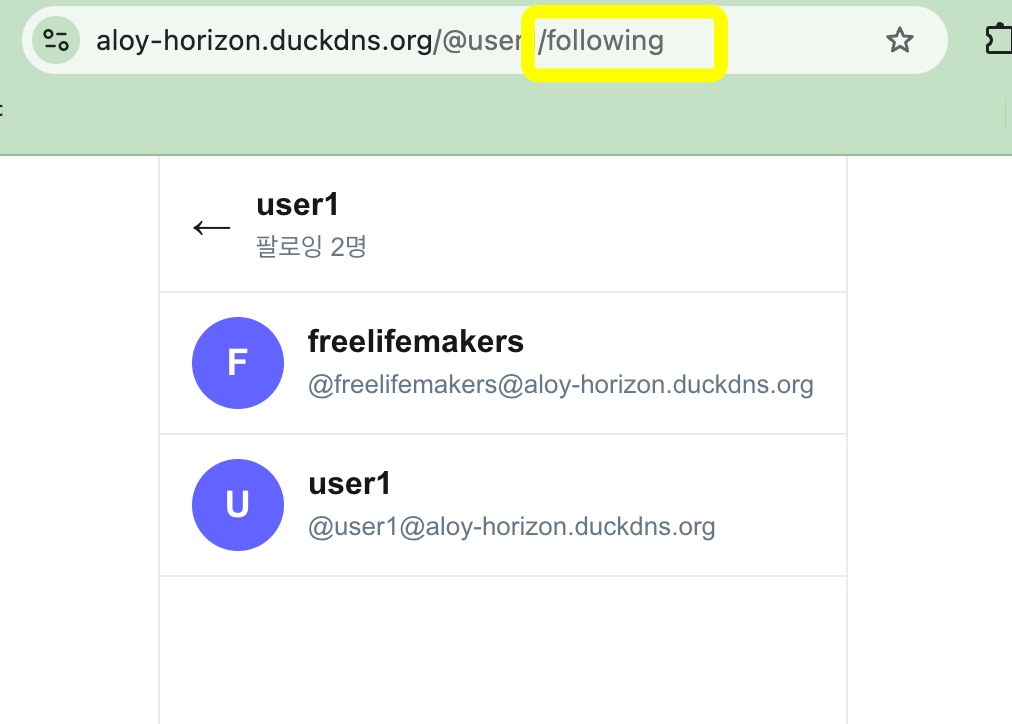
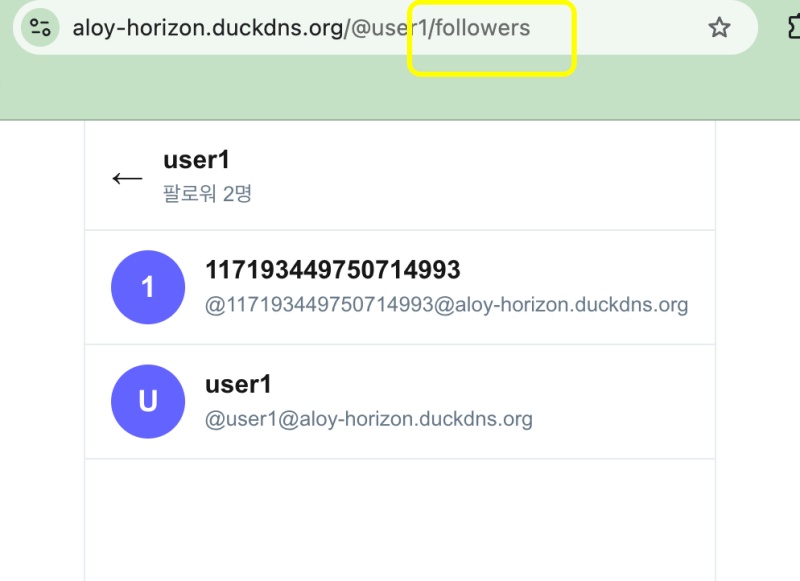
✔️ 팔로우리스트 / Follow list
✔️ 팔로워리스트 / Follower list
요한복음 8장 32절 / John 8:32
“그리고 너희는 진리를 알게 될 것이며, 진리가 너희를 자유롭게 할 것이다.”
“Then you will know the truth ,and the truth will set you free”