👉🏻 myapp43에서는 테마파일에서 팔로우,팔로워목록을 호출하는 방식으로 전환합니다.
In myapp43, we are switching to a method that calls the lists of people being followed and followers directly from the theme files.
👉🏻 전체 코드는 깃허브에서 확인 할 수 있습니다.
You can find the full code on GitHub.
https://github.com/gideonslife01/flm-nextjs
📁 전체 프로젝트 구조 / Overall Project Structure
myapp project/
├── app/  (Next.js App Router)
│   ├── .well-known/webfinger/route.ts  -> webfinger
│   ├── api/follow/route.ts    -> Follow API(temporary)
│   ├── api/announce/route.ts  -> Boost(Announcement)
│   ├── api/like/route.ts.     -> Like API
│   ├── api/posts/route.ts     -> Writing API
│   ├── api/timeline/route.ts  -> Timeline API
│   ├── api/followinglist/route.ts  -> followinglist API
│   ├── api/followerslist/route.ts  -> followerslist API
│   ├── api/v1/instance/route.ts -> auth
│   ├── api/v1/apps/route.ts.    -> auth
│   ├── api/v1/accounts/verify_credentials/route.ts -> auth
│   ├── api/v1/statuses/route.ts -> Write Post
│   ├── api/v1/timelines/home/route.ts -> timeline
│   ├── oauth/authorize/route.ts -> auth
│   ├── oauth/token/route.ts -> auth
│   ├── api/v1/search/home/route.ts -> search
│   ├── api/v2/search/home/route.ts -> search
│   ├── api/v1/accounts/[id]/followers/route.ts -> followers
│   ├── api/v1/accounts/[id]/following/route.ts -> following
│   ├── api/auth/signup/route.ts        -> Signup
│   ├── api/auth/login/route.ts         -> Login
│   ├── api/auth/logout/route.ts        -> Logout
│   ├── api/auth/refresh/route.ts       -> Refresh Token
│   ├── api/auth/me/route.tsx           -> Login Check
│   ├── auth/signup/page.tsx            -> Signup UI
│   ├── auth/signup/page.tsx            -> Login UI
│   ├── users/[username]/
│   │   ├── statuses/[id]/route.ts -> Indivisual Post
│   │   ├── route.ts               -> Acotr Information
│   │   ├── followers/route.ts     -> Followers List
│   │   ├── following/route.ts     -> Following List
│   │   ├── inbox/route.ts         -> Inbox
│   │   └── outbox/route.ts        -> outbox
│   ├── usersui/[username]/
│   │   ├── page.tsx               -> Timeline UI(Server, 404)
│   │   ├── ClientPage.tsx.        -> Timeline UI(Client,Call Active Themes)
│   │   └── _components/themes/
│   │       ├── themeex/ThemeexTheme.tsx   -> Example Theme
│   │       ├── pinafore/PinaforeTheme.tsx -> Theme 1
│   │       ├── pinafore/FollowersList.tsx -> Theme 1,FollowersList
│   │       ├── pinafore/FollowingList.tsx -> Theme 1,FollowingList
│   │       ├── mastodon/MastodonTheme.tsx -> Theme 2
│   │       └── minimal/MinimaltTheme.tsx  -> Theme 3
│   ├── layout.tsx, page.tsx, globals.css
│   └── favicon.ico
├── lib/
│   ├── theme.tsx              -> Theme Provider
│   ├── watchThemes.ts         -> Check real-time theme changes
│   ├── auth.ts                -> Authentication, User Management
│   ├── ap.ts                  -> Follow,Undo,Create,Likes,Announce
│   └── db.ts                  -> DB connection
├── data/
│   ├── keys/userIDs/          -> private.pem, public.pem(New)
│   └── keys/                  -> private.pem, public.pem(legacy)
├── data.sqlite                -> Database(1/3)
├── data.sqlite-wal            -> Database(2/3)
├── data.sqlite-shm            -> Database(3/3)
├── Caddyfile                  -> https
├── instrumentation.ts         -> Background Server
└── package.json
📁 프로젝트 시작 / Project Start
📁 구조 변경 설명 / Explanation of Structural Changes
✔️ 현재 방식은 팔로워,팔로우를 클릭하면 새로운 페이지로 팔로워,팔로우 리스트가 표시됩니다.
In the current method, clicking on “Followers” or “Following” displays the respective list on a new page.
✔️ 지금 이 앱에 있는 엑티브 테마기능을 활용하려면 테마페이지에서 팔로워,팔로우 리스트를 호출하는게 효율적입니다.
To utilize the active theme feature currently in this app, it is efficient to call up the follower and following lists from the theme page.
✔️ 그러면 하나의 페이지에서 클릭으로,타임라인,팔로우 및 팔로워 리스트를 컴포넌트 형식으로 변경하므로 테마별로 디자인 일관성을 유지 할 수 있습니다.
This allows you to switch between the timeline and the lists of people you follow and your followers as components with a single click on the same page, thereby maintaining design consistency across themes.
# 기존 라우트 -> 삭제 / Existing route -> Delete
app/usersui/[username]/followers/
app/usersui/[username]/following/

# 신규 라우트 / New Route
app/api/followlist/route.ts
app/api/followinglist/route.ts
📁 코드수정 및 라우트 추가 / Code Modification and
✔️ app/api/followinglist/route.ts -> 라우트 추가 / Add route
— API
... ...
export async function GET(req: Request) {
  const data = rows.map(r => {
... ...

      // ✅ 도메인이 내 도메인일 때만 로컬 DB 조회!
      // Query the local DB only when the domain matches mine!
      const isLocalDomain = hostname === DOMAIN || hostname === 'localhost' || hostname.endsWith(`.${DOMAIN}`);

      let info = null;
      if (isLocalDomain && remoteName) {
        info = db.prepare('SELECT username, display_name FROM users WHERE username=?').get(remoteName) as any;
      }

      const isLocalUser = isLocalDomain &&!!info;

      return {
        username: remoteName || r.actor,
        display_name: info?.display_name || remoteName || 'remote',
        acct: isLocalUser
         ? `${remoteName}@${DOMAIN}` // ✅ 진짜 로컬일 때만 aloy
          : `${remoteName}@${hostname}`, // ✅ freelifemakers.com이면 freelifemakers@freelifemakers.com
        actor: r.actor,
        domain: hostname,
      };
    } catch {
      return { acct: r.actor, actor: r.actor, username: r.actor };
    }
  });
  }
}
✔️ app/api/followerslist/route.ts -> 라우트 추가 / Add route
— API
followinglist/route.ts와 테이블이름만 다름 전체 코드 동일함.
It differs from followinglist/route.ts only in the table name; the rest of the code is identical.
✔️ app/usersuui/[username]/_components/theme/pinafore/FollowersList.tsx -> 페이지 추가 / Add page
— UI(테마에포함 / Included in the theme)
— API정보 받아와서 return부분의 HTML에 출력
Fetch the API data and output it to the HTML in the return section.
// ✅ app/usersui/[username]/_components/theme/pinafore/FollowersList.tsx

'use client';
import { useEffect, useState } from 'react';

export default function FollowersList({ username, style }: { username: string, style?: any }) {
  const [users, setUsers] = useState<any[]>([]);
  const [loading, setLoading] = useState(true);

  useEffect(() => {
    // ✅ /api/followerslist/route.ts 호출!
    // Calling /api/followerslist/route.ts
    fetch(`/api/followerslist?username=${username}`)
     .then(r => r.json())
     .then(d => { setUsers(Array.isArray(d)? d : d.accounts || []); setLoading(false); })
     .catch(() => setLoading(false));
  }, [username]);

  if (loading) return <div style={{ padding: 20, textAlign: 'center' }}>Loading...</div>;

  return (
    <div style={style}>
      {users.map((u, i) => (
        <div key={i} style={{ display: 'flex', gap: 12, padding: '12px 16px', borderBottom: '1px solid #eee' }}>
          <div style={{ width: 46, height: 46, borderRadius: '50%', background: '#6364ff', color: 'white', display: 'flex', alignItems: 'center', justifyContent: 'center', fontWeight: 800 }}>
            {(u.display_name || u.username || '?')[0].toUpperCase()}
          </div>
          <div>
            <div style={{ fontWeight: 700 }}>{u.display_name || u.username}</div>
            <div style={{ fontSize: 13, color: '#657786' }}>{u.acct || u.actor}</div>
          </div>
        </div>
      ))}
      {users.length === 0 && <div style={{ padding: 40, textAlign: 'center', color: '#999' }}>팔로워 없음 / No followers</div>}
    </div>
  );
}
✔️ app/usersuui/[username]/_components/theme/pinafore/FollowingList.tsx -> 페이지 추가 / Add page
— UI(테마에포함 / Included in the theme)
— API정보 받아와서 return부분의 HTML에 출력
Fetch the API data and output it to the HTML in the return section.
코드 동일하고 FollowerList.tsx부분의 데이터베이스 테이블명만 다름(following)
The code is identical, except for the database table name in `FollowerList.tsx` (which is `following`).
✔️ app/usersuui/[username]/_components/theme/pinafore/PinaforeTheme.tsx -> 코드수정/ Code Modification
— 버튼 클릭시 타임라인 영역부분에 view의 값에 따라서 다른 컴포넌트를 배치합니다.
When the button is clicked, a different component is placed in the timeline area based on the view value.
... ...
export function PinaforeTheme({ timeline, username, onBoost, onLike }: any) {
... ...
  // ✅ myapp43 -  링크 관점: 페이지 이동 없이 슬롯만 교체! / Link Perspective: Swap only the slot without navigating to a new page!
  const switchView = (e: React.MouseEvent, v: typeof view) => {
    e.preventDefault();
    setView(v);
    const url = v === 'timeline'? `/@${username}` : `/@${username}/${v}`;
    window.history.pushState({}, '', url);
  };

  return (
... ...
              <div className="profile-stats">

                <a href={`/@${username}/following`} onClick={(e) => switchView(e, 'following')}>
                  <b>{counts.following}</b> <span>팔로잉/Followng</span>
                </a>
                <a href={`/@${username}/followers`} onClick={(e) => switchView(e, 'followers')}>
                  <b>{counts.followers}</b> <span>팔로워/Follower</span>
                </a>
                <a href={`/@${username}`} onClick={(e) => switchView(e, 'timeline')}>
                  <b>{counts.posts}</b> <span>게시물/Toots</span>
                </a>
              </div>
    ... ...
          {view === 'timeline' && (
            <>
            {timeline.length === 0 && (
              <div style={{ padding: 20, color: '#999' }}>타임라인이 비어있습니다 / No posts</div>
            )}
            {timeline.map((p: any) => (

              <article key={`${p.source}-${p.id}`} className="pinafore-status">
               ... ...
              </article>

            ))}
            </>
          )}
          {view === 'followers' && (
            <FollowersList username={username} style={{ padding: '0' }} />
          )}

          {view === 'following' && (
            <FollowingList username={username} style={{ padding: '0' }} />
          )}
  );
}
✔️ lib/watchThemes -> 코드수정 / Code Modification
— watchThemes는 파일이나 디렉토리변경이 있는지 확인해서 갱신된 테마를 불러올 index.ts파일을 생성합니다.
watchThemes monitors for changes to files or directories and generates an index.ts file to load the updated themes.
— 테마 디렉토리에 새로 추가된 followerlist.tsx,followinglist.tsx 파일을 index.ts에 포함시키게 됩니다.
The newly added followerlist.tsx and followinglist.tsx files in the theme directory will be included in index.ts.
— 그래서 followerslist.tsx, followinglist.tsx 파일을 테마 파일에서 제외 시키는 코드를 추가합니다.
So, I am adding code to exclude the followerslist.tsx and followinglist.tsx files from the theme files.
... ...
export function watchThemes() {
... ...
          // ✅ myapp43 - followerlist,followinglist 파일 스킵 / Skip followerlist and followinglist files.
          files = files.filter(f =>!f.toLowerCase().includes('list'));
          if (!files.length) continue; // false -> continue

          // ✅ myapp43 - PinaforeTheme.tsx 같은 Theme 파일 우선 정렬
          files.sort((a,b) => {
            const aIsTheme = a.toLowerCase().includes('theme')? 0 : 1;
            const bIsTheme = b.toLowerCase().includes('theme')? 0 : 1;
            return aIsTheme - bIsTheme;
          });
... ...
}
💡 파일 정렬 과정 / File sorting process
— const fileName = files[0];이 부분이 테마파일이름으로 사용됩니다.
The part const fileName = files[0]; is used as the theme file name.
–그래서 정렬과정을 통해서 실제로 배열 0번에 테마파일 이름이 셋팅되도록 합니다.
Therefore, through the sorting process, the theme file name is actually set at index 0 of the array.
// 읽어온 파일 배열
const files = ['FollowersList.tsx', 'PinaforeTheme.tsx', 'FollowingList.tsx']

// sort가 내부적으로 호출하는 과정
// files.sort((a,b) => ...)

1차 비교: a = 'FollowersList.tsx', b = 'PinaforeTheme.tsx'
  -> aIsTheme = 1, bIsTheme = 0
  -> 1 - 0 = 1 (양수) -> b가 앞으로!
  -> ['PinaforeTheme.tsx', 'FollowersList.tsx', 'FollowingList.tsx']

2차 비교: a = 'FollowersList.tsx', b = 'FollowingList.tsx'
  -> aIsTheme = 1, bIsTheme = 1
  -> 1 - 1 = 0 -> 순서 그대로!

최종: ['PinaforeTheme.tsx', 'FollowersList.tsx', 'FollowingList.tsx']
✔️ next.config.ts
— view에 get 방식으로 값을 전달합니다.
Pass values to the view using the GET method.
— 이 값은 sns페이지에서 following 리스트와 followers 리스트를 불러오는 역할을 합니다.
This value serves to retrieve the “following” and “followers” lists from the social media page.
import type { NextConfig } from "next";

const nextConfig: NextConfig = {

  /* allow domain*/
  allowedDevOrigins: ['aloy-horizon.duckdns.org', '*.duckdns.org'],

  /* host.domain.org/@userid */
  async rewrites() {
    return [
      {
        source: '/@:username',
        destination: '/usersui/:username',
      },
      {
        source: '/@:username/following',
        destination: '/usersui/:username?view=following', // ✅ myapp43 - initialView
      },
      {
        source: '/@:username/followers',
        destination: '/usersui/:username?view=followers',
      },
    ]
  },

};

export default nextConfig;
✔️ initialView
— initialView를 셋팅하지 않으면 next.config.ts에서 get방식으로 전달되는 view값을 받을 수 없습니다.
If initialView is not set, you cannot receive the view value passed via the GET method in next.config.ts.
— 이런경우 버튼 클릭시는 정상적으로 followers,following리스트를 불러오지만 라우트를 재실행하면 타임라인을 불러오게 됩니다.
In this case, clicking the button correctly loads the followers and following lists, but reloading the route causes the timeline to load instead.
— 그래서 버튼 클릭 뿐아니라 라우트가 재실행될 때도 view값을 전달받아서 followers,following 리스트를 제대로 불러올 수 있습니다.
This allows the view value to be passed not only when the button is clicked but also when the route is re-executed, ensuring the followers and following lists are loaded correctly.
— 변수전달 / Variable passing : paget.tsx -> ClientPage.tsx -> pinafore/PinaforeTheme.tsx
— app/usersui/[username]/page.tsx
... ...
type Props = {
  params: Promise<{ username: string }>,
  searchParams: Promise<{ view?: string }>
};
export default async function Page({ params,searchParams }: Props) {
... ...
return <ClientPage username={username} initialView={view} />;
}
— app/usersui/[username]/ClientPage.tsx
... ...
export default function ClientPage({ username, initialView}: {username:String, initialView?:String}) {
... ...
  const props = { timeline, username, initialView,onBoost: handleBoost, onLike: handleLike };

  // getThemeComponent : import { themeRegistry, getThemeComponent } from './_components/themes'; --> index.ts
  const ActiveTheme = getThemeComponent(theme as any) || themeRegistry.pinafore?.component || themeRegistry[themeNames[0]]?.component;
  if (!ActiveTheme) return <div>No themes found</div>;

  return <ActiveTheme {...props} />;
}
— app/usersui/[username]/ClientPage.tsx
📁 기존 라우트 삭제(사용안함.)
Delete existing route (unused).
✔️ 기존의 팔로워,팔로우 라우트 및 하위 파일을 삭제합니다.
Delete the existing follower and following routes and sub-files.
— app/usersui/[username]/followers/
— app/usersui/[username]/followiing/
📁 테스트 / Test
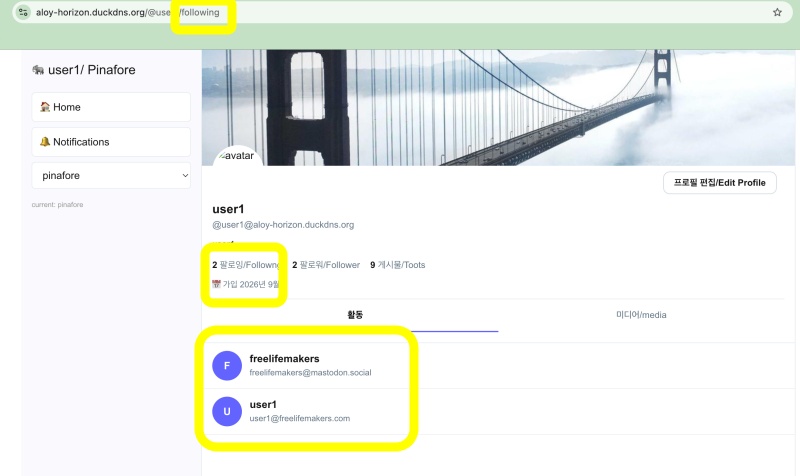
✔️ 팔로잉 리스트 / following list
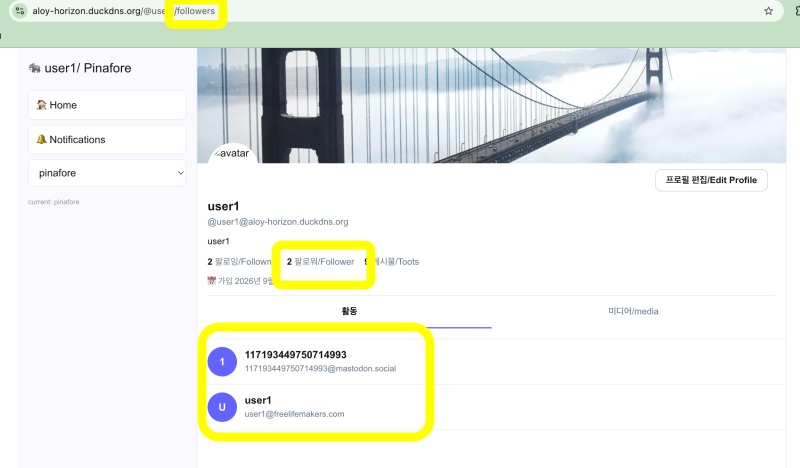
✔️ 팔로워 리스트 / followers list
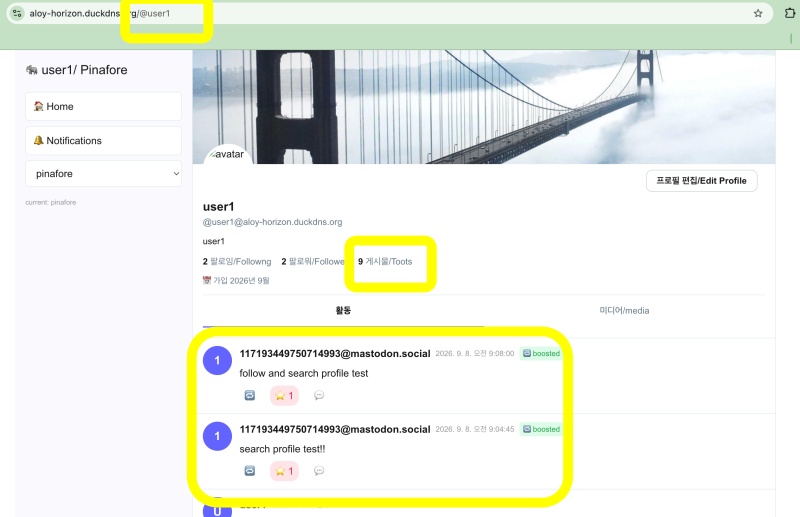
✔️ 타임라인 / Timeline
요한복음 8장 32절 / John 8:32
“그리고 너희는 진리를 알게 될 것이며, 진리가 너희를 자유롭게 할 것이다.”
“Then you will know the truth ,and the truth will set you free”


