👉🏻 햄버거 메뉴와 슬라이드 메뉴를 결합한 형태의 메뉴입니다.
This is a menu format that combines a hamburger menu with a slide-out menu.
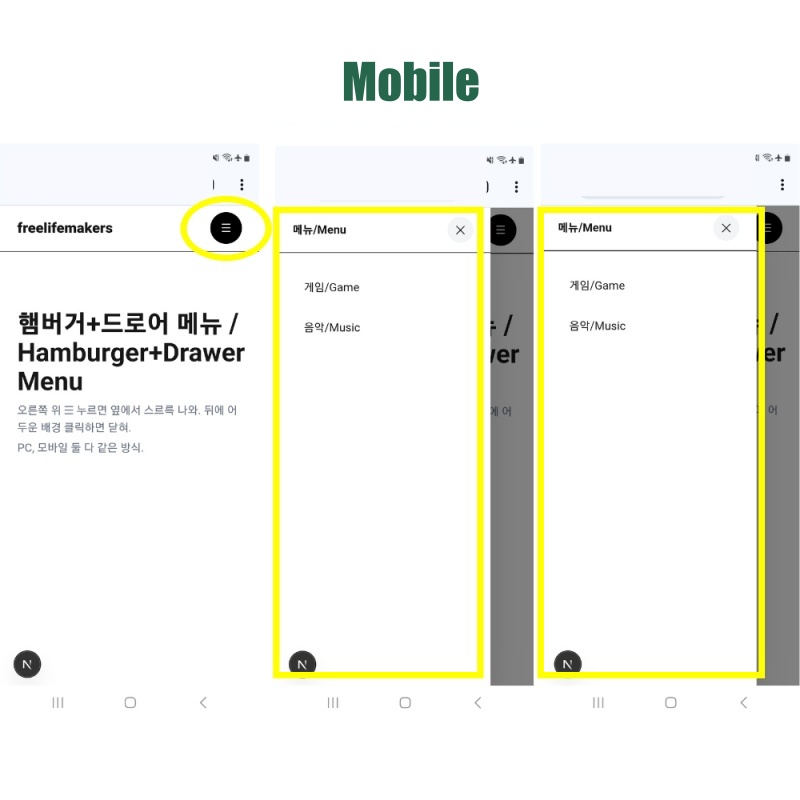
👉🏻 햄버거 메뉴를 클릭하면 슬라이드메뉴가 나타납니다.
Clicking the hamburger menu reveals a slide-out menu.
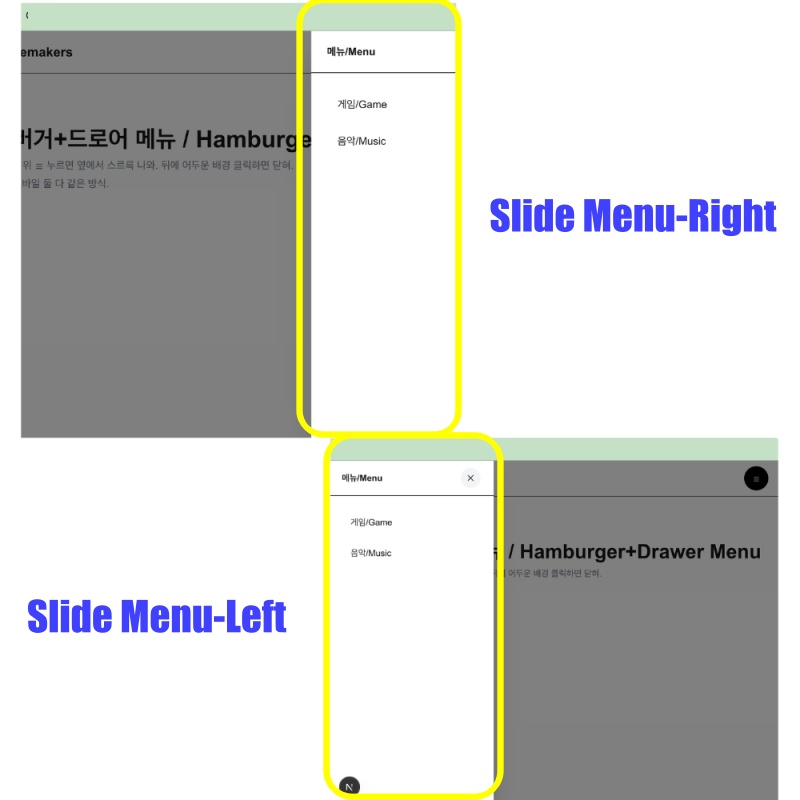
👉🏻 슬라이드메뉴는 우측또는 좌측에서 나타나게 설정할 수 있습니다.
The slide menu can be set to appear from either the right or the left side.
👉🏻 부드러운 메뉴열림 닫힘을 위해서 css와 tailwindcss를 혼합해서 사용합니다.
To ensure smooth opening and closing of the menu, a combination of CSS and Tailwind CSS is used.
📁 디렉토리 구조 / Directory structure
tailwindcss-nextjs/
└── app/
    ├── layout.tsx
    ├── page.tsx (루트 /)
    ├── globals.css
    ├── favicon.ico
    │
    ├── ui/
    │   ├── page.tsx
    │   └── _components/
    │       ├── button.tsx
    │       ├── dropdown.tsx
    │       └── navigation/
    │           ├── HorizontalNavMenu.tsx
    │           ├── MegaMenu.tsx
    │           └── Hamburger-Drawer.tsx  # hamberger-drawer
    │
    ├── hamberger-drawer/
    │   ├── page.tsx                     # /hamberger-drawer
    │   └── game/
    │       └── page.tsx                 # /hamberger-drawer/game
    │
    └── button-css/ , button-tailwind/ ... ...
📁 슬라이드메뉴설정 / Slide Menu Settings
✔️ 슬라이드메뉴를 오른쪽 또는 왼쪽에서 나오게 할 수 있습니다.
You can have the slide menu appear from either the right or the left.
1)오른쪽에서 나오게 설정 / Set it to appear from the right
... ...
          {/** 오른쪽에서 메뉴 나오는 설정 / Setting to make the menu appear from the right */}
        <div className={`fixed top-0 right-0 h-full w-[300px] bg-white z-50 shadow-2xl flex flex-col ${open ? 'animate-slide-in' : 'animate-slide-out'}`}>

... ...
 <style>{`
        /* 들어갈 때 - 오른쪽 / When entering from the right */
        @keyframes slide-in {
          from { transform: translateX(100%); }
          to { transform: translateX(0); }
        }
... ...
        /* 나갈 때-오른쪽 / When exiting to the right */
        @keyframes slide-out {
          from { transform: translateX(0); }
          to { transform: translateX(100%); }
        }
... ...
`}</style>
... ...
2)왼쪽에서 나오게 설정 / Set it to appear from the left
... ...
{/* 왼쪽에서 메뉴 나오는 설정 / Setting to make the menu appear from the left */}
<div className={`fixed top-0 left-0 h-full w-[300px] bg-white z-50 shadow-2xl flex flex-col ${open ? 'animate-slide-in' : 'animate-slide-out'}`}>

... ...
      <style>{`
... ...

        /* 들어갈 때 - 왼쪽 / When entering from the left */
        /*@keyframes slide-in {
           from { transform: translateX(-100%); }
           to { transform: translateX(0); }
        }*/
... ...
        /* 나갈 때-왼쪽 / When exiting to the left */
       /* @keyframes slide-out {
          from { transform: translateX(0); }
          to { transform: translateX(-100%); }
        } */
      `}</style>
... ...
3)top-0은 위에서 0px만큼 위치 ,right-0는 오른쪽에서 0px만큼 위치,left-0는 왼쪽에서 0px만큼 위치 하도록 설정top-0 sets the position to 0px from the top, right-0 sets it to 0px from the right, and left-0 sets it to 0px from the left.
📁 메뉴 랜더링 상태 / Menu rendering state
... ...
const [render, setRender] = useState(false)
... ...
  useEffect(() => {
    if (open) {
      setRender(true)
      document.body.style.overflow = 'hidden'
    } else {
      // 메뉴 닫을때 , 0.3초 후에 setRender함수 실행
      // When closing the menu, execute the `setRender` function after 0.3 seconds.
      const t = setTimeout(() => setRender(false), 300)
      document.body.style.overflow = ''
      return () => clearTimeout(t)
    }
  }, [open])
... ...
1)메뉴가 열리고 닫힘에 따라 setRender함수로 메뉴 랜더링 상태를 처리합니다.
The rendering state of the menu is managed using the setRender function as the menu opens and closes.
2)메뉴가 오픈 되었을때는 반투명 배경뒤의 화면 스크롤을 숨김처리하고 메뉴가 닫히면 스크롤 사용가능하게 설정합니다.
When the menu is opened, scrolling on the screen behind the semi-transparent background is disabled; when the menu is closed, scrolling is re-enabled.
# 메뉴가 열림인 경우 / When the menu is open
document.body.style.overflow = 'hidden'

# 메뉴가 닫힘인 경우 / When the menu is closed
document.body.style.overflow = ''
📁 햄버거 메뉴 열림/닫힘 버튼
Hamburger menu open/close button
... ...
<button onClick={() => setOpen(true)} className="w-11 h-11 bg-black text-white rounded-full">☰</button>
... ...
<button onClick={() => setOpen(false)} className="w-9 h-9 bg-gray-100 rounded-full">✕</button>
... ...
📁 슬라이드 메뉴 열림/닫힘
Open/close slide menu
... ...
{render && ( ...
...)}
... ...
📁 스타일 /
✔️ 슬라이드 메뉴 숨김,나타나기
Hide/show slide menu
... ...
  from { transform: translateX(100%); } // 시작 / start
  to { transform: translateX(0); } // 끝 / end
... ...
1)슬라이드 메뉴가 시작 위치 부터 끝 위치까지 이동합니다.
The slide menu moves from the starting position to the end position.
2)100%는 슬라이드 메뉴의 전체 크기입니다.
100% is the full size of the slide menu.
3)즉 메뉴 숨겨졌다가 메뉴 전체가 0px떨어진 위치만큼 이동하는 설정입니다.
In other words, this setting involves the menu starting out hidden and then shifting by a distance of 0px.
4)메뉴의 방향은 div코드에서 right-0또는 left-0가 초기 메뉴의 위치입니다. 이 부분에서 메뉴 이동 애니메이션이 시작됩니다.
The direction of the menu is determined by the right-0 or left-0 setting in the div code, which defines the initial position of the menu. The animation for the menu’s movement begins from this point.
<div className={`fixed top-0 right-0 h-full w-[300px] ... ...${open ? 'animate-slide-in' : 'animate-slide-out'}`}>
... ...
</div>
✔️ 애니메이션 형태 / Animation format
... ...
        @keyframes fade-in {
          from { opacity: 0; }
          to { opacity: 1; }
        }
... ...
        @keyframes fade-out {
          from { opacity: 1; }
          to { opacity: 0; }
        }
... ...
1)페이드 인(천천히 나타남),페이드 아웃(천천히 사라짐) 설정입니다.
These are the settings for fade-in (appearing gradually) and fade-out (disappearing gradually).
2)opacity가 0이면 투명,1이면 불투명이고 0.5이면 반투명입니다.
An opacity value of 0 is transparent, 1 is opaque, and 0.5 is semi-transparent.
... ...
        .animate-slide-in { animation: slide-in 0.3s ease-out forwards; }
        .animate-slide-out { animation: slide-out 0.3s ease-out forwards; }
        .animate-fade-in { animation: fade-in 0.3s ease-out forwards; }
        .animate-fade-out { animation: fade-out 0.3s ease-out forwards; }
... ...
1)슬라이드인,슬라이드아웃 또는 페이드인,페이드아웃할때 세부설정입니다.
These are the detailed settings for slide-in, slide-out, fade-in, or fade-out effects.
2)0.3s는 애니메이션속도,ease-out은 애니메이션 구현중 속도형태,forward는 애니메이션 끝난 후의 상태입니다.
‘0.3s’ is the animation duration, ‘ease-out’ is the speed pattern during the animation, and ‘forwards’ defines the state after the animation has finished.
3)ease-out은 처음엔 빠르게, 끝에서 천천히 실행됩니다.이 외에도 ease-in,ease-in-out,linear등이 있습니다.
‘ease-out’ starts quickly and slows down toward the end. Other options include ‘ease-in’, ‘ease-in-out’, and ‘linear’.
4)forwards설정이 없으면 애니메이션이 끝난후 처음으로 돌아갑니다. 애니메이션이 끝난후 메뉴가 열림상태로 유지하려면 forwards 설정이 있어야 합니다.
If the ‘forwards’ setting is not used, the animation will return to its initial state after it finishes.
To keep the menu in an open state after the animation finishes, you must include the forwards setting.
📁 테스트 / Test
✔️ PC
✔️ Mobile
마태복음 21장 22절 / Matthew 21: 22
“너희가 기도할 때에 무엇이든지 믿고 구하는 것은 다 받으리라 하시니라”
“And everything you ask in prayer, believing, you will receive.”


