👉🏻 로그인 로그아웃 구현하기 위한 기본 로직에 대한 코드입니다.
This is the code for the basic logic used to implement login and logout functionality.
👉🏻 데이터 베이스를 사용하지 않고 배열을 사용합니다.
It uses an array instead of a database.
👉🏻 실제로 구현되는 로그인 기능은 훨씬 더 복잡하지만 이 코드를 통해서 간단한 개념을 이해할 수 있습니다.
While the actual implementation of a login function is far more complex, this code allows you to understand the basic concepts.
👉🏻 파일 / Files
— node_modules,package-lock.json,package.json 이 디렉토리와 파일은 npm install 명령어 실행하면 자동생성됩니다.
The node_modules directory and the package-lock.json and package.json files are automatically generated when you run the npm install command.
# projet directory

node_modules		package-lock.json	package.json		public			server.js
# public directory
login.ejs👉🏻 모듈 설치 / Install Module
npm install express express-session bcrypt ejs👉🏻 전체 코드 / Full Code
✔️server.js
const express = require('express');
const session = require('express-session');
const bcrypt = require('bcrypt');
const app = express();
const port = 3000;

// 간단한 사용자 데이터베이스 (배열) : simple user database (array)
const users = [
  { id: 1, username: 'testuser', passwordHash: '$2b$10$abKhb8aJsQ02T2TwSi0J4eVK42eRojFDTe.3EmWUQkdiXvaFVboxq' } // '11111111'의 hash
];

// 미들웨어 설정 : middleware settings
app.use(express.urlencoded({ extended: false }));
app.use(express.json());
app.use(session({
  secret: 'your-secret-key',
  resave: false,
  saveUninitialized: false,
  cookie: { secure: false }
}));

// 로그인 상태 확인 미들웨어 (모든 요청에서 실행) : middleware for loging status checking
app.use((req, res, next) => {

  // 기본값 세팅 (로그인 안 된 상태를 가정) : Default settings (assuming the user is not logged in)
  res.locals.isLoggedIn = false;
  res.locals.userid = "";
  res.locals.name = "";
  res.locals.loggedInUser = null;

  // 로그인 세션(member)이 존재하는 경우 데이터 채워넣기 : If the login session (member) exists, fill in the data
  if (req.session.member) {
    res.locals.isLoggedIn = true;
    res.locals.userid = req.session.member.userid;
    res.locals.name = req.session.member.name;

    // 데이터베이스(users 배열)에서 로그인한 유저 객체 찾아서 넣어주기
     // Find the logged-in user object in the database (users array) and assign it.
    res.locals.loggedInUser = users.find(user => user.username === req.session.member.userid) || null;
  }

  next(); // 다음 라우터로 ... / To the next router...
});


// 뷰 엔진 설정 (ejs 사용) : 'view engine settings(use ejs)
app.set('view engine', 'ejs');
app.set('views', './public');

// 정적 파일 제공 (css 등) : static file setting (css)
app.use(express.static('public'));

// bcrypt패스워드 생성 : generate bcrype password
async function generateHash(password) {
  try {
      const saltRounds = 10;
      const hash = await bcrypt.hash(password, saltRounds);
      console.log("해시된 비밀번호/Hashed password:", hash);
      return hash;
  } catch (err) {
      console.error("해싱 오류/Hashing error:", err);
  }
}


// 루트 라우터 : root router
app.get('/', (req, res) => {
  res.render('login');
});

// 로그인 폼 표시 :  login form
app.get('/login', (req, res) => {
  res.render('login');
});


// 로그인 처리 : login process
app.post('/loginProc', async (req, res) => {
  const { username, password } = req.body;
  const user = users.find(u => u.username === username);

  // generate bcrypt password
  const bbcrypt = await generateHash(password);
  //console.log(bbcrypt);


  if (!user) {
    return res.send('로그인 실패 /login failed: , 사용자 없음 / cannot find user');
  }

  // search user
  const isMatch = await bcrypt.compare(password, user.passwordHash);

  if (isMatch) {
    req.session.member = {
      userid: req.body.username, //
      name: 'anomymous' //
  };
    res.redirect('/');
  } else {
    res.send('로그인 실패 / login failed: ,비밀번호 불일치 / password error');
  }
});

// 로그아웃 처리 : logout process
app.get('/logout', (req, res) => {
  req.session.destroy((err) => {
    if (err) {
      console.error('세션 삭제 실패 session delete failed:', err);
      res.send('로그아웃 실패 logout failed');
    } else {
      res.redirect('/');
    }
  });
});

app.listen(port, () => {
  console.log(`서버가 http://localhost:${port} 에서 실행 중입니다.\nServer is running at http://localhost:${port}`);
});

// npm install express express-session bcrypt ejs
✔️ /public/login.ejs
<!DOCTYPE html>
<html>
<head>
    <title>Login</title>
    <style>
    input[type="submit"] {
        background-color: #4CAF50;
        color: white;
        padding: 10px 20px;
        border: none;
        border-radius: 4px;
        cursor: pointer;
    }
    input[type="submit"]:hover {
        background-color: #45a049;
    }
    input[type="text"],
    input[type="password"],
    textarea,
    select {
        /* 입력 필드의 가로 사이즈를 폼에 맞춤  /
Fit the width of the input field to the form */
        width: 20%;
        padding: 8px;
        margin-bottom: 10px;
        border: 1px solid #ccc;
        border-radius: 4px;
        box-sizing: border-box;
    }
    </style>
</head>
<body>
    <div>
        <%if(locals.userid){ %> ID:<%= locals.userid %> 이름:<%= locals.name%>
            <a href="/logout">Log out</a>
        <%}else{%>
            <form id="loginForm" action="/loginProc" method="post">

                <label for="title">Login:</label>
                <input type="text" id="username" name="username" required><br><br>

                <label for="title_group">Password:</label>
                <input type="password" id="password" name="password" required><br><br>

                <input type="submit" value="submit">
            </form>
        <%}%>
    </div>
</body>
</html>
👉🏻 실행 / Run
✔️ 서버실행 / Run server
— server.js를 아래처럼 실행합니다.
Run server.js as shown below.
nodejs7 % node server.js

서버가 http://localhost:3000 에서 실행 중입니다.
Server is running at http://localhost:3000
✔️ 브라우저 접속 / Access Browser
— http://localhost:3000으로 브라우저에 접속합니다.
Access http://localhost:3000 in your browser.
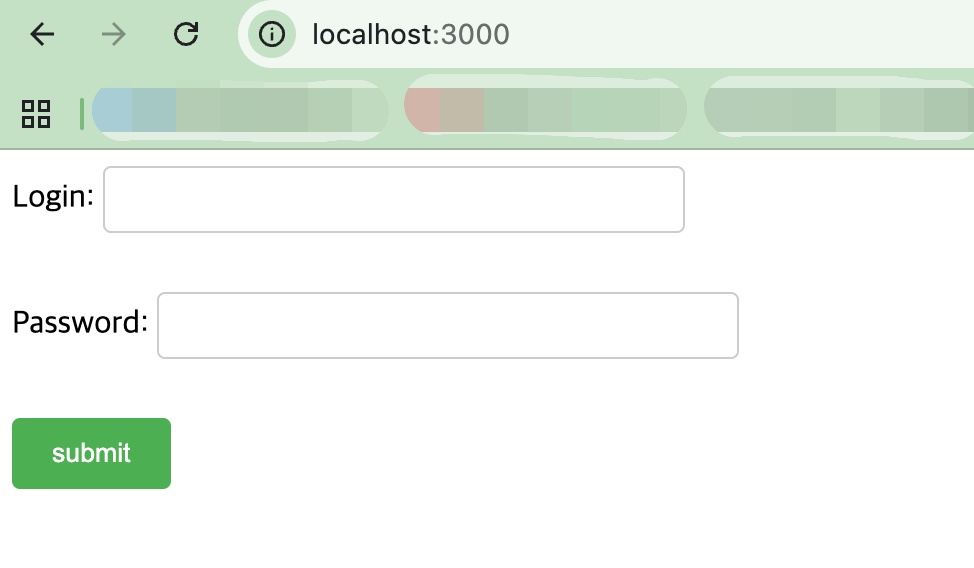
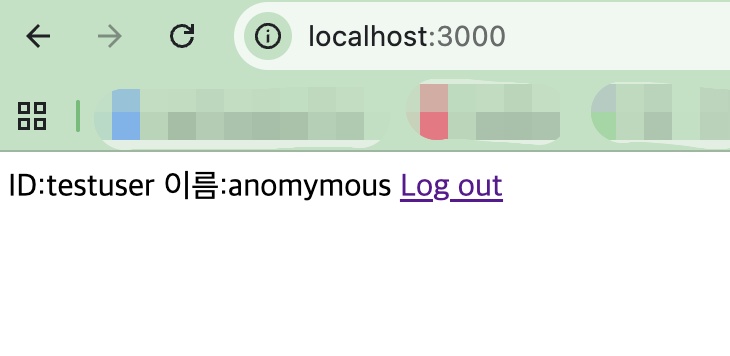
✔️ 아이디에 testuser 패스워드는 11111111 을 입력하고 submit버튼을 누릅니다. 그러면 다음과 같은 화면을 볼 수 있습니다.
Enter “testuser” for the ID and “11111111” for the password, then click the submit button. You will then see the following screen.
✔️ 터미널에는 입력된 비빌번호를 암호화한 코드를 출력해줍니다.
The terminal outputs a code representing the encrypted version of the entered password.
해시된 비밀번호/Hashed password: $2b$10$ZYVlLeO2BIWLyWHsdZgRYuFMn6Tb2C.5IeF6.mQFOf65ZTdtAmPLe👉🏻 코드 설명 / Code Explanation
✔️ 설치된 모듈 불러오기
Load installed modules
— npm install로 설치된 모듈을 불러옵니다.
Import the module installed via npm install.
const express = require('express');
const session = require('express-session');
const bcrypt = require('bcrypt');
✔️ 미들웨어 설정
Middleware Configuration
— 요청과 응답사이에서 일어나는 작업을 미들웨어가 수행합니다.
Middleware performs the tasks that take place between the request and the response.
–urlencode,json
app.use(express.urlencoded({ extended: false }));
app.use(express.json());
1) express.urlencode :
HTML의 태그를 통해 전송된 데이터를 서버가 읽을 수 있도록 파싱(해석)해주는 미들웨어입니다.
It is middleware that parses (interprets) data transmitted via HTML tags so that the server can read it.
2)express.json :
Axios/Fetch를 이용해 JSON 형식으로 보낸 데이터를 처리.
Process data sent in JSON format using Axios/Fetch.
— 로그인 완료후 세션정보에 대한 설정입니다.
These are the settings for session information after login is complete.
app.use(session({
  secret: 'your-secret-key',
  resave: false,
  saveUninitialized: false,
  cookie: { secure: false }
}));
1)로그인된 정보는 메모리에 저장됩니다.
Logged-in information is stored in memory.
2)secret : ‘your-secret-key’
서버가 사용자에게 발급하는 세션 ID 쿠키가 조작되지 않았는지 검증할 때 사용하는 암호화 키입니다. 실제 사용할때에는 더 복잡하게 만듭니다.
This is an encryption key used to verify that the session ID cookie issued by the server to the user has not been tampered with. In a real-world scenario, a more complex key would be used.
3)resave : false
false는 변경사항이 있을때만 세션을 저장합니다. 기본값을 false로 설정합니다.
Setting this to false saves the session only when there are changes. The default value is false.
4)saveUninitialized: false
초기화 되지 않은 세션은 저장하지 않습니다. 기본값을 false로 설정합니다.
Uninitialized sessions are not saved. The default value is set to false.
5)cookie: { secure: false }
secure: true로 설정하면 오직 암호화된 https:// 환경에서만 쿠키가 주고받아집니다. 기본값을 false로 설정합니다.
When secure: true is set, the cookie is transmitted only over an encrypted HTTPS connection. The default value is false.
— 로그인 되어 있는 경우와 없는 경우를 확인해서 res.locals 변수를 셋팅합니다.
The res.locals variable is set based on whether the user is logged in or not.
app.use((req, res, next) => {

  // 기본값 세팅 (로그인 안 된 상태를 가정) : Default settings (assuming the user is not logged in)
  res.locals.isLoggedIn = false;
  res.locals.userid = "";
  res.locals.name = "";
  res.locals.loggedInUser = null;

  // 로그인 세션(member)이 존재하는 경우 데이터 채워넣기 : If the login session (member) exists, fill in the data
  if (req.session.member) {
    res.locals.isLoggedIn = true;
    res.locals.userid = req.session.member.userid;
    res.locals.name = req.session.member.name;

    // 데이터베이스(users 배열)에서 로그인한 유저 객체 찾아서 넣어주기
    // Find the logged-in user object in the database (users array) and assign it.
    res.locals.loggedInUser = users.find(user => user.username === req.session.member.userid) || null;
  }

  next(); // 다음 라우터로 통과! / To the next router...
});
1)res.locals변수는 login.ejs에서 아래처럼 사용합니다.
The res.locals variable is used in login.ejs as shown below.
<%if(locals.userid){ %> ID:<%= locals.userid %> 이름:<%= locals.name%>
<%}else{%>
<%}%>
2) res.locals변수에 넣으면 따로변수를 넘기지 않아도 ejs파일에서 사용가능합니다.
If you store data in the res.locals variable, you can use it in the EJS file without having to pass a separate variable.
— 아래의 함수에에 패스워드가 입력되면 암호화시킨 비밀번호를 출력합니다.
When a password is entered into the function below, it outputs the encrypted password.
// bcrypt패스워드 생성 : generate bcrype password
async function generateHash(password) {
  try {
      const saltRounds = 10;
      const hash = await bcrypt.hash(password, saltRounds);
      console.log("해시된 비밀번호/Hashed password:", hash);
      return hash;
  } catch (err) {
      console.error("해싱 오류/Hashing error:", err);
  }
}
–로그인 처리 하는 부분입니다.
This is the section that handles the login process.
app.post('/loginProc', async (req, res) => {
  const { username, password } = req.body;
  const user = users.find(u => u.username === username);

  // generate bcrypt password
  const bbcrypt = await generateHash(password);
  //console.log(bbcrypt);


  if (!user) {
    return res.send('로그인 실패 /login failed: , 사용자 없음 / cannot find user');
  }

  // search user
  const isMatch = await bcrypt.compare(password, user.passwordHash);

  if (isMatch) {
    req.session.member = {
      userid: req.body.username, //
      name: 'anomymous' //
  };
    res.redirect('/');
  } else {
    res.send('로그인 실패 / login failed: ,비밀번호 불일치 / password error');
  }
});
1)배열에서 아이디아 같은 이름을 찾습니다.
Find a name like ‘Idea’ in the array.
const user = users.find(u => u.username === username);1)패스워드를 generateHash함수로 암호화합니다. 비동기 함수이므로 await이 붙어 있습니다.
The password is encrypted using the generateHash function. Since it is an asynchronous function, await is used.
const bbcrypt = await generateHash(password);2)user가 있는지 확인합니다.
Check if the user exists.
  if (!user) {
    return res.send('로그인 실패 /login failed: , 사용자 없음 / cannot find user');
  }
3)폼에서 입력된 패스워드와 암호화돈 패스워드를 bcrypt.compare함수로 확인합니다.
The password entered in the form and the encrypted password are verified using the bcrypt.compare function.
4) isMatch가 true이면 req.session.member에 아이디와 anonymous가 입력됩니다.
If isMatch is true, the ID and anonymous status are stored in req.session.member.
  const isMatch = await bcrypt.compare(password, user.passwordHash);

  if (isMatch) {
    req.session.member = {
      userid: req.body.username, //
      name: 'anomymous' //
  };
— 로그아웃할 경우 req.session.destroy로 세션값을 지웁니다.
When logging out, the session value is cleared using req.session.destroy.
app.get('/logout', (req, res) => {
  req.session.destroy((err) => {
    if (err) {
      console.error('세션 삭제 실패 / session delete failed:', err);
      res.send('로그아웃 실패 / logout failed');
    } else {
      res.redirect('/');
    }
  });
});