👉🏻 리버스 프록시는 웹서버에 들어온 요청을 다른 서버로 요청을 전달하기 위해서 사용합니다.
A reverse proxy is used to forward requests received by a web server to another server.
👉🏻 리버스 프록시가 셋팅된 서버http,https,5080)와 실제로 실행될 서버(http,3000)를 실행합니다.
Run the server with the reverse proxy set up (http,https,5080) and the server to be actually executed (http,3000).
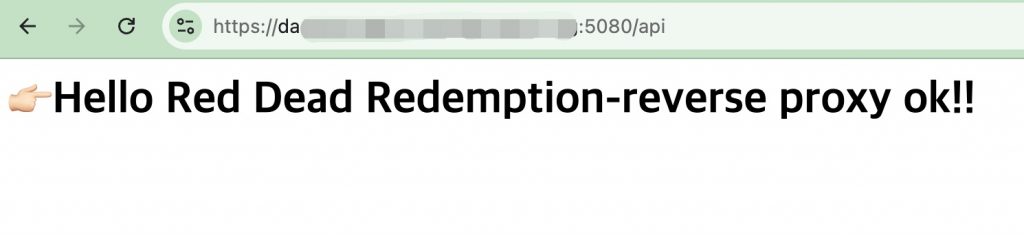
👉🏻 브라우저에서 다음처럼 5080포트로 실행하면 포트3000번인 서버정보를 볼 수 있습니다.
If you run it on port 5080 in a browser as follows, you can view the server information on port 3000.
✔️Linux : https://host.domain.org:5080/api
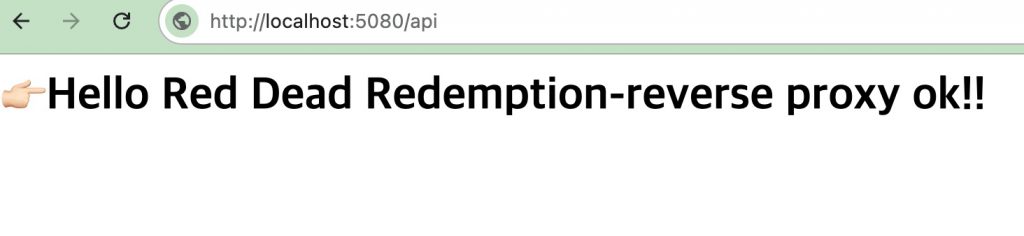
✔️macOS : http://localhost:5080/api
👉🏻 macOS에서는 http서버를 테스트하고 Linux서버에서는 https서버를 테스트합니다.
Test the HTTP server on macOS and the HTTPS server on Linux.
👉🏻 방화벽에서 3000번 포트를 추가로 오픈 합니다.(iptables)
Open port 3000 additionally in the firewall (iptables).
$ sudo iptables -I INPUT -p tcp --dport 3000 -j ACCEPT
$ sudo netfilter-persistent save
👉🏻 나머지 방화벽 설정 부분 설명은 이전 게시물을 참조하세요
Please refer to the previous post for the explanation of the remaining firewall settings.
✔️ httplib.h(0.42.0)
curl -L https://raw.githubusercontent.com/yhirose/cpp-httplib/master/httplib.h -o httplib.h👉🏻Http server(http_server.cpp)-Reverse proxy setting
✔️ 코드 / Code
#include "httplib.h"
#include <iostream>

static void copy_response(const httplib::Result& r, httplib::Response& res) {
    if (!r) {
        res.status = 502;
        res.set_content("Backend server is unreachable.", "text/plain; charset=utf-8");
        return;
    }
    res.status = r->status;

    for (const auto& h : r->headers) {
        if (h.first == "Connection" || h.first == "Keep-Alive" ||
            h.first == "Proxy-Authenticate" || h.first == "Proxy-Authorization" ||
            h.first == "TE" || h.first == "Trailers" ||
            h.first == "Transfer-Encoding" || h.first == "Upgrade") {
            continue;
        }
        res.set_header(h.first.c_str(), h.second.c_str());
    }

    res.body = r->body;
}

int main() {
    httplib::Server svr;

    // /api 와 /api/... 모두 처리
    svr.Get(R"(/api.*)", [](const httplib::Request& req, httplib::Response& res) {
        std::cout << "Proxying: " << req.method << " " << req.path << "\n";

        httplib::Client cli("localhost", 3000);

        if (auto backend_res = cli.Get(req.path.c_str())) {
            copy_response(backend_res, res);
        } else {
            res.status = 502;
            res.set_content("Backend server is unreachable.", "text/plain; charset=utf-8");
        }
    });

    std::cout << "Proxy server listening on http://0.0.0.0:5080\n";
    svr.listen("0.0.0.0", 5080);

    return 0;
}
✔️ 컴파일 / Compiling
g++ -o http_server http_server.cpp -std=c++17 -pthread ✔️ 실행 / Run
./http_server👉🏻Https server(https_server.cpp)-Reverse proxy setting
✔️ 인증서 복사 / Copy certificate
— 이전에 발급받은 Let’s Encrypt인증서입니다.(이전 게시물 참조)
Please refer to the previous post for the explanation of the remaining firewall settings.
$ sudo cp /etc/letsencrypt/live/host.domain.org/fullchain.pem ./
$ sudo cp /etc/letsencrypt/live/host.domain.org/privkey.pem ./

# 내 계정으로 소유권 변경 / Change ownership to my account
$ sudo chown username:username *.pem
✔️ 코드 / Code
#define CPPHTTPLIB_OPENSSL_SUPPORT
#include "httplib.h"
#include <iostream>

static void copy_response(const httplib::Result& r, httplib::Response& res) {
    if (!r) {
        res.status = 502;
        res.set_content("Backend server is unreachable.", "text/plain; charset=utf-8");
        return;
    }
    res.status = r->status;


    for (const auto& h : r->headers) {
        if (h.first == "Connection" || h.first == "Keep-Alive" ||
            h.first == "Proxy-Authenticate" || h.first == "Proxy-Authorization" ||
            h.first == "TE" || h.first == "Trailers" ||
            h.first == "Transfer-Encoding" || h.first == "Upgrade") {
            continue;
        }
        res.set_header(h.first.c_str(), h.second.c_str());
    }

    res.body = r->body;
}

int main() {
    httplib::SSLServer svr("./fullchain.pem", "./privkey.pem");

    if (!svr.is_valid()) {
        std::cerr << "SSL server setup failed\n";
        return 1;
    }

    // 모든 /api/... 요청을 프록시 처리
    svr.Get(R"(/api.*)", [](const httplib::Request& req, httplib::Response& res) {
        httplib::Client cli("localhost", 3000);

        if (auto backend_res = cli.Get(req.path.c_str())) {
            copy_response(backend_res, res);
        } else {
            res.status = 502;
            res.set_content("Backend server is unreachable.", "text/plain; charset=utf-8");
        }
    });

    std::cout << "Proxy server listening on https://0.0.0.0:5080\n";
    svr.listen("0.0.0.0", 5080);

    return 0;
}
✔️ 컴파일 / Compiling
g++ -o https_server https_server.cpp -std=c++17 -pthread -lssl -lcrypto✔️ 실행 / Run
./https_server👉🏻 http server(httplib_server.cpp)
✔️ 코드 / Code
#include "httplib.h"
#include <iostream>

int main()
{
  httplib::Server svr;

  svr.Get("/",[](const httplib::Request &req, httplib::Response &res){
      res.set_content("<h1>Hi! silver hand!!!👋</h1>", "text/html; charset=utf-8");
  });

  svr.Get("/api",[](const httplib::Request &req, httplib::Response &res){
   //res.set_content("Hello Red Dead Redemption!","text/plain");
   res.set_content("<h1>👉🏻Hello Red Dead Redemption-reverse proxy ok!!</h1>", "text/html; charset=utf-8");
  });

  std::cout << "cpp-httplib server listening on http://localhost:3000" << std::endl;
  svr.listen("0.0.0.0", 3000);

  return 0;
}
✔️ 컴파일 / Compiling
g++ -o https_server https_server.cpp -std=c++17✔️ 실행 / Run
./httplib_server👉🏻 서버 실행 방법 / How to run the server
✔️ 위에서 작성된 코드를 아래처럼 테스트 할 수 있습니다.
You can test the code written above as follows.
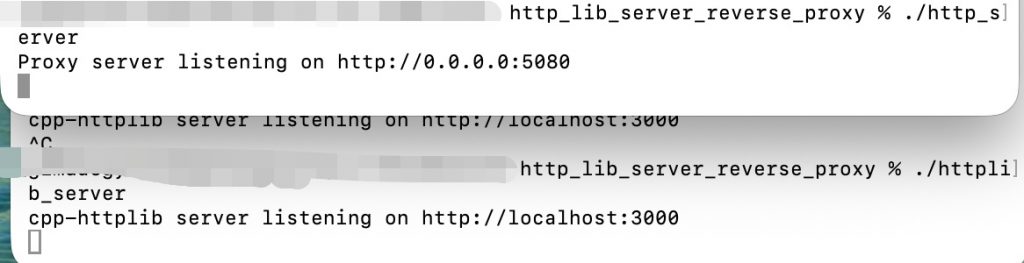
✔️ macOS
— 5080서버와 3000번 서버를 실행합니다.
Run server 5080 and server 3000.
— 브라우저에서 5080포트서버로 접속합니다. / Connect to the server on port 5080 in your browser.
(http://localhost:5080/api)
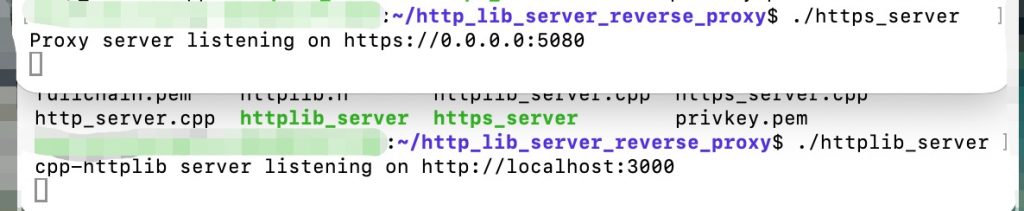
✔️ Linux
— 5080서버와 3000번 서버를 실행합니다.
Run server 5080 and server 3000.
— 브라우저에서 5080포트서버로 접속합니다. / Connect to the server on port 5080 in your browser.
(https://host.domain.org:5080/api)