👉🏻 myapp18에서는 개별글 확인과 타임라인을 구현합니다.
In myapp18, we implement the viewing of individual posts and the timeline.
👉🏻 데이터베이스 성능 향상을 위해서 인덱스를 추가합니다.
Indexes are added to improve database performance.
📁 전체 프로젝트 구조 / Overall Project Structure
myapp18/
├── app/  (Next.js App Router)
│   ├── .well-known/webfinger/route.ts  -> webfinger
│   ├── api/posts/route.ts     -> Writing API
│   ├── api/follow/route.ts    -> Follow API(temporary)
│   ├── api/timeline/route.ts  -> Timeline API
│   ├── users/[username]/
│   │   ├── statuses/[id]/route.ts -> Indivisual Post
│   │   ├── route.ts               -> Acotr Information
│   │   ├── followers/route.ts     -> Followers List
│   │   ├── following/route.ts     -> Following List
│   │   ├── inbox/route.ts         -> Inbox
│   │   └── outbox/route.ts        -> outbox
│   ├── usersui/[username]/page.tsx  -> Timeline UI
│   ├── layout.tsx, page.tsx, globals.css
│   └── favicon.ico
├── lib/
│   ├── ap.ts                  -> Follow Accept
│   └── db.ts                  -> DB connection
├── data/
│   └── keys/                  -> private.pem, public.pem
├── data.sqlite                -> Database
├── Caddyfile                  -> https
└── package.json
📁 프로젝트 시작(myapp18)
Project Start (myapp18)
npx create-next-app@latest📁 SQLite설치 / Installing SQLite
cd ~/myapp18
npm install better-sqlite3
npm install -D @types/better-sqlite3
📁 DDNS,https설정 / DDNS,https settings
📁 데이터베이스 스키마 보완
Database schema supplementation
✔️ 데이터 베이스 부분과 코드를 보완합니다.
I am refining the database components and the code.
✔️ 인덱스 추가 / Add Index
— 인덱스에 대한 추가 설명은 가장 아래 부분의 설명을 참조 하세요
Please refer to the explanation at the very bottom for additional details regarding the index.
-- 1. posts 타임라인용 (필수) / Posts for timeline (Required)
CREATE INDEX idx_posts_username_created ON posts(username, created_at DESC);

-- 2. inbox_posts 타임라인용 (필수) / inbox_posts for timeline (Required)
CREATE INDEX idx_inbox_username_created ON inbox_posts(username, created_at DESC);

-- 3. inbox_posts actor 검색용 (선택) / inbox_posts actor search term (optional)
CREATE INDEX idx_inbox_actor ON inbox_posts(actor);
✔️ 인덱스 작동 확인 / Verify index operation
sqlite> EXPLAIN QUERY PLAN SELECT * FROM posts WHERE username='user1' ORDER BY created_at DESC;
QUERY PLAN
`--SEARCH posts USING INDEX idx_posts_username_created (username=?)
sqlite> EXPLAIN QUERY PLAN SELECT * FROM inbox_posts WHERE username='user1' ORDER BY created_at DESC;
QUERY PLAN
`--SEARCH inbox_posts USING INDEX idx_inbox_username_created (username=?)
sqlite>
📁 개별글 라우트 / Individual Post Route
✔️ myapp18/app/users/[username]/statuses/[id]/route.ts
// myapp18✅/app/users/[username]/statuses/[id]/route.ts
import db from '@/lib/db';
import { NextRequest, NextResponse } from 'next/server';

export async function GET(
  req: NextRequest,
  { params }: { params: Promise<{ username: string; id: string }> }
) {
  const { username, id } = await params;

  // posts table
  let post: any = db.prepare(
    `SELECT * FROM posts WHERE id = ? AND username = ?`
  ).get(id, username);

  // inbox_posts table
  if (!post) {
    // inbox는 id가 전체 URL이라 LIKE로 찾기
    // inbox uses the full URL as id, so we search with LIKE
    post = db.prepare(
      `SELECT * FROM inbox_posts WHERE id LIKE ? AND username = ?`
    ).get(`%${id}`, username);
  }

  if (!post) {
    return new NextResponse('Not found', { status: 404 });
  }

  const base = process.env.NEXT_PUBLIC_BASE_URL || 'https://aloy-horizon.duckdns.org';
  const url = `${base}/users/${username}/statuses/${id}`;

  return NextResponse.json({
    "@context": "https://www.w3.org/ns/activitystreams",
    id: url,
    type: "Note",
    attributedTo: `${base}/users/${username}`,
    content: post.content,
    published: post.created_at,
    to: ["https://www.w3.org/ns/activitystreams#Public"],
  });
}
📁 타임라인 API / Timeline API
✔️ myapp18/app/api/timeline/route.ts
// app/api/timeline/route.ts
// myapp18✅
import db from '@/lib/db';
import { NextResponse } from 'next/server';

export async function GET(req: Request) {
  const { searchParams } = new URL(req.url);
  const username = searchParams.get('username') || 'user1';

  const timeline = db.prepare(`
    SELECT id, content, username, created_at, 'mine' as source
    FROM posts WHERE username = ?
    UNION ALL
    SELECT id, content, username, created_at, 'inbox' as source
    FROM inbox_posts WHERE username = ?
    ORDER BY created_at DESC
    LIMIT 50
  `).all(username, username);

  return NextResponse.json(timeline);
}
📁 프로필 UI에서 타임라인 붙이기
Adding a timeline to the profile UI
✔️ myapp18/app/usersui/[username]/page.tsx
// app/usersui/[username]/page.tsx
import db from '@/lib/db';

export default async function Page({ params }: { params: Promise<{ username: string }> }) {
  const { username } = await params;

  // 동일한 테이블이기 때문에 사용가능
  // Same table, so it's available
  const timeline = db.prepare(`
    SELECT id, content, created_at, 'mine' as source FROM posts WHERE username=?
    UNION ALL
    SELECT id, content, created_at, 'inbox' as source FROM inbox_posts WHERE username=?
    ORDER BY created_at DESC LIMIT 50
  `).all(username, username) as any[];

  /*
  // UNION ALL을 쓰지 않고, 두 쿼리를 따로 실행한 후 합치고 정렬하는 방법
  // You can also execute two queries separately and then merge and sort them without using UNION ALL

  const mine = db.prepare(`SELECT ... FROM posts ...`).all(username);
  const inbox = db.prepare(`SELECT ... FROM inbox_posts ...`).all(username);
  const timeline = [...mine, ...inbox].sort(...)
  */

  return (
    <div style={{ padding: 20 }}>
      <h1>{username} 타임라인 / Timeline</h1>
      <ul>
        {timeline.map((p:any) => (
          <li key={p.id}>[{p.source}] {p.content} - {p.created_at}</li>
        ))}
      </ul>
    </div>
  );
}
📁 테스트 / Test
✔️ 개별 글 라우트 / Indivisual post route
— 데이터베이스의 username과 id가 파라메터가 됩니다.
The database username and ID serve as parameters.
— inbox_posts테이블의 개별글은 id로 url은 제외하고 해시값만 입력합니다.
For individual posts in the inbox_posts table, only the hash value is entered—excluding the URL—based on the ID.
# posts table post
https://aloy-horizon.duckdns.org/users/user1/statuses/aea0ec89-a368-44a9-8493-b2bd82a797a8

{
  "@context": "https://www.w3.org/ns/activitystreams",
  "id": "https://aloy-horizon.duckdns.org/users/user1/statuses/aea0ec89-a368-44a9-8493-b2bd82a797a8",
  "type": "Note",
  "attributedTo": "https://aloy-horizon.duckdns.org/users/user1",
  "content": "post test! #test",
  "published": "2026-08-11 12:08:18",
  "to": [
    "https://www.w3.org/ns/activitystreams#Public"
  ]
}

# inbox_posts table post
https://aloy-horizon.duckdns.org/users/user1/statuses/01M0EJPP57WC47FAK0N395S7MB

{
  "@context": "https://www.w3.org/ns/activitystreams",
  "id": "https://aloy-horizon.duckdns.org/users/user1/statuses/01M0EJPP57WC47FAK0N395S7MB",
  "type": "Note",
  "attributedTo": "https://aloy-horizon.duckdns.org/users/user1",
  "content": "\u003Cp\u003Einbox_posts table test\u003C/p\u003E",
  "published": "2026-08-15 12:16:15",
  "to": [
    "https://www.w3.org/ns/activitystreams#Public"
  ]
}
✔️ 타임라인 API / TImeline API
https://aloy-horizon.duckdns.org/api/timeline?username=user1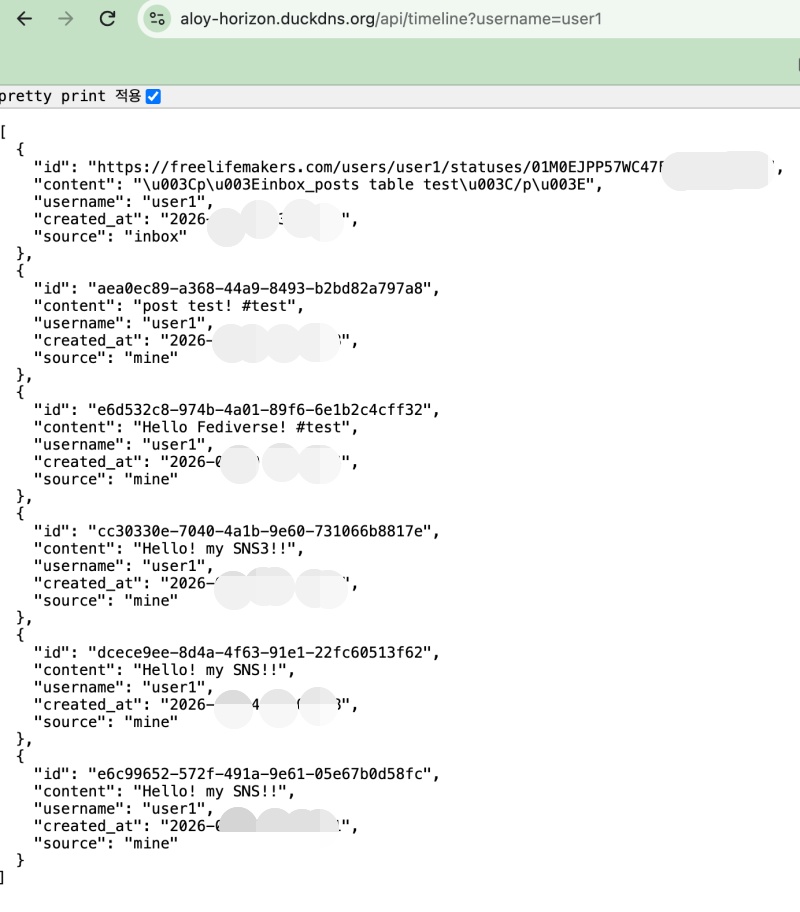
✔️ 타임라인 UI / Timeline UI
https://aloy-horizon.duckdns.org/usersui/user1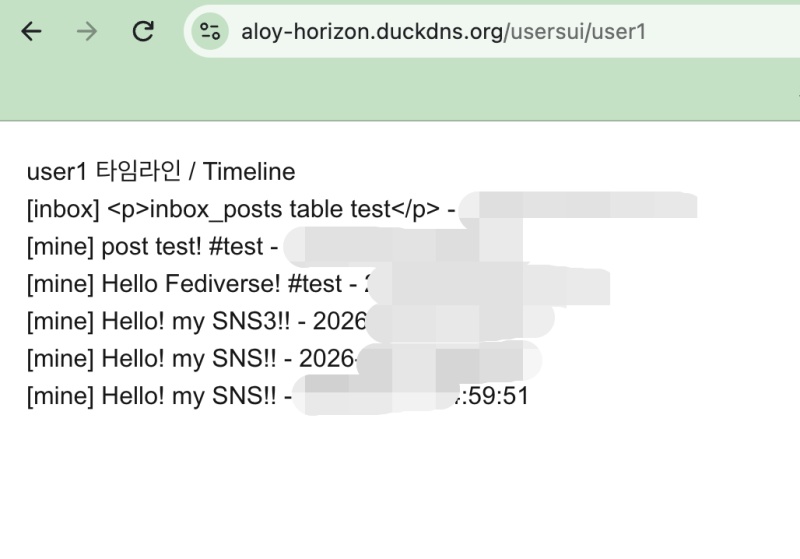
📁 인덱스 / Index
✔️ 인덱스는 데이터베이스 검색시 빠른 검색을 위해서 사용됩니다.
Indexes are used to enable fast searches when querying a database.
✔️ sqlite데이터베이스에 다음과 같은 인덱스를 사용하고 있습니다.
I am using the following index in the SQLite database.
CREATE INDEX idx_posts_username_published ON posts(username, published DESC);— 그러면 아래와 같은 상황에서 작동합니다.
Then, it operates in the following situation.
— 앞에서부터 순서대로 맞으면 작동합니다.
It operates if the conditions are met in the specified order, starting from the beginning.
(ON posts(username, published DESC))
-- username만 있어도 작동합니다.
It works with just the username.
-- 라벨 앞부분으로 찾기 가능 합니다.
You can search using the front part of the label.

WHERE username='user1'

-- username + published 정렬은 완벽히 작동합니다.
Sorting by username + published works perfectly.
-- 라벨이랑 100% 일치하는 경우이고 제일 빠릅니다.
This is the case where it matches the label 100%, and it is the fastest method.

WHERE username='user1' ORDER BY published DESC

-- username + published 조건도 작동합니다.
The username + published condition also works.
-- 앞+뒤 다 사용하는 경우입니다.
This is a case where both the front and back are used.

WHERE username='user1' AND published > '2026-05-10'
— 다음과 같이 username같이 앞부분 부터 조건이 맞지 않는 조건은 작동하지 않습니다.
Conditions that do not match from the beginning—such as username—will not work.
-- published만 검색하는 경우 입니다.
This applies when searching only for 'published' items.
-- 라벨 앞이 username인데 username 조건이 없기 떄문에 인덱스 검색이 작동하지 않습니다.
The `username` field appears at the beginning of the label, but since there is no condition specified for `username`, the index search does not work.

WHERE published DESC


-- content로 검색하는 경우입니다.
This is the case when searching by content.
-- 인덱스에 content 없어서 인덱스 검색이 작동하지 않습니다.
Index search is not working because the index lacks content.

WHERE content='hello'
— sqlite는 B-Tree구조로 되어 있습니다.
SQLite uses a B-Tree structure.
— 나무처럼 뿌리에서 가지,잎과 유사한 형태로 점점 뻗어나가면서 데이터 인덱스(라벨)가 저장됩니다.
A data index stores data indexes (labels) in a form similar to how a tree branches out into limbs and leaves.
— 이때 잎이나 가지에 해당하는 곳에 라벨로 데이터베이스 필드와 날짜를 많이 사용합니다.
In this case, database fields and dates are frequently used as labels for the parts corresponding to leaves or branches.
— 인덱스를 사용하면 검색시 데이터 전체 검색을 하지 않아도 됩니다.
Using an index eliminates the need to scan the entire dataset during a search.
— 인덱스에서 데이터베이스 필드이름이나 날짜가 같은 라벨에서만 찾으면 되기때문에 속도가 빠릅니다.
It is fast because the search within the index is limited to labels matching the database field name or date.
요한복음 8장 32절 / John 8:32
“그리고 너희는 진리를 알게 될 것이며, 진리가 너희를 자유롭게 할 것이다.”
“Then you will know the truth ,and the truth will set you free”


