👉🏻 팔로잉과 팔로워가 테이블에 저장되지 않는 문제를 수정하였습니다.
Fixed an issue where following and follower data were not being saved to the table.
👉🏻 IGNORE INTO를 추가해서 데이터 중복입력 발생시 에러를 발생시키지 않고 지나갑니다.
By adding IGNORE INTO, the operation proceeds without throwing an error when duplicate data is encountered.
📁 전체 프로젝트 구조 / Overall Project Structure
myapp22/
├── app/  (Next.js App Router)
│   ├── .well-known/webfinger/route.ts  -> webfinger
│   ├── api/posts/route.ts     -> Writing API
│   ├── api/follow/route.ts    -> Follow API(temporary)
│   ├── api/timeline/route.ts  -> Timeline API
│   ├── users/[username]/
│   │   ├── statuses/[id]/route.ts -> Indivisual Post
│   │   ├── route.ts               -> Acotr Information
│   │   ├── followers/route.ts     -> Followers List
│   │   ├── following/route.ts     -> Following List
│   │   ├── inbox/route.ts         -> Inbox
│   │   └── outbox/route.ts        -> outbox
│   ├── usersui/[username]/page.tsx  -> Timeline UI
│   ├── layout.tsx, page.tsx, globals.css
│   └── favicon.ico
├── lib/
│   ├── ap.ts                  -> Follow Accept
│   └── db.ts                  -> DB connection
├── data/
│   └── keys/                  -> private.pem, public.pem
├── data.sqlite                -> Database
├── Caddyfile                  -> https
└── package.json
📁 프로젝트 시작(myapp22)
Project Start (myapp22)
npx create-next-app@latest📁 SQLite설치 / Installing SQLite
cd ~/myapp22
npm install better-sqlite3
npm install -D @types/better-sqlite3
📁 DDNS,https설정 / DDNS,https settings
📁 도메인허용, @userid 사용하기
Allowing domains, using @userid
— next.config.ts
import type { NextConfig } from "next";

const nextConfig: NextConfig = {
  /* allow domain*/
  allowedDevOrigins: ['aloy-horizon.duckdns.org', '*.duckdns.org'],

  /* host.domain.org/@userid */
  async rewrites() {
    return [
      {
        source: '/@:username',
        destination: '/usersui/:username',
      },
    ]
  }
};


export default nextConfig;
📁 코드 수정 / Code modification
✔️ myapp22/app/users/[username]/inbox/route.ts
      // ✅ myapp22 - insert or ignore
      try {
        db.prepare('INSERT OR IGNORE followers (id, actor, inbox, username) VALUES (?,?,?,?)')
          .run(body.id, actorId, inboxUrl, username);
        console.log(`✅ [${username}] 팔로우 저장 / follow save : ${actorId}`);
      } catch (e: any) {
        if (e.code === 'SQLITE_CONSTRAINT_UNIQUE') {
          console.log(`ℹ️ 중복 팔로워 차단 / Block Duplicate Followers (UNIQUE): ${actorId}`);
          return new Response('', { status: 202 });
        }
        throw e;
      }
✔️ myapp22/api/follow/route.ts
    // myapp22 ✅
    // 데이터베이스에 중복 입력 방지 / Preventing duplicate entries in the database
    if (result.ok) {
      try {
        db.prepare('INSERT OR IGNORE INTO following (id, actor, username) VALUES (?, ?, ?)')
          .run(result.followDoc.id, target, username);
        console.log(`✅ DB 저장 / DB Save: ${username} -> ${target}`);
      } catch (e: any) {
        if (e.code === 'SQLITE_CONSTRAINT_UNIQUE') {
          console.log(`ℹ️ 이미 저장됨  / Already saved: ${target}`);
        } else {
          console.error('DB 저장 실패 / DB save failed:', e);
        }
      }
    }
✔️ myapp22/lib/db.ts
— DB스키마 재반영(프로젝트 코드 참조)
Re-apply DB schema (refer to project code)
📁 테스트 / Test
✔️ 터미널에서 아래의 라우트로 테스트 할 수 있습니다.
You can test using the route below in the terminal.
# 팔로우 (following 1로 증가)
# Follow (following increased to 1)

curl -X POST https://aloy-horizon.duckdns.org/api/follow \
  -H "Content-Type: application/json" \
  -d '{"username":"user1","target":"https://freelifemakers.com/users/user1"}'

# 언팔로우 (following 0으로 감소)
# Unfollow (following count reduced to 0)

curl -X DELETE https://aloy-horizon.duckdns.org/api/follow \
  -H "Content-Type: application/json" \
  -d '{"username":"user1","target":"https://freelifemakers.com/users/user1"}'

# 글 쓰기 (outbox 7로 증가 + 팔로워들에게 배달)
# Writing a post (added to outbox 7 + delivered to followers)

curl -X POST https://aloy-horizon.duckdns.org/api/posts \
  -H "Content-Type: application/json" \
  -d '{"username":"user1","content":"Hello Follow! #test"}'
✔️ https://freelifemakers.com/users/user1 에게 팔로우를 요청하면 following 테이블에 데이터 저장되는지확인합니다.
Check if data is saved to the following table when a follow request is sent to https://freelifemakers.com/users/user1.
# 팔로우 요청 / Follow request
myapp22 % curl -X POST https://aloy-horizon.duckdns.org/api/follow \
  -H "Content-Type: application/json" \
  -d '{"username":"user1","target":"https://freelifemakers.com/users/user1"}'

# 응답 / response
{"ok":true,"inbox":"https://freelifemakers.com/users/user1/inbox","target":"https://freelifemakers.com/users/user1","username":"user1","result":"{\"status\":\"Accepted\"}","follow":{"@context":"https://www.w3.org/ns/activitystreams","id":"https://aloy-horizon.duckdns.org/users/user1/follows/1787615594327","type":"Follow","actor":"https://aloy-horizon.duckdns.org/users/user1","object":"https://freelifemakers.com/users/user1"}}%

# 데이터베이스에 데이터 저장 상태 확인 / Checking the data storage status in the database
myapp22 % sqlite3 data.sqlite "SELECT * FROM following;"
https://aloy-horizon.duckdns.org/users/user1/follows/1787615594327|https://freelifemakers.com/users/user1|user1|2026-08-24 23:53:14
gimdaegyeong@gimdaegyeong-ui-MacBookAir myapp22 %
✔️ freelifemakers.com/@user1(pinafore)이 aloy-horizon.ducdns.org에게 팔로우를 요청하면 follower테이블에 저장됩니다.
When freelifemakers.com/@user1(pinafore) requests to follow aloy-horizon.ducdns.org, the request is stored in the follower table.
# sqlite db 접속 / Connect to SQLite database
myapp22 % sqlite3 data.sqlite
SQLite version 3.51.0 2025-06-12 13:14:41
Enter ".help" for usage hints.
sqlite> select * from followers;
https://freelifemakers.com/users/user1/follow/01RR6E0D7QZA98S06VJYC99FNH|https://freelifemakers.com/users/user1|https://freelifemakers.com/users/user1/inbox|user1
sqlite>
✔️ API 확인 / Check API
— 배열에 저장된 값이 출력되는지 확인합니다.
Check whether the values stored in the array are output.
— following
https://aloy-horizon.duckdns.org/users/user1/following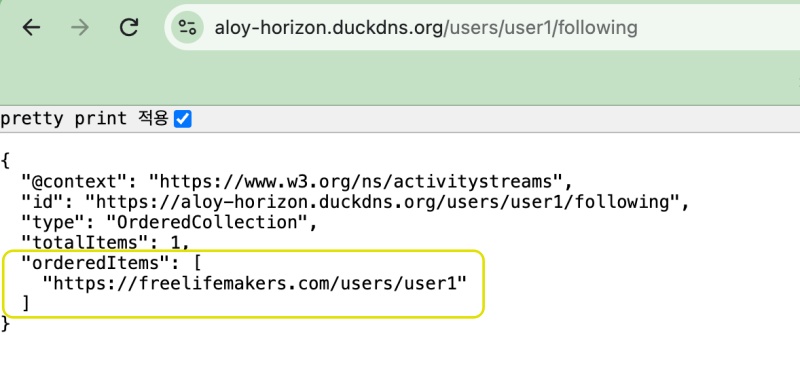
— followers
https://aloy-horizon.duckdns.org/users/user1/followers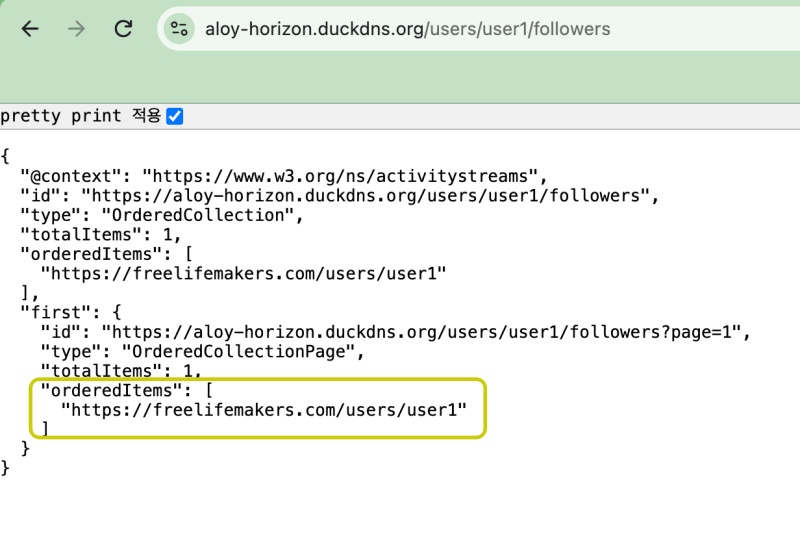
요한복음 8장 32절 / John 8:32
“그리고 너희는 진리를 알게 될 것이며, 진리가 너희를 자유롭게 할 것이다.”
“Then you will know the truth ,and the truth will set you free”


