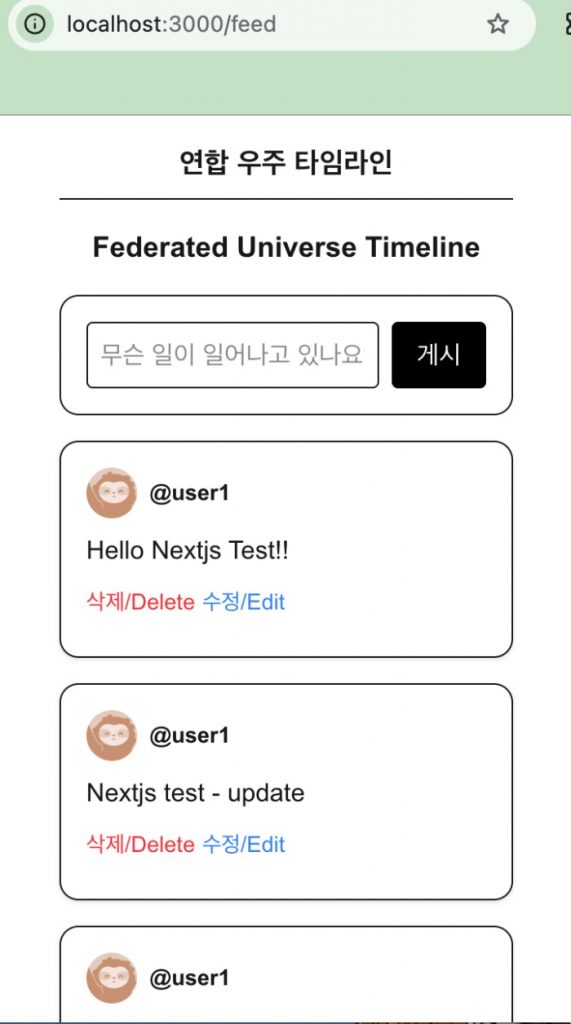
👉🏻 기존 프로젝트에 글쓰기 기능과 글 수정기능을 추가합니다.
Add post creation and editing features to the existing project.
👉🏻 타임라인을 불러오는 gotosocial.ts파일은 삭제됐습니다.
The gotosocial.ts file that fetches the timeline has been deleted.
📁 프로젝트 구조 / Project Structure
myapp10/
├── app/
│ ├── api/
│ │ ├── auth/ # NextAuth
│ │ └── gts/
│ │      └── statuses/
│ │       ├── route.ts # POST Create
│ │       └── [id]/
│ │            └── route.ts # DELETE, PUT
│ ├── feed/
│ │    ├── page.tsx # frontend(main page,post read)
│ │    ├── PostCard.tsx # frontend(post content,delete,update)
│ │    └── PostComposer.tsx # frontend(post create)
│ ├── layout.tsx
│ ├── page.tsx # Home
│ └── globals.css
├── auth.ts.   # NextAuth
└── package.json
📁 Nextjs 프로젝트 생성
Create a Next.js project
npx create-next-app@latest📁 next-auth 설치
Install next-auth
npm install next-auth@beta📁 글쓰기 / Writing(Create)
✔️ myapp10/app/feed/PostComposer.tsx
— 글 작성 폼 / Post Creation Form
'use client'
import { useState } from 'react'

export function PostComposer() {
  const [text, setText] = useState('')

  const handlePost = async () => {
    await fetch('/api/gts/statuses', {
      method: 'POST',
      headers: { 'Content-Type': 'application/json' },
      body: JSON.stringify({ status: text })
    })
    location.reload()
  }

  return (
    <div className="border p-4 rounded-xl flex gap-2">
      <input value={text} onChange={e => setText(e.target.value)} className="flex-1 border p-2 rounded" placeholder="무슨 일이 일어나고 있나요?" />
      <button onClick={handlePost} className="bg-black text-white px-4 rounded">게시</button>
    </div>
  )
}
1)서버에서 CORS에러를 막기위해서 /api/gts/statuses 라우터로 fetch를 실행합니다.
To prevent CORS errors on the server, a fetch request is made to the /api/gts/statuses route.
✔️ myapp10/app/feed/page.tsx
— 메인페이지,글 작성 폼을 불러옵니다. / Loads the main page and post creation form. (PostComposer.tsx)
import { PostComposer } from './PostComposer' // Create Component
... ...
    return (
      <div className="max-w-xl mx-auto p-4 space-y-4">
        <h1 className="text-xl font-bold border-b pb-2">연합 우주 타임라인</h1>
        <h1 className="text-sm text-gray-500"> Federated Universe Timeline </h1>

        {/* Post Composer */}
        <PostComposer token={session.accessToken} />

        {/* Post Cards */}
        {posts.length === 0 ? (
          <p className="text-gray-500 py-10 text-center">아직 타임라인에 표시할 글이 없습니다. / No posts to display yet.</p>
        ) : (
          posts.map((p: any) => <PostCard key={p.id} post={p} token={session.accessToken} />)
        )}
      </div>
    )
1)클라이언트와 서버의 기능을 동일한페이지에 사용할 수 없기 때문에 파일을 분리합니다.
Since client-side and server-side functions cannot be used on the same page, the files are separated.
✔️ myapp10/app/api/gts/router.ts
— gotosocial서버에 글을 저장합니다.
Saves the post to the GoToSocial server.
import { auth } from "@/auth"

export async function POST(req: Request) {
  const session = await auth()
  if (!session?.accessToken) return new Response("Unauthorized", { status: 401 })

  const { status } = await req.json()
  const baseUrl = process.env.GTS_URL || "https://freelifemakers.com"

  const res = await fetch(`${baseUrl}/api/v1/statuses`, {
    method: 'POST',
    headers: {
      Authorization: `Bearer ${session.accessToken}`,
      'Content-Type': 'application/json'
    },
    body: JSON.stringify({ status,visibility : "public" })
  })

  const data = await res.json()
  return Response.json(data)
}
📁 글 수정 / Edit Post (Update)
✔️ myapp10/app/feed/PostCard.tsx
— 글 삭제 아래 부분에 글 수정 버튼을 붙입니다.
Place the “Edit Post” button below the “Delete Post” button.
— 정규 표현식은 html을 제거하는 부분입니다.
The regular expression is the part that removes HTML.
        <button
          onClick={async () => {
            const newText = prompt('수정할 내용수정할 내용 / Edit content:', post.content.replace(/<[^>]*>/g, '')) // HTML 태그 제거
            if(!newText) return
            await fetch(`/api/gts/statuses/${post.id}`, {
              method: 'PUT',
              headers: { 'Content-Type': 'application/json' },
              body: JSON.stringify({ status: newText })
            })
            location.reload()
          }}
          className="text-blue-500 text-sm"
        >
          수정/Edit
        </button>
✔️ myapp10/app/api/gts/statuses/[id]/route.ts
— 글 수정 라우트 입니다.
This is the route for editing a post.(Update)
// 수정 / Update
export async function PUT(req: Request, { params }: { params: Promise<{ id: string }> }) {
  const { id } = await params
  const session = await auth()
  const { status } = await req.json()
  const baseUrl = process.env.GTS_URL || "https://freelifemakers.com"

  const res = await fetch(`${baseUrl}/api/v1/statuses/${id}`, {
    method: 'PUT',
    headers: {
      Authorization: `Bearer ${session.accessToken}`,
      'Content-Type': 'application/json'
    },
    body: JSON.stringify({ status, visibility : "public" })
  })

  return Response.json(await res.json())
}
📁 서버실행 / Start Server
npm run dev📁 브라우저 접속 / Access Browser
http://localhost:3000/feed