👉🏻 freelifemaker.com(gotosocial)서버에서 나의 nextjs서버로 팔로워하는기능을 구현하는 과정을 설명합니다.
This explains the process of implementing a follower feature from the freelifemaker.com (GoToSocial) server to my Next.js server.
👉🏻 테스트를 위해서는 실제로 도메인이 연결되어 있어야합니다.
To perform the test, the domain must actually be connected.
👉🏻 그래서 ddns로 도메인 연결을 합니다.
So, I connect the domain using DDNS.
👉🏻 https는 앞전에 설명했던 caddy를 사용하면됩니다.
For HTTPS, you can use Caddy, which I explained earlier.
📁 Actor,Inbox,Outbox
✔️ ActivityPub SNS에서 사용되는 간단한 용어 입니다.
These are simple terms used in ActivityPub-based social networks.
Actor (사람) :
- https://yourhost.domain.org/users/usename
- Actor는 사용자를 의미합니다.
"Actor" refers to the user.

Inbox (우편함 / mailbox) :
- 일종의 우편함으로 남이 나한테 편지 보내는 곳입니다.
It is a kind of mailbox where others can send me letters.

Outbox (발신함 / Outbox) :
- 내가 쓴 글 목록이 저장되는 곳입니다.
This is where the list of posts I have written is stored.
📁 진행과정을 요약하면 아래와 같습니다.
The process is summarized below.
1, 키 생성 / Key Generation

- ActivityPub은 글을 쓸때 키로 검증 해야합니다.
With ActivityPub, you must verify using a key when creating a post.

- private key와 함께 보내면 상대방 서버가 내 서버에 public key 요청해서 검증합니다.
When sent along with the private key, the recipient's server requests the public key from my server to verify it.

- private key는 비공개 키,public key는 actor에게 공개하는 키입니다.
A private key is a key that is kept secret, while a public key is a key disclosed to the actor.

2. DB에 followers 테이블 추가
Add a 'followers' table to the database.

- lib/db.ts에 followers 테이블 추가합니다.
Add the `followers` table to `lib/db.ts`.

- 누가 나를 팔로우 했는지 inbox 주소 저장용으로 사용됩니다.
It is used to store the inbox address of the person who followed me.

3.라우트 만들기 / Creating a Route

- Actor 검색시 주소 알려주기
Provide the address when searching for an actor.
/.well-known/webfinger/route.ts

- 내이름,inbox,공개키 알려주기
Share my name, inbox, and public key.
/users/[username]/route.ts

- Follow받기,상대방 글을 받는 우편함
"Follow" — an inbox for receiving posts from others.
/users/[username]/inbox/route.ts

- 내가 쓴 글 목록
List of posts I've written
/users/[username]/outbox/route.ts

4.팔로우하기 / Follow

- yourhost.domain.org 서버실행(또는 배포)
Run (or deploy) the server on yourhost.domain.org

- GTS(pinafore.social)에서 @user1@yourhost.domain.org 검색
Search for @user1@yourhost.domain.org on GTS(pinafore.social).


5.GTS(Pinafore)에서 followers 1 만들기
Creating 1 follower in GTS (Pinafore)

- yourhost.domain.org 팔로우하기
Follow yourhost.domain.org

- lib/ap.ts에서 private.pem으로 서명해서 Accept를 GTS inbox로 POST전송 하기
Sign the "Accept" activity with `private.pem` and send it via POST to the GTS inbox in `lib/ap.ts`.

- GTS 202 Accepted
📁 전체 프로젝트 구조 / Project Structure
myapp12/
├── app/  (Next.js App Router)
│   ├── .well-known/webfinger/route.ts     -> webfinger
│   ├── api/posts/route.ts     -> 글 쓰기 API / Writing API
│   ├── users/[username]/
│   │   ├── route.ts           -> Actor정보 / Acotr Information
│   │   ├── inbox/route.ts     -> Inbox
│   │   └── outbox/route.ts    -> outbox
│   ├── layout.tsx, page.tsx, globals.css
│   └── favicon.ico
├── lib/
│   ├── ap.ts                  -> Follow Accept
│   └── db.ts                  -> DB connection
├── data/
│   └── keys/                  -> private.pem, public.pem
├── data.sqlite                -> Database
├── Caddyfile                  -> https
└── package.json
📁 프로젝트 생성 / Create Project (myapp12)
npx create-next-app@latest📁 SQLite설치 / Installing SQLite
cd ~/myapp11
npm install better-sqlite3
npm install -D @types/better-sqlite3
📁 caddy 설치 / Install Caddy
brew install caddy📁 코드 작성
Writing Code
✔️ 1. 키 생성 (ActivityPub은 모든 요청에 서명을 합니다.)
Key Generation (ActivityPub signs all requests.)
cd ~/myapp12

# 키 폴더 / key folder
mkdir -p data/keys
openssl genrsa -out data/keys/private.pem 2048
openssl rsa -in data/keys/private.pem -pubout -out data/keys/public.pem
echo "data/" >> .gitignore
1)키는 내가 요청 수락할때 privatekey와 함께 팔로워를 요청한 상대방 서버에 보냅니다.
When I accept a request, the key is sent—along with the private key—to the server of the person who requested to follow.
2)상대방이 서버가 내 서버에서 publickey로 내가 보낸 privatekey와 맞는지 확인해 봅니다.
The remote server checks whether the private key I sent matches the public key on my server.
✔️ 2. DB에 followers 테이블 추가
Add a ‘followers’ table to the database.
db.exec(`
  CREATE TABLE IF NOT EXISTS followers (
    id TEXT PRIMARY KEY,
    actor TEXT NOT NULL,
    inbox TEXT NOT NULL
  );
`);
✔️ 3.라우트 만들기 / Creating a Route
file 1: app/.well-known/webfinger/route.ts
file 2: app/users/[username]/route.ts
file 3: app/users/[username]/inbox/route.ts
file 4: app/users/[username]/outbox/route.ts
✔️ 4. 팔로우하기 / Follow
— https://pinafore.social/ 에서 내 서버의 검색이 가능하게하려면 webfinger와 Actor확인이 가능해야 합니다.
To enable searching for your server on https://pinafore.social/, WebFinger and Actor verification must be supported.
— webfinger 테스트(user1이 있는 지 확인하기)
WebFinger test (check if user1 exists)
# webfinper테스트 / WebFinger test
myapp12 % curl "http://localhost:3000/.well-known/webfinger?resource=acct:user1@yourhost.domain.org"

# 응답 / Response
{"subject":"acct:user1@yourhost.doman.org","links":[{"rel":"self","type":"application/activity+json","href":"https://yourhost.domain.org/users/user1"}]}%
— Actor확인하기 / Check Actor
#  HTML 말고 application/activity+json 형태로 된 JSON으로 요청하기
Make the request using JSON in the `application/activity+json` format instead of HTML.
myapp12 %  curl -H "Accept: application/activity+json" "http://localhost:3000/users/user1"

# 응답 / Response
{
  "id": "https://aloy-horizon.duckdns.org/users/user1",
  "type": "Person",
  "preferredUsername": "user1",
  "inbox": "https://aloy-horizon.duckdns.org/users/user1/inbox",
  "outbox": "https://aloy-horizon.duckdns.org/users/user1/outbox",
  "publicKey": { "publicKeyPem": "-----BEGIN PUBLIC KEY-----..." }
}id: 내 주소 / My addresstype: Person(Bot, Service도 가능 / Bots and services are also supported.)preferredUsername: 내 이름 / My name (user1)inbox: Follow, 글 배달 받는 곳 / Where to receive the writingsoutbox: 내가 쓴 글,내 타임라인 / My posts, my timelinepublicKey: 검증하기 위한 키 / Key for verification
📁 실행 / Run
— Nextjs서버 실행 / Run NextJS Server
npm run dev— Caddy 실행
Caddy start— pinafore.social에서 검색해서 내서버가 검색되는지 확인해 보기
Search on pinafore.social to see if my server shows up in the results.
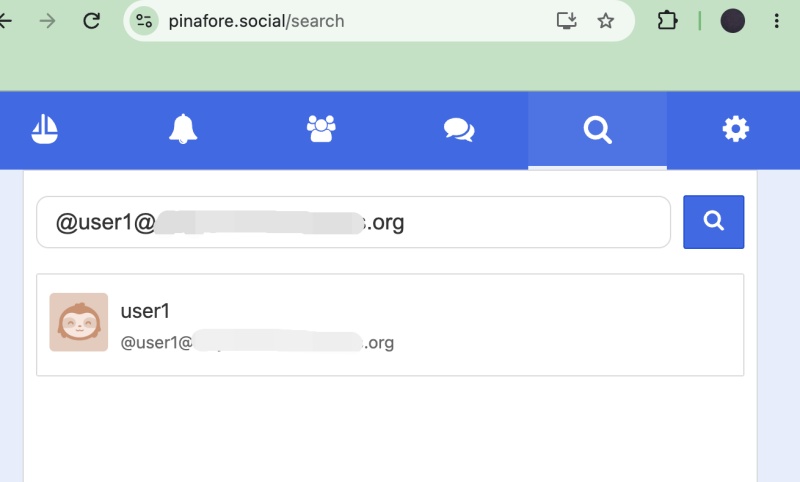
— freelifemakers.com 계정으로 로그인해서 검색된 내 sns서버에 팔로우하기
Log in with your freelifemakers.com account and follow the discovered SNS server.
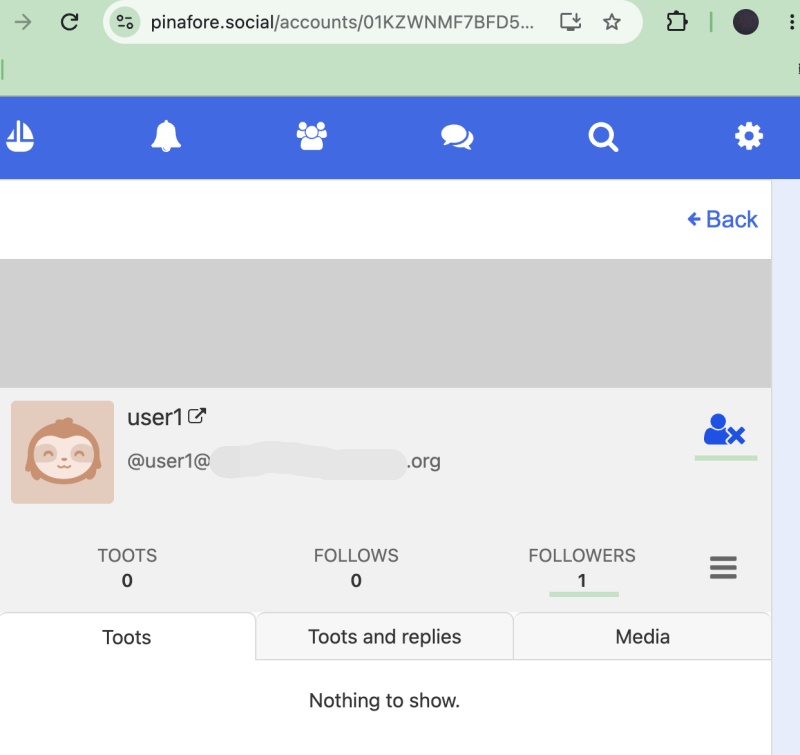
— pinafore.social에서 팔로우가 되고 팔로워가 1이되는 로직은 다음과 같습니다.
The logic for gaining a follower on pinafore.social is as follows.
export async function POST(req: Request, { params }: { params: Promise<{ username: string }> }) {
  const { username } = await params;
  try {
    const body = await req.json();
    console.log(`📩 [${username}] INBOX:`, body.type, body.actor);

    // 상대방 public키로 검증, 테스트 부분이라 제외 시킴
    // Verification using the other party's public key—excluded as it is part of the testing phase.
    // const actorUrl = body.actor;
    // const actorData = await fetch(actorUrl, {
    //   headers: { Accept: 'application/activity+json' }
    // }).then(r => r.json());

    // const publicKeyPem = actorData.publicKey.publicKeyPem;
    // const isValid = verify(req, publicKeyPem);

    // if (!isValid) return Response.json({}, { status: 401 });

    const actorId = typeof body.actor === 'string' ? body.actor : body.actor?.id;
    const actorInbox = typeof body.actor === 'object' ? body.actor?.inbox : null;

    if (body.type === 'Follow') {
      const inboxUrl = actorInbox || `${actorId}/inbox`;
      db.prepare('INSERT OR IGNORE INTO followers (id, actor, inbox) VALUES (?,?,?)')
        .run(body.id, actorId, inboxUrl);
      console.log(`✅ [${username}] 팔로우 저장 / follow save : ${actorId}`);

      // Accept 비동기로 전송 (응답 빨리 주려고) / Send Accept asynchronously (to respond quickly)
      sendAccept(inboxUrl, body, username).catch(e => console.error('Accept 실패:', e));
    }

    return new Response('', { status: 202 });
  } catch (e) {
    console.error('inbox 에러 / inbox error:', e);
    return new Response('', { status: 202 });
  }
}
1)@user1@yourhost.domain.org 에 팔로우 하는 사람의 정보를 저장합니다.
Stores information about people following @user1@yourhost.domain.org.
2)freelifemakers.com (GoToSocial 서버)에 내가 누굴 팔로우하는 건지 저장합니다.
It stores who I am following on the freelifemakers.com (GoToSocial) server.
3)그래서 실제로 팔로워 숫자는 freelifemakers.com서버의 정보를 보여주는 겁니다.
So, the actual follower count reflects the information from the freelifemakers.com server.
4) pinafore에서 팔로우 아이콘이 바뀌는것도 freelifemakers.com서버의 정보를 통해서 바뀌는 겁니다.
The change of the “Follow” icon in Pinafore is also driven by information from the freelifemakers.com server.
5) 내서버에 저장하는 정보는 상대방 서버에 글을 배달하기 위해 필요한 정보입니다.
The information stored on my server is what is required to deliver the post to the recipient’s server.
4)위의 코드에서는 public key요청하는 코드가 빠져 있습니다.
The code for requesting the public key is missing from the code above.
요한복음 8장 32절 / John 8:32
“그리고 너희는 진리를 알게 될 것이며, 진리가 너희를 자유롭게 할 것이다.”
“Then you will know the truth ,and the truth will set you free”


