👉🏻 User테이블(회원정보)을 만들고 webfinger로 검색시 User테이블의 정보로 검색되도록 수정합니다.
Create a User table (for member information) and modify the system so that searches using WebFinger retrieve data from that table.
📁 프로젝트 설치,라이브러리 설치,HTTPS설정
Project setup, library installation, HTTPS configuration
✔️ 아래의 이전 포스트를 참조하세요
Please refer to the previous post below.
📁 전체 프로젝트 구조 / Overall Project Structure
myapp16/
├── app/  (Next.js App Router)
│   ├── .well-known/webfinger/route.ts  -> webfinger
│   ├── api/posts/route.ts     -> 글 쓰기 API / Writing API
│   ├── api/follow/route.ts    -> 팔로우 API(임시) / Follow API(temporary)
│   ├── users/[username]/
│   │   ├── route.ts           -> Actor정보 / Acotr Information
│   │   ├── followers/route.ts -> Followers List
│   │   ├── inbox/route.ts     -> Inbox
│   │   └── outbox/route.ts    -> outbox
│   ├── layout.tsx, page.tsx, globals.css
│   └── favicon.ico
├── lib/
│   ├── ap.ts                  -> Follow Accept
│   └── db.ts                  -> DB connection
├── data/
│   └── keys/                  -> private.pem, public.pem
├── data.sqlite                -> Database
├── Caddyfile                  -> https
└── package.json
📁 프로젝트 시작(myapp16)
Project Start (myapp16)
npx create-next-app@latest📁 SQLite설치 / Installing SQLite
cd ~/myapp13
npm install better-sqlite3
npm install -D @types/better-sqlite3
📁 Webfinger 수정 / WebFinger modification
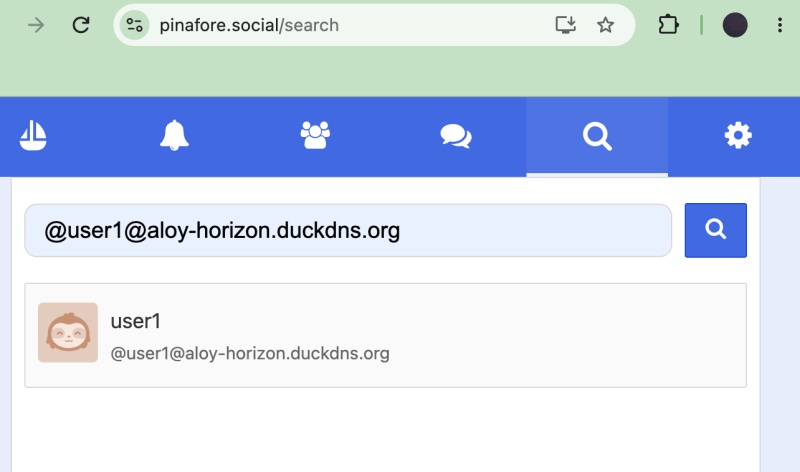
✔️ webfinger는 사용자를 검색할때 사용됩니다.
WebFinger is used to search for users.
✔️ 이전에 구현했던 webfinger를 사용자 검색시 실제 회원가입된 정보가 검색되도록 수정합니다.
I am modifying the previously implemented WebFinger functionality so that actual registered user information is returned when searching for users.
✔️ webfinger는 Mastodon, Pinafore, GoToSocial, Misskey 에서 모두 검색되도록 합니다.
WebFinger ensures discoverability across Mastodon, Pinafore, GoToSocial, and Misskey.
✔️ 이전에 User테이블이 없기 때문에 새롭게 User테이블을 생성합니다.
Since the User table does not exist, a new User table is created.
— User테이블 생성 / Create User table
-- users 테이블 생성 / Create User table
CREATE TABLE IF NOT EXISTS users (
  username TEXT PRIMARY KEY,
  display_name TEXT DEFAULT '',
  summary TEXT DEFAULT '',
  private_key TEXT,
  public_key TEXT,
  created_at DATETIME DEFAULT CURRENT_TIMESTAMP
);

-- 기본 유저 넣기 / Add basic user
INSERT OR IGNORE INTO users (username, display_name, summary)
VALUES ('user1', 'user1', 'My Fediverse account on aloy-horizon');

-- 유저 확인 / Check User Information
SELECT * FROM users;
— 전체 데이터 베이스 스키마는 아래처럼 설정합니다.
The entire database schema is configured as shown below.
-- 1. users(신규추가 / Newly Added)
CREATE TABLE IF NOT EXISTS users (
  username TEXT PRIMARY KEY,
  display_name TEXT,
  summary TEXT,
  private_key TEXT,
  public_key TEXT,
  created_at DATETIME DEFAULT CURRENT_TIMESTAMP
);

-- 2. followers
CREATE TABLE IF NOT EXISTS followers (
  id TEXT PRIMARY KEY,
  actor TEXT NOT NULL,
  inbox TEXT NOT NULL,
  username TEXT NOT NULL,
  created_at DATETIME DEFAULT CURRENT_TIMESTAMP
);

-- 3. posts
CREATE TABLE IF NOT EXISTS posts (
  id TEXT PRIMARY KEY,
  content TEXT NOT NULL,
  author TEXT,
  created_at DATETIME DEFAULT CURRENT_TIMESTAMP
);

-- 인덱스 / Index
CREATE INDEX IF NOT EXISTS idx_followers_username ON followers(username);
CREATE INDEX IF NOT EXISTS idx_followers_actor ON followers(actor);
✔️ webfinger 코드 수정 / Modify WebFinger code
— myapp15/app/.well-known/webfinger/route.ts
import db from '@/lib/db';

export async function GET(req: Request) {
  const { searchParams } = new URL(req.url);
  const resource = searchParams.get('resource') || '';
  const DOMAIN = process.env.DOMAIN || 'aloy-horizon.duckdns.org';

  let username: string | null = null;
  if (resource.startsWith('acct:')) {
    const m = resource.match(/^acct:([^@]+)@/);
    if (m) username = m[1];
  } else if (resource.includes('/users/')) {
    const m = resource.match(/\/users\/([^\/\?]+)/);
    if (m) username = m[1];
  }

  if (!username) return new Response('not found', { status: 404 });

  // DB에서 검색 / Search in DB
  const user = db.prepare('SELECT username FROM users WHERE username =?').get(username) as any;
  if (!user) {
    console.log(`❌ WebFinger: ${username} 없음 / Not found`);
    return new Response('not found', { status: 404 });
  }

  console.log(`✅ WebFinger: ${username} 찾음 / Found`);
  const actorUrl = `https://${DOMAIN}/users/${username}`;

  return new Response(JSON.stringify({
    subject: `acct:${username}@${DOMAIN}`,
    aliases: [actorUrl],
    links: [{ rel: 'self', type: 'application/activity+json', href: actorUrl }]
  }), {
    headers: {
      'Content-Type': 'application/jrd+json',
      'Access-Control-Allow-Origin': '*'
    }
  });
}
📁 테스트 / Test
✔️ 터미널에서 실행하면 아래와 같은 결과를 볼 수 있습니다.
If you run it in the terminal, you will see results like the following.
myapp16 % curl "https://aloy-horizon.duckdns.org/.well-known/webfinger?resource=acct:user1@aloy-horizon.duckdns.org"
{"subject":"acct:user1@aloy-horizon.duckdns.org","aliases":["https://aloy-horizon.duckdns.org/users/user1"],"links":[{"rel":"self","type":"application/activity+json","href":"https://aloy-horizon.duckdns.org/users/user1"}]}% gimdaegyeong@gimdaegyeong-ui-MacBookAir myapp16 %
✔️ 서버 로그 / Server Log
 GET /users/user1/followers 200 in 870ms (next.js: 842ms, application-code: 28ms)
✅ WebFinger: user1 찾음!
 GET /.well-known/webfinger?resource=acct:user1@aloy-horizon.duckdns.org 200 in 58ms (next.js: 52ms, application-code: 6ms)
📁 지금까지 완료한 내용 / Work completed so far
— WebFinger (users 테이블 생성 + DB 검색)
WebFinger (create ‘users’ table + DB search)
— Follow 보내기 / 받기
Follow Send/Receive
— 글 배달 / Article(Post) Delivery

요한복음 8장 32절 / John 8:32
“그리고 너희는 진리를 알게 될 것이며, 진리가 너희를 자유롭게 할 것이다.”
“Then you will know the truth ,and the truth will set you free”


