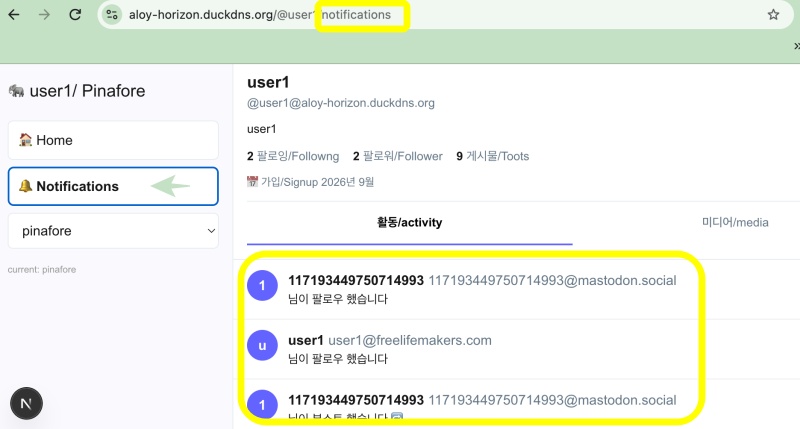
👉🏻 myapp44에서는 myapp43팔로잉,팔로워 리스트처럼 알림을 pinafore 테마에 포함시킵니다.
In myapp44, notifications—similar to the following and follower lists in myapp43—are included in the Pinafore theme.
👉🏻 알림 API는 기존의 것을 재활용합니다.(app/api/v1/notifications/route.ts)
The notification API reuses the existing one (app/api/v1/notifications/route.ts)
👉🏻 전체 코드는 깃허브에서 확인 할 수 있습니다.
You can find the full code on GitHub.
https://github.com/gideonslife01/flm-nextjs
📁 전체 프로젝트 구조 / Overall Project Structure
myapp project/
├── app/  (Next.js App Router)
│   ├── .well-known/webfinger/route.ts  -> webfinger
│   ├── api/follow/route.ts    -> Follow API(temporary)
│   ├── api/announce/route.ts  -> Boost(Announcement)
│   ├── api/like/route.ts.     -> Like API
│   ├── api/posts/route.ts     -> Writing API
│   ├── api/timeline/route.ts  -> Timeline API
│   ├── api/followinglist/route.ts  -> followinglist API
│   ├── api/followerslist/route.ts  -> followerslist API
│   ├── api/v1/instance/route.ts -> auth
│   ├── api/v1/apps/route.ts.    -> auth
│   ├── api/v1/accounts/verify_credentials/route.ts -> auth
│   ├── api/v1/statuses/route.ts -> Write Post
│   ├── api/v1/timelines/home/route.ts -> timeline
│   ├── oauth/authorize/route.ts -> auth
│   ├── oauth/token/route.ts -> auth
│   ├── api/v1/search/home/route.ts -> search
│   ├── api/v2/search/home/route.ts -> search
│   ├── api/v1/accounts/[id]/followers/route.ts -> followers
│   ├── api/v1/accounts/[id]/following/route.ts -> following
│   ├── api/auth/signup/route.ts        -> Signup
│   ├── api/auth/login/route.ts         -> Login
│   ├── api/auth/logout/route.ts        -> Logout
│   ├── api/auth/refresh/route.ts       -> Refresh Token
│   ├── api/auth/me/route.tsx           -> Login Check
│   ├── auth/signup/page.tsx            -> Signup UI
│   ├── auth/signup/page.tsx            -> Login UI
│   ├── users/[username]/
│   │   ├── statuses/[id]/route.ts -> Indivisual Post
│   │   ├── route.ts               -> Acotr Information
│   │   ├── followers/route.ts     -> Followers List
│   │   ├── following/route.ts     -> Following List
│   │   ├── inbox/route.ts         -> Inbox
│   │   └── outbox/route.ts        -> outbox
│   ├── usersui/[username]/
│   │   ├── page.tsx               -> Timeline UI(Server, 404)
│   │   ├── ClientPage.tsx.        -> Timeline UI(Client,Call Active Themes)
│   │   └── _components/themes/
│   │       ├── themeex/ThemeexTheme.tsx   -> Example Theme
│   │       ├── pinafore/PinaforeTheme.tsx -> Theme 1
│   │       ├── pinafore/FollowersList.tsx -> Theme 1, FollowersList
│   │       ├── pinafore/FollowingList.tsx -> Theme 1, FollowingList
│   │       ├── pinafore/NotificationsList.tsx -> Theme 1, NotificationsList
│   │       ├── mastodon/MastodonTheme.tsx -> Theme 2
│   │       └── minimal/MinimaltTheme.tsx  -> Theme 3
│   ├── layout.tsx, page.tsx, globals.css
│   └── favicon.ico
├── lib/
│   ├── theme.tsx              -> Theme Provider
│   ├── watchThemes.ts         -> Check real-time theme changes
│   ├── auth.ts                -> Authentication, User Management
│   ├── ap.ts                  -> Follow,Undo,Create,Likes,Announce
│   └── db.ts                  -> DB connection
├── data/
│   ├── keys/userIDs/          -> private.pem, public.pem(New)
│   └── keys/                  -> private.pem, public.pem(legacy)
├── data.sqlite                -> Database(1/3)
├── data.sqlite-wal            -> Database(2/3)
├── data.sqlite-shm            -> Database(3/3)
├── Caddyfile                  -> https
├── instrumentation.ts         -> Background Server
└── package.json
📁 프로젝트 시작 / Project Start
📁 코드 수정 / Code modification
✔️ next.config.ts
— 테마파일에서 notifications 부분을 보여주기 위해서 initialview 전송 코드를 추가합니다.
Add the code to pass the initialView in order to display the notifications section in the theme file.
import type { NextConfig } from "next";

const nextConfig: NextConfig = {

  /* allow domain*/
  allowedDevOrigins: ['aloy-horizon.duckdns.org', '*.duckdns.org'],

  /* host.domain.org/@userid */
  async rewrites() {
    return [
      {
        source: '/@:username',
        destination: '/usersui/:username',
      },
      {
        source: '/@:username/following',
        destination: '/usersui/:username?view=following', // ✅ myapp43 - initialView
      },
      {
        source: '/@:username/followers',
        destination: '/usersui/:username?view=followers',
      },
      { source: '/@:username/notifications', // ✅ myapp44 - initialView for notifications
        destination: '/usersui/:username?view=notifications'
      },
    ]
  },

};

export default nextConfig;
✔️ notification라우트는 따로 만들지 않고 기존 라우트를 재활용합니다.
Instead of creating a separate notification route, the existing route is reused.
— app/api/v1/notifications/route.ts
✔️ 엑티브 테마 기능으로 테마디렉토리 내의 파일이름에 “List”가 있으면 테마파일로 인식하지 않습니다.(이전 프로젝트에서 처리 함.)
Due to the active theme feature, files in the theme directory with “List” in their names are not recognized as theme files (this was handled in a previous project).
— lib/watchThemes
✔️ app/usersui/[username]/_components/theme/pinafore/PinaforeTheme.tsx
— 변수전달 / Variable passing : paget.tsx -> ClientPage.tsx -> pinafore/PinaforeTheme.tsx
— initialview(=view)변수의 전달은 myap43에서 처리했기 때문에 테마파일에서만 수정합니다.
Since the passing of the initialview (or view) variable is handled in myap43, you only need to make modifications in the theme file.
— Home 버튼클릭시는 타임라인이 보이도록 수정합니다.
The Home button is being modified so that the timeline appears when clicked.
... ...
import NotificationsList from './NotificationsList'; // ✅ myapp44
... ...
export function PinaforeTheme({ timeline, username, initialView, onBoost, onLike }: any) {
... ...
  // ✅ myapp43 + myapp44
  const [view, setView] = useState<'timeline' | 'followers' | 'following' | 'notifications'>(initialView || 'timeline');
... ...
          {/** ✅ myapp44 */}
          <button
            onClick={(e) => switchView(e, 'timeline')}
            style={{ fontWeight: view === 'timeline' ? 800 : 400 }}
          >
            🏠 Home
          </button>
          <button
            onClick={(e) => switchView(e, 'notifications')}
            style={{ fontWeight: view === 'notifications' ? 800 : 400 }}
          >
            🔔 Notifications
          </button>
... ...
          {view === 'notifications' && (
            <NotificationsList username={username} style={{ padding: '0' }} />
          )}

}
📁 테스트 / Test
요한복음 8장 32절 / John 8:32
“그리고 너희는 진리를 알게 될 것이며, 진리가 너희를 자유롭게 할 것이다.”
“Then you will know the truth ,and the truth will set you free”


