👉🏻 이 포스트에서는 팔로우리스트 부분에 대해서 살펴 봅니다.
In this post, we take a look at the “following” list section.
👉🏻 팔로우리스트는 내가 다른서버의 사용자를 팔로우한 사람의 목록입니다.
The “following” list is a list of users from other servers whom you have chosen to follow.
👉🏻이 부분은 테마디렉토리의 MainTheme.tsx파일에서 호출되는 부분입니다.
This part is called from the MainTheme.tsx file in the theme directory.
👉🏻 페이지네이션 부분에서 설명했던 TimelineList부분과 매우 유사합니다.
This is very similar to the TimelineList component discussed in the section on pagination.
📁 UI부분 / UI section
✔️ themeex를 테마로 사용하는 경우 팔로우리스트 UI부분은 프로젝트 루트로 부터 아래의 경로에 있습니다.
If you are using the ‘themeex’ theme, the UI component for the follow list can be found at the following path, relative to the project root:
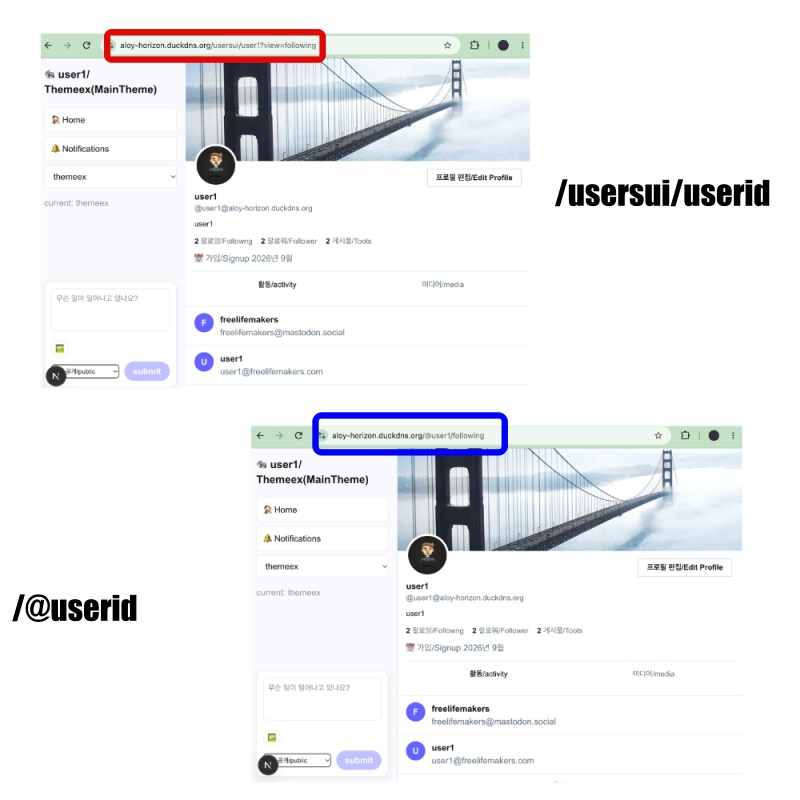
https://aloy-horizon.duckdns.org/@userid/following
(ex. https://aloy-horizon.duckdns.org/@user1/following)

또는 / or

https://aloy-horizon.duckdns.org/usersui/user1?view=following
(ex. https://aloy-horizon.duckdns.org/usersui/userid?view=following)
1)위와 같은 라우트로 실행시 팔로우 리스트를 볼 수 있습니다.
You can view the follow list by accessing the route mentioned above.
2)라우트 실행시 @userid 또는 usersui/userid 이렇게 실행할 수 있습니다.
When executing a route, you can use either @userid or usersui/userid.
3)이 부분은 next.config.ts에 보시면 이 설정이 있습니다.
You can find this configuration in next.config.ts.
  async rewrites() {
    return [
      {
        source: '/@:username',
        destination: '/usersui/:username',
      },
      {
        source: '/@:username/following',
        destination: '/usersui/:username?view=following', // ✅ myapp43 - initialView
      },
      {
        source: '/@:username/followers',
        destination: '/usersui/:username?view=followers',
      },
      { source: '/@:username/notifications', // ✅ myapp44 - initialView for notifications
        destination: '/usersui/:username?view=notifications'
      },
    ]
  },
4)본인의 계정으로 SNS페이지에 접속후 프로필 부분의 “팔로잉/Followng”을 클릭하면 볼 수 있습니다.
You can view this by accessing your social media page and clicking on “Following” in your profile section.
✔️ 페이지네이션 / Pagination
✔️ app/usersui/[username]/_components/theme/pinafore/FollowingList.tsx
  const {
    flatData: users,
    fetchNextPage,
    hasNextPage,
    isFetchingNextPage,
    isLoading
  } = useCursorPagination({
    key: ['following', username],
    fetcher: async (cursor) => {
      const params = new URLSearchParams();
      params.set('username', username);
      params.set('limit', '20');
      if (cursor) params.set('max_id', cursor);

      const r = await fetch(`/api/followinglist?${params.toString()}`, { credentials: 'include' });
      const d = await r.json();
      const accounts = Array.isArray(d)? d : d.accounts || d.data || [];

      return {
        data: accounts,
        nextCursor: accounts.length === 20? accounts[accounts.length - 1]?.created_at || String(accounts.length) : null,
        hasMore: accounts.length === 20,
      };
    },
  });
1)UI 부분 코드를 확인하시면 페이지네이션 구현을 위해서 useCursorPagination 훅을 사용하고 있습니다.
If you look at the UI-related code, you will see that the useCursorPagination hook is being used to implement pagination.
2)콜백함수로 useCursorPagination에 전달합니다
Pass it to useCursorPagination as a callback function.
3)그리고 훅내부의 함수와 변수 값을 다시 리턴해서 FollowingList.tsx에서 사용합니다.
Then, the functions and variable values from within the hook are returned so that they can be used in FollowingList.tsx.
4)이런 방식은 기존의 타임라인에서 구현하는 방식과 동일합니다.
This approach is the same as the one implemented in the existing timeline.
✔️ 페이지네이션(무한스크롤 옵저버)
Pagination (Infinite Scroll Observer)
  ... ...
  const loaderRef = useRef<HTMLDivElement>(null);
  useEffect(() => {
    const el = loaderRef.current;
    if (!el ||!hasNextPage) return;
    const observer = new IntersectionObserver(
      ([entry]) => {
        if (entry.isIntersecting &&!isFetchingNextPage) fetchNextPage();
      },
      { threshold: 0.3 }
    );
    observer.observe(el);
    return () => observer.disconnect();
  }, [hasNextPage, isFetchingNextPage, fetchNextPage]);
... ...
<div ref={loaderRef} className="h-10 flex items-center justify-center text-sm text-[#999]">
... ...
</div>
1)사용자가 화면 스크롤을 내리면 무한스크롤 옵저버가 <div ref={loaderRef}를 확인하면 fetchNextPage()함수를 실행합니다.
When the user scrolls down the screen, the infinite scroll observer detects the <div ref={loaderRef}> element and triggers the fetchNextPage() function.
2)fetchNextPage()함수는 userCursorPagination훅에서 리턴되는 함수입니다.
The fetchNextPage() function is a function returned by the userCursorPagination hook.
// app/usersui/[username]/_components/theme/pinafore/FollowingList.tsx
... ...
  const {
    flatData: users,
    fetchNextPage,
    hasNextPage,
    isFetchingNextPage,
    isLoading
  } = useCursorPagination({
    key: ['following', username],
    fetcher: async (cursor) => {
... ....

       const r = await fetch(`/api/followinglist?${params.toString()}`, { credentials: 'include' });
... ...
      };
    },
  });
// app/hooks/useCursorPagination.ts
... ...
const fetchNextPage = useCallback(async () => {
... ...
const res: any = await fetcher(nextCursorRef.current || undefined);
... ...
setPages(prev => {
// Set : 중복 없는 집합 / Set with no duplicates
const seen = new Set(prev.flat().map((p:any) => p.id));
const filtered = data.filter((p:any) => p.id &&!seen.has(p.id));
if (filtered.length === 0) {
setHasNextPage(false);
return prev;
}
return [...prev, filtered];
});
... ...
}
... ...
return {
flatData,
pages: pages.map(data => ({ data })),
fetchNextPage, // 다음 페이지 가져오는 함수 / Function to fetch the next page
hasNextPage, // 다음 페이지가 있는지 / Whether there is a next page
isFetchingNextPage, // 다음 페이지 로딩중인지 / Checking if the next page is loading...
isLoading, // 첫 로딩중인지 / Is it loading for the first time?
};✔️ 데이터를 UI에 출력 / Display data in the UI
      {users.map((u: any, i: number) => (
        <div key={u.id || i} className="flex gap-3 px-4 py-3 border-b border-[#eee] hover:bg-[#fafafe]">
          <div className="w-9 h-9 rounded-full bg-[#6364ff] text-white flex items-center justify-center font-extrabold shrink-0">
            {(u.display_name || u.username || '?')[0].toUpperCase()}
          </div>
          <div className="min-w-0 flex-1">
            <div className="font-bold text- truncate">{u.display_name || u.username}</div>
            <div className="text- text-[#657786] truncate">{u.acct || u.actor}</div>
          </div>
          {/* <button className="ml-auto px-3 py-1 bg-[#6364ff] text-white rounded-full text-xs font-bold hover:bg-[#5556ee]">
            Following
          </button> */}
        </div>
      ))}
📁API
✔️ app/api/followerslist/route.ts
✔️ 파라메터 변수에 username이 없으면 에러를 리턴합니다.
If ‘username’ is missing from the parameter variables, an error is returned.
if (!username) return NextResponse.json({ error: 'username required' }, { status: 400 });✔️데이터베이스 following 테이블에서 username변수의 값과 일치하는 필드를 검색합니다.
Search for a field in the following database table that matches the value of the username variable.
const rows = db.prepare(`SELECT actor FROM following WHERE username=? ORDER BY created_at DESC`).all(username) as any[];
✔️ map함수로 데이터를 뽑아냅니다.
Extract data using the map function.
const data = rows.map(r => { ... }✔️ URL에서 id부분만 분리합니다.
Extract only the ‘id’ portion from the URL.
      const url = new URL(r.actor);
      const hostname = url.hostname; // ex) freelifemakers.com

      const parts = url.pathname.split('/').filter(Boolean);
      let remoteName: string | null = null;
      const idx = parts.indexOf('users');
      if (idx!== -1) remoteName = parts[idx+1];
      else if (parts[0]?.startsWith('@')) remoteName = parts[0].substring(1);
      else remoteName = parts[0];
1)URL에서 ‘/’를 기준으로 분리하고 값이 null,false면 버립니다.
Split the URL by ‘/’ and discard any values that are null or false.
const parts = url.pathname.split('/').filter(Boolean);A.URL객체는 ‘/’를 기준으로 분리하면 ‘https://’이 부분은 이미 분리되어 배열에 포함되어 있지 않습니다.
When a URL object is split based on the ‘/’ character, the ‘https://’ portion is already separated out and is not included in the resulting array.
B.즉 0번 배열은 ‘https://’ 다음 값 입니다.
In other words, the element at index 0 is the value that follows ‘https://’.
2)URL에 users값이 포함되어 있으면 user다음 값이 0번 배열이 됩니다. 즉 users/user2의 경우 user2가remoteName에 저장됩니다.
If the URL contains the value ‘users’, the segment following ‘user’ becomes the first element (index 0) of the array. For example, in the case of ‘users/user2’, ‘user2’ is stored in ‘remoteName’.
let remoteName: string | null = null;
const idx = parts.indexOf('users');
if (idx !== -1) remoteName = parts[idx+1];
else if (parts[0]?.startsWith('@')) remoteName = parts[0].substring(1);
else remoteName = parts[0];
A.URL에 ‘@’값이 포함되어 있으면 1인덱스 부터 끝까지 잘라서 remoteName에 저장합니다.
If the URL contains an ‘@’ character, the portion from index 1 to the end is extracted and stored in remoteName.
(parts[0]?.startsWith('@')) remoteName = parts[0].substring(1);B.substring(1)은 ‘@’를 자르고 다음 문자열부터 문자열 마지막까지 선택하는 역할을 합니다.substring(1) serves to remove the ‘@’ character and select the remainder of the string, from the next character to the very end.
✔️ 로컬 도메인인지 확인해서 로컬도메인이면 데이터베이스에서 username과 display_name을 검색합니다.
Check whether it is a local domain; if it is, retrieve the username and display_name from the database.
      const isLocalDomain = hostname === DOMAIN || hostname === 'localhost' || hostname.endsWith(`.${DOMAIN}`);

      let info = null;
      if (isLocalDomain && remoteName) {
        info = db.prepare('SELECT username, display_name FROM users WHERE username=?').get(remoteName) as any;
      }

      const isLocalUser = isLocalDomain &&!!info;
A.isLocalUser에는 true/false 값이 저장됩니다.
isLocalUser stores a true/false value.
B.isLocalDomain이 존재하고 info값도 존재해야 isLocalUser에 true값이 저장됩니다.isLocalUser is set to true only if both isLocalDomain and info are present.
C.즉 URL로접속한 ID와 로컬 데이터베이스에서 조회한 결과가 모두 존재해야 로컬도메인으로 인정합니다.
In other words, a domain is recognized as a local domain only if both the ID accessed via the URL and the result retrieved from the local database exist.
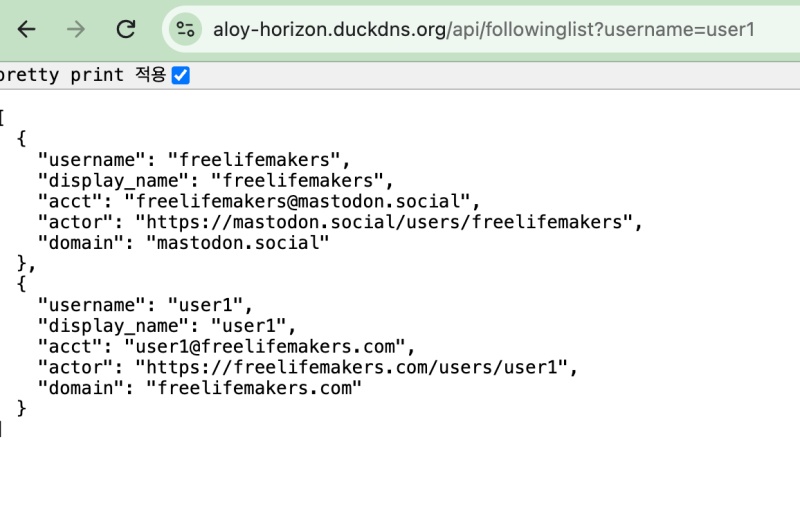
✔️ UI에서 읽을 값을 아래 처럼 리턴합니다
Return the values to be read by the UI as shown below.
      return {
        username: remoteName || r.actor,
        display_name: info?.display_name || remoteName || 'remote',
        acct: isLocalUser
         ? `${remoteName}@${DOMAIN}` // ✅ 진짜 로컬일 때만 aloy / only when it's truly local
          : `${remoteName}@${hostname}`, // ✅ freelifemakers.com이면 freelifemakers@freelifemakers.com
        actor: r.actor,
        domain: hostname,
      };
📁 테스트 / Test
✔️ UI
✔️ API
마태복음 21장 22절 / Matthew 21: 22
“너희가 기도할 때에 무엇이든지 믿고 구하는 것은 다 받으리라 하시니라”
“And everything you ask in prayer, believing, you will receive.”