👉🏻 이번 포스트는 팔로잉 리스트를 구현하는 부분입니다.
This post covers the implementation of the following list feature.
👉🏻 팔로잉과 팔로우 개념은 아래와 같습니다.
The concepts of “following” and “being followed” are as follows.
1. followers

- 남(user1@freelifemakers.com)이 나를 팔로우하는 경우 입니다.
This is the case where someone (user1@freelifemakers.com) follows me.

- 다음과 같은 과정이 수행되는 경우입니다.
This applies when the following process is carried out.

  1)pinafore.social에 로그인(user1@freelifemakers.com)
   Log in to pinafore.social (user1@freelifemakers.com)

  2)user1@aloy-horizon.duckdns.org을 검색
   Search for user1@aloy-horizon.duckdns.org

  3)팔로우 버튼 클릭하기
   Click the Follow button.

  4)나의 서버 inbox로 Follow 들어오고 followers 테이블에 저장
   A "follow" request arrives in my server's inbox and is stored in the `followers` table.

2. following

- 내(user1@aloy-horizon.duckdns.org)가 남(user1@freelifemakers.com)을 팔로우하는 경우 입니다.
This is the case where I (user1@aloy-horizon.duckdns.org) follow another person (user1@freelifemakers.com).

- 이건 pinafore에서 테스트 되지 않습니다.
This is not tested in Pinafore.

- 내 서버가 user1@freelifemakers.com같은 외부 사람을 팔로우하는 경우 입니다.
This is the case where my server follows an external user, such as user1@freelifemakers.com.

- 내가팔로우 하는 사람은 following 테이블에 저장 됩니다.
The people I follow are stored in the 'following' table.
📁 프로젝트 설치,라이브러리 설치,HTTPS설정
Project setup, library installation, HTTPS configuration
✔️ 아래의 이전 포스트를 참조하세요
Please refer to the previous post below.
📁 전체 프로젝트 구조 / Overall Project Structure
myapp16/
├── app/  (Next.js App Router)
│   ├── .well-known/webfinger/route.ts  -> webfinger
│   ├── api/posts/route.ts     -> 글 쓰기 API / Writing API
│   ├── api/follow/route.ts    -> 팔로우 API(임시) / Follow API(temporary)
│   ├── users/[username]/
│   │   ├── route.ts           -> Actor정보 / Acotr Information
│   │   ├── followers/route.ts -> Followers List
│   │   ├── folloing/route.ts  -> Following List
│   │   ├── inbox/route.ts     -> Inbox
│   │   └── outbox/route.ts    -> outbox
│   ├── layout.tsx, page.tsx, globals.css
│   └── favicon.ico
├── lib/
│   ├── ap.ts                  -> Follow Accept
│   └── db.ts                  -> DB connection
├── data/
│   └── keys/                  -> private.pem, public.pem
├── data.sqlite                -> Database
├── Caddyfile                  -> https
└── package.json
📁 프로젝트 시작(myapp17)
Project Start (myapp17)
npx create-next-app@latest📁 SQLite설치 / Installing SQLite
cd ~/myapp17
npm install better-sqlite3
npm install -D @types/better-sqlite3
📁 following 테이블 및 인덱스 생성
CREATE TABLE following (
  id TEXT PRIMARY KEY,
  actor TEXT NOT NULL,
  username TEXT NOT NULL,
  created_at DATETIME DEFAULT CURRENT_TIMESTAMP
);
CREATE INDEX idx_following_username ON following(username);
CREATE INDEX idx_following_actor ON following(actor);
📁 코드 수정 및 라우트 추가 / Code modifications and route additions
✔️ 라우트 추가 / Add Route
— app/users/[username]/following/route.ts
import db from '@/lib/db';

export async function GET(
  req: Request,
  { params }: { params: Promise<{ username: string }> }
) {
  const { username } = await params; // ← await 해야함 / must await
  const DOMAIN = process.env.DOMAIN || 'aloy-horizon.duckdns.org';

  let following: any[] = [];
  try {
    following = db.prepare('SELECT actor FROM following WHERE username = ?').all(username) as any[];
  } catch (e) {
    console.log('following 테이블 없음 또는 에러 / Following table not found or error:', e);
  }

  return Response.json({
    "@context": "https://www.w3.org/ns/activitystreams",
    "id": `https://${DOMAIN}/users/${username}/following`,
    "type": "OrderedCollection",
    "totalItems": following.length,
    "orderedItems": following.map((f: any) => f.actor)
  }, {
    headers: {
      'Content-Type': 'application/activity+json; charset=utf-8',
      'Access-Control-Allow-Origin': '*'
    }
  });
}
1) 내가 팔로우한 사용자 리스트를 출력합니다.
Displays the list of users I follow.
✔️ 코드 수정 / Code modification
— app/api/follow/route.ts
import { sendFollow, signedFetch } from '@/lib/ap';
import db from '@/lib/db';

// 팔로우 API / Follow API
export async function POST(req: Request) {

... ...

    // myapp17✅
    //  4.성공하면 following 테이블에 저장! / If successful, save to the following table!
    if (result.ok) {
      try {
        db.prepare('INSERT OR IGNORE INTO following (id, actor, username) VALUES (?, ?, ?)')
          .run(result.followDoc.id, target, username);
        console.log(`✅ following DB 저장 / If successful, save to the following table!: ${username} -> ${target}`);
      } catch (e) {
        console.error('DB 저장 실패 / DB save failed:', e);
      }
    }

... ...

}

// 언팔로우 추가 / Unfollow added
export async function DELETE(req: Request) {
  try {
    const { username, target } = await req.json();
    if (!username || !target) return Response.json({ error: 'username, target 필요 / Username and target required' }, { status: 400 });

    const DOMAIN = process.env.DOMAIN || 'aloy-horizon.duckdns.org';

    // Undo Follow 만들기 (sendFollow 참고해서) / Create Undo Follow (refer to sendFollow)
    const { sendUndoFollow } = await import('@/lib/ap');
    const result = await sendUndoFollow(target, username);

    // DB에서 삭제 / Delete from DB
    db.prepare('DELETE FROM following WHERE actor = ? AND username = ?').run(target, username);
    console.log(`🗑️ following 삭제 / Delete from DB: ${username} -X-> ${target}`);

    return Response.json({ ok: true, result });
  } catch (e: any) {
    return Response.json({ error: e.message }, { status: 500 });
  }
}
1)팔로우,언팔로우 할때 following테이블에서 사용자를 추가하고 삭제 합니다.
Users are added to and removed from the following table when following or unfollowing.
— lib/ap.ts
port async function sendUndoFollow(targetActor: string, username: string) {
  const actorId = `https://${DOMAIN}/users/${username}`;

  // let으로 밖에 선언(타입에러 수정) / Declare outside with let (type error fix)
  let followId = `${actorId}/follows/${targetActor}`;

  try {
    const db = (await import('@/lib/db')).default;
    const row = db.prepare('SELECT id FROM following WHERE actor = ? AND username = ?').get(targetActor, username) as any;
    if (row?.id) {
      followId = row.id;
    }
  } catch {}

  const actorRes = await signedFetch(targetActor, username);
  if (!actorRes.ok) {
    const t = await actorRes.text();
    throw new Error(`대상 조회 실패 ${actorRes.status}: ${t}`);
  }
  const actorData = await actorRes.json();
  const inbox = actorData.inbox;

  const undoId = `${actorId}#undo/${Date.now()}`;
  const undoDoc = {
    '@context': 'https://www.w3.org/ns/activitystreams',
    id: undoId,
    type: 'Undo',
    actor: actorId,
    object: {
      id: followId,
      type: 'Follow',
      actor: actorId,
      object: targetActor
    }
  };

  const body = JSON.stringify(undoDoc);
  const url = new URL(inbox);
  const digest = `SHA-256=${crypto.createHash('sha256').update(body).digest('base64')}`;
  const date = new Date().toUTCString();
  const signingString = `(request-target): post ${url.pathname}\nhost: ${url.host}\ndate: ${date}\ndigest: ${digest}`;

  const signer = crypto.createSign('sha256');
  signer.update(signingString);
  const signature = signer.sign(PRIVATE_KEY, 'base64');

  const keyId = `${actorId}#main-key`;
  const sigHeader = `keyId="${keyId}",headers="(request-target) host date digest",signature="${signature}"`;

  console.log(`↩️ [${username}] Undo Follow 전송 -> ${inbox}`);

  const res = await fetch(inbox, {
    method: 'POST',
    headers: {
      'Content-Type': 'application/activity+json',
      'Date': date,
      'Digest': digest,
      'Signature': sigHeader,
      'Host': url.host
    },
    body
  });

  const text = await res.text();
  console.log(`📬 Undo 결과 / Undo result: ${res.status}`, text);
  return { ok: res.ok, status: res.status, text, undoDoc };
}
1)app/api/follow/route.ts에서 호출되는 팔로우 취소 함수입니다.
This is the unfollow function called from app/api/follow/route.ts.
📁 테스트 하기 / Run a test
✔️ 브라우저에서 folllowing 리스트 보기
View the following list in the browser.
https://aloy-horizon.duckdns.org/users/user1/following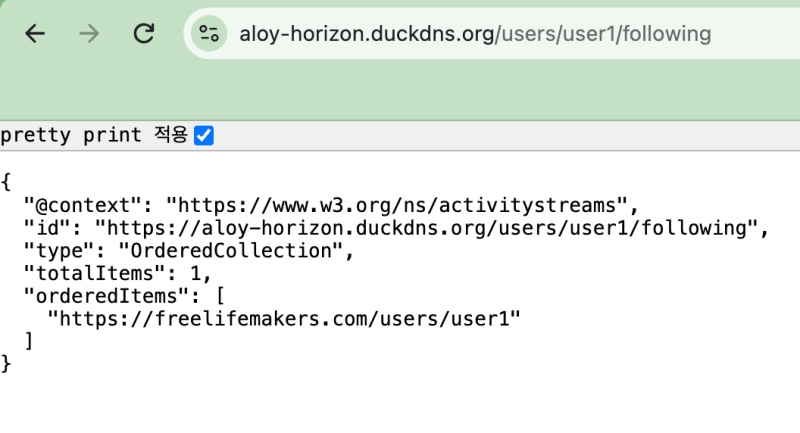
✔️ 터미널에서 팔로우,언팔로우 ,팔로잉 리스트보기
Follow, unfollow, and view following list in the terminal.
# 1. user1이 freelifemakers를 팔로우 (following에 저장)
# user1 follows freelifemakers (saved to 'following')

curl -X POST https://aloy-horizon.duckdns.org/api/follow \
  -H "Content-Type: application/json" \
  -d '{"username":"user1", "target":"https://freelifemakers.com/users/user1"}'

# 확인 / check
curl https://aloy-horizon.duckdns.org/users/user1/following
# → totalItems: 1

# 2. 언팔로우 (following에서 삭제)
# Unfollow (remove from 'following' list)

curl -X DELETE https://aloy-horizon.duckdns.org/api/follow \
  -H "Content-Type: application/json" \
  -d '{"username":"user1", "target":"https://freelifemakers.com/users/user1"}'

# 확인 / check
curl https://aloy-horizon.duckdns.org/users/user1/following
# → totalItems: 0
✔️ 터미널에서 실행결과 (팔로우)
Execution results in the terminal (follow)
following % curl -X POST https://aloy-horizon.duckdns.org/api/follow \
  -H "Content-Type: application/json" \
  -d '{"username":"user1", "target":"https://freelifemakers.com/users/user1"}'
{"ok":true,"inbox":"https://freelifemakers.com/users/user1/inbox","target":"https://freelifemakers.com/users/user1","username":"user1","result":"{\"status\":\"Accepted\"}","follow":{"@context":"https://www.w3.org/ns/activitystreams","id":"https://aloy-horizon.duckdns.org/users/user1/follows/1787190758589","type":"Follow","actor":"https://aloy-horizon.duckdns.org/users/user1","object":"https://freelifemakers.com/users/user1"}}%
following %
📁 지금까지 완료한 내용 / Work completed so far
— WebFinger (users 테이블 생성 + DB 검색)
WebFinger (create ‘users’ table + DB search)
— Follow 보내기 / 받기
Follow Send/Receive
— 글 배달
Article(Post) Delivery
— 내가 팔로우한 리스트 만들기
Create a list of people I follow
— 브라우저에서 테스트 할 수 있는 라우트
Routes that can be tested in a browser
1. WebFinger
https://aloy-horizon.duckdns.org/.well-known/webfinger?resource=acct:user1@aloy-horizon.duckdns.org

2. Actor (프로필 / Profile)
https://aloy-horizon.duckdns.org/users/user1

3. Followers (남이 나 팔로우 / Someone follows me)
https://aloy-horizon.duckdns.org/users/user1/followers

4. Following (내가 남을 팔로우 / I follow others)
https://aloy-horizon.duckdns.org/users/user1/following

5. Outbox (내 글 / My Post)
https://aloy-horizon.duckdns.org/users/user1/outbox

6. 개별 글 / indivisual posts
myapp18에서 구현 예정
Scheduled for implementation in myapp18.
— 터미널에서만 테스트 가능한 라우트
Routes that can only be tested in the terminal
# 팔로우 (following 1로 증가)
# Follow (following increased to 1)

curl -X POST https://aloy-horizon.duckdns.org/api/follow \
  -H "Content-Type: application/json" \
  -d '{"username":"user1","target":"https://freelifemakers.com/users/user1"}'

# 언팔로우 (following 0으로 감소)
# Unfollow (following count reduced to 0)

curl -X DELETE https://aloy-horizon.duckdns.org/api/follow \
  -H "Content-Type: application/json" \
  -d '{"username":"user1","target":"https://freelifemakers.com/users/user1"}'

# 글 쓰기 (outbox 7로 증가 + 팔로워들에게 배달)
# Writing a post (added to outbox 7 + delivered to followers)

curl -X POST https://aloy-horizon.duckdns.org/api/posts \
  -H "Content-Type: application/json" \
  -d '{"username":"user1","content":"Hello Fediverse! #test"}'
1)브라우저에서 사용시 POST전송이나 DELETE전송은 폼 submit등의 형식으로 전송되어야 합니다.
When using a browser, POST or DELETE requests must be sent using a format such as a “form submit.”
👉🏻 여기서는 내가 쓴글은 posts테이블에 저장하고 내가 팔로잉하는 서버에서 받은 글은 inbox_posts에 저장되도록 수정하는 부분입니다.
Here, we are modifying the system so that posts I write are stored in the posts table, while posts received from servers I follow are stored in inbox_posts.
👉🏻 post테이블에 외부 글이 섞이는 버그를 수정한 부분입니다.
This change fixes a bug where external posts were getting mixed into the post table.
📁 DB 마이그레이션 / DB Migration
sqlite3 data.db

# posts에 username 컬럼 추가
# Add username column to posts
ALTER TABLE posts ADD COLUMN username TEXT DEFAULT 'user1';

# 잘못 들어간 remote 글 삭제
# Deleted accidentally posted remote-related entry
DELETE FROM posts WHERE id LIKE 'https://%';

# inbox_posts 테이블 만들기
# Create the inbox_posts table
CREATE TABLE IF NOT EXISTS inbox_posts (
  id TEXT PRIMARY KEY,
  actor TEXT,
  content TEXT,
  username TEXT,
  created_at DATETIME DEFAULT CURRENT_TIMESTAMP
);
📁 코드 수정 / Code Modification
✔️ api/posts/route.ts
// app/api/posts/route.ts

// ✅ myapp17
import db from '@/lib/db';
import { randomUUID } from 'crypto';
import { sendNote } from '@/lib/ap';

const DOMAIN = process.env.DOMAIN || 'aloy-horizon.duckdns.org';

export async function GET(req: Request) {
  const { searchParams } = new URL(req.url);
  const username = searchParams.get('username') || 'user1';

  // ✅ 해당 유저 글만 / Only that user's posts
  const posts = db.prepare('SELECT * FROM posts WHERE username = ? ORDER BY created_at DESC').all(username);
  return Response.json(posts);
}

export async function POST(req: Request) {
  const { content, username = 'user1' } = await req.json();
  if (!content) return Response.json({ error: '내용 없음 / Content required' }, { status: 400 });

  const id = randomUUID();

  // ✅ username 저장! / Save username!
  db.prepare('INSERT INTO posts (id, content, username) VALUES (?, ?, ?)').run(id, content, username);

  const noteId = `https://${DOMAIN}/users/${username}/posts/${id}`;
  const note = {
    id: noteId,
    type: 'Note',
    attributedTo: `https://${DOMAIN}/users/${username}`,
    content: content,
    to: ['https://www.w3.org/ns/activitystreams#Public'],
    cc: [`https://${DOMAIN}/users/${username}/followers`]
  };

  // ✅ 해당 유저의 팔로워만!
  const followers = db.prepare('SELECT * FROM followers WHERE username = ?').all(username) as any[];
  console.log(`📤 [${username}] ${followers.length}명에게 배달`);

  for (const follower of followers) {
    try {
      await sendNote(follower.inbox, note, username, id, content);
      console.log(`✅ 배달 성공 / Delivery successful -> ${follower.actor}`);
    } catch (e) {
      console.error(`❌ 배달 실패 / Delivery failed -> ${follower.actor}`, e);
    }
  }

  const post = db.prepare('SELECT * FROM posts WHERE id = ?').get(id);
  return Response.json(post);
}

export async function PUT(req: Request) {
  const { id, content, username = 'user1' } = await req.json();
  if (!id || !content) {
    return Response.json({ error: 'id와 content 필요' }, { status: 400 });
  }
  // ✅ 내 글만 수정 / Only edit my own posts
  const result = db.prepare('UPDATE posts SET content = ? WHERE id = ? AND username = ?').run(content, id, username);
  if (result.changes === 0) {
    return Response.json({ error: '해당 글 없음 / Post not found' }, { status: 404 });
  }
  const post = db.prepare('SELECT * FROM posts WHERE id = ?').get(id);
  return Response.json(post);
}

export async function DELETE(req: Request) {
  const { searchParams } = new URL(req.url);
  const id = searchParams.get('id');
  const username = searchParams.get('username') || 'user1';
  if (!id) return Response.json({ error: 'id 필요 / id required' }, { status: 400 });
  // ✅ 내 글만 삭제 / Only delete my own posts
  db.prepare('DELETE FROM posts WHERE id = ? AND username = ?').run(id, username);
  return Response.json({ ok: true });
}
✔️ app/inbox/route.ts
    if (body.type === 'Create') {
      const note = body.object;
      if (note && note.type === 'Note') {
        console.log(`📝 [${username}] 새 글 도착 / New post received from ${actorId}`);
        console.log(`내용/content: ${note.content?.slice(0, 100)}`);

        try {
          const postId = note.id || `remote-${Date.now()}-${Math.random()}`;
          const content = note.content || '';

          // author 컬럼 없으면 에러나니까 content에 작성자 포함해서 저장
          // If there's no author column, include the author in the content to avoid errors
          const fullContent = `[from: ${actorId}] ${content}`;

          // db.prepare('INSERT OR IGNORE INTO posts (id, content) VALUES (?,?)')
          //  .run(postId, fullContent);
          //console.log(` [${username}] 글 저장 완료 / Post saved successfully : ${postId}`);

           // ✅ myapp17 - inbox_posts에 저장! posts 아님! / Save to inbox_posts, not posts!
          db.prepare(`
            INSERT OR IGNORE INTO inbox_posts (id, actor, content, username)
            VALUES (?, ?, ?, ?)
          `).run(postId, actorId, content, username);

          console.log(`✅ [${username}] inbox_posts 저장 완료 : ${postId}`);

        } catch (e) {
          console.error(`❌ 글 저장 실패 / Failed to save post`, e);
        }
      }
      return new Response('', { status: 202 });
    }
📁 테스트 / Test
✔️ 내 서버에 글 쓰기 / write post to my server
# 글 쓰기 (outbox 7로 증가 + 팔로워들에게 배달)
# Writing a post (added to outbox 7 + delivered to followers)

curl -X POST https://aloy-horizon.duckdns.org/api/posts \
  -H "Content-Type: application/json" \
  -d '{"username":"user1","content":"Hello Fediverse! #test"}'
myapp17 % sqlite3 data.sqlite
SQLite version 3.51.0 2025-06-12 13:14:41
Enter ".help" for usage hints.
sqlite> select * from posts;
e6c99652-572f-491a-9e61-05e67b0d58fc|Hello! my SNS!!|2026-08-12 04:59:51|user1
dcece9ee-8d4a-4f63-91e1-22fc60513f62|Hello! my SNS!!|2026-08-12 05:00:18|user1
cc30330e-7040-4a1b-9e60-731066b8817e|Hello! my SNS3!!|2026-08-12 23:08:05|user1
e6d532c8-974b-4a01-89f6-6e1b2c4cff32|Hello Fediverse! #test|2026-08-22 02:16:04|user1
aea0ec89-a368-44a9-8493-b2bd82a797a8|post test! #test|2026-08-12 03:08:18|user1
sqlite> select * from inbox_posts;
sqlite>
✔️ 글받기(inbox_posts 테이블에 저장)
Receive posts (stored in the inbox_posts table)
— 글 작성은 pinafore(website)나 Tusky(android),Feditex(IOS)에서 작성할 수 있습니다.
You can create posts using Pinafore(website), Tusky (Android), or Feditex (iOS).
— 서버 로그 / Server Log
# server log

📩 [user1] INBOX: Create https://freelifemakers.com/users/user1
📝 [user1] 새 글 도착 / New post received from https://freelifemakers.com/users/user1
내용/content: <p>inbox_posts table test</p>
✅ [user1] inbox_posts 저장 완료 : https://freelifemakers.com/users/user1/statuses/01M0EJPP57WC47FAK0N395S7MB
— index_posts에 글 저장확인 하기
Check if posts are saved in index_posts
sqlite> select * from inbox_posts;
https://freelifemakers.com/users/user1/statuses/0--------7FAK0N395----|https://freelifemakers.com/users/user1|<p>inbox_posts table test</p>|user1|2026-08-20 03:16:15
sqlite> 
요한복음 8장 32절 / John 8:32
“그리고 너희는 진리를 알게 될 것이며, 진리가 너희를 자유롭게 할 것이다.”
“Then you will know the truth ,and the truth will set you free”


